
Multiple Face Swap is a photo editor for assigning different portraits to selected people in one group picture. Mark up to six faces, upload a portrait for each, and request one 1K–4K PNG; the model is asked to preserve unmarked people, clothing and the setting, but details can change. Edits start at 4 credits, with no added visible site watermark. The 1-credit signup gift does not cover an edit.
How multiple face swap works
Multiple Face Swap follows the numbered positions you mark in a group photo. Each number gets its own replacement portrait, so you can request a different identity for every selected person. The original picture supplies the composition; replacement portraits supply facial identity. Review every assignment before generating, then inspect the finished faces before downloading or sharing the image.
1. Upload the group picture
Choose the original group photo as JPG, PNG or WebP, up to 10 MB and 2048 pixels per side. Export HEIC photos as JPEG first.
2. Mark and match the faces
Select a numbered replacement card, tap its face in the original picture, and upload a clear portrait for that number. Add or remove cards as needed, up to six.
3. Generate one photo
Choose quality and shape, confirm permission and check the displayed credits. Sign in to generate, then review the result and download the PNG.
Multi face swap illustrated examples
These multi face swap illustrations show how numbered portraits correspond to selected people in a group photo. Each layout includes an original composition, every replacement portrait and an edited view, so you can compare identities one person at a time. Check the eyes, nose, jawline and facial details against the matching number. Your own photos guide the model; identity matching and blending can vary.
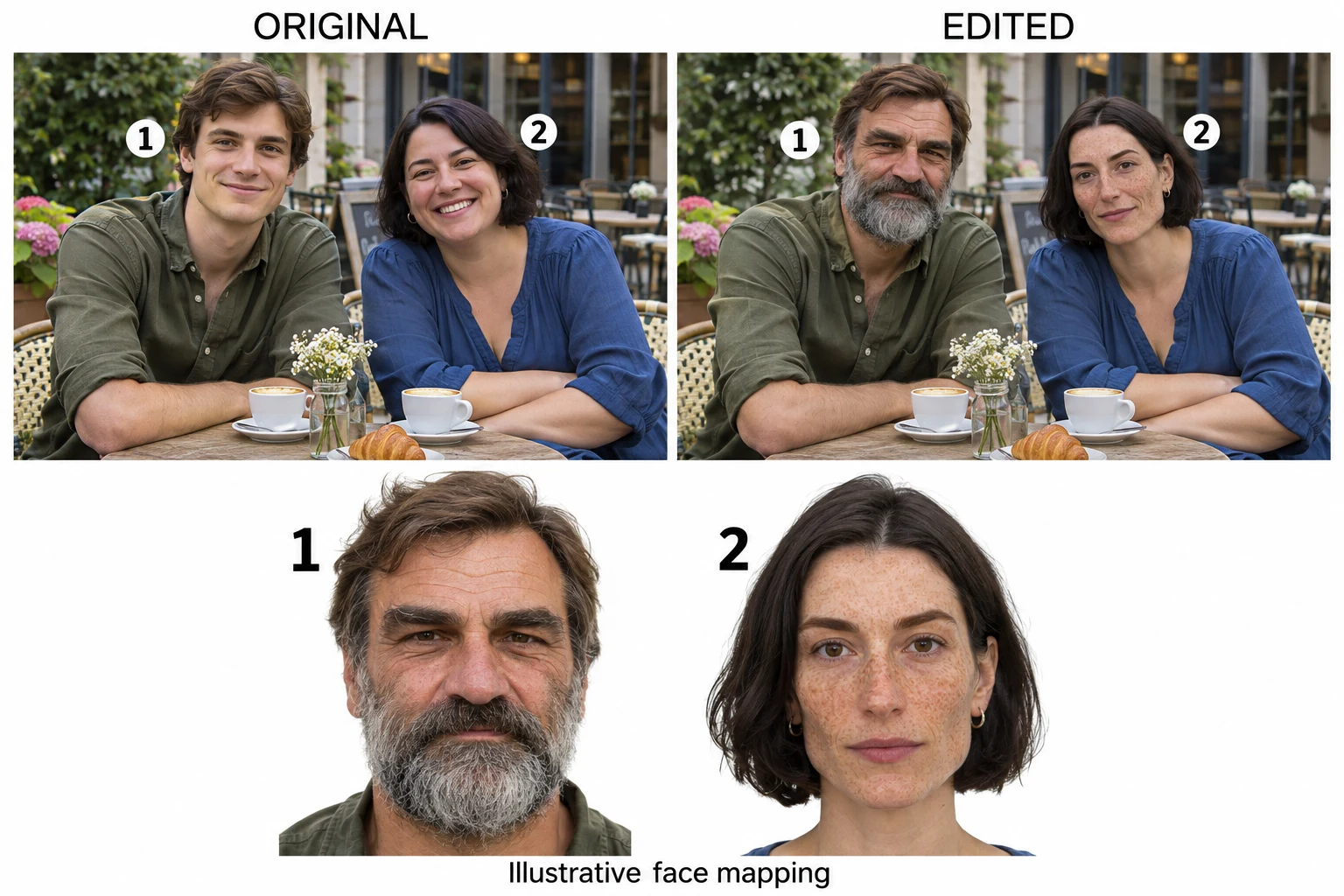
Two face assignments at a café
Illustrated example: portrait 1 matches the grey-bearded man on the left; portrait 2 matches the freckled woman on the right. The original and edited groups appear above the two numbered portraits.
Open full-size illustration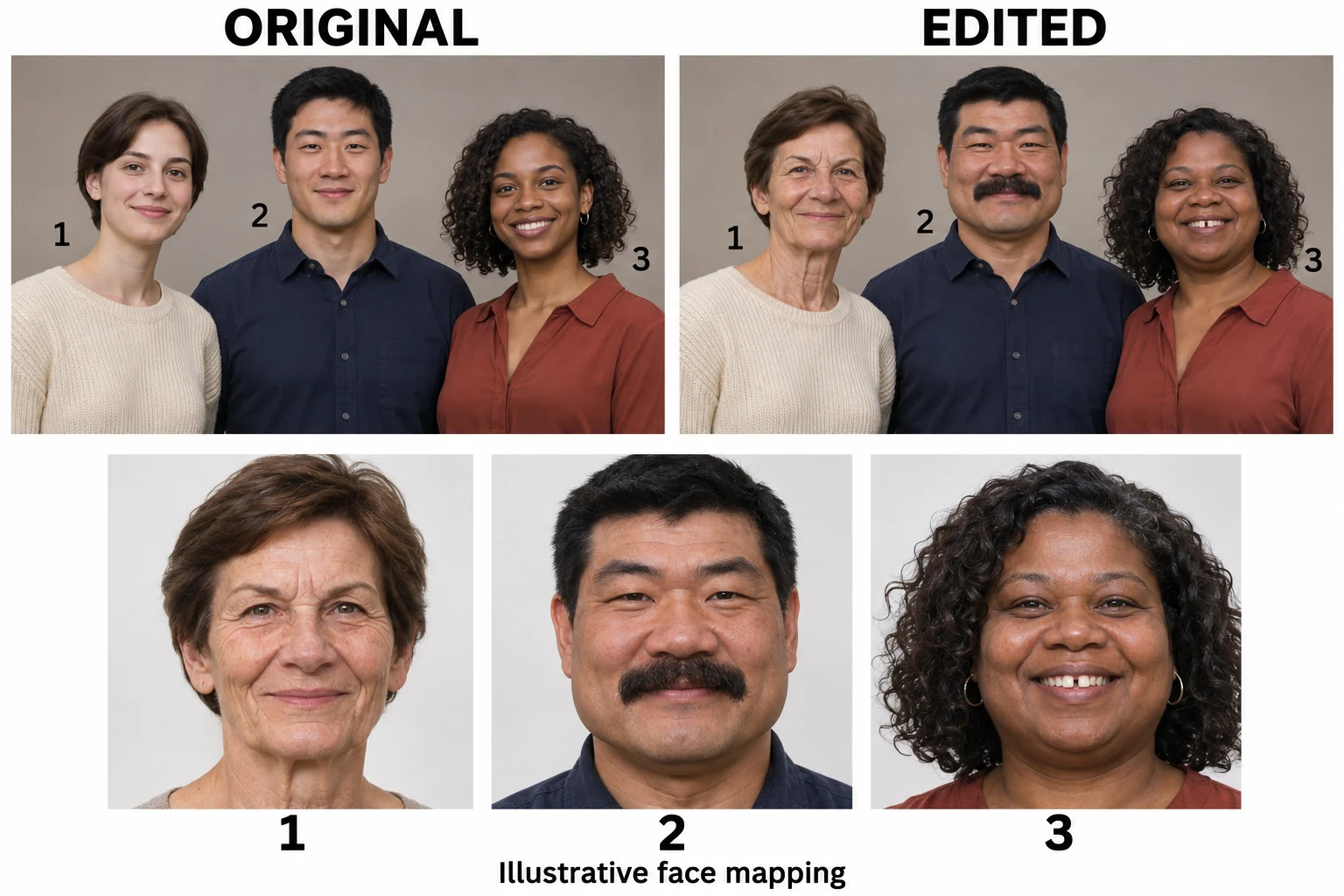
Three portraits, three assigned faces
Illustrated example: portraits 1, 2 and 3 match the left, center and right adults. Compare the older woman’s facial lines, the man’s thick moustache and the woman’s full cheeks against the edited group.
Open full-size illustration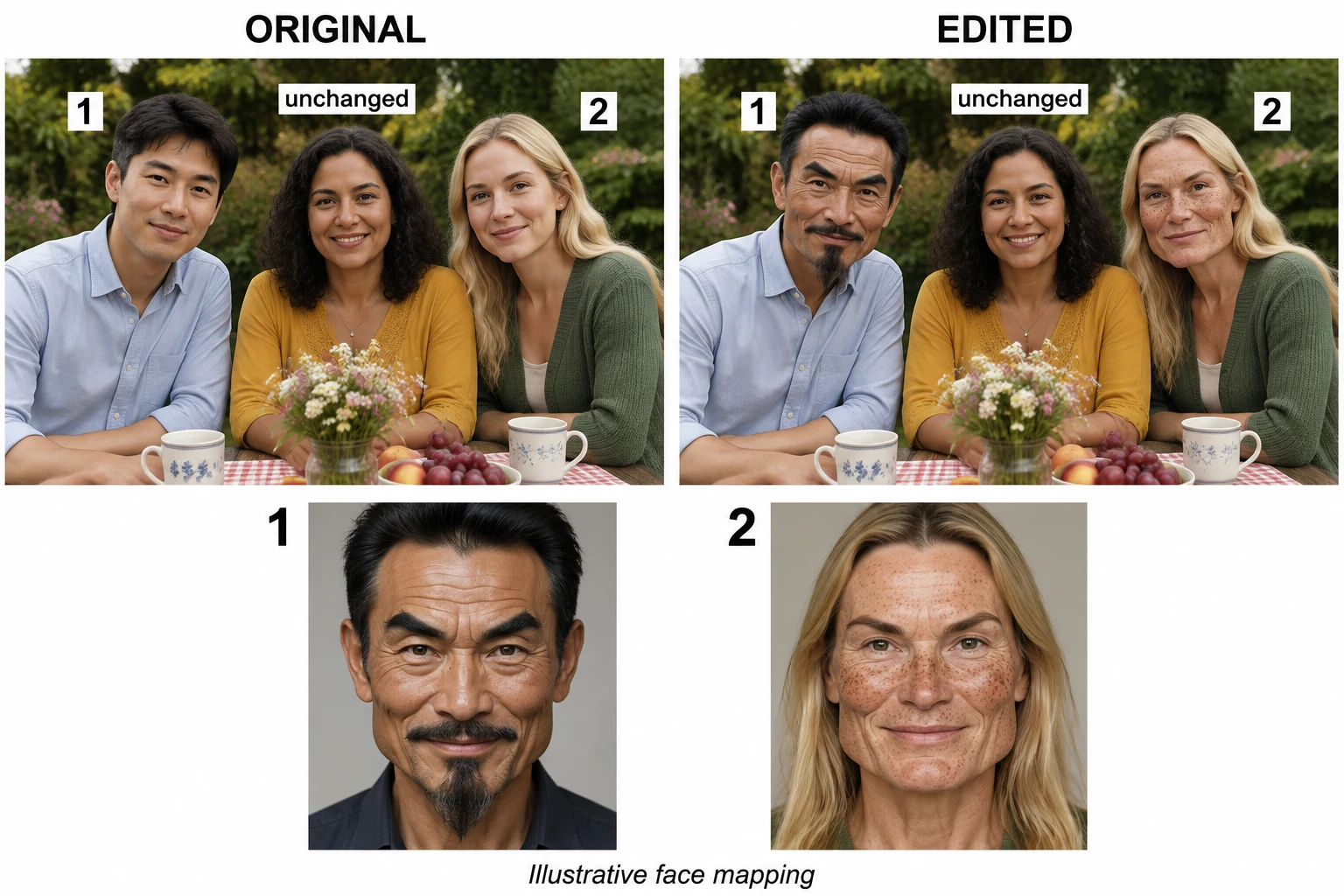
Replace two faces and leave one unselected
Illustrated example: portrait 1 matches the left man’s pointed beard, and portrait 2 matches the right woman’s freckles. The unselected woman in yellow remains in the center of both group views.
Open full-size illustrationHow do I change multiple faces in one photo?
Multiple Face Swap lets you mark one to six face positions in the same original photograph and upload a separate replacement portrait for each number. To replace only some people, create cards only for those faces. Recheck each marker against its portrait before generating. The prompt asks the model to leave unmarked people alone and blend each new face into the existing head angle, but the result is not a pixel-locked edit.
Can I use this multiple face swap online free?
Multiple Face Swap on Consistent Character AI requires purchased credits in addition to the signup gift to complete an edit. The 1-credit signup gift does not cover an edit. A single-face Fast image costs 4 credits and the default two-face image costs 5; a $5 one-time trial pack provides 10 credits. Positioning faces and browsing examples do not spend credits. Generating requires sign-in, and saving a completed PNG has no extra credit charge.
Can I use multiple face swap online without an app?
Multiple Face Swap runs in a current browser on a phone, tablet or computer, so you do not need to install an app. Upload saved group photos and replacement portraits, then tap the face positions or use the percentage fields for precise placement. The image edit runs through an online service; it is not an offline camera filter. Keep the request identifier if the connection drops so you can check the same result.
Multiple face swap pricing & credits
Multiple Face Swap charges once for one generated group photo, with the credit total determined by quality and the number of face assignments. Fast starts at 4 credits ($2.00 at the trial-pack rate); the default two-face Fast edit costs 5 credits ($2.50). From zero balance, the smallest purchase that covers the default edit is the $5 one-time trial pack with 10 credits. Downloads carry no additional credit charge.
| Faces replaced | Fast 1K | HD 2K | Ultra HD 4K | Studio 2K |
|---|---|---|---|---|
| 1 | 4 | 5 | 6 | 7 |
| 2 | 5 | 6 | 7 | 8 |
| 3 | 6 | 7 | 8 | 9 |
| 4 | 7 | 8 | 9 | 10 |
| 5 | 8 | 9 | 10 | 11 |
| 6 | 9 | 10 | 11 | 12 |
Add one credit for each additional face assignment. Dollar examples use the $5 / 10-credit trial-pack rate; larger packs and subscriptions have different effective rates. Resolution labels describe the model’s size tier, with exact pixel dimensions depending on shape.
| Feature | Details |
|---|---|
| Signup allowance | The 1-credit signup gift does not cover an edit. |
| Smallest purchase | $5 one-time trial pack · 10 credits; subject to the existing trial eligibility rules. |
| Paid qualities | HD, Ultra HD and Studio require paid access. All four options use GPT Image 2.6 Flare on this page. |
| Preview and download | Marking positions costs no credits. Generating is charged; completed PNG downloads have no extra fee. |
| Visible watermark | No visible site watermark is added. This does not promise removal of marks already present in your input. |
| Failed or delayed requests | Confirmed provider rejection or generation failure returns the original credit charge. An unconfirmed submission is retained for checking. If the provider delivered but saving is delayed, recovery retries saving the same image without another generation charge. |
What multiple face swap cannot guarantee
Multiple Face Swap cannot guarantee identical facial likeness, unchanged expressions or pixel-for-pixel preservation of the background. Small, blurred, overlapping or strongly turned faces make the requested mapping harder to follow. Use a clear portrait with one visible face for each replacement and inspect all people after generation. The page edits one still photo at a time; it does not provide batch processing, live camera effects, full head replacement, GIFs or video.
Multiple face swap FAQ
Multiple Face Swap uses numbered positions to connect each selected person with a replacement portrait. The following details explain account access, input preparation and how uploaded pictures are handled. This is a generated photo edit rather than an automatic identity guarantee; use only images and likenesses you have permission to edit.
Do I need to sign in for multi face swap?
Yes. You can inspect the editor and position markers before signing in, but uploading to the service, generating and reading your saved result require an account. This page does not offer anonymous generation.
Which portraits work best for a realistic multi face swap?
Choose a sharp portrait of one person with even lighting and an unobstructed face. Avoid sunglasses, hair covering the eyes and extreme side views. Use the marker at the center of the intended face in the original group photo. These are input recommendations, not a guarantee of likeness or blending.
Are my uploaded photos and results private?
Multiple Face Swap does not guarantee private storage. Uploads and generated images use this project’s existing storage; the website checks account ownership for result previews and downloads, but someone holding a direct storage link may still be able to open an image. Automatic deletion and model-provider training restrictions are not promised.