
Online AI glare and reflection remover
Remove Glare from Photo
Remove glare from photo uploads in one step. Clear reflections on glasses, glare on framed pictures and windows, flash hotspots, shiny skin and washed-out labels, and get the same photo back without the bright spots.
Pick the kind of glare, or let the AI find it. The tool keeps the people, faces, frames, text and layout of your photo and redraws only what the glare covered. Fast, HD, Ultra HD and Studio cost 1 to 17 credits per image; failed images are refunded.
Example result
Auto detectFaces and frames kept
Hidden detail redrawn
Five glare types


Drag the slider to compare. Example made with ChatGPT's image model using this tool's glare instruction.
Remove Glare from Photo: Before and After
Each pair shows one photo before and after we used the tool's glare instruction on it, one pair for each glare type. Look at the lenses, the glass, the skin and the printed words: those are the places where glare hides detail.


Glasses: window reflections on both lenses
A bright office window was reflected in both lenses and hid the eyes. After the Glasses glare pass both eyes are visible through clear lenses, and the frames, beard, sweater and office behind him stay as they were.
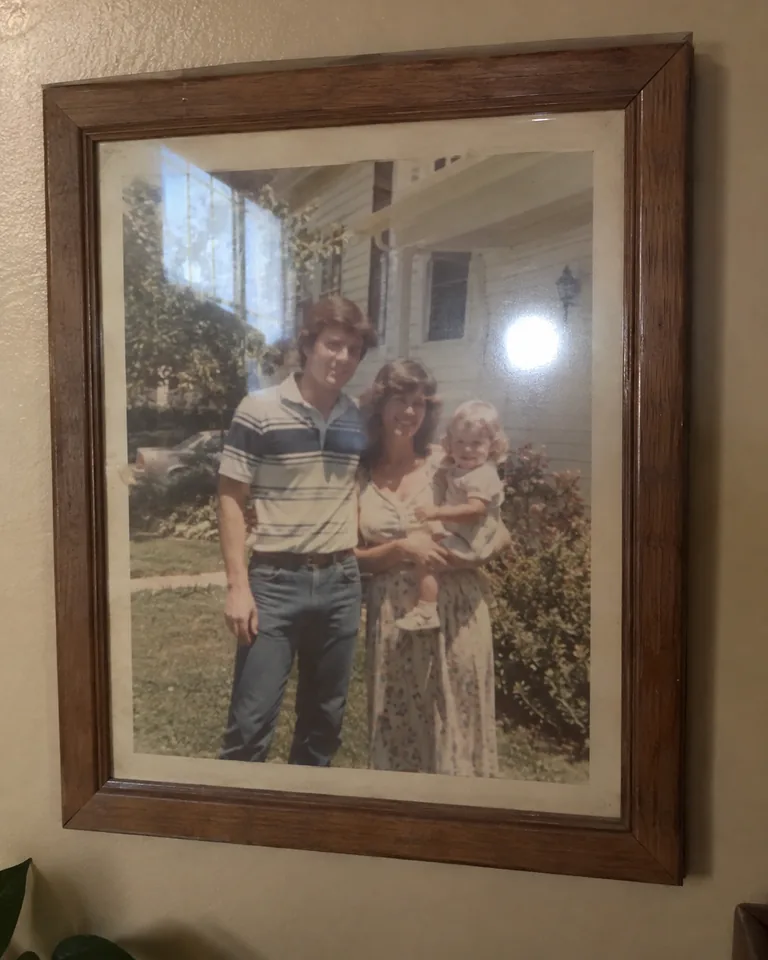
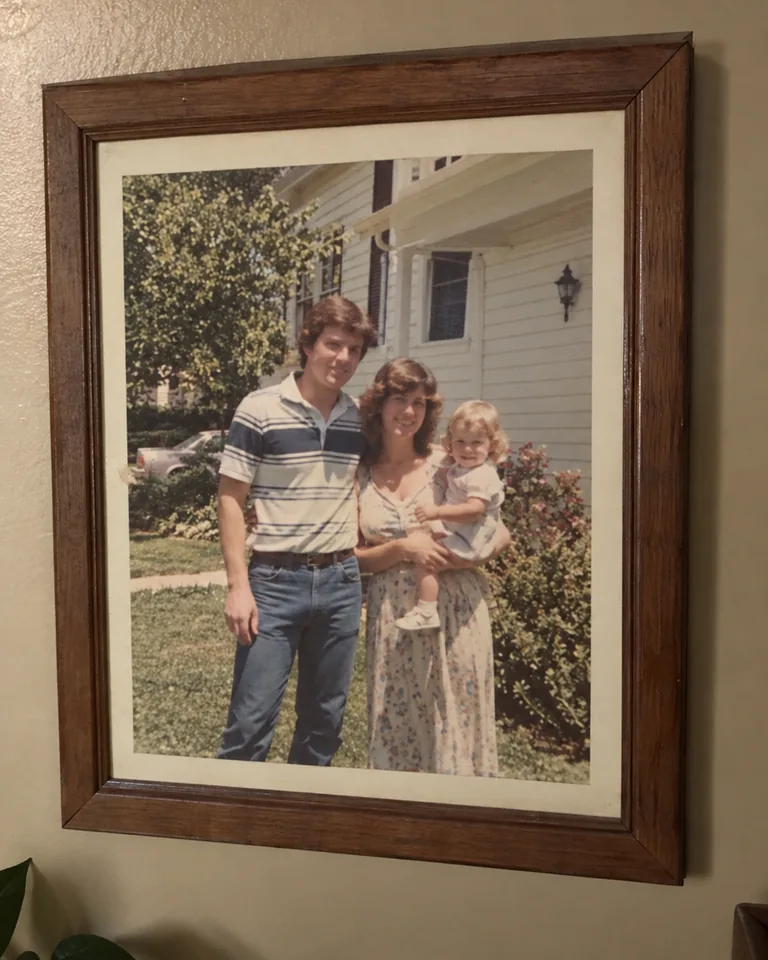
Glass and frames: an old print behind glass
A phone copy of a framed family photo picked up a round flash spot and a window reflection on the glass. After the Glass and frames pass both are gone, the tree and house behind them are filled back in, and the print looks clearer without the haze.


Flash and shine: hotspots on skin
An on-camera flash left white shine on the forehead, nose, cheeks and shoulder. After the Flash and shine pass the hotspots are toned down to a soft highlight, and skin tone and freckles show through again.
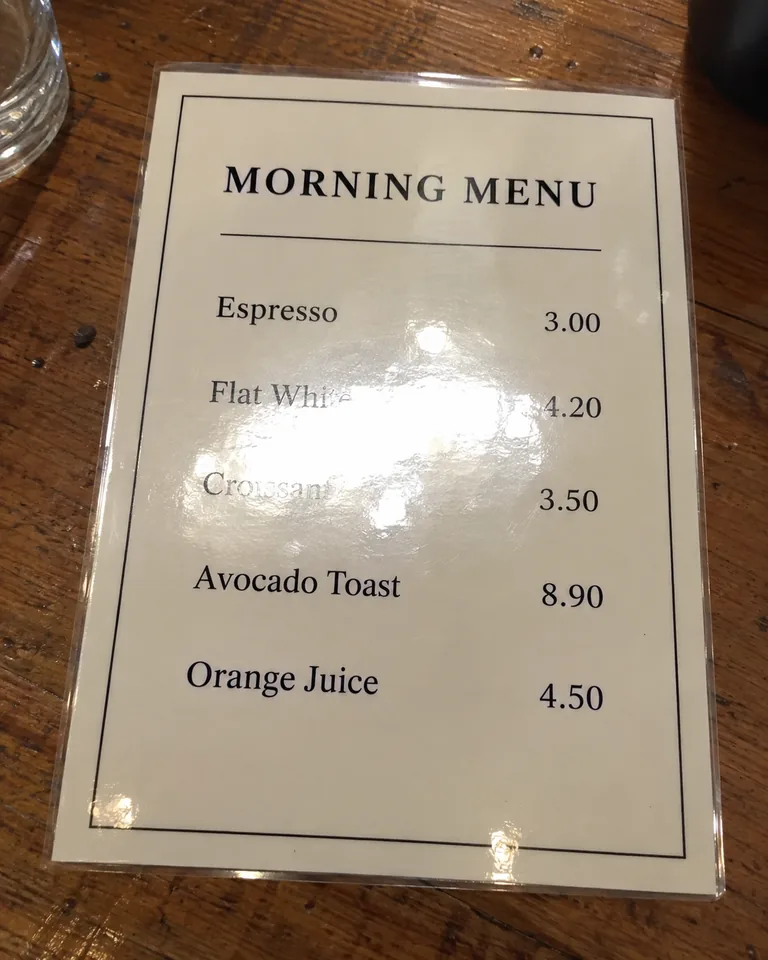
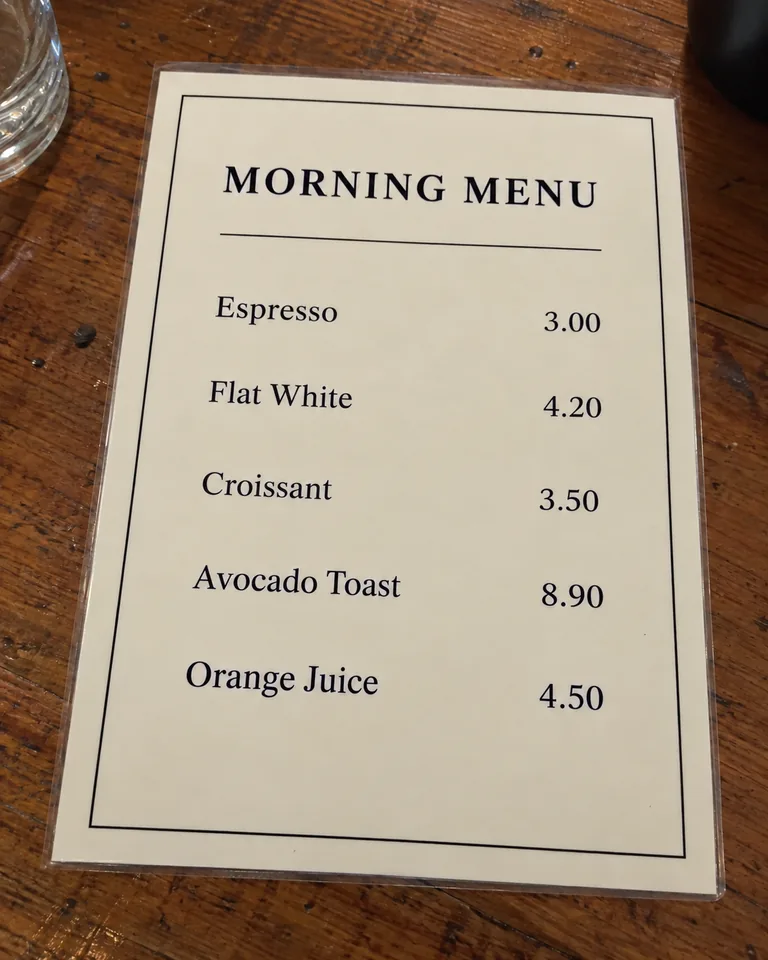
Documents and screens: glare on a laminated menu
Ceiling lights washed out the Flat White and Croissant lines on a laminated menu. After the Documents and screens pass the glare patch is gone and both lines read clearly again, because enough of the letters was still visible. Check every word and price before you rely on it.
Auto detect: sun flare in an outdoor portrait
Low sun behind the subject left hazy flare, a flare dot and bright streaks across his face and jacket. With Auto detect the streaks and haze are cleared and the face has contrast again, while the sunset and warm evening light stay in the shot.
The before photos are fictional images made with ChatGPT's image model to show each kind of glare. Each after image was made by sending the same glare instruction this tool uses to ChatGPT's image model. Your own results will differ in detail.
Remove Glare from Photo by Type, or Let the AI Find It
Most glare removers either make you brush every spot by hand or clean the whole picture at once and dim things you wanted bright. Telling the tool which glare to remove keeps the edit focused when you remove glare from photo portraits, prints and documents.
Auto detect
Finds lens reflections, glass reflections, flash hotspots, shine and sun flare on its own, and keeps catchlights, lamps and bright windows that belong in the scene.
Best for: Photos with more than one kind of glare, or when you are not sure
Glasses glare
Removes reflections of windows, screens, ring lights and lamps from eyeglass lenses and redraws the eyes behind them, so you can remove glasses glare from photo portraits without retouching. The frames stay on.
Best for: Portraits, headshots, selfies, video-call shots and school photos
Glass and frames
Removes reflections and flash spots from glass over framed prints, art, certificates, display cases and windows, and rebuilds the picture behind the glass. Use it to remove glass reflection from photo copies of framed prints.
Best for: Copying old family photos, artwork, museum shots and photos where you need to remove window glare
Flash and shine
Tones down white flash spots and oily shine on faces and objects to a soft, natural highlight instead of painting them flat. It is the setting to remove flash glare from photo portraits.
Best for: Party and event photos, close flash portraits, oily skin
Documents and screens
Removes glare from paper, laminated cards, book covers, labels and phone or monitor screens so the content reads evenly. It is told not to invent or rewrite words.
Best for: Menus, recipe cards, notes, product labels and screen photos
Strength
Gentle
Softens the glare and keeps a faint natural highlight. The smallest change to the photo.
Balanced
Removes the glare clearly and blends the rebuilt area into the photo. The default and the best start.
Strong
Removes heavy, large reflections completely and rebuilds more of the area underneath. More is redrawn, so check details.
How to Remove Glare from Photo in 3 Steps
There is nothing to brush or mask. To remove glare from photo files you only choose what kind of glare it is and how hard to push.
- 1
Upload the photo with glare
Drop a JPG, PNG or WebP up to 20 MB and sign in. Use the largest original you have, not a screenshot or a messaging-app copy, because the AI rebuilds the glare area from the detail around it.
- 2
Choose the glare type and strength
Pick Glasses glare, Glass and frames, Flash and shine or Documents and screens, or leave Auto detect on. Start with Balanced, then choose Fast, HD, Ultra HD or Studio, from 1 to 17 credits.
- 3
Compare and download
Drag the slider to compare the result with your original, check the eyes and any text, and download the PNG. Every result is also saved to your generation history.
What Causes Glare in a Photo
Photo glare is light bouncing off a smooth surface straight into the lens. Where it lands decides what it hides, and which setting to use when you remove glare from photo shots afterwards.
Lens reflections on glasses
Windows, ring lights, laptop screens and overhead lamps reflect in eyeglass lenses, often right over the eyes. Use Glasses glare.
Glass over pictures and windows
Glass glare comes from picture-frame glass, display cases and shop windows, which mirror the room, the window behind you and your own flash. Use Glass and frames.
On-camera flash
A flash fired straight at the subject bounces back as a white spot on glass, glossy paper and skin. Use Flash and shine, or Glass and frames if the spot is on glass.
Oily or sweaty skin
Foreheads, noses and cheeks catch hard light and turn into bright patches in warm rooms or under stage light. Use Flash and shine.
Glossy paper, labels and screens
Laminated cards, magazine pages, glossy photo prints and phone or monitor screens reflect ceiling lights and wash out what is printed. Use Documents and screens.
Sun and strong backlight
Shooting toward the sun or a bright lamp adds haze, flare streaks and bright patches across the frame. Use Auto detect to remove light glare from photo backgrounds and faces.
What the Glare Remover Can and Can't Bring Back
Glare is not a layer sitting on top of your picture: it replaced the detail underneath. When you remove glare from photo areas that are partly visible, the AI has a lot to work with; where the glare is pure white, it has to redraw the area to fit. This is what to expect.
| Glare | What the tool does | What to check |
|---|---|---|
| Reflection over part of a lens | Clears the reflection and uses the visible part of the eye and the other eye to redraw it | Eye color, gaze direction and that both eyes match |
| Lens fully white, eye hidden | Redraws an eye that fits the face; it cannot see the real one | That the person still looks like themselves; for official photos, retake instead |
| Reflection on glass over a print or painting | Removes the reflection and rebuilds the picture from the visible parts around it | Faces in old prints and fine brushwork under large spots |
| Flash spot or shine on skin | Brings back skin tone and texture and leaves a soft highlight | That skin was not smoothed or retouched beyond the glare |
| Glare on printed text or a screen | Evens out the surface; partly visible letters usually read again | Every word, number and price; fully washed-out text can't be read back |
AI Glare Remover vs Photoshop, Lightroom and Reshooting
There are four common ways to remove glare from photo files. The right one depends on whether you can take the picture again and how much time you want to spend.
| This AI glare remover | Photoshop clone and heal | Lightroom reflection removal | Reshoot with a new angle or polarizer | |
|---|---|---|---|---|
| Works on photos already taken | Yes | Yes | Yes, for glass and window reflections | No |
| What you do | Upload, pick the glare type | Select and paint over each glare spot by hand | Run the reflection tool, then fix leftovers | Change the angle, light or filter before shooting |
| Detail hidden under the glare | Redrawn by AI to match the photo | Copied from nearby pixels by you | Separated by AI from the reflection layer | Captured for real |
| Cost and time | 1–17 credits, depending on quality | Subscription and minutes to hours of retouching | Subscription and desktop app | No cost, if you can take the photo again |
| Best for | Quick fixes of any glare type, on any device | Pixel-exact retouching by an experienced editor | Batches of window and glass reflections | Official and ID photos, product shoots you can redo |
How to Avoid Glare Next Time
The best glare is the one you never shoot. These habits keep most reflections out, so you only need to remove glare from photo shots you can't retake.
Tilt the glasses, not the face
Ask the person to tip their glasses down slightly, or lower their chin a little, so the lenses stop mirroring the light. Keep lights higher than the lenses.
Shoot glass at an angle
For framed pictures and windows, step slightly to the side so the reflection bounces away from the lens, and stand close to the glass.
Turn the flash off
Use window light or a lamp placed to the side instead of the on-camera flash; it is the most common cause of white spots on glass and skin.
Use a polarizing filter or hood
A circular polarizer cuts reflections on water, glass and glossy paint; a lens hood blocks stray sun that causes flare.
Blot shine before the shot
A tissue or blotting paper on the forehead and nose takes more shine off than any camera setting.
Copying a framed photo without glare
Turn off the flash and the room lights behind you · put two equal lamps at about 45° on each side · hold the phone parallel to the frame · darken the room if the glass still mirrors it · take the print out of the frame if you can.
What This Remove Glare from Photo Tool Won't Do
- To remove glare from photo areas that are completely white, the AI redraws what was likely there. It is a best guess that fits the photo, not the original detail, so eyes, faces in old prints and small text can differ from reality.
- It does not change official documents. Do not use it to alter IDs, passports, receipts, contracts or evidence; for passport and visa photos, retake the picture without glare.
- It keeps the glasses on. It removes reflections from the lenses, not the frames.
- It does not remove people, objects or shadows. Glare and reflections are the only target.
- It works on still photos only, one image per run. It does not process video.
- Very small or heavily compressed images give the AI little to rebuild from, so results are weaker. Upload the original file.
Remove Glare from Photo FAQ
How do I remove glare from a photo?
Upload the photo to the remove glare from photo tool at the top of this page, leave Auto detect or pick the glare type, keep Balanced strength and click Remove glare. The AI removes the bright spots and redraws what was under them, and you compare the result with a slider before downloading.
How do you remove glasses glare from a photo?
Choose Glasses glare. It removes reflections of windows, screens and ring lights from the lenses and redraws the eyes behind them using the visible parts of the eyes and the face. Compare the eyes with the original afterwards, especially if a lens was completely white.
Can I remove glare from glasses without removing the glasses?
Yes. The frames, lens shape and lens tint stay as they are; only the reflections on the lenses are removed.
Can it remove reflections on glass, like a framed picture or a window?
Yes. Glass and frames removes reflections and flash spots from picture-frame glass, display cases and windows and rebuilds the picture behind the glass from the parts you can still see.
Will removing the glare change the person's face or blur the photo?
The tool is told to keep faces, features, skin tone, pose, clothing and the layout unchanged and only redraw the glare area. AI editing can still shift small details, so compare faces and eyes before you use the result. For larger output, choose HD or Ultra HD.
Can this fix ring light glare or blue glare on glasses?
Yes. Ring-light circles and the blue or green tint that anti-reflective coatings throw back are lens reflections, so Glasses glare removes them. Tinted or transition lenses keep their tint.
Can it remove sun glare from outdoor photos?
Yes. Use Auto detect for sun flare, haze and bright streaks. It keeps the warm outdoor light and only removes the glare, so the photo still looks like it was taken in sunshine.
Can AI remove glare from photo text, like a menu or a document?
Documents and screens evens out glare on paper, labels and screens, and partly visible words usually read again. Text that the glare washed out completely cannot be recovered, and the tool is told not to invent words. Check every word and number, and never use it to alter official documents.
Can ChatGPT or Gemini remove glare from a photo?
General chat image models can follow a remove-glare instruction, but you have to write and refine the prompt yourself. This page gives you a ready-made glare instruction for each glare type, a before-and-after slider, and saves every result to your history.
Can I remove glare from photo files on my iPhone or Android phone?
Yes. The tool runs in your phone's browser: open this page, upload the photo from your camera roll as JPG, PNG or WebP, and download the PNG result. HEIC photos need to be saved as JPG first.
How do I take a picture of a picture without glare?
Turn off the flash, light the print from both sides at about 45 degrees, hold the camera parallel to the frame and step slightly to the side if the glass still reflects you. If you already have the photo, remove the glare with Glass and frames.
What does it cost, and is my photo private?
Fast costs 1 credit per image, HD 4, Ultra HD 6 and Studio 17, and failed images are refunded automatically. HD and above are for subscribers. You need to sign in. Your photo is sent to our AI image provider only to create the result, and the result is saved to your generation history.
More tools after you remove glare from photo files
AI Relight
Change the lighting of a photo after you've removed the glare.
Image Upscale
Enlarge the glare-free photo 2× to 8× for prints and large screens.
Headshot Background
Put a glare-free portrait on a clean studio or office background.
Make AI Photo Realistic
Remove the glossy AI look from generated images.
Remove Glare from Your Photo Now
Upload the photo, pick the glare type and compare the result with your original. Remove glare from photo files with Fast, HD, Ultra HD or Studio, from 1 to 17 credits, with failed images refunded.
Remove glare from photo