
Upload one clear selfie, or two photos for the Duo version, and get one vertical 9:16 PNG for a Christmas post or profile picture. The prompt asks the model to keep your face, skin tone and hair color recognizable while it changes the hairstyle, nose tip, outfit and background. Portraits cost 5–9 credits, with Fast at $2.50 at the $5 pack rate and no added visible watermark. It makes a still image, not a video.
How the Whoville AI Generator Works
The Whoville AI generator needs one photo and three choices. Upload a clear selfie, pick Solo, Duo or Pet, choose an image quality and sign in to generate. Duo adds a second photo so two people stand side by side; Pet gives your dog or cat a curly tuft and a tiny fur-trimmed coat. Compare the portrait with your photo, then download one PNG. A recognizable face is the goal of the prompt, not a guaranteed exact copy.
1. Upload your selfie
Choose a JPG, PNG or WebP up to 10 MB and 2048 pixels per side. A chest-up photo with your face clearly visible and even light gives the model the most to follow.
2. Pick Solo, Duo or Pet
Solo makes one Who portrait, Duo adds a partner or friend from a second photo, and Pet dresses an animal. Custom requires a description and accepts an optional outfit or color reference.
3. Download and share
Check the face, then download a 9:16 PNG. Post it as a before-and-after carousel or set it as your Christmas profile picture; the file has no sound.
Who Character Portrait Examples
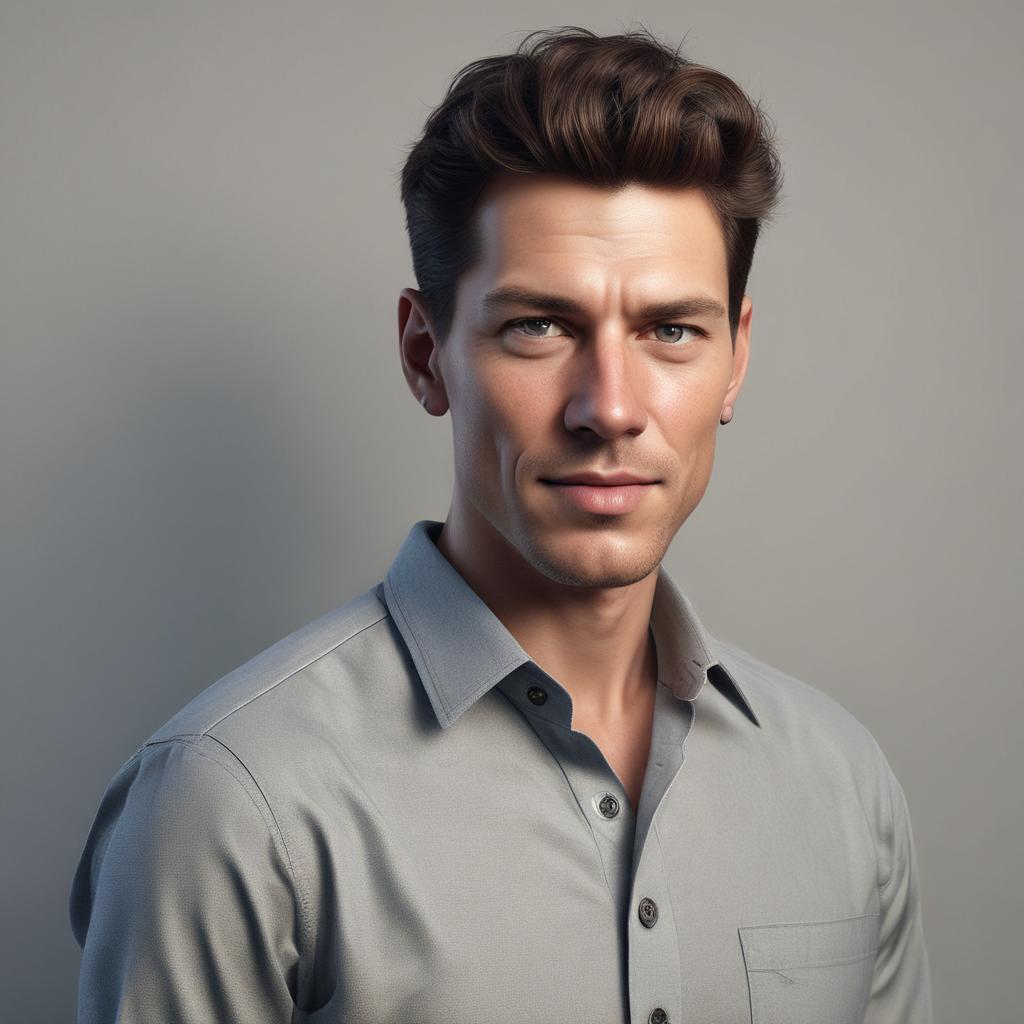
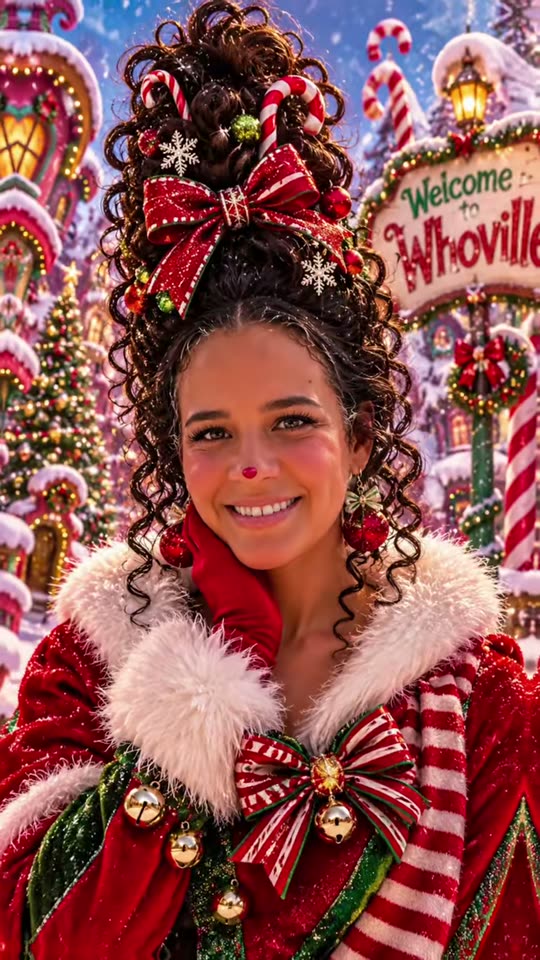
These examples show the look this generator is built around: hair piled high in curls with red bows and candy canes, a rosy nose tip, a red coat with white fur trim and a snowy street of crooked, candy-colored houses. The first pair puts a plain portrait next to its Who version so you can compare face and hair. Sign text varies between these pictures; this tool’s prompt asks for a sign that reads “Merry Christmas”. Results depend on your photo and quality setting.
Original photo

Who portrait
Studio portrait to Who suit
A man in a grey shirt becomes a Who in a red coat with green lapels and a large green bow tie, with his hair swept up into a tall wave. This pair is square; downloads from this tool are 9:16.
Portrait only
Towering dark curls
Dark curls stacked high with a red-and-gold bow and candy canes, a red nose tip and a fur-trimmed coat with bells, in front of a candy-striped welcome sign.

Portrait only
Blonde curls and knitted scarf
Blonde curls decorated with peppermint candies and red ribbons, a striped knitted scarf and a white fur collar against glowing storybook houses.

Portrait only
Red bow and red nose
Brown hair swept into a tall twist with an oversized red bow, a bright red nose tip and a red velvet coat with a striped bow.
What Is the Whoville AI Trend?
The Whoville AI trend is a Christmas photo trend in which people turn a selfie into a Who, one of the cheerful townsfolk of Whoville from Dr. Seuss’s 1957 book How the Grinch Stole Christmas! The AI version took off in TikTok posts in November 2026, usually created in ChatGPT: towering curls, a big red bow, candy canes, a rosy nose and a fur-trimmed coat in a snowy town. It is different from a Grinch filter, which turns you green and furry.
Is There a Free Whoville AI Generator?
Free Whoville AI options are limited: ChatGPT’s free plan can make a Whoville-style picture from a typed prompt within its usage limits, and some filter sites offer a few free tries. Whoville AI on this site is not free with the current signup allowance. A portrait costs at least 5 credits. The current 1-credit signup allowance is below one generation. From zero balance, the smallest purchase is the one-time $5 pack with 10 credits, enough for two Fast portraits, with no subscription and no added visible watermark.
What Is Whoville Hair, and Can AI Do It?
Whoville hair is the gravity-defying holiday hairstyle the Whos wear: hair swept up into a tall tower, loop or twist of curls and decorated with bows, ornaments and candy canes. Whoville AI paints that hairstyle onto your photo, and the prompt asks the model to keep your own hair color. It is a picture, so it shows what the look could be; wearing Whoville hairstyles for a party or costume still means styling your real hair by hand.
Is There a Whoville AI App?
You do not need an app for Whoville AI: some Christmas photo-editor apps in the app stores offer similar filters, but this generator runs in the browser. Open this page in Safari, Chrome or another current browser on iPhone, Android or a computer, upload a selfie and save the PNG to your camera roll; sign-in and credits are required to generate. Uploads go to this site and its image provider, and anyone holding a direct storage link may be able to open the file.
Whoville Portrait Price & Credits
One Who portrait costs 5, 7, 8 or 9 credits, depending on quality. The one-time $5 Trial Pack includes 10 credits: enough for two Fast portraits from zero balance. At that pack rate, Fast is $2.50 per portrait; other packs and subscriptions change the cash equivalent. Higher-quality choices require eligible paid credits. The tables list the signup allowance, export and watermark terms.
| Quality | Output | Credits | Pack equivalent |
|---|---|---|---|
| Fast | 1K · PNG | 5 | $2.50 |
| HD | 2K · PNG | 7 | $3.50 |
| Ultra HD | 4K · PNG | 8 | $4.00 |
| Studio | 2K · PNG | 9 | $4.50 |
| Item | What is included |
|---|---|
| Signup allowance | The current 1-credit signup allowance is below one generation. |
| Smallest purchase | $5 once · 10 credits · no recurring subscription |
| Download | One 9:16 PNG; no extra download fee |
| Watermark | No added visible site watermark |
| Access | Browser on mobile or desktop; sign-in required to generate |
| Unfinished requests | Confirmed provider failures return credits; saving a delivered result is retried without another generation charge |
What This Who Portrait Tool Cannot Do
The generator redraws the whole picture, so it cannot lock every facial pixel, copy a logo on your shirt or guarantee the same face in two separate runs. It paints one person, two people with Duo, or one pet; larger family or group photos are not a supported workflow. It does not animate the portrait or add music, it does not recreate film stills or named characters, and it returns a flat PNG rather than a layered file or video.
Whoville Filter FAQ
Short answers about choosing a photo, the Duo and Pet versions, and using the picture. Prices are in the table above; the trend, the free allowance, Whoville hair and the app question have their own sections.
Which photo works best?
Use one sharp, chest-up photo with your face clearly visible, looking at the camera, in even light and without heavy beauty filters. Hats and sunglasses hide what the prompt is trying to carry over. For Duo, use two separate photos, one per person, rather than one group shot. Only upload photos you have permission to use.
Can I make a Whoville photo with my partner or a friend?
Yes. Choose Duo and add two photos: yours first, then your partner or friend. The prompt places the first person on the left and the second on the right, both from the chest up, and asks the model not to blend the two faces. Both photos count as one portrait, at the same credit price as Solo.
Can I turn my dog or cat into a Who?
Yes. Choose Pet and upload one clear photo of the animal facing the camera. The prompt asks for the same breed, markings and fur colors, with the fur on top of the head swept into a curly tuft, a red bow and a small fur-trimmed coat. Photos where the face is turned away or blurred give weaker results.
Is this official, and can I use the picture commercially?
No, this tool is not affiliated with or endorsed by Dr. Seuss Enterprises; "Whoville" here only describes the holiday style. Personal posts and profile pictures are the intended use. Whoville is a registered trademark of Dr. Seuss Enterprises, so check with a lawyer before using a portrait in advertising, products or paid campaigns, and get permission from everyone whose photo you upload.
More Christmas Photo Tools
Christmas PFP turns a photo into a festive profile picture in other holiday styles. Ugly Christmas Sweater AI dresses you in a loud knitted sweater. Each tool has its own options and credit costs.