
This AI glasses remover edits a single adult portrait into one 3:4 PNG, with frames and lenses removed by generative editing. The model reconstructs covered skin and eyes, so check your likeness; unchanged pixels are not guaranteed. The 1-credit signup allowance does not cover one image. Images cost 5–9 credits; packs start at $5 for 10 credits. PNG downloads include no added visible site watermark.
How to remove eye glasses from a photo
Upload one clear adult portrait, leave Remove glasses selected and choose the image quality. The editing request removes the frames, lenses, reflections and nose-pad marks while asking the model to preserve your recognizable features. Sign in and check the cost before generating. Compare the eyes, brows and nose bridge with your original before saving the PNG.
1. Upload a clear portrait
Choose a clear photo of one adult with visible facial detail and glasses. Use your own photo or one you have permission to edit.
2. Choose the edit and quality
Remove glasses is ready by default. Custom requires a description and optionally accepts the same person’s glasses-free eye reference.
3. Compare and download
Generate one PNG, then inspect the eyes, brows and nose bridge against the original. Download only a result you are happy with.
AI glasses removal before and after
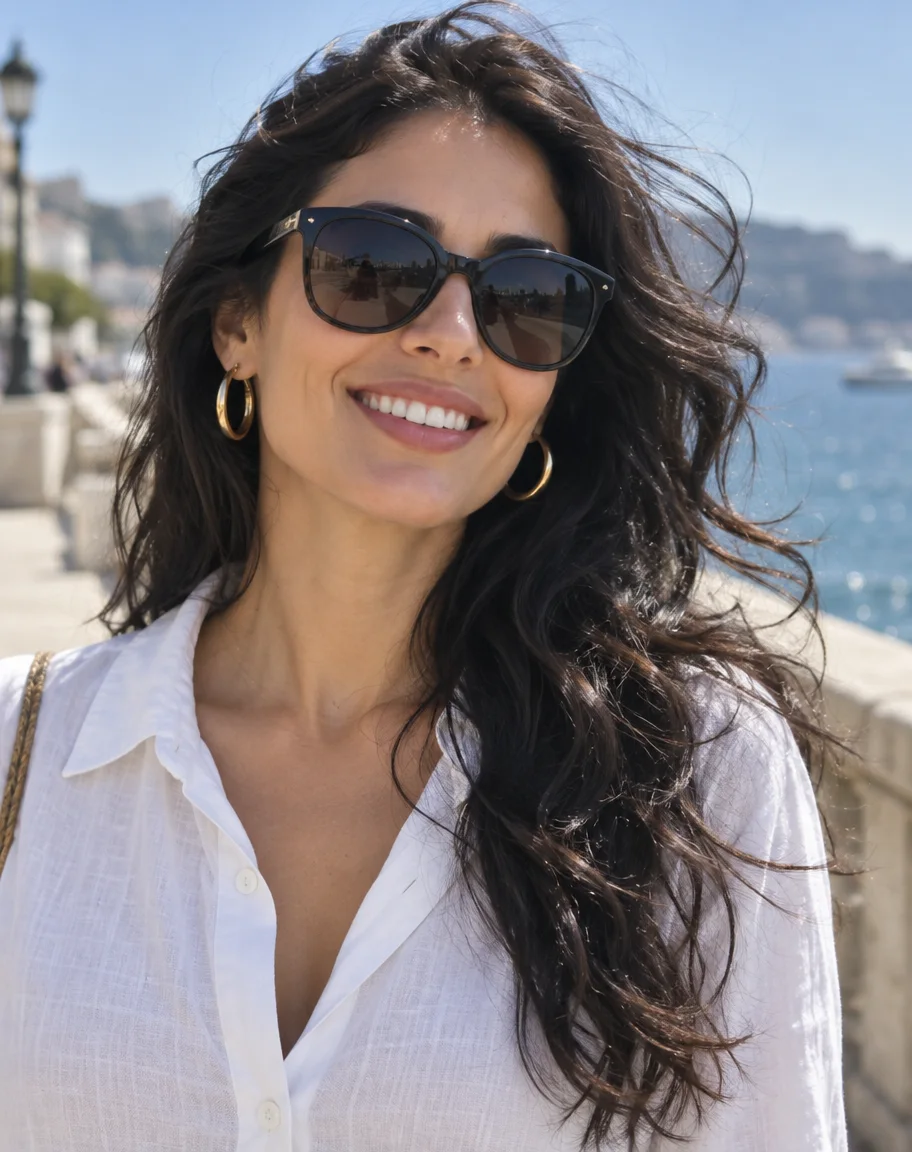
Each pair shows the same portrait with glasses and a glasses-free edit, making the removed frame and lens area easy to compare. Look closely at the eyelids, eyebrows and bridge of the nose rather than judging only the whole face. Thin frames leave more visible detail to work from; dark lenses conceal information that an image model must invent.
With glasses

Glasses removed

Thin wire frames
A café portrait with round gold frames beside a glasses-free edit. Compare the brows, inner eye corners and skin around the nose.
With glasses

Glasses removed

Thick black frames
A bearded man’s black frames are removed in the matching library portrait. The temples and nose bridge are reconstructed.
With glasses
Glasses removed

Dark lenses
A seaside portrait with dark sunglasses beside an edit with uncovered eyes. The concealed eyes are an AI interpretation, not recovered evidence.
Can I remove glasses from photo online free without sign up?
Generation is not free with the current signup allowance. The 1-credit signup allowance does not cover one image. Viewing the tool and example pairs does not require an account, but generating or downloading your own result requires sign-in. There is no recurring daily free quota. Packs start at $5 for 10 credits, and Fast uses 5 credits. A completed PNG has no extra download fee or added visible site watermark.
Do I need an app to remove glasses from a photo on iPhone?
You can use this page in a current iPhone or Android browser without installing an app. Choose a JPG, PNG or WebP from your photos, select the image quality and sign in before generating. Save the completed PNG using Download. If your phone photo is HEIC or larger than the upload limits, export a supported, smaller copy first.
Does AI glasses removal also remove glare from glasses?
Removing glasses means asking the model to take away the entire frame and both lenses, including their reflections. Removing glare is a different edit: it keeps the glasses and reduces reflections on the lenses. If you want to keep wearing the same glasses in the portrait, use the linked glare tool instead. Neither edit can reliably recover details that were completely hidden.
Remove Glare from PhotoRemove glasses from photo pricing & credits
Each request produces one vertical 3:4 PNG and uses the credits shown for its selected quality. At the $5 one-time pack rate of 10 credits, Fast is equivalent to $2.50; you buy the pack, not a single-image checkout. There is no separate fee for downloading a completed PNG. Another edit or variation uses credits again.
| Quality | Output | Credits | Pack-rate equivalent |
|---|---|---|---|
| Fast | 1K · PNG | 5 | $2.50 |
| HD | 2K · PNG | 7 | $3.50 |
| Ultra HD | 4K · PNG | 8 | $4.00 |
| Studio | 2K · PNG | 9 | $4.50 |
| Condition | What applies here |
|---|---|
| Signup allowance | The 1-credit signup allowance does not cover one image. |
| Smallest credit pack | $5 once for 10 credits; no subscription required. |
| Download | One PNG per request; no extra download fee. |
| Visible watermark | No visible site watermark is added; model-level invisible markings are not guaranteed absent. |
| Account and daily quota | Sign-in required. Higher qualities need active paid access, from purchased credits or a subscription. No recurring daily free quota. |
| Failed request | Confirmed failed generation returns its credits. An uncertain or saving request keeps the same request ID while checked. |
What an AI glasses remover cannot recover
This editor cannot reveal the actual eyes or skin hidden behind opaque lenses or thick frames. It creates plausible replacement details and may change visible facial features, hair or background objects. The prompt requests a restrained glasses-only edit, but the image is not pixel-locked and the fixed 3:4 output can reframe the scene. Start with one consenting adult and compare every result; it is not verified identity evidence.
Remove glasses from photo FAQ
These answers cover the editing brief, supported photos, optional eye reference and storage. The default edit needs only one portrait; Custom adds guidance for that same glasses-removal task. Output is a single still image rather than a video or live camera filter. Review all facial details before using or sharing it.
What prompt can I use to remove glasses from a photo?
For Custom, try: “Remove only my glasses, including the frames, lenses and nose-pad shadows. Keep my expression, visible eye details, skin texture, hair, clothing and background as close to the original as possible. Do not beautify my face.” This is guidance, not a guarantee that unchanged pixels will be preserved.
Which photo formats and sizes are accepted?
Upload JPG, PNG or WebP up to 10 MB, with neither side longer than 2048 pixels. The tool creates one 3:4 PNG at the selected quality; that fixed output shape can change the original framing. It does not process videos, GIFs or a batch of photos.
Can I provide a photo of my eyes without glasses?
Yes. Select Custom, write the required glasses-removal description, then optionally upload a clear glasses-free photo of the same adult. The first photo remains the identity and composition reference; the second offers eye detail only. It can guide the edit but does not guarantee an exact match.
Where are my photos and results saved?
Photos are uploaded to this site and passed to its image provider for editing. Results stay in this project’s storage; preview and download routes check your account. Direct storage links may be accessible to anyone who holds them. Avoid sensitive photos and do not share those links.
Related photo tools
Choose glare removal when you want to keep the frames and lenses while reducing bright reflections. The beard tool addresses a separate portrait edit. Each page has its own credit cost and limitations; changing to another task does not make its output free. Use your original photo when starting a different edit.