
AI headshot background changer · upload, pick, download
Headshot Background Changer
Upload a photo taken anywhere and swap the headshot background for a clean studio, plain white, blurred office or any scene you describe. Your face, hair and outfit stay the same.
A good headshot background should almost disappear: it frames you, matches the light on your face and never competes for attention. This AI headshot background tool redraws everything behind you, so a kitchen or car selfie can become a professional headshot for LinkedIn, a resume, a team page or a speaker bio without booking a studio.
Example result
Light grey studioSame face, hair and outfit
Light matched to the scene
Six presets or your own


Drag the slider to compare. Example made with ChatGPT's image model from a fictional photo; your result will differ.
Headshot background examples: before and after
Each pair starts from an ordinary phone photo of a fictional person. Only the headshot background and framing changed, so compare the faces, hair and clothing side by side.
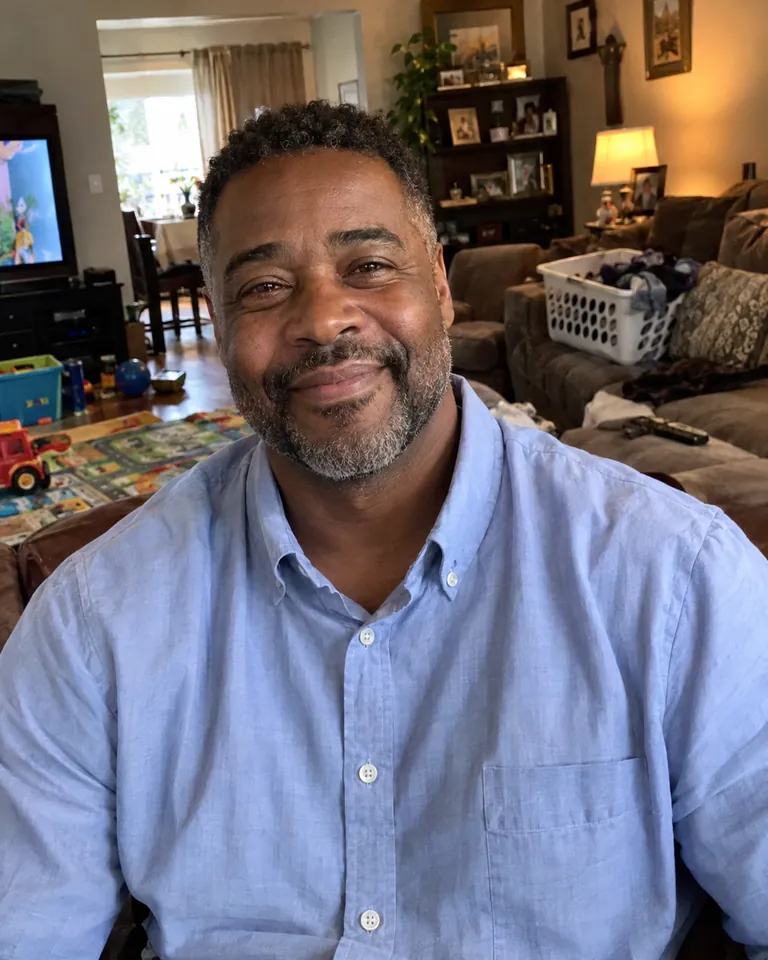
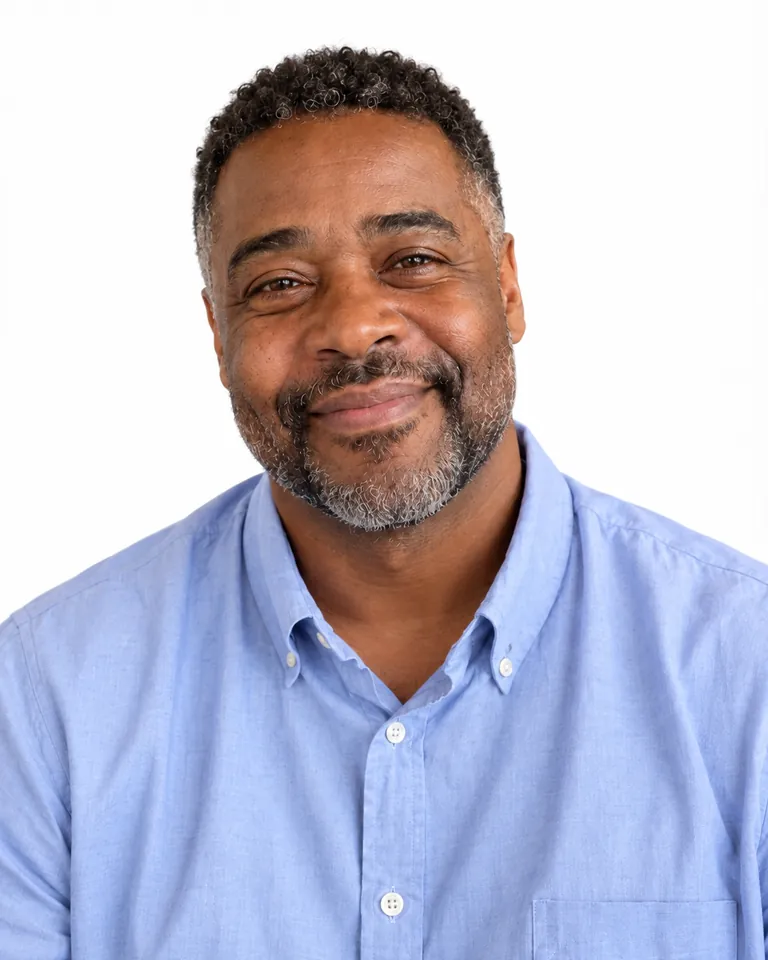
Family living room → plain white headshot background
Laundry on the sofa, toys on the rug and a TV behind his shoulder. The Plain White preset clears all of it, while the blue shirt keeps its folds and the beard keeps its gray flecks. The result is a clean white headshot background that fits a LinkedIn profile or an online application.


Parking-lot selfie → blurred office background
An overcast selfie with parked cars and shopping carts behind him. The Blurred Office preset replaces the lot with a softly out-of-focus workspace and evens out the gray daylight, so the sweater and collar read as business casual. The original selfie angle is kept because only the backdrop is redrawn.


Spare-room home office → custom bookshelf background
Stacked boxes, an ironing board and a flat ceiling light. Instead of a preset, we typed “a warm wooden bookshelf wall in a quiet study, softly out of focus”. A custom headshot background like this suits authors, coaches and educators who want warmth without clutter; her glasses, gray streaks and cardigan texture carry over.
All example images were made with ChatGPT's image model in a web chat, using the same instructions this tool sends. The people are fictional. Your own result will differ in detail.
Six headshot background presets, plus your own
Every preset below was applied to the same kitchen photo shown in the tool above, so you can judge the backgrounds alone. Pick one in the tool, or choose Custom and describe your own headshot backdrop in a sentence.
Light grey studio
Seamless grey with a soft gradient that is slightly brighter behind the head. The safest headshot background: it works with most outfits and skin tones.
Best for: corporate profiles, team pages, press kits
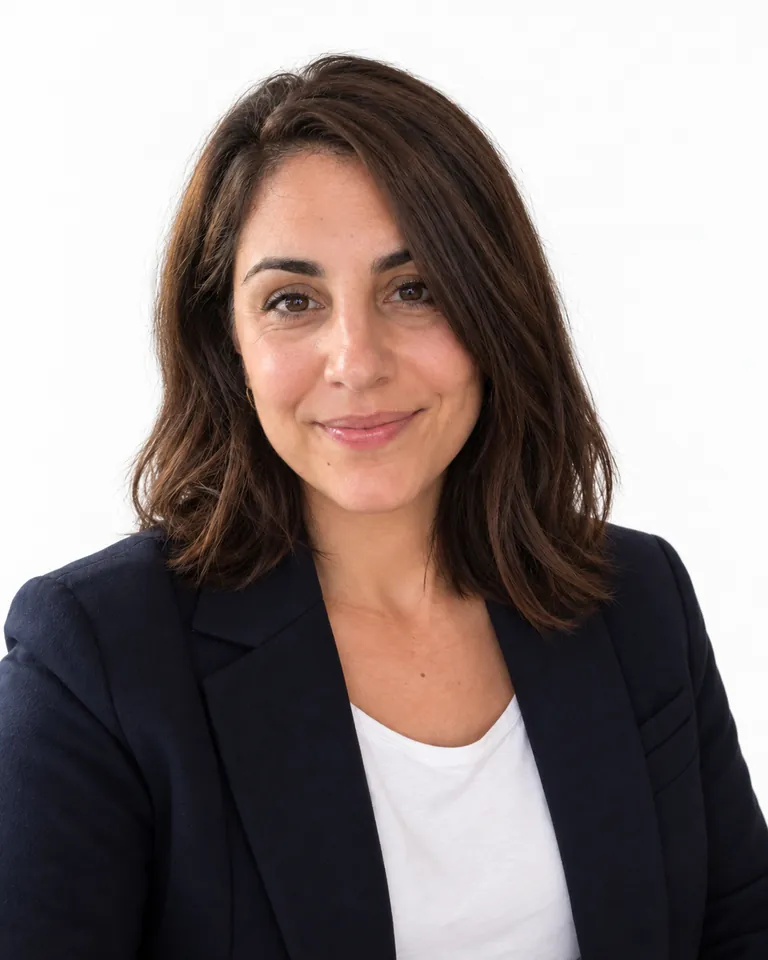
Plain white
Even, shadowless white that looks clean and modern and drops neatly into any website layout.
Best for: LinkedIn, resumes, job applications, marketplace bios

Blurred office
A bright modern office, out of focus so nothing sharp sits behind your head. It reads like an on-site company shoot.
Best for: startups, consultants, recruiters, sales teams
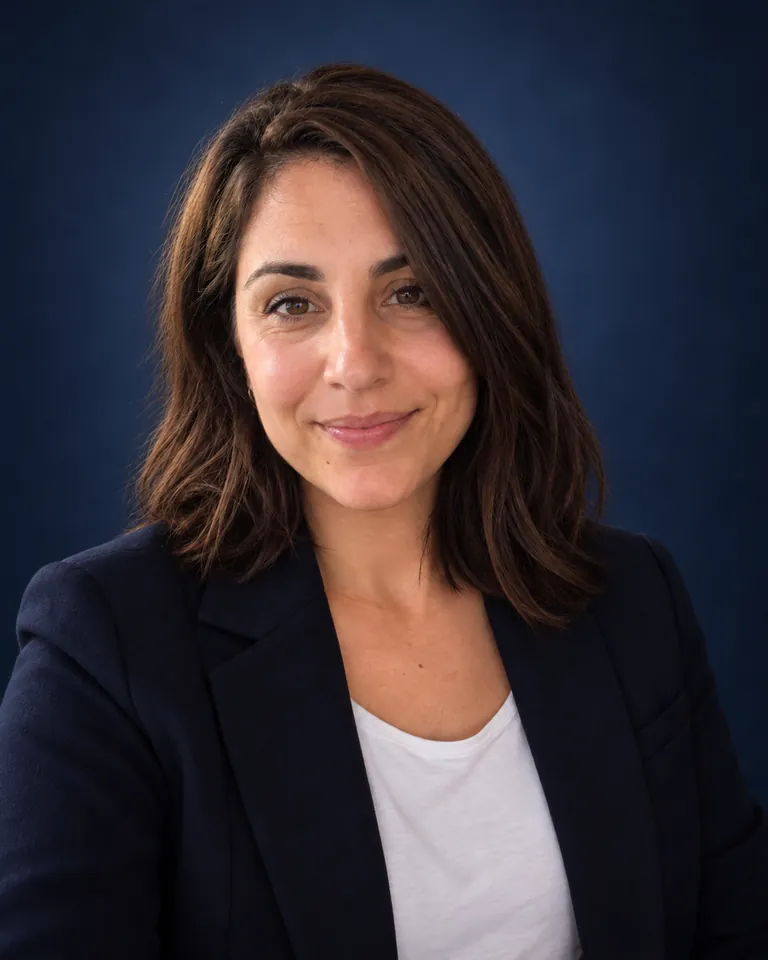
Navy blue
Deep navy with a gentle vignette for a formal, confident look.
Best for: finance, law, executives, board pages

Warm beige
A soft neutral beige gradient that feels approachable without looking casual.
Best for: healthcare, coaching, real estate, therapy
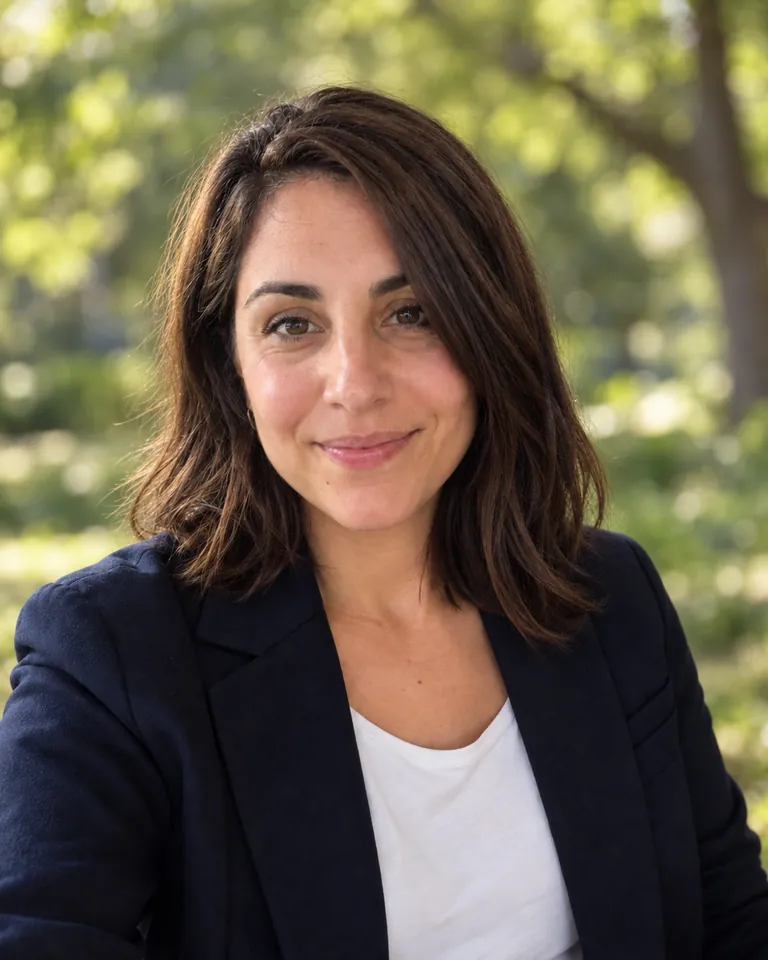
Outdoor bokeh
Green foliage blurred into creamy bokeh in daylight, relaxed but still tidy.
Best for: creatives, teachers, wellness, personal brands
How to change a headshot background in three steps
- 1
Upload your photo
Choose a JPG, PNG or WebP up to 20 MB. A sharp, front-facing photo from the chest up, with your hair fully in frame, gives the cleanest headshot background swap.
- 2
Choose a headshot background
Tap a preset or pick Custom and describe the scene. Keep the head-and-shoulders crop or your own framing, choose Fast, HD, Ultra HD or Studio, and set an aspect ratio such as 1:1 for a profile picture.
- 3
Download your new headshot
The result appears next to your original with a before/after slider. Download the PNG now, or find it later in your generation history.
What is the best background for a professional headshot?
There is no single right answer. The photographer guides we reviewed agree on the basics: the best background for headshots is simple, contrasts with you and suits where the photo will be used. Use this table as a starting point.
| Headshot background | Good for | Watch out for |
|---|---|---|
| Light grey studio | Company websites, staff directories, conference speaker pages | Hard to get wrong; pick a darker grey if you wear light grey |
| Plain white | LinkedIn, resumes, job applications, marketplaces | Can wash out very fair skin or white shirts; it does not make a photo ID-compliant |
| Navy or charcoal | Law, finance, consulting, executive bios | A dark suit needs contrast, so try grey or beige instead |
| Blurred office | Startups, agencies, sales and recruiting | Recognisable objects behind your head distract, so keep the blur strong |
| Warm beige or soft gradient | Healthcare, coaching, real estate | Avoid a beige outfit that matches the backdrop |
| Outdoor bokeh | Creatives, teachers, personal brands | Reads less formal on conservative corporate pages |
AI headshot background vs background remover vs studio reshoot
There are three common ways to get a professional headshot background. Here is how they compare when one person wants to update one photo.
| AI headshot background (this tool) | Background remover + stock backdrop | Studio photo shoot | |
|---|---|---|---|
| Hair and edges | Redrawn together with the new scene, without a cut-out outline | Often jagged or haloed around flyaway hair | Natural |
| Light on your face | Adjusted to match the new background | Keeps the old room light, which can look pasted on | Matches by design |
| Face accuracy | Same person, but small details can shift; always compare | Pixel-identical | New photo, new expression |
| Effort | Upload, pick a background, download | Several manual steps in an editor | Booking, travel and styling |
| Cost | 1–17 credits, depending on quality | App subscription or editing time | A photographer's session fee |
Tips for a better headshot background result
The AI only replaces what is behind you, so the source photo still matters.
Start with a sharp face
Blurry or heavily filtered selfies stay blurry. Use good window light, hold the camera at eye level and turn off beauty filters.
Keep your hair and shoulders in frame
If the top of your head is cut off, the new headshot background cannot convincingly fill it back in. Leave a little space above your hair.
Contrast your outfit and skin with the backdrop
Dark suit? Try light grey or beige. Light blouse? Navy or the blurred office separates you better. Pick a tone that stands apart from your skin, too.
Use one preset for the whole team
Using the same background for headshots makes a team page look like one shoot, even when the photos come from different homes and offices.
What this headshot background changer does not do
- It redraws the background with AI instead of cutting you out pixel by pixel, so small details such as stray hairs, earrings or collar edges can shift. Compare the result with your original before you publish it.
- It does not export transparent PNG files; every result has a full background.
- It is not a passport or ID photo tool and does not check official size, head position or lighting rules.
- It keeps your outfit and expression. It will not add a suit, change your smile or apply beauty retouching.
- Group photos work, but faces are most reliable with one person facing the camera.
- Sign-in is required. Fast, HD, Ultra HD and Studio cost 1 to 17 credits per image, HD and above are for subscribers, and credits for failed generations are refunded automatically.
Headshot background FAQ
How do I change my headshot background?
Upload your photo to the headshot background changer at the top of this page, pick a preset such as Light grey studio or describe your own scene, and click Change background. The AI replaces everything behind you and keeps your face, hair and clothes. Download the PNG when it is ready.
What is the best background color for a professional headshot?
Light grey and other soft neutrals are the most widely recommended because they suit most outfits and skin tones. White is common on LinkedIn and resumes, navy or charcoal reads formal for law and finance, and a blurred office suits startup and team pages.
Should a headshot background be white or grey?
Both are safe. White feels bright and modern and blends into most websites; grey is more forgiving for fair skin, white shirts and print. If you cannot decide, generate both versions and compare them.
Is a solid or blurred headshot background better?
Solid backdrops are timeless and work with any outfit, which is why studios default to grey or white. A blurred office or outdoor scene adds context and warmth. Either way, the background should be soft enough that nobody notices it before your face.
Can I change the background of a headshot after it was taken?
Yes. That is exactly what this tool does: it takes a finished photo, gives it a new headshot background and adjusts the light on you to match, with no reshoot.
Will the AI change my face?
It is instructed to keep your face, skin tone, expression, hair and clothing unchanged and not to retouch you. Because the whole image is regenerated, minor details can still differ, so check the before/after slider before you use the photo professionally.
What background should I use for a LinkedIn headshot?
Plain white, light grey or a softly blurred office all work well on LinkedIn. Choose the 1:1 aspect ratio under More options for a square profile picture and keep your face large in the frame.
Can I use it for a passport or visa photo?
No. Official ID photos have strict rules on size, head position, lighting and editing, and many authorities do not accept digitally altered images. Use an approved photo service for official documents.
How many credits does a headshot background change cost?
Fast costs 1 credit per image, HD 4, Ultra HD 6 and Studio 17. HD and above are for subscribers. You need to be signed in, and if a generation fails the credits are refunded automatically. See the pricing page for plans and credit packs.
Is my photo private?
Your upload is stored with your account and sent to our image model provider only to create the result. Finished images appear in your generation history. See our Privacy Policy for details.
More photo tools
Image Upscale
Enlarge your new headshot 2× to 8× for print or high-resolution profiles.
Photo to Cartoon
Turn a headshot into a stylized cartoon avatar.
90s Photo Generator
Give a portrait a retro flash, yearbook or film look.
Realistic Character AI
Create the same realistic person across new poses and scenes.
AI Suit Photo Generator
Keep the setting and change a portrait’s clothes to business attire.
Give your photo a professional headshot background
Upload a photo, pick a backdrop and download a polished headshot in a few clicks.
Change my headshot background