
This speech bubble generator turns one photo into a horizontal 4:3 PNG with your bubble and dialogue. Fast costs 5 credits, equivalent to $2.50 using the $5 pack of 10 credits; the current 1-credit signup allowance is short of the 5-credit minimum. Choose 1K–4K output without an added visible watermark. The model is asked to preserve the photo, but lettering, placement, and other details can vary.
How the speech bubble maker works
The speech bubble maker accepts one photo, a bubble style, and the words you want inside it. Choose the image quality and submit after signing in. The model receives instructions to place the bubble in spare space and preserve the subject, but it can change details or misspell text. Compare the result with your original before downloading the PNG.
1. Upload your photo
Choose a JPG, PNG, or WebP up to 10 MB and 2048 pixels per side. Leave some space around the subject for a bubble.
2. Choose a bubble and words
Pick Speech, Thought, or Shout and enter up to 100 characters. Custom also needs a bubble design brief; a style reference is optional.
3. Review and download
Check spelling, the pointer, and the original subject. Download the PNG when it suits your use; lettering is part of the image.
Speech bubble photo examples
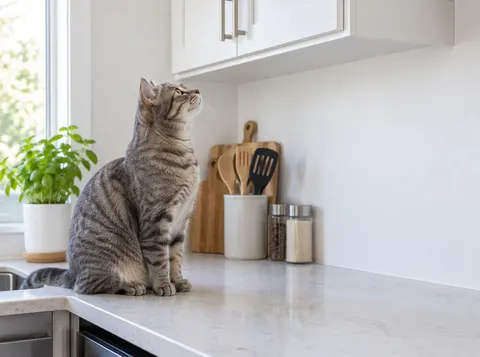
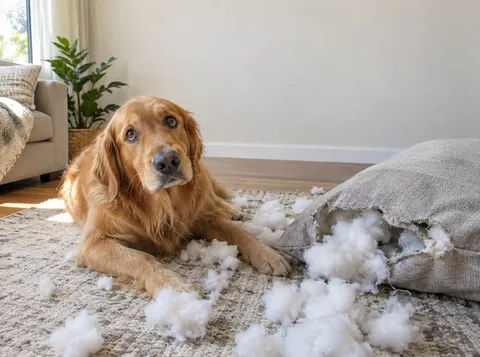
These original-and-edited pairs show three bubble layouts: a rounded dialogue bubble beside a man, a cloud-shaped thought bubble above a cat, and a burst-shaped shout beside a dog. Compare the pointer, text spacing, and covered areas in each pair. The images illustrate the styles; your own result depends on the photo, chosen settings, and model interpretation.
Original

With bubble

A dialogue bubble in the park
A man holding a coffee has a rounded white bubble beside him. Compare the lettering, the pointer toward the speaker, and the space left around his face.
Original
With bubble
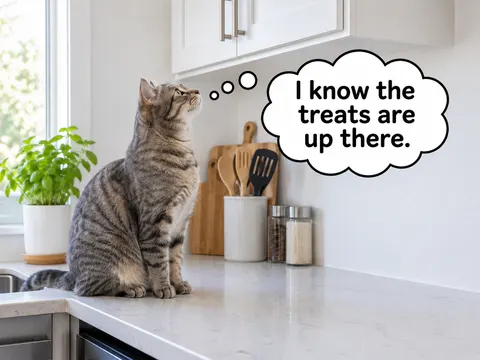
A cat’s kitchen thought bubble
A cat on a kitchen counter has a cloud-shaped thought bubble with a short trail of circles. The text sits in the open area beside its head.
Original
With bubble

A shout bubble beside a dog
A dog beside a torn cushion has a yellow burst-shaped bubble with bold lettering. Check how the larger shape uses space above the dog.
Is this speech bubble maker free?
This speech bubble maker’s 1-credit signup allowance does not cover its 5-credit minimum. This speech bubble maker charges 5 credits for Fast and up to 9 for Studio; $5 buys 10 credits. The Fast equivalent is $2.50 within that pack, rather than a single-image checkout. Sign-in is required. There is no daily free generation quota or separate export charge. Browsing examples and choosing settings cost nothing, but those actions do not generate your photo.
Can I create manga speech bubbles from a photo?
This speech bubble generator can request dialogue, thought, or shout bubbles on a manga illustration or photo you upload. The presets ask to retain the original subject and surroundings rather than redraw the whole scene as manga. Custom accepts a bubble design brief and an optional style reference. Text is generated within the image, so inspect spelling and placement; this is not a manga lettering editor or a multi-panel comic builder.
Can I make Discord speech bubble images?
This speech bubble maker creates a static PNG with your own short dialogue inside the picture. You can download it and share it as a Discord image. A cropped, empty bubble that points toward the chat message above it is a different reaction-image format. Use the related blank-bubble tool for that format or animated GIFs; this generator does not create animation, track a moving subject, or act as a Discord bot.
Speech bubble maker pricing and credits
Each speech bubble maker submission requests one image at the quality and credit cost shown below. Fast costs 5 credits, equivalent to $2.50 using the $5 pack of 10 credits; from zero balance, that pack is the minimum purchase. Subscriptions and larger packs have different credit prices. Fast needs sufficient credits after sign-in; the other tiers also need paid access. Confirmed failed generations return the original credits.
| Quality | Output | Credits | Pack-equivalent cost |
|---|---|---|---|
| Fast | 1K · PNG | 5 | $2.50 |
| HD | 2K · PNG | 7 | $3.50 |
| Ultra HD | 4K · PNG | 8 | $4.00 |
| Studio | 2K · PNG | 9 | $4.50 |
| Condition | What applies here |
|---|---|
| Signup allowance | The current 1-credit signup allowance is short of the 5-credit minimum. No daily free generation quota. |
| Minimum purchase from zero | $5 for 10 credits. Fast uses 5 credits per image; $2.50 is its pack-equivalent cost, not a separate checkout. |
| Download | One PNG per successful image; no extra export charge. Output quality follows the selected tier. |
| Visible watermark | No visible watermark is added. Existing marks in the uploaded photo are not a removal target. |
| Account and photo processing | Sign-in and enough credits are required; HD, Ultra HD, and Studio need paid access. Photos go to this site’s storage and image provider. Owning-account checks protect result viewing and downloads, but holders of a direct storage link may be able to open it. No fixed automatic-deletion period is promised. |
| Failed or unconfirmed request | Confirmed failures refund credits. If submission is unconfirmed, check the same request rather than paying for another attempt. |
What this speech bubble generator cannot do
This speech bubble generator cannot guarantee perfect spelling, exact pointer placement, or unchanged faces and backgrounds. It has no draggable bubble layer, manual brush mask, batch editor, or multi-panel comic layout. Generated text is flattened into the image. Output is one horizontal 4:3 PNG; fitting that shape may extend the background. Review all lettering and important photo details before sharing, and retain your original file.
Speech bubble generator FAQ
The speech bubble generator works with a photo and a short line of dialogue, then returns a finished image. Choose a preset for a familiar bubble shape or describe a custom design before submitting. The questions below explain device access, transparency, pixel styling, and whether the final text stays editable, so you can decide whether this workflow suits the image you need.
Do I need to install a speech bubble maker app?
No app installation is needed. This online speech bubble maker runs in a phone or desktop browser, with sign-in required to generate. Your photo is uploaded for processing; it is not an offline editor. Use a stable internet connection to submit and retrieve your image.
Does this speech bubble generator export transparent PNG overlays?
No. PNG is the file format, but this tool requests a complete photo with a bubble, not a transparent bubble-only overlay. It does not expose a transparent-background export setting. Choose a separate blank-bubble editor if you need a reusable overlay instead of a finished photo.
Can I use the speech bubble generator for pixel-style bubbles?
Custom lets you describe a pixel-style outline and lettering and optionally add a style reference. This is a request to an image model, not a pixel-grid renderer. Exact pixel alignment, font shapes, and spelling are not guaranteed; inspect the downloaded image at the size where you plan to use it.
Can I edit the words after the speech bubble image is generated?
The downloaded PNG has no separate text or bubble layers. Edit your dialogue before submitting, or change it and make another request afterward; a new generation costs credits again. The tool has no text correction or draggable pointer control for an existing generated image.
Related image tools
Choose the blank-bubble tool when you want a cropped reaction bubble without generated dialogue, including GIF support. Choose the image generator when you want to create a new picture from a prompt. This page focuses on adding a single written bubble to an uploaded photo, with your original picture serving as the editing input.