
Anime eye trend generator · also called the anime face trend
Anime Eye Trend: Make the Star Eye Photo from One Selfie
Upload one selfie in your browser. AI draws your original anime twin, then a star-shaped anime eye goes over your real eye with three anime stickers around you. Star eye, heart eye or black-and-white manga, 9:16 PNG, no watermark.
Unlike AI apps that redraw your whole picture, this anime eye trend generator never sends your face back through the model: your selfie stays pixel-for-pixel as you took it, and you can drag the star onto your eye and move the stickers before you download. Choose Fast, HD, Ultra HD or Studio, from 1 to 17 credits, refunded if a run fails.
Updated October 21, 2026 · the TikTok anime star eye trend of October 2026
Example result
Star eyeYour face stays untouched
Star, heart or manga
Drag the star, no extra credits


Drag the slider to compare. Example made with ChatGPT's image model from a fictional selfie.
Anime eye trend examples: before and after
Each example starts from a normal phone selfie of a fictional person. Only the star eye and the three stickers are new; everything else in the picture is the original photo.
Hoodie selfie → star eye photo
One eye visible under a hood is the classic anime eye trend pose. Her anime twin keeps her dark hair, brown eyes and grey hoodie, and the star sits over her uncovered eye.
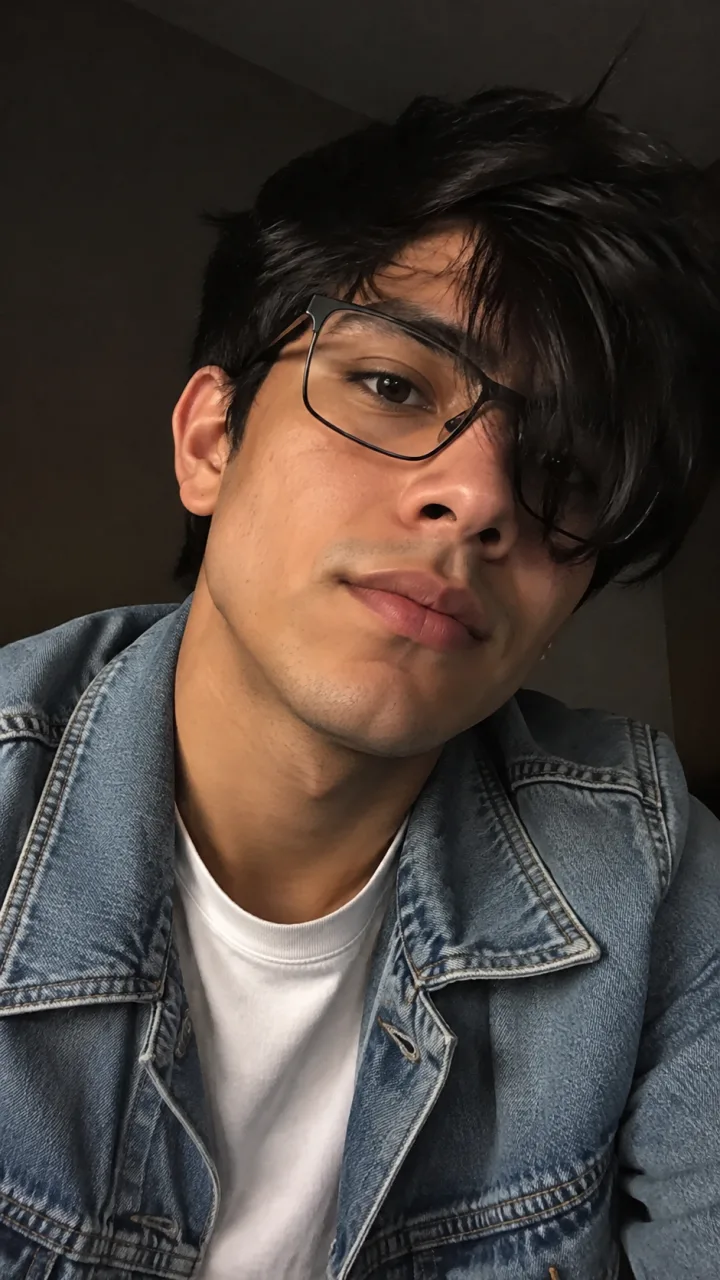
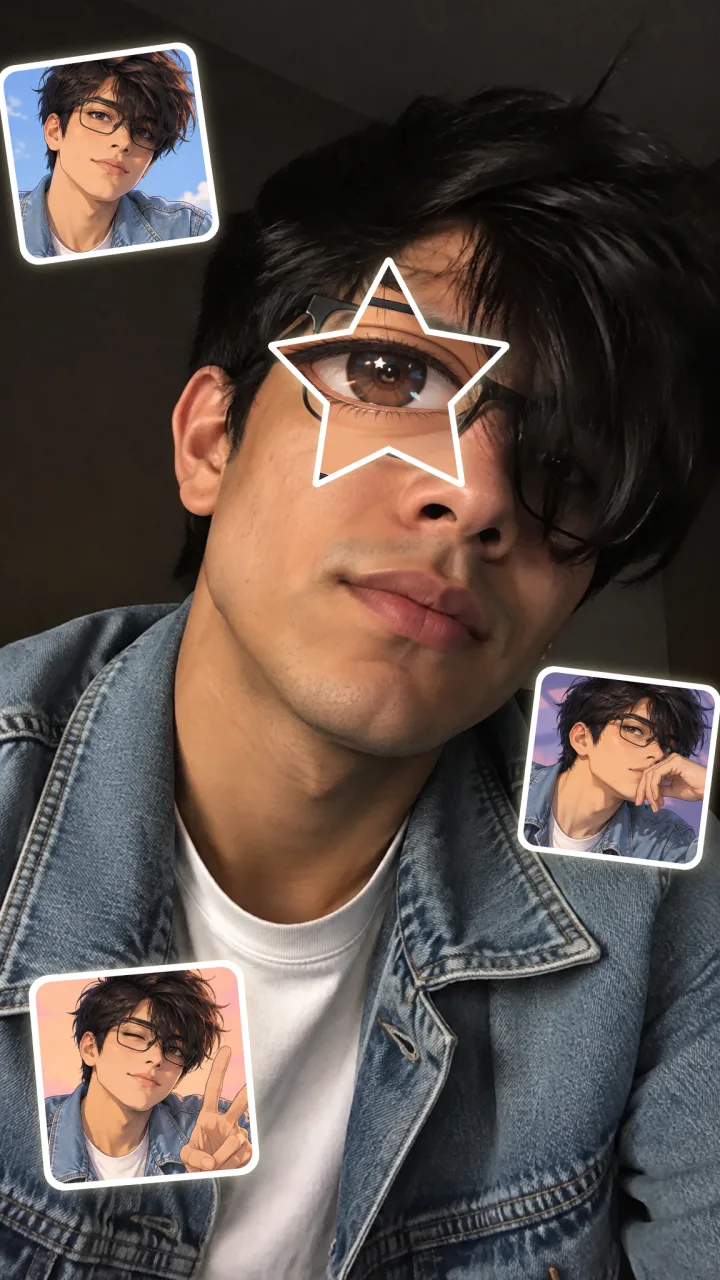
Boy with hair over one eye → anime face trend
The anime face trend works the same for boys. His twin copies the messy black hair, the glasses and the denim jacket, so the stickers read as him rather than a random character.
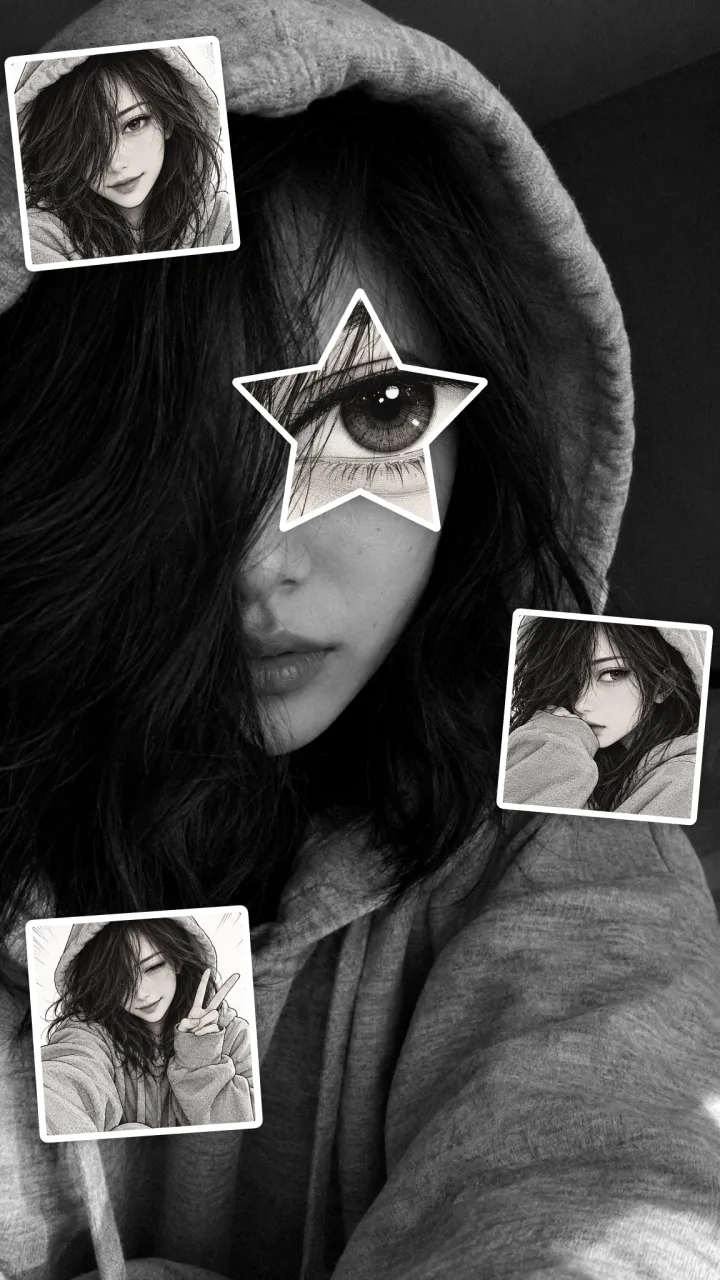
Same selfie → black-and-white manga
The manga look turns the photo black and white with light film grain and draws the twin in ink and screentone, for a moodier version of the anime eye photo trend.
All example images were made with ChatGPT's image model in a web chat and composed with the same layout this tool uses. The people are fictional, and your result will differ in detail.
Three anime eye trend looks
Pick a look before you generate. The look decides how the anime twin is drawn and the shape of the eye and stickers.
Star eye
The original anime star eye trend: a five-point star cut-out with a glowing border and three rounded sticker portraits in pastel colours.
Best for: TikTok photo posts with the trending sound
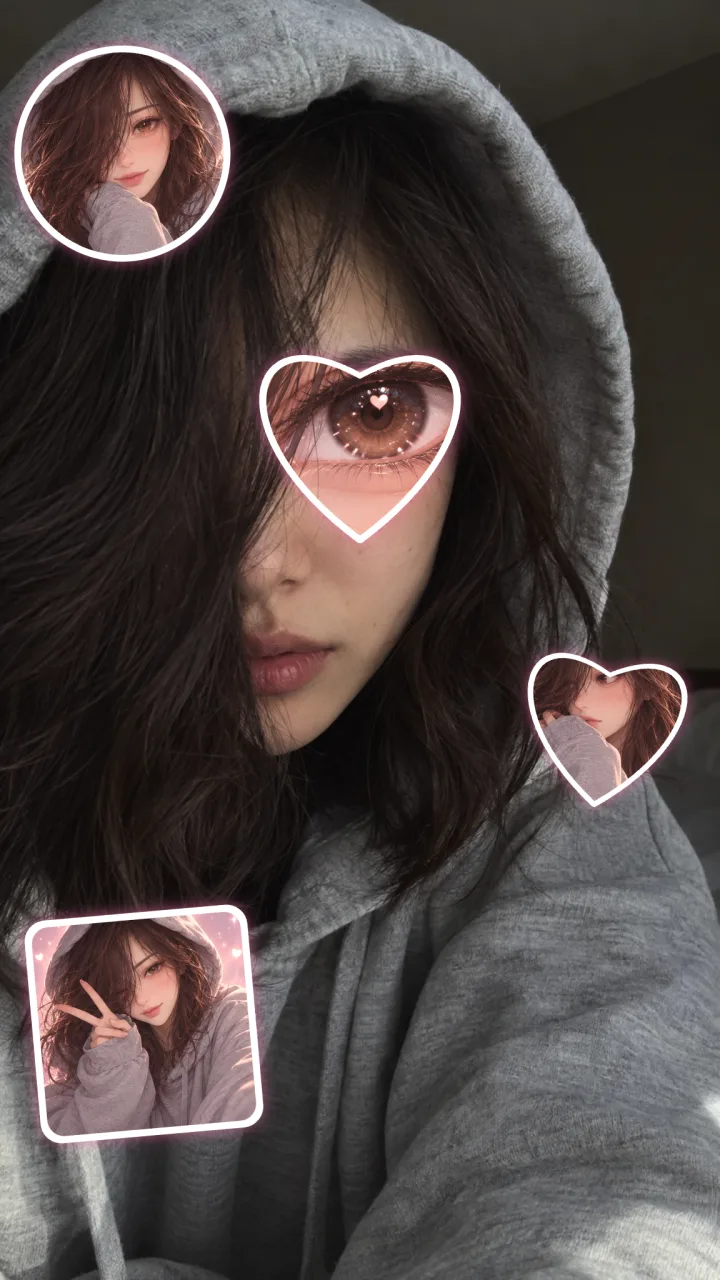
Heart eye
A heart-shaped eye in pink and lavender, with circle, heart and square stickers. Popular for couples and soft girl edits.
Best for: Couple posts and pastel feeds
Manga
Black-and-white photo with film grain, an inked manga eye inside the star and screentone stickers.
Best for: Moody edits and dark outfits
How the tool keeps your face exactly the same
The most common complaint about anime eye trend AI is that it changes your face. This page avoids that by splitting the job in two.
- 1
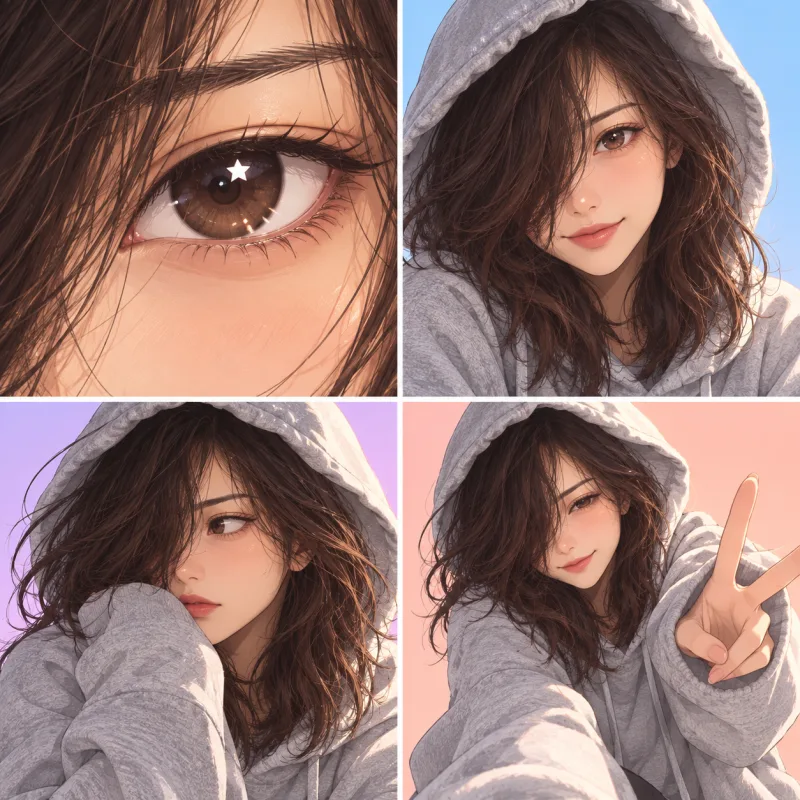
AI draws only your anime twin
The AI looks at your selfie and draws one sheet with four panels: a close-up of your twin's eye and three portraits of the same original anime character with your hair, eye colour and outfit.
- 2
Your browser builds the photo
The eye panel is cut into a star (or heart) and the portraits into stickers, then placed on top of your untouched selfie. Nothing outside the star and stickers is generated.
- 3
You fix the layout at no extra cost
Drag the star onto your eye, resize or rotate it, move or hide any sticker and switch between 9:16 and your photo's own ratio. Changing the layout never costs another credit.
How to do the anime eye trend in three steps
- 1
Upload a selfie with one eye showing
JPG, PNG or WebP up to 20 MB. A close-up with one eye clearly visible works best; hair, a hood or a hand over the other side is part of the look.
- 2
Choose star, heart or manga and generate
Click Create anime twin. In about a minute the AI draws your original anime character, and the tool places the star eye and stickers on your photo.
- 3
Drag the star onto your eye and download
Tap your eye to move the star there, adjust the size and the stickers, then download the PNG and post it as a TikTok photo with the trending sound.
Which selfie works best for the anime eye trend?
One eye, close and sharp
Fill most of the frame with your face and keep the visible eye in focus. The star covers that eye, so a blurry eye shows around the edges.
Cover half your face
Hair, a hoodie, a cap or a hand over one side gives the mysterious anime reveal that most trend posts use.
Show your hair and outfit
Your anime twin copies your hair colour and style, eye colour, glasses and clothes. Black hair, brown hair, curly hair, short hair and hijabs are all followed when they are visible.
Moody light, plain background
Soft window light or a darker room makes the glowing star stand out. Busy backgrounds compete with the stickers.
Use your own photo
Upload only selfies of yourself, or of adults who agreed. The tool is for people 18 and over.
What is the anime eye trend and where did it come from?
The anime eye trend, also called the anime face trend, anime star eye trend or my anime look-alike trend, took off on TikTok in October 2026.
- A real selfie, often with half the face hidden, gets a star-shaped cut-out of an anime eye over one real eye.
- Three or four small anime character pictures are placed around the face to show your anime look-alike.
- Posts usually use the TikTok “original sound” by The One LSR.
- A CapCut template called “anime eye trend” was published on October 18, 2026. It needs five photos and most people fill it with screenshots of existing anime characters.
- AI versions like this page draw an original anime twin from your selfie instead of using copyrighted characters.
Anime eye trend vs anime eyes filter
Search “anime eyes filter” and you get a different effect. Here is how to tell them apart.
| Anime eye trend (this page) | Anime eyes filter | |
|---|---|---|
| Starts from | A still selfie | Your live camera |
| What changes | A star-shaped anime eye over one eye, plus stickers | Both eyes enlarged or turned cartoon |
| Your face | Stays photographic and unchanged | Warped or animated |
| Result | A photo collage to post | A video effect |
Ways to make the anime eye trend compared
Four common ways to make the anime star eye photo, from fully manual to one upload.
| This generator | CapCut template | Picsart / manual edit | ChatGPT or Gemini prompt | |
|---|---|---|---|---|
| What you need | One selfie in a browser | The CapCut app and 5 photos | A photo editor and anime images | A selfie and a long prompt |
| Anime character | Original twin drawn from your selfie | Usually existing characters | Whatever images you find | Original, if the prompt says so |
| Your face | Never redrawn | Never redrawn | Never redrawn | Often redrawn or beautified |
| Placing the eye | Tap and drag, no regeneration | Template slots | Fully manual | Re-prompt to fix |
| Cost | 1–17 credits per anime twin | Some templates need CapCut Pro | No credits, but takes longer | Chatbot plan limits |
| Works on | Any browser: Chromebook, Android, iPhone, PC | Phone or desktop app | App or web editor | Chat app |
Anime eye trend prompts for ChatGPT and Gemini
Prefer to make it in a chatbot? Upload your selfie, paste one of these prompts and check the face carefully, because chat image editors redraw the whole photo.
Star eye prompt
Use my uploaded selfie as the base and keep my face, skin texture, hair, expression, pose, lighting and background exactly the same. Do not beautify or turn my face into anime. Design an original anime character who looks like me: same hair colour and style, eye colour and outfit. Place a five-point star-shaped cut-out over one of my eyes showing a large glossy anime eye of that character with sparkling highlights and a thin white glowing border. Add three small rounded sticker portraits of the same anime character around me without covering my face. Vertical 9:16. No text, no watermark, no existing anime characters, no extra eyes.
Heart eye prompt
Keep my uploaded selfie unchanged: same face, hair, skin, lighting and background. Create an original soft shoujo anime version of me in pink and lavender tones with my hair colour, eye colour and outfit. Put a heart-shaped cut-out over one of my eyes showing that character's big sparkling anime eye with heart-shaped highlights and a pink glow. Add three stickers of the same character around me, one circle, one heart and one square, each with a white border. Vertical 9:16. No text, no watermark, no famous characters.
Black-and-white manga prompt
Turn my uploaded selfie black and white with light film grain, keeping my face and everything else exactly as it is. Draw an original manga character who looks like me in black ink with screentone shading. Place a star-shaped cut-out over one of my eyes showing that character's inked manga eye with white highlights. Add three square black-and-white manga panels of the same character around me. Vertical 9:16. No colour, no text, no watermark, no existing manga characters.
Chatbots regenerate the whole picture, so your face can change and the star can land in the wrong place. If that happens, use the generator above: it keeps your photo untouched and lets you drag the star. Create my anime twin
Anime eye trend generator at a glance
| Input | One JPG, PNG or WebP selfie up to 20 MB |
|---|---|
| Looks | Star eye, heart eye, black-and-white manga |
| Output | PNG in 9:16 or your photo's ratio, 1,536 px (Fast), 2,048 px (HD, Studio) or 3,840 px (Ultra HD) on the long side |
| Price | 1 credit on Fast, 4 on HD, 6 on Ultra HD, 17 on Studio; failed runs are refunded automatically |
| Re-layout | Moving, resizing or hiding the star and stickers uses no credits |
| Time | Usually about a minute |
| Watermark | None added |
| Model | The AI draws the anime twin; your photo is composed in your browser |
| Works on | Any modern browser, including Chromebook, Android and iPhone; no app or CapCut needed |
| Your photo | Stored with your account and sent to the image model provider only to draw your anime twin |
What goes wrong, and how to fix it
| Problem | Fix |
|---|---|
| The star is not on my eye | Select Eye, then tap your eye on the picture or drag the star. Use the size slider until the star covers the iris. No new credits are used. |
| A sticker covers my face | Drag it to the edge, make it smaller or hide it. Two stickers look fine too. |
| My anime twin does not look like me | Use a selfie where your hair and outfit are visible and your eye colour is clear, then generate again. Glasses and hair colour are copied from what the model can see. |
| The picture looks blurry on TikTok | Choose HD or higher and keep the 9:16 frame. Post it as a photo, not inside a video, so TikTok compresses it less. |
| My face looks retouched | It is not changed by this tool. Turn off the beauty filter in your camera app before taking the selfie. |
| The run failed | Your credits are refunded automatically. Try again with a clearer selfie or check your generation history. |
How to post your anime star eye photo
- Post it as a TikTok photo (photo mode) and add the trending “original sound” by The One LSR.
- Keep the caption short, for example “my anime twin” or “anime eye trend”, and add #animeeyetrend or #animefacetrend.
- Make all three looks and post them as a carousel: star, heart and manga.
- Leave TikTok's AI-generated content label on, since the anime twin is made with AI.
Anime eye trend FAQ
What is the anime eye trend?
The anime eye trend is a TikTok photo trend from October 2026. You take a selfie, often with half your face hidden, place a star-shaped cut-out of an anime eye over one of your real eyes and add a few small anime character pictures around you to show your anime look-alike. It is usually posted with “original sound” by The One LSR.
Is the anime face trend the same as the anime eye trend?
Yes. Anime face trend, anime star eye trend, anime eyes photo trend and my anime look-alike trend all describe the same star-eye selfie collage. It is not the anime eyes filter, which is a live camera effect that makes both of your eyes bigger.
How do I do the anime eye trend from a selfie?
Upload a selfie with one eye visible at the top of this page, choose Star eye, Heart eye or Manga and click Create anime twin. After about a minute, tap your eye to move the star onto it, adjust the stickers and download the PNG. You do not need CapCut, an app or a prompt.
Will the AI change my face?
No. The AI only draws your anime twin on a separate sheet. Your browser places the star eye and stickers on top of your original selfie, so every pixel outside the star and stickers is exactly your photo. That is the main difference from chatbot edits, which redraw the whole picture.
Is there an anime eye trend app or CapCut template?
There is a CapCut template named “anime eye trend” that uses five photos, and you can also build the effect by hand in Picsart. This generator runs in any browser, so it works on a Chromebook, Android phone, iPhone or computer without installing anything.
How much does one anime eye trend photo cost?
One anime twin costs 1 credit on Fast, 4 on HD, 6 on Ultra HD or 17 on Studio. Credits are charged only when you click Create anime twin and are refunded automatically if the run fails. Moving, resizing or hiding the star and stickers afterwards never costs more credits, and the download has no watermark.
Does the anime eye trend work for boys and girls?
Yes, it is the same tool for everyone. The anime twin follows what is in your selfie, including black, brown, curly or short hair, a hijab, glasses and your outfit, so the anime face trend photo for boys and girls only differs by the selfie you upload.
Can I use Gojo or other real anime characters?
This generator draws an original character that looks like you rather than a character from an existing series, because those characters belong to their studios. If you use screenshots of real characters in your own edit, keep it a personal fan post and avoid using it to promote a brand.
Can I move the star after the photo is made?
Yes. Select Eye or any sticker, then drag it, tap where you want it, change the size or rotation, or hide it. You can also switch between a 9:16 frame and your photo's own shape. None of this uses credits.
What prompt should I use for the anime eye trend in ChatGPT or Gemini?
Start by telling it to keep your selfie and face exactly the same, describe an original anime character with your hair, eye colour and outfit, ask for a star-shaped cut-out over one eye and three stickers around you, and end with no text, no watermark and no existing characters. The three prompts above cover the star, heart and manga looks.
Is my photo private, and who can use this?
Your upload is stored with your account and sent to our image model provider only to draw your anime twin; the finished sheet appears in your generation history. The tool is for adults using their own photos or photos of adults who agreed. Keep the AI label on when you post. See our Privacy Policy and Terms of Service for details.
More anime and photo tools
Photo to Cartoon
Turn a whole photo into anime, cartoon or comic art in one click.
Consistent Anime Character AI
Keep one anime character identical across poses, outfits and scenes.
Anime Reference Sheet Generator
Make a turnaround and expression sheet for your anime character.
Animate Image
Turn your anime eye photo into a short video clip.
Make your anime eye trend photo
One selfie, about a minute, and your face stays exactly as you took it. Drag the star onto your eye and post it with the trending sound.
Create my anime twin