
The GTA filter takes one photo of you, a couple or a small group and returns one 3:4 PNG in an illustrated game-cover style. The prompt asks the model to keep faces, hair and outfits recognizable while it changes the rendering and, for preset scenes, the background. Pictures cost 5–9 credits at 1K to 4K; Fast is $2.50 at the $5 pack rate, the current 1-credit signup allowance is below one generation. There is no added visible watermark.
How the GTA Filter Works
The GTA filter needs one photo and two choices. Upload a clear photo, pick a scene — Sunset, Neon or My scene — choose an image quality and sign in to generate. The prompt sends your photo and a fixed style board to the image model, asks for the same people in the same poses, and redraws them with ink outlines and hard-edged shading. Compare the result with your photo, then download one PNG. A recognizable face is the goal, not a guaranteed exact copy.
1. Upload your photo
Choose a JPG, PNG or WebP up to 10 MB and 2048 pixels per side. A waist-up photo with faces clearly visible and even light gives the model the most to follow.
2. Pick a scene
Sunset puts palm trees and a hazy skyline behind you, Neon a pink-and-blue beachfront, and My scene redraws your own setting. Custom requires a description and accepts an optional setting or outfit reference.
3. Download and share
Check the faces, then download a 3:4 PNG. Use it as a gaming profile picture, a thumbnail or a before-and-after post; add any title text yourself in an editor.
GTA Style Art Examples: Photo to Illustration
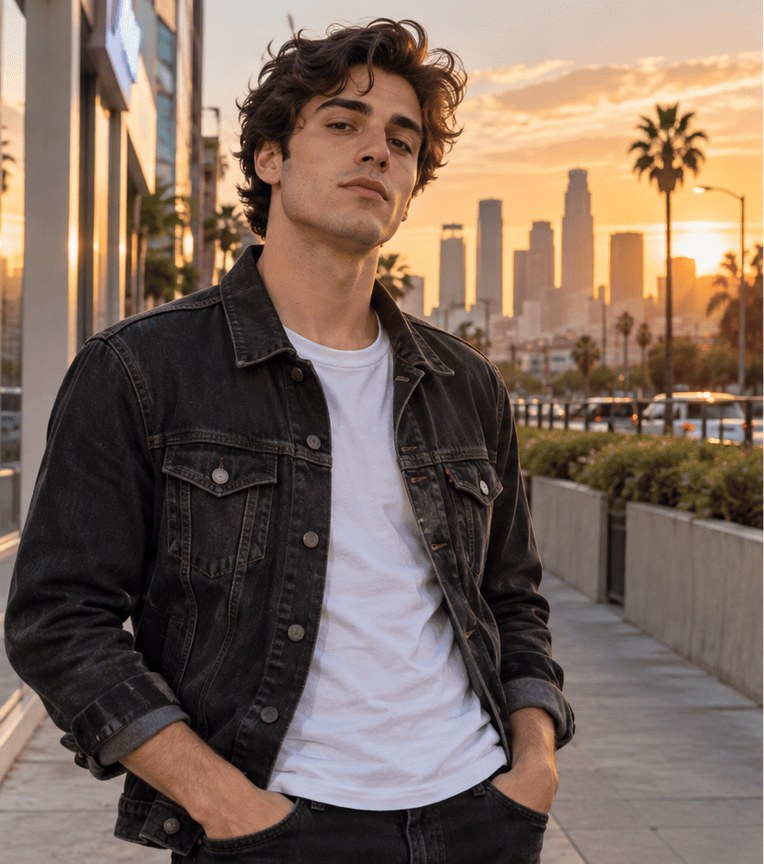
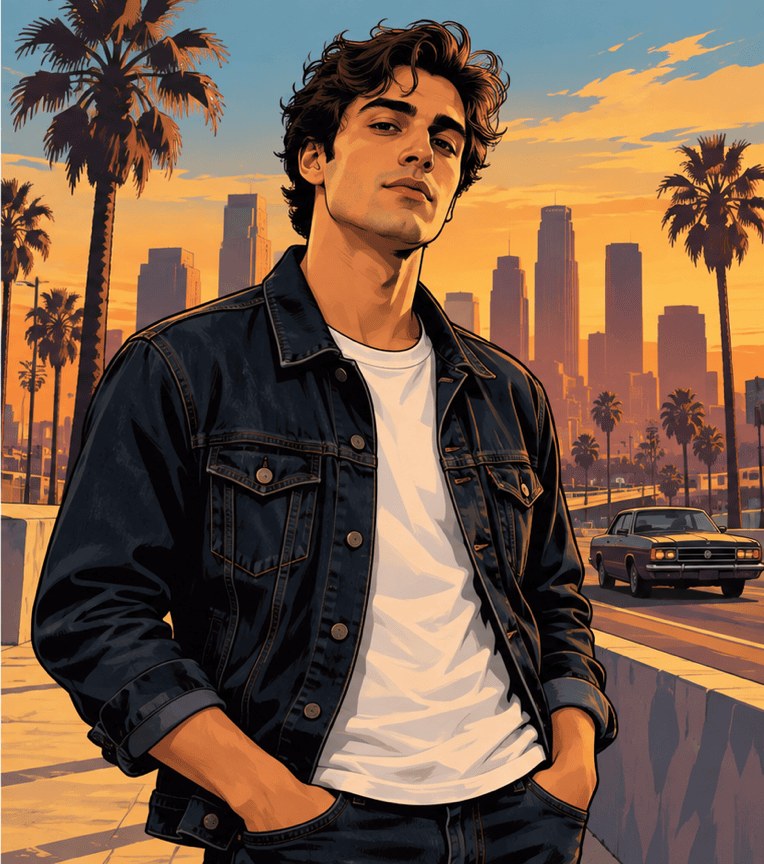
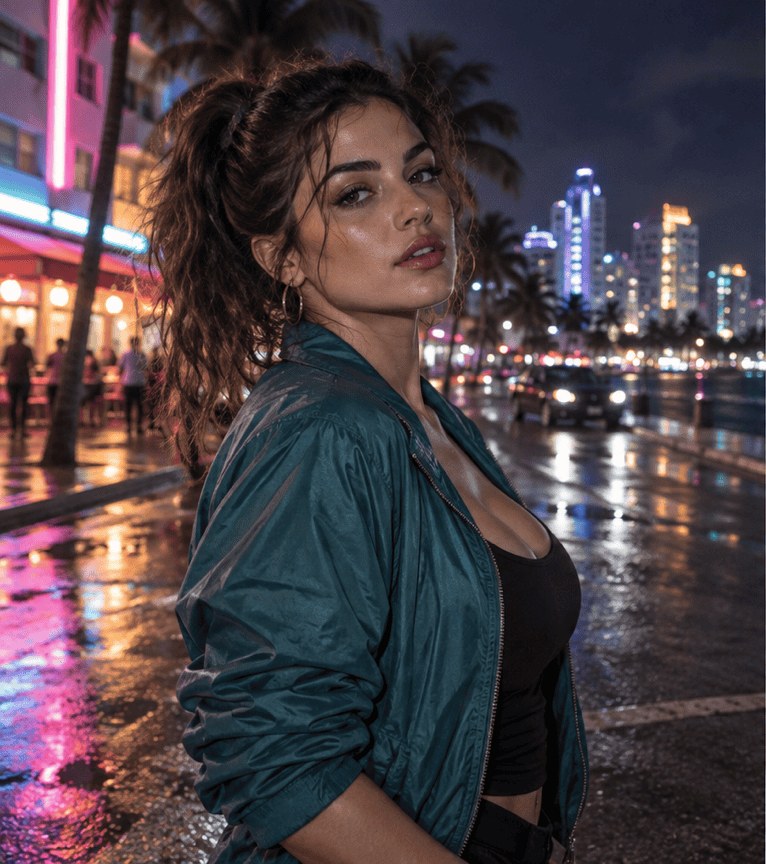
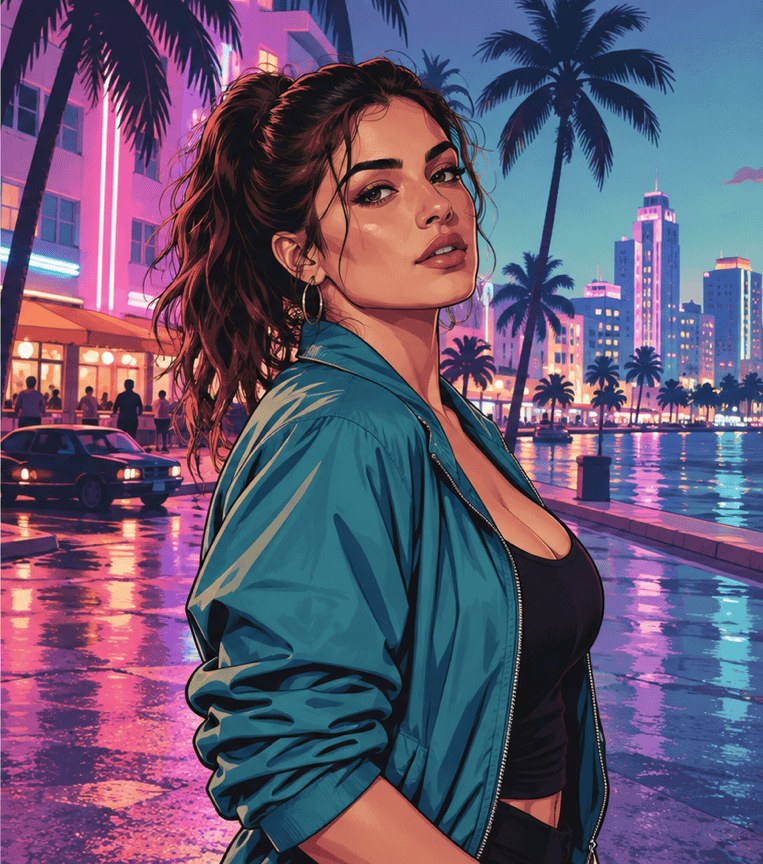
Each pair puts an ordinary photo next to an illustrated version in the look this tool is built around: thick dark outlines, flat-shaded skin and fabric, saturated sky colors and palm-lined city streets. They cover one person at golden hour, one at night under neon, a couple and a group of three. The pairs are about 8:9; downloads from this tool are 3:4, and results depend on your photo and quality setting.
Original photo
GTA-style version
Golden-hour city street
A young man with dark curly hair in a black denim jacket and white T-shirt, hands in pockets on a city sidewalk. The illustrated version keeps the pose and outfit and adds tall palm trees, a downtown skyline and a classic car under a golden sky.
Original photo
GTA-style version
Neon night boulevard
A woman with a long ponytail in a teal satin jacket on a wet street at night. The illustrated version turns the street lights into pink and blue neon, adds art-deco hotels and palm silhouettes, and paints reflections on the pavement.
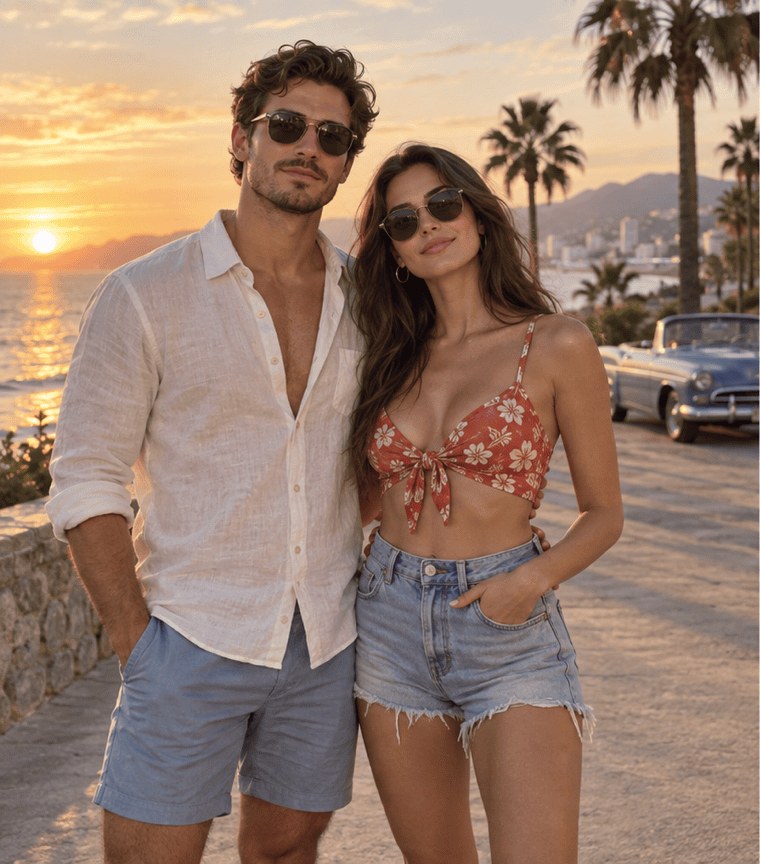
Original photo
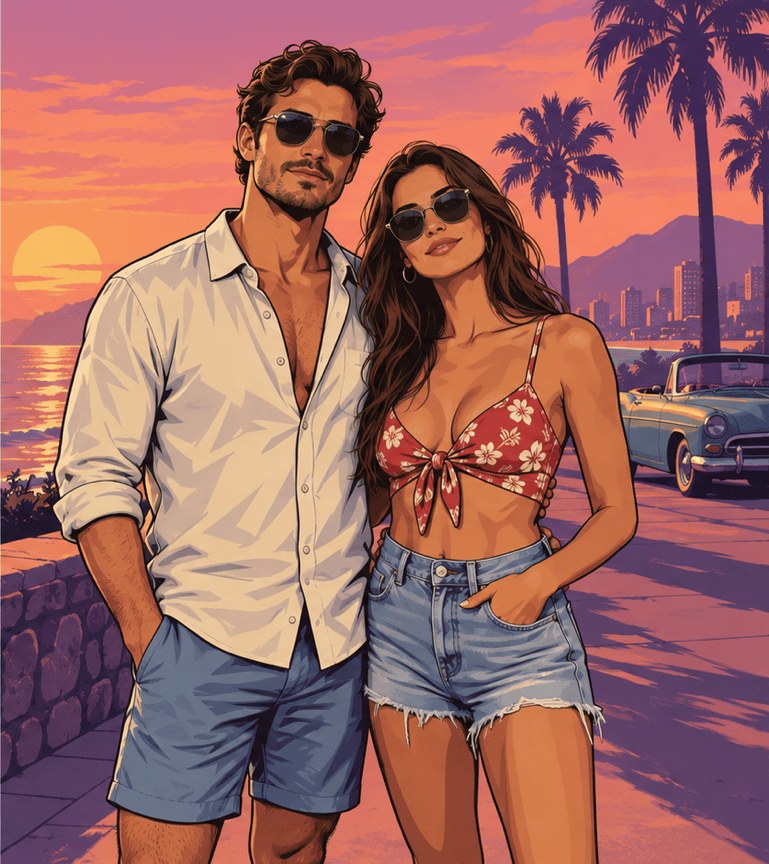
GTA-style version
Couple at the seafront
A couple in sunglasses, a linen shirt and a floral top, posing on a seafront path with palm trees and a vintage convertible. Both outfits carry over, and the sunset becomes a painted pink-and-orange sky.
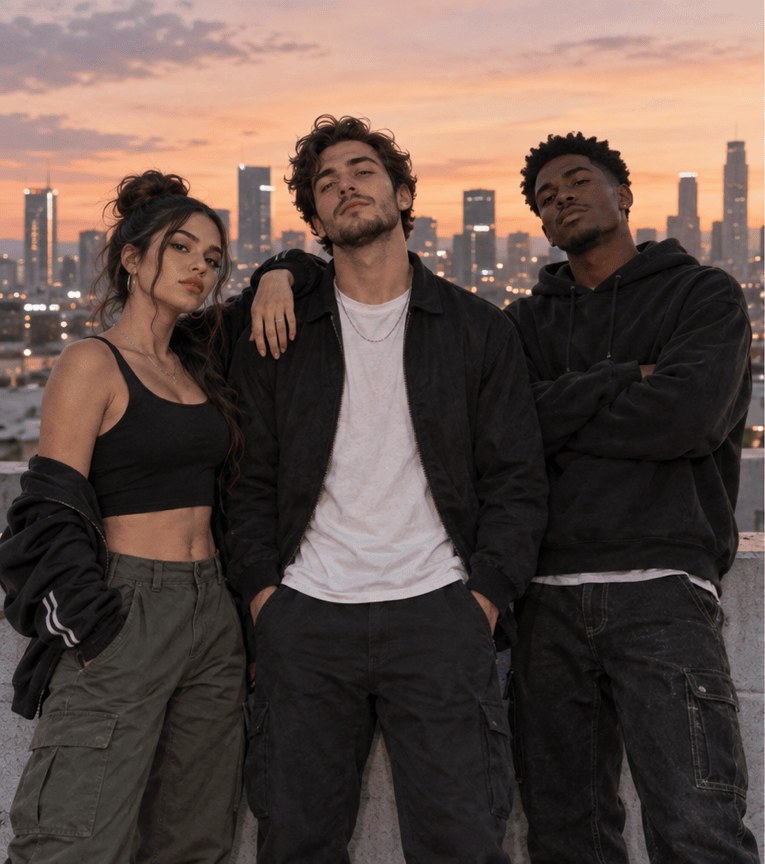
Original photo
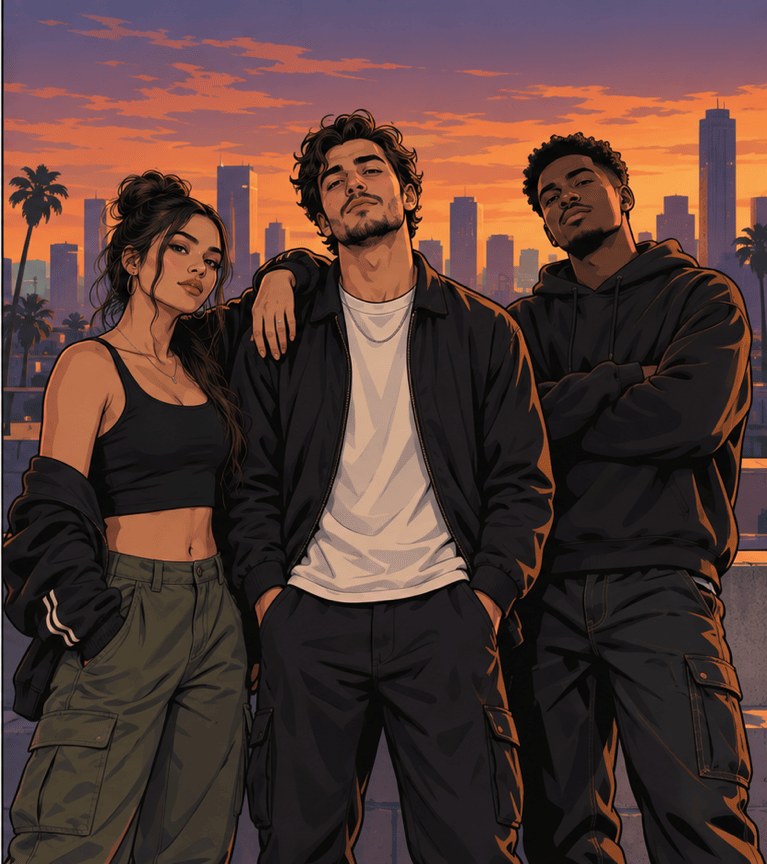
GTA-style version
Three friends on a rooftop
Three friends in dark streetwear and cargo pants on a rooftop at dusk, the city skyline behind them. The group photo stays a group: all three faces, poses and outfits, redrawn with ink lines and a purple-orange sky.
What Is the GTA Art Style?
The GTA art style is the illustrated look of Grand Theft Auto box art and loading screens: realistic proportions drawn with bold black outlines, cel-shaded skin and clothing with hard-edged shadows, saturated color and a sunny or neon city behind the characters. GTA V art leans on golden-hour palm trees and skylines, the Vice City look on pink-and-blue neon, and GTA IV on darker, greyer tones. This tool’s prompt asks for that kind of finish without logos, game titles or real game characters.
Is There a Free GTA Style Art Generator?
The GTA filter on this site is not free with the current signup allowance. Other free GTA style art generators are limited: ChatGPT’s and Gemini’s free plans can restyle an uploaded photo from a typed prompt within their usage limits, and some filter sites offer a few free tries. Here a picture costs at least 5 credits. The current 1-credit signup allowance is below one generation. From zero balance, the smallest purchase is the one-time $5 pack with 10 credits, enough for two Fast pictures, with no subscription and no added visible watermark.
Do You Need to Download a GTA Style Art Generator?
No download is needed for this GTA style art generator: it runs in the browser. Open this page in Safari, Chrome or another current browser on iPhone, Android or a computer, upload a photo and save the PNG to your camera roll or downloads folder; sign-in and credits are required to generate. Uploads go to this site and its image provider, and anyone holding a direct storage link may be able to open the file.
Can AI Turn a Photo Into GTA Loading Screen Art?
Yes, as a single illustrated portrait: this tool redraws your photo in the painted style of a GTA loading screen and returns one 3:4 PNG. It does not build the multi-panel GTA 6 loading-screen collage, add a game logo or title, or make a video transition. For a loading-screen post, generate the picture here, then add your own text in a photo editor; leaving out the official logo also keeps the image clearly fan-made.
GTA Style AI Art Price & Credits
One GTA-style picture costs 5, 7, 8 or 9 credits, depending on quality. The one-time $5 Trial Pack includes 10 credits: enough for two Fast pictures from zero balance. At that pack rate, Fast is $2.50 per picture; other packs and subscriptions change the cash equivalent. Higher-quality choices require eligible paid credits. The tables list the signup allowance, export and watermark terms.
| Quality | Output | Credits | Pack equivalent |
|---|---|---|---|
| Fast | 1K · PNG | 5 | $2.50 |
| HD | 2K · PNG | 7 | $3.50 |
| Ultra HD | 4K · PNG | 8 | $4.00 |
| Studio | 2K · PNG | 9 | $4.50 |
| Item | What is included |
|---|---|
| Signup allowance | The current 1-credit signup allowance is below one generation. |
| Smallest purchase | $5 once · 10 credits · no recurring subscription |
| Download | One 3:4 PNG; no extra download fee |
| Watermark | No added visible site watermark |
| Access | Browser on mobile or desktop; sign-in required to generate |
| Unfinished requests | Confirmed provider failures return credits; saving a delivered result is retried without another generation charge |
What This GTA-Style Photo Editor Cannot Do
The model redraws the whole picture, so it cannot lock every facial pixel, copy small text or logos on clothing, or promise the same face in two separate runs. Group photos work best with up to about four people; in larger crowds, faces get small and can merge. It does not add the Grand Theft Auto logo or real game characters, does not draw weapons or violence, and returns one flat PNG rather than a layered file, a GIF or a video.
GTA Art Style AI FAQ
Short answers about choosing a photo, group shots, non-AI options and using the picture. Prices are in the table above; the style itself, free options, downloads and loading-screen art have their own sections.
Which photo gives the most recognizable result?
Use one sharp photo from the waist or chest up, faces clearly visible and turned toward the camera, in even light and without heavy beauty filters. Sunglasses and hats are kept as part of the outfit, so they also hide what the prompt is trying to carry over. Only upload photos you have permission to use.
Does it work with couple and group photos?
Yes. Upload one photo with everyone in it; the prompt asks the model to keep the same number of people in roughly the same positions and not to blend or swap faces. Couples and groups of three or four fit the 3:4 frame best, and a group picture costs the same credits as a solo one.
Is there a GTA filter with no AI?
Not this one: it uses an AI image model to repaint the photo. Non-AI routes are manual — posterize, outline and color-grade effects in a photo editor, or drawing over the photo yourself or commissioning an artist. Those keep every pixel you choose, but they take longer and rarely get the full painted game-cover look.
Is this official, and can I use the picture commercially?
No, this tool is not affiliated with or endorsed by Rockstar Games or Take-Two Interactive; "GTA" here only describes the illustration style. Personal posts and profile pictures are the intended use. Grand Theft Auto is a trademark of Take-Two Interactive, so check with a lawyer before using a picture in advertising, merchandise or paid campaigns, and get permission from everyone whose photo you upload.
More Photo Style Tools
Photo to Cartoon turns a picture into other cartoon styles. One Piece Wanted Poster puts your photo on an anime bounty poster. Each tool has its own options and credit costs.