
AI Stylist works like an AI personal stylist for a wedding, interview, party or trip: unlike closet apps, it picks the whole outfit and shows it on you. One photo and one occasion return a full-length 3:4 PNG from 768 × 1024 (Fast, 5 credits, $2.50 at the $5 for 10 credits rate) up to 2480 × 3312, with no added site watermark. Eligible new accounts get 1 signup credit. One Fast look needs 5 credits.
How the AI stylist works
The AI stylist needs one photo of you and an occasion. You do not describe the clothes: the prompt asks the model to choose the top and bottom or a dress, an outer layer if it helps, shoes and two or three accessories in a three-to-four color palette, and to keep your face, hair and body shape. Results vary with the photo and the model.
1. Upload one photo of yourself
Use a clear, well-lit photo of one person with the face visible. A full-length photo shows proportions best; with a selfie or half-body photo the model has to draw the rest of the figure.
2. Pick the occasion
Choose Garden wedding, Interview or Cocktail party, or pick Custom and write your own occasion, dress code, season, colors or budget. Custom can also take an outfit inspiration photo.
3. Generate, compare and save
Choose a quality level, check the credit cost, sign in and generate. Compare the look with your photo, download the PNG, and try the same photo with another occasion.
Outfit examples: one photo, a complete look
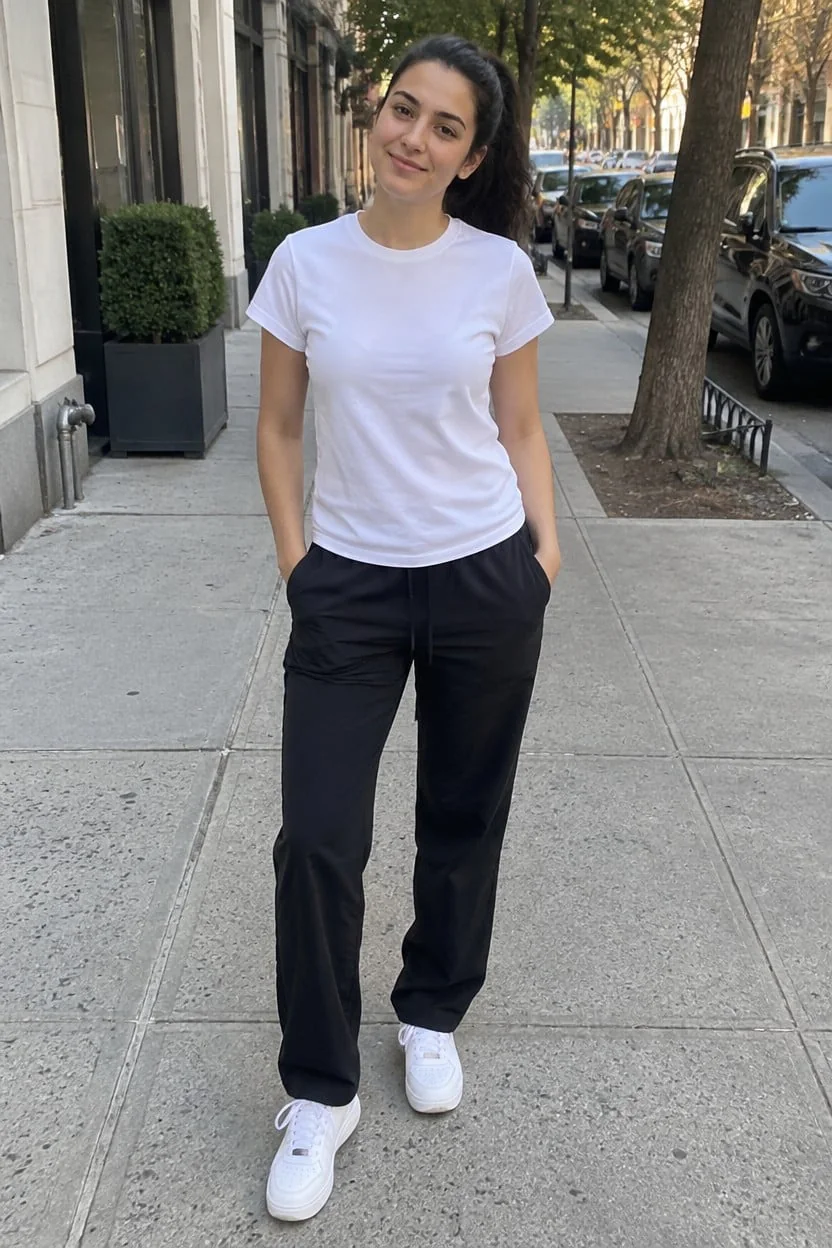
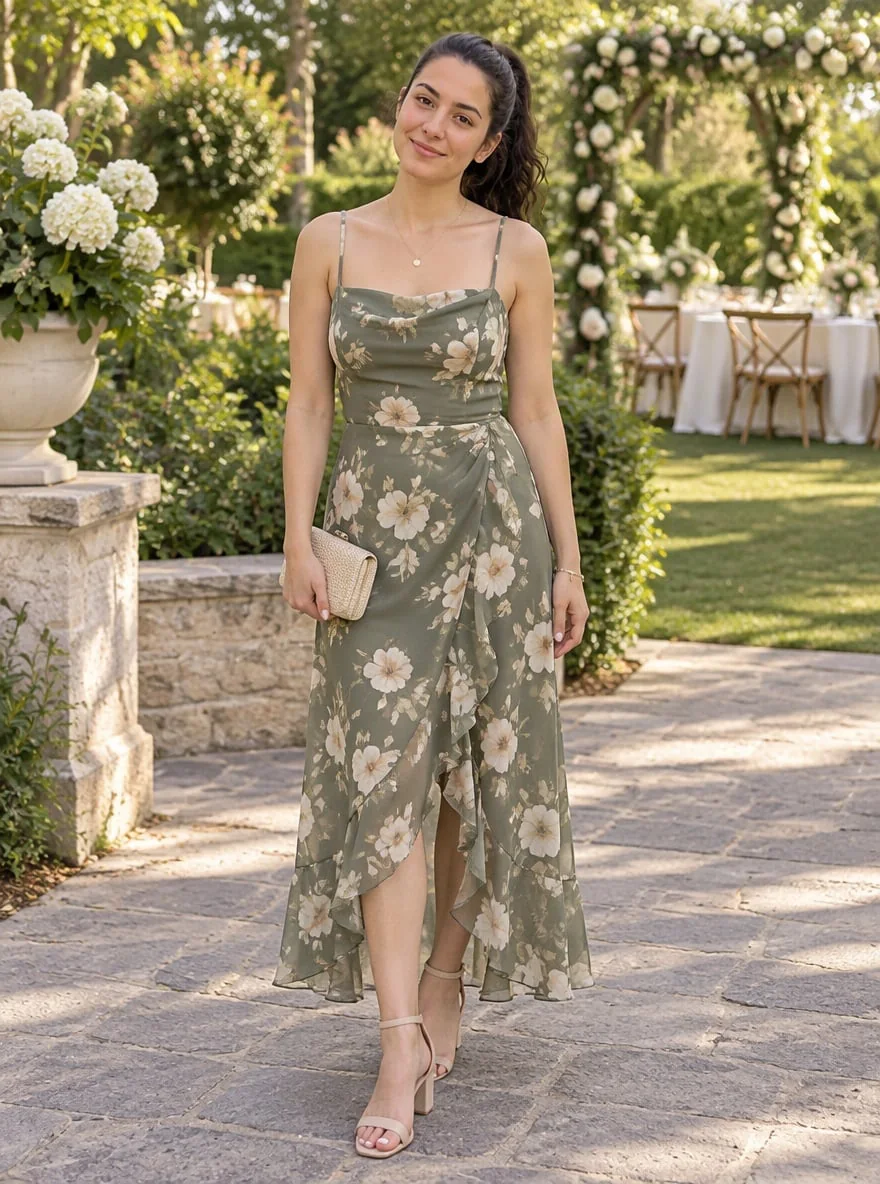
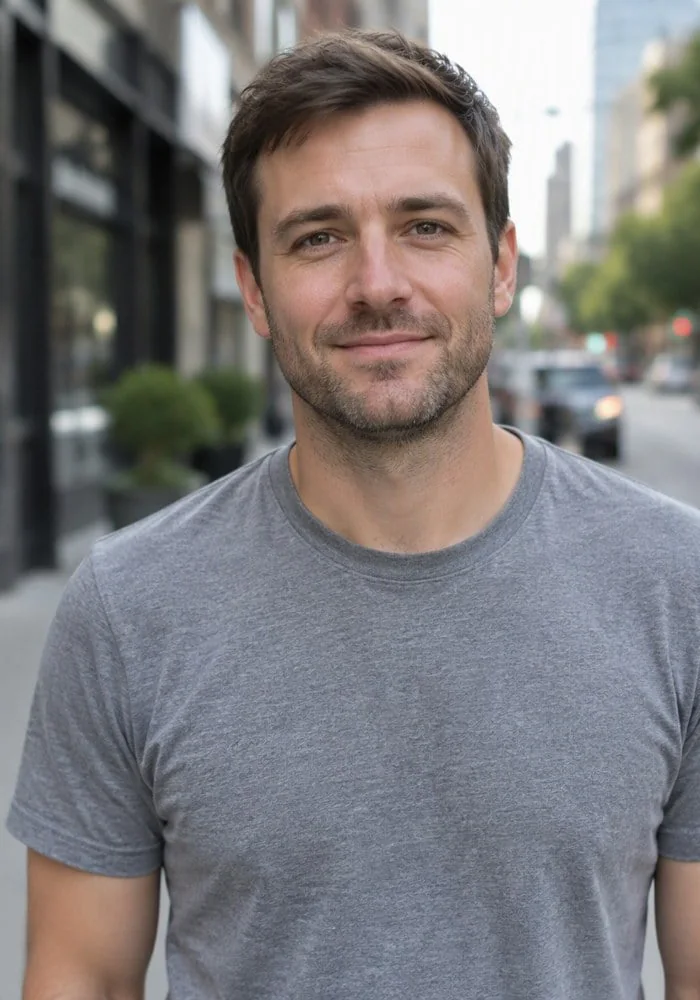
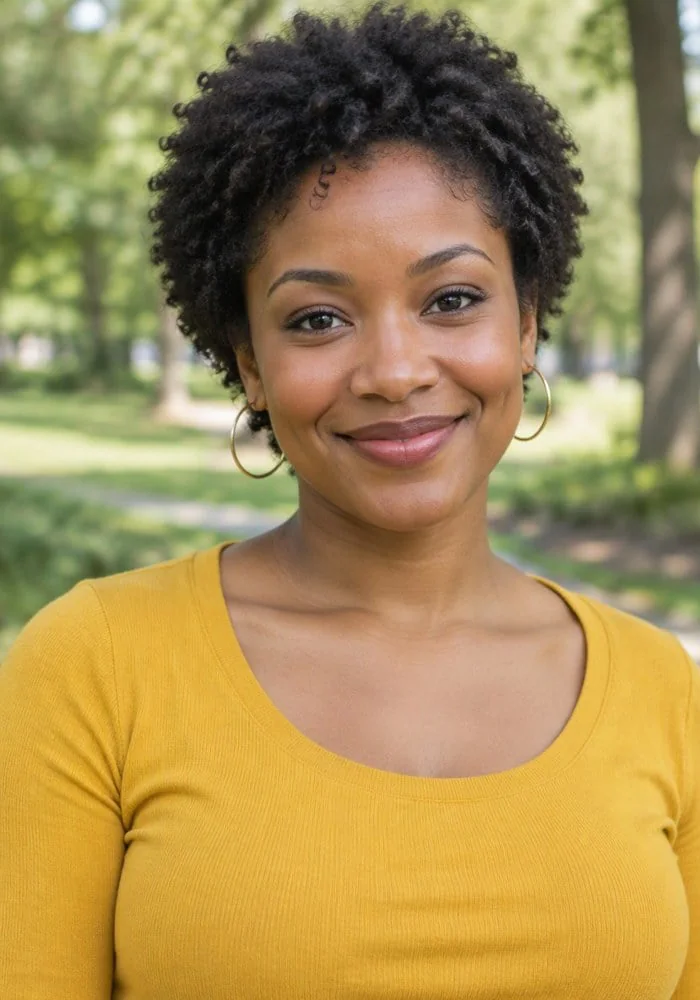
Each pair below shows a starting photo and a full-length styled look for one occasion. The first three match the Garden wedding, Interview and Cocktail party cards; the brunch look shows what a written Custom occasion asks for. Three of the four starting photos are not full-length, so the rest of the figure in those looks was drawn in.
Photo
Styled look
Garden wedding guest
A white T-shirt, black trousers and sneakers on a city sidewalk become a sage floral midi dress with strappy nude sandals, a small beige clutch and a fine necklace in a garden with white flowers.
Photo

Styled look
Job interview at a modern office
A grey T-shirt head-and-shoulders photo becomes a full-length navy suit with a white open-collar shirt, brown belt and brown leather shoes in a bright glass office lobby.
Photo
Styled look
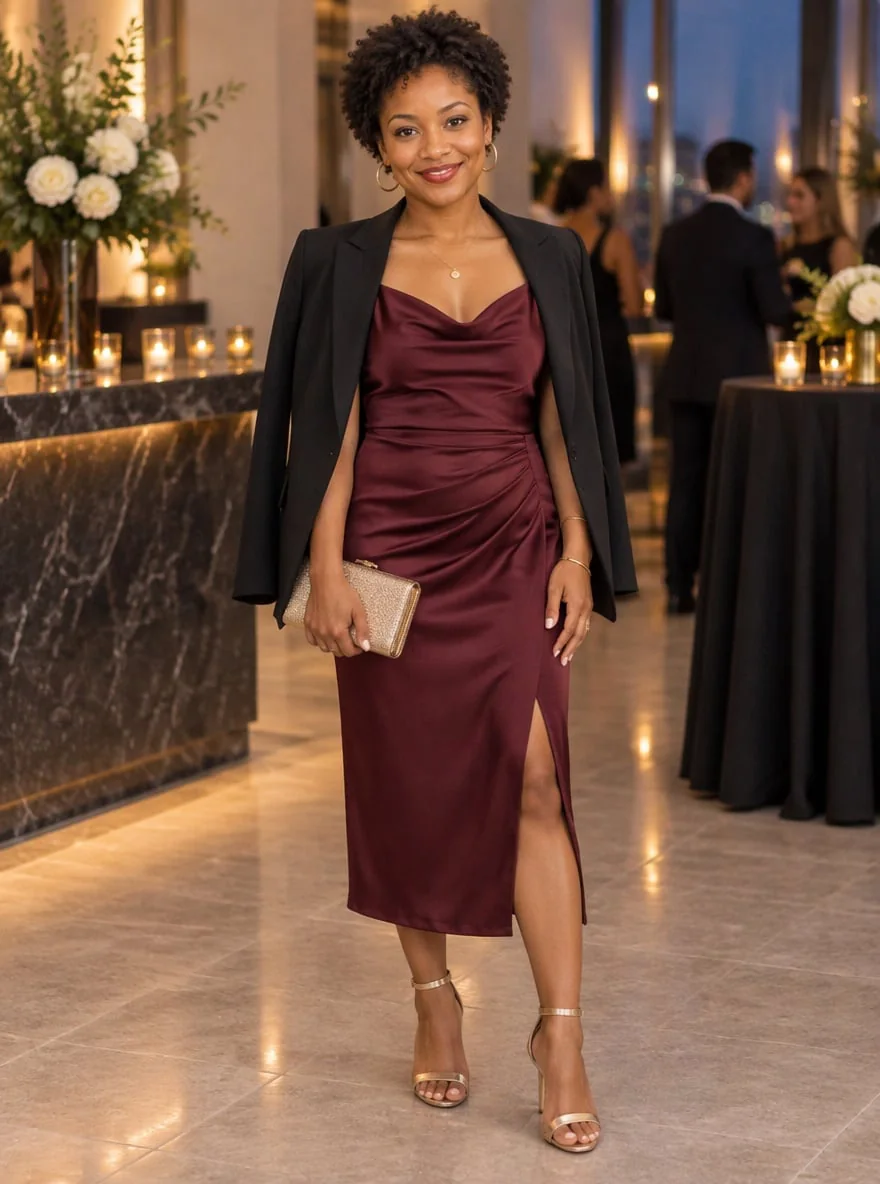
Evening cocktail party
A yellow top half-body photo becomes a burgundy satin slip dress with a black blazer over the shoulders, gold heeled sandals, a metallic clutch and gold hoops at a candlelit bar.

Photo
Styled look
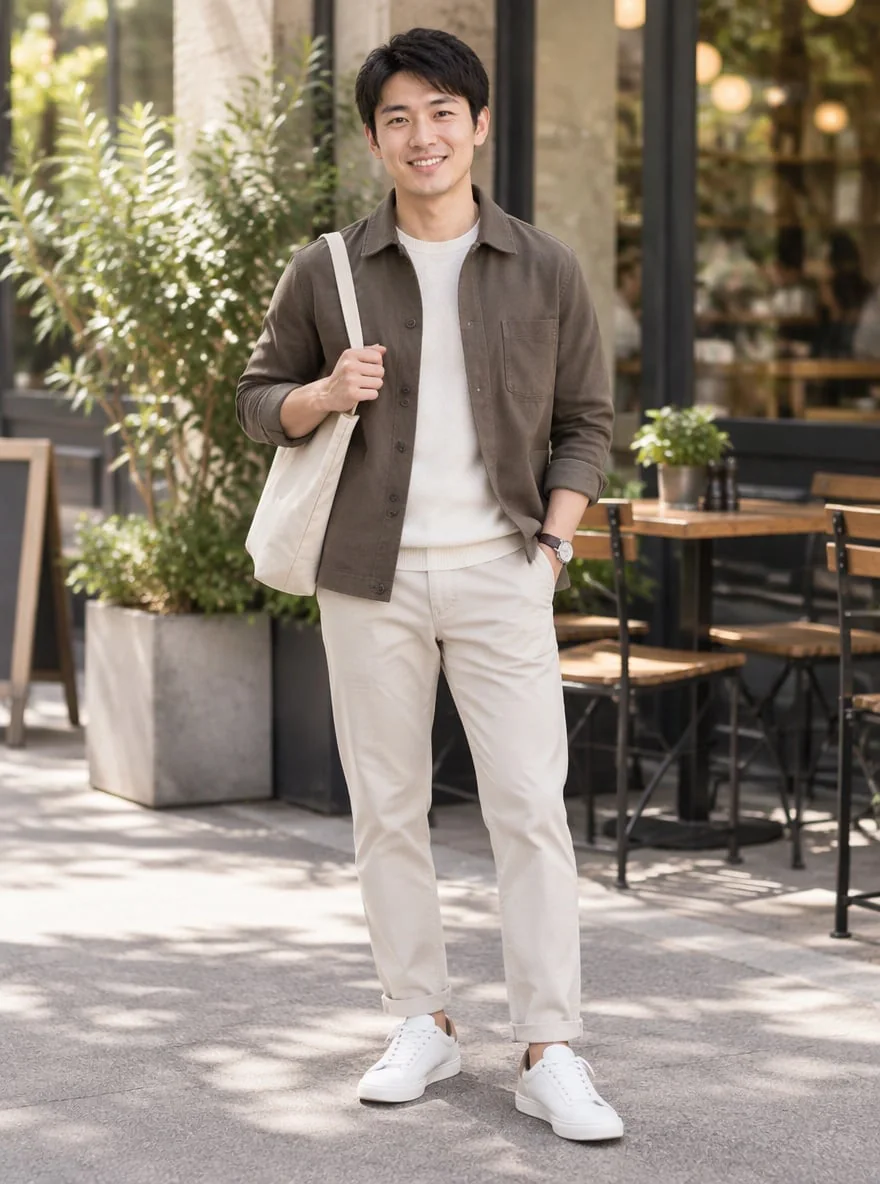
Relaxed weekend brunch
A navy hoodie head-and-shoulders photo becomes an olive overshirt over a cream T-shirt, stone chinos, white sneakers and a canvas tote outside a café.
What is an AI stylist, and how is it different from a closet app?
An AI stylist, also called an AI personal stylist or AI fashion stylist, is a tool that picks clothes for you and explains or shows the result. Three kinds share the name: closet apps that plan outfits from clothes you photograph, virtual try-on tools that put one garment photo on you, and one-photo generators like this page that choose a whole new outfit for an occasion and show it on you.
Closet apps such as Alta suit daily outfit planning with clothes you already own, but you photograph your wardrobe first. Try-on tools need a picture of the exact item. This page needs neither: name an occasion and see a complete look, then use it as a shopping list or inspiration. The clothes are generated, not products from a store.
Is there a free AI stylist?
The AI stylist on this page is not free to generate: each look uses 5–9 credits, and the current signup allowance of 1 signup credit does not cover one. Closet apps are often free to start; one-photo outfit generators that render you in a new look usually charge per image, because every look is a paid model call.
From zero credits, the smallest purchase here is $5 for 10 credits, enough for 2 Fast looks ($2.50 each at that rate). Downloads cost no extra credits and carry no added visible site watermark. There is no daily free look and no generation without signing in.
Is there an AI stylist for men?
Yes. The AI stylist on this page has no men’s or women’s mode: the prompt asks the model to keep your gender presentation and body shape and to dress you for the occasion, so a man’s photo with the Interview card asks for interview clothes such as a suit or blazer, trousers and leather shoes.
For business casual, streetwear or a smart date-night look, choose Custom and write it, for example “business casual for a tech office, no tie, dark sneakers and a watch”. Two of the four examples above start from men’s head-and-shoulders photos.
Pricing, free access and watermark
AI stylist pricing depends on the quality level you pick: 5–9 credits per look ($2.50–$4.50 at the $5 for 10 credits pack rate). Fast, HD and Ultra HD raise the pixel size; Studio uses the model’s high-detail setting at 1536 × 2048, so it costs more than Ultra HD despite fewer pixels.
| Quality | Pixels | Credits | Pack-rate equivalent |
|---|---|---|---|
| Fast | 768 × 1024 | 5 | $2.50 |
| HD | 1536 × 2048 | 7 | $3.50 |
| Ultra HD | 2480 × 3312 | 8 | $4.00 |
| Studio | 1536 × 2048 | 9 | $4.50 |
| Feature | Details |
|---|---|
| Free access | Eligible new accounts get 1 signup credit. One Fast look needs 5 credits. |
| Generation | Sign in with enough credits. HD, Ultra and Studio require eligible paid access. |
| Download | One full-length vertical 3:4 PNG per generation. No extra credits. |
| Watermark | No visible watermark added by this site. |
| Phone use | Runs in mobile and desktop browsers. No app to install. |
The services below are separate from this site, with their own accounts and prices; the details come from their own public pages. Alta is a closet app, and Lookora renders a stylist-made outfit on your photo.
| Tool | Free use | Paid options | Watermark | Output |
|---|---|---|---|---|
| Consistent Character AI | Eligible new accounts get 1 signup credit. One Fast look needs 5 credits. | 5–9 credits per look. One-time pack: $5 for 10 credits. | No added visible site watermark | New outfit on your photo, 3:4 PNG in the browser |
| Lookora | 3 looks a month in the iPhone app; the browser has no free tier | 5 looks for $0.99 or 30 looks for $4.99, paid once | No wordmark on paid looks | Outfit rendered on your photo |
| Alta | “Alta is free to use” | Not published on the main page | Not published on the main page | Closet app: outfits from clothes you own, try-on on a virtual avatar |
Checked 2026-11-20 on each service’s public pages.
What the outfit generator can’t do
This AI stylist styles one person per photo and returns one still image. It does not organize your closet, link to products you can buy, or promise how real clothes would fit; generated fabric, sizing and drape are an impression, not a measurement. The prompt asks the model to keep your face, hair and body shape, but likeness and details such as hands, shoes and jewelry can still come out wrong, so check them before you share the image.
If you already know the clothes you want, describe them in the AI Clothes Changer. To see one specific garment from a product photo on you, use AI Virtual Try-On.
AI stylist FAQ
Is there an AI stylist app, or does it work in a browser?
There is no app to install. The tool runs in Safari on iPhone, Chrome on Android and desktop browsers, and the PNG downloads straight to your device. You need to sign in to generate.
What should I write as a custom AI stylist prompt?
Name the occasion first, then any rules: dress code, season or weather, colors you like or avoid, budget feel and style words. For example: “beach wedding in July, semi-formal, no heels, soft blue and sand colors, under $200 look”. You do not need to describe the face or body; the system prompt already asks the model to keep them.
Why might the face change, and how do I keep it?
Image models redraw the whole picture, so the face can drift even though the prompt asks the model to keep your face, skin tone, hairstyle and body size. A sharp photo where the face fills more of the frame, without heavy compression or filters, gives the model more to keep; results vary, so regenerate if the likeness is off.
Is it safe to upload my photo?
Only upload a photo of yourself or someone who agreed, and confirm the permission box. Photos and results are stored as unlisted files that the image provider reads, and anyone with a direct file link could open them, so avoid sensitive images. Downloads are available only to the account that made the look.