
Sunglasses remover AI edits a saved portrait for people who want a version without shades. The prompt requests removal of lenses, frames and their shadows; hidden eyes are generated, not recovered. The current 1-credit signup allowance is below one generation. One 3:4 PNG starts at 5 credits, about $2.50 at the $5/10-credit pack rate, with no added visible watermark or separate download fee.
How to remove sunglasses from a photo
To remove sunglasses from a photo, upload one portrait, choose Remove sunglasses and select the image quality. The prompt asks the model to remove lenses, frames and frame shadows while retaining the surrounding face, clothing and background; results vary. For a more specific request, choose Custom, describe the eyes or target person, and optionally add a photo of the same person without glasses. Sign in and review the credit charge before generating.
1. Upload your portrait
Choose a JPG, PNG or WebP up to 10 MB and 2048 pixels per side. Include the full face and eyewear, rather than a tiny cropped eye area.
2. Choose the edit
Use Remove sunglasses for the default request. Custom needs a description and can include an optional same-person eye reference. Check quality and credits.
3. Review eyes and download
Compare the gaze, eyelids, eyebrows and former frame edges with the original. Download one PNG. Keep an unconfirmed request to check again without paying twice.
Remove sunglasses from photo: before and after
These sunglasses-removal pairs compare the same portrait before and after an edit: gold aviators on a beach, dark frames in an outdoor headshot and large white frames at a festival. Look at the eye area, nose bridge and frame shadows within each pair. They illustrate the requested change, not a guarantee for your photo. Fully hidden eye details in an edited image should be treated as an estimate.
Original
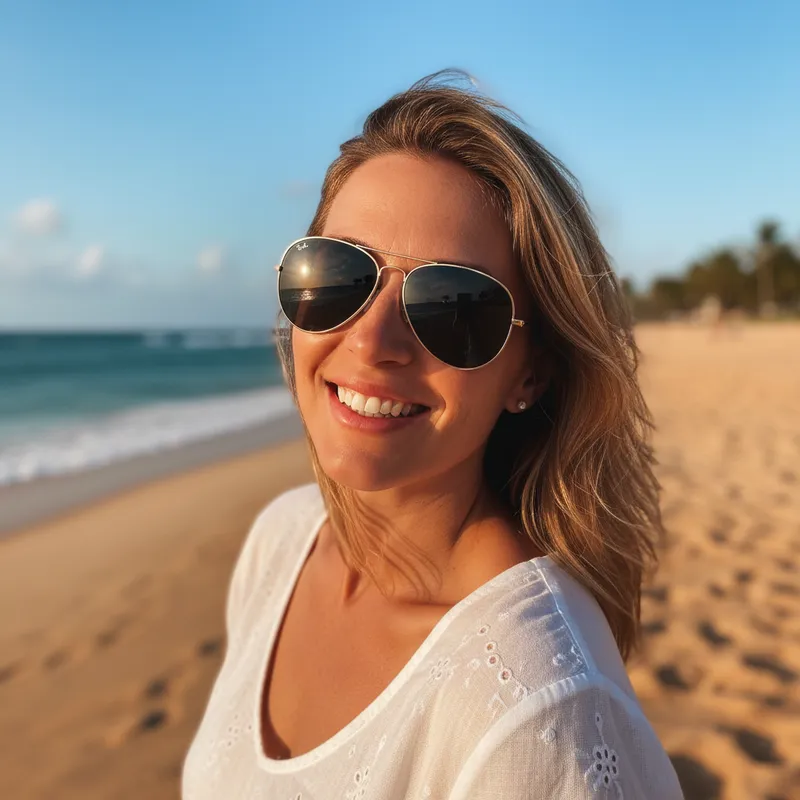
Removal edit
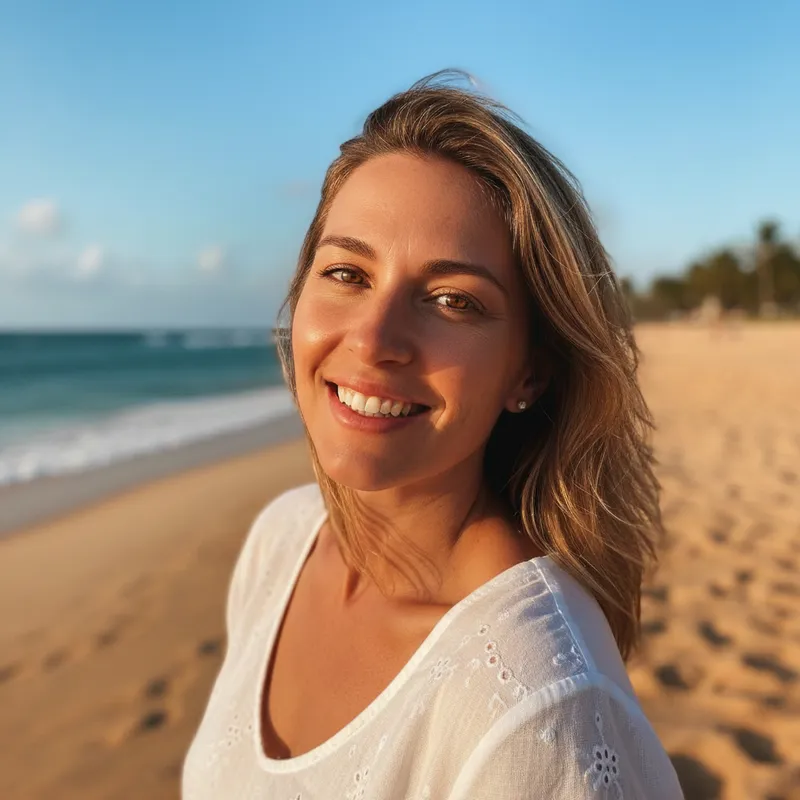
Gold aviators · beach portrait
Gold aviator frames and dark lenses disappear in a beach portrait; the edited eye area is an estimate.
Original

Removal edit

Dark frames · outdoor headshot
A side-by-side look at dark frames, eyes and the nose bridge in a blue-jacket portrait.
Original
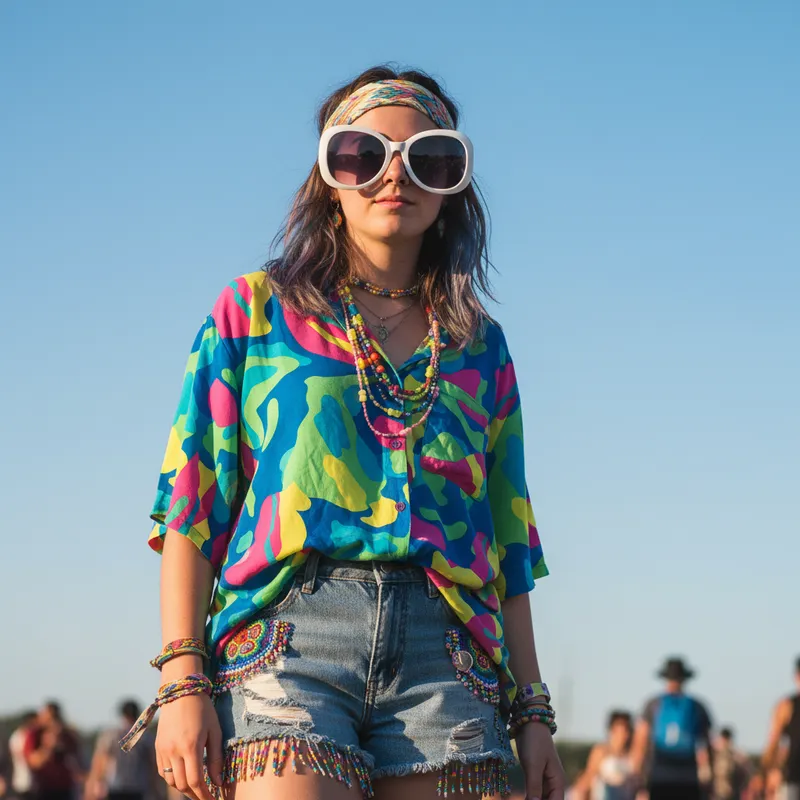
Removal edit
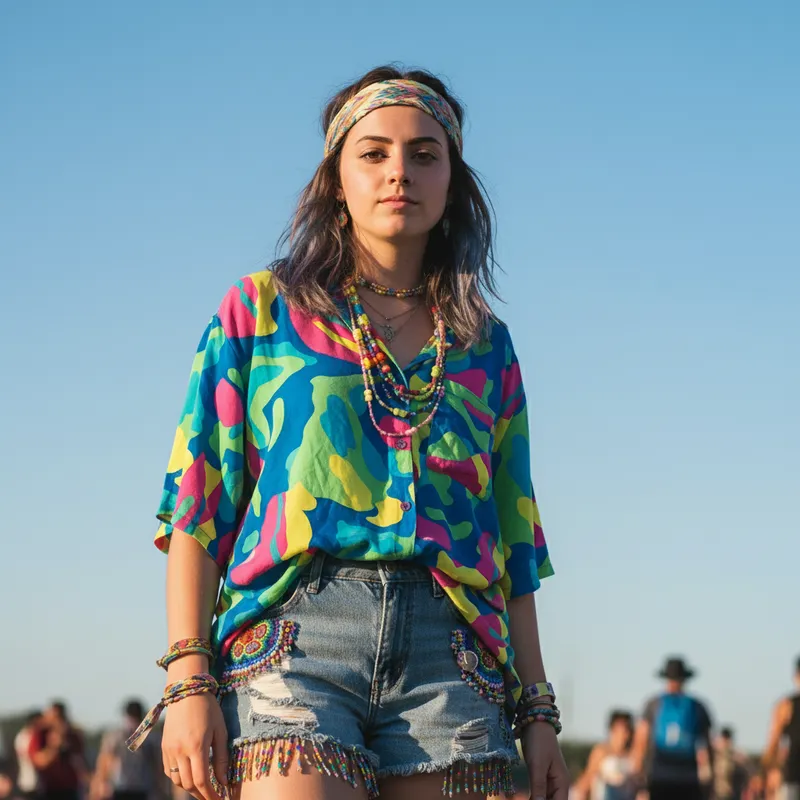
Large white frames · festival photo
Oversized white frames cover a broad eye area; compare the eyes and eyebrows in the edited portrait.
Can I use this sunglasses remover AI for free?
This sunglasses remover AI is not free with the current signup allowance. Viewing examples and setting up a request costs nothing, but generation uses at least 5 credits. The current 1-credit signup allowance is below one generation. From zero balance, the smallest purchase covering one image is the $5 one-time pack with 10 credits. There is no recurring free daily quota or separate payment to download a generated PNG.
How should I choose the best sunglasses remover AI?
The best sunglasses remover AI for a photo depends on how much of the eyes is visible and how closely the edit must resemble the person. Check the actual price, export size, reference-photo support and whether the tool explains that hidden eyes are generated. This tool offers an optional same-person reference in Custom, but cannot verify or restore eyes hidden behind opaque lenses. Review the result against a real glasses-free photo before sharing it.
Do I need a sunglasses remover AI app?
You can use this sunglasses remover AI in a phone or desktop browser without installing an app. Upload an existing portrait, select the edit and image quality, then sign in with enough credits to generate. It returns one downloadable still image. This is an online photo-editing tool, not a live camera filter, an offline editor, a video tool or a batch processor.
Sunglasses remover AI pricing & credits
Sunglasses remover AI pricing is per generated image, including Custom with an optional eye reference. Fast costs 5 credits, equivalent to $2.50 at the $5/10-credit pack rate. A zero-balance account can buy that one-time pack to cover an image. Higher quality tiers require paid access. The selected quality determines the output size and credit charge; downloading a finished PNG spends no additional credits.
| Quality | Output | Credits | Pack-rate equivalent |
|---|---|---|---|
| Fast | 1K · PNG | 5 | $2.50 |
| HD | 2K · PNG | 7 | $3.50 |
| Ultra HD | 4K · PNG | 8 | $4.00 |
| Studio | 2K · PNG | 9 | $4.50 |
| Item | What you receive |
|---|---|
| Signup allowance | The current 1-credit signup allowance is below one generation. |
| Minimum purchase | $5 one-time Trial Pack · 10 credits. No subscription required. |
| Download | One PNG included; no second download charge. |
| Visible watermark | This tool adds no visible watermark. Supplier provenance metadata is not removed. |
| Quality access | Fast requires sign-in and enough credits. HD, Ultra HD and Studio require paid access. |
| Unfinished requests | Confirmed provider failure or an invalid output returns the charged credits. Lost confirmation or temporary saving delays keep the same request for recovery; do not pay again. |
What this sunglasses remover cannot guarantee
Sunglasses remover AI cannot recover real eyes that are absent from the photo. Opaque or mirrored lenses require invented details, even with an eye reference. The prompt requests recognizable facial features, expression, hair, clothing and background, but generative edits can change them. There is no pixel-locked brush mask or guarantee that only one person changes. Use a real glasses-free photo when exact identity matters; do not treat generated eyes as evidence of a person’s actual appearance.
Sunglasses remover AI FAQ
This sunglasses remover works on a saved photo and returns one edited still image. The answers below cover a Custom request, output dimensions, the difference between removal and glare cleanup, and uploaded-photo handling. Review the selected quality and credit amount before each new request, then inspect both the eyes and the surrounding face in the result.
Can I add an eye reference or write my own removal prompt?
Choose Custom and describe the requested edit, for example: “Remove my black sunglasses and their shadows. Use brown eyes, match the head angle and lighting, and retain my expression and background.” A description is required. You may add a photo of the same person without glasses as an eye reference; it guides the request but does not guarantee a matching identity.
What image can I download, and at what size?
The download is one 3:4 PNG: Fast 768×1024, HD and Studio 1536×2048, or Ultra HD 2480×3312. The prompt requests background extension when the original has a different shape. These are output dimensions, not a promise to recover hidden detail. No video, GIF or editable mask is included.
Does this remove normal eyeglasses or just lens glare?
The default request removes the entire eyewear, including frames, lenses and their shadows. It can request the same removal for clear eyeglasses. This page does not offer a separate mode to reduce glare while retaining the glasses. If you want to keep the frames, use a dedicated glare-editing tool rather than the removal preset.
What happens to the photos I upload?
Photos are uploaded to this site’s storage and shared with the image provider to process your request. Result access through this site checks your account, but anyone holding a direct storage link may be able to open it. Upload only pictures you have permission to edit.
More portrait tools
For a portrait with shut eyes rather than sunglasses, try Fix closed eyes. For a separate change to the direction or feel of the lighting, use Relight a portrait. Each tool has its own settings and credit costs. Neither can recover missing information with certainty, so compare the edited face with an original photo.