
AI relight photo editor · upload, pick the light, download
AI Relight
Relight a photo with AI in your browser. Pick golden hour, a studio softbox, neon or your own words, choose where the light comes from, and AI Relight changes the light and shadows while the person, product or room stays the same.
AI Relight is an AI lighting editor for photos that are already taken. A portrait under office fluorescents, a product shot ruined by phone flash or a living room on a grey afternoon can all be relit: the AI redraws the light direction, the highlights, the shadows and the color of the light, and keeps the composition. Relight AI tools used to mean a Photoshop plugin or a 3D scene; here you upload one image, choose a light and download the result.
Example result
Golden hourSame subject, new light
Choose the light direction
Eight presets or your own words


Drag the slider to compare. Example made with ChatGPT's image model from a fictional person.
AI Relight examples: before and after
Each pair starts from an ordinary photo with a common lighting problem. Only the lighting was changed with the same instructions AI Relight sends, so you can see what moved and what stayed.
Portrait: office fluorescent → golden hour window light
Flat overhead tubes made her skin look grey and left no shape on the face. With the Golden hour preset and the light coming from the left, AI Relight added warm low sun, a soft shadow on the far cheek and a glow in the hair. Her face, glasses and sweater stayed the same.
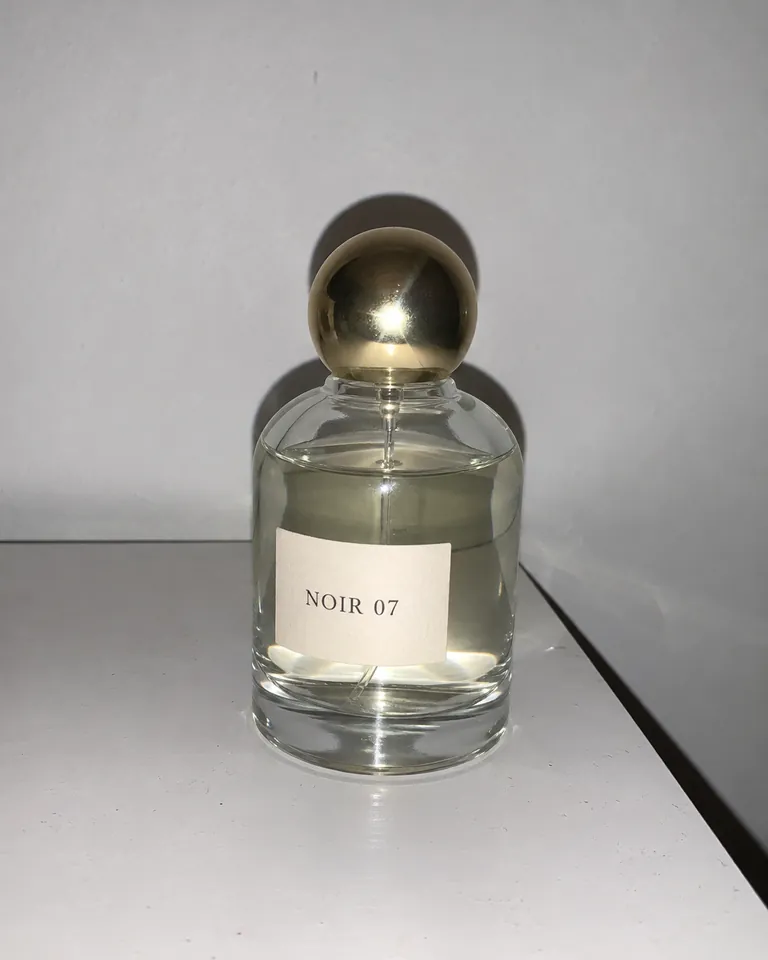
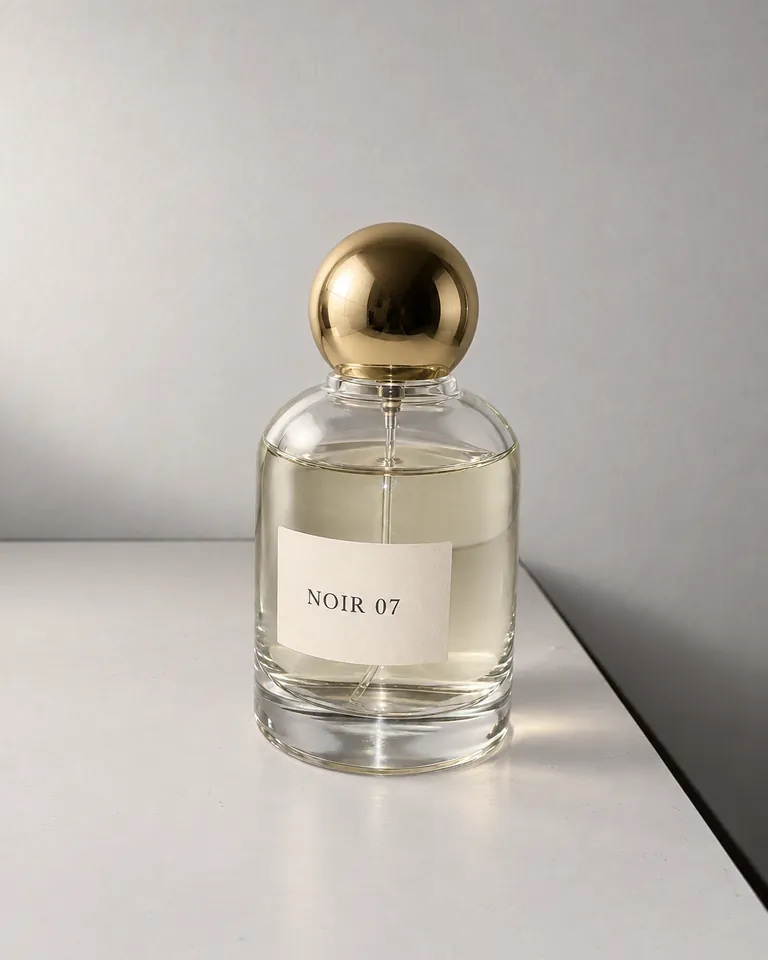
Product: phone flash → studio softbox
A perfume bottle shot with the phone flash had a blown-out hot spot on the cap and a hard shadow on the wall. The Studio softbox preset replaced it with a large soft light from the side: the hot spot and the wall shadow are gone, the glass picks up a clean highlight and the table shows a soft gradient. The bottle shape and the label were kept; check small text before you publish a listing.
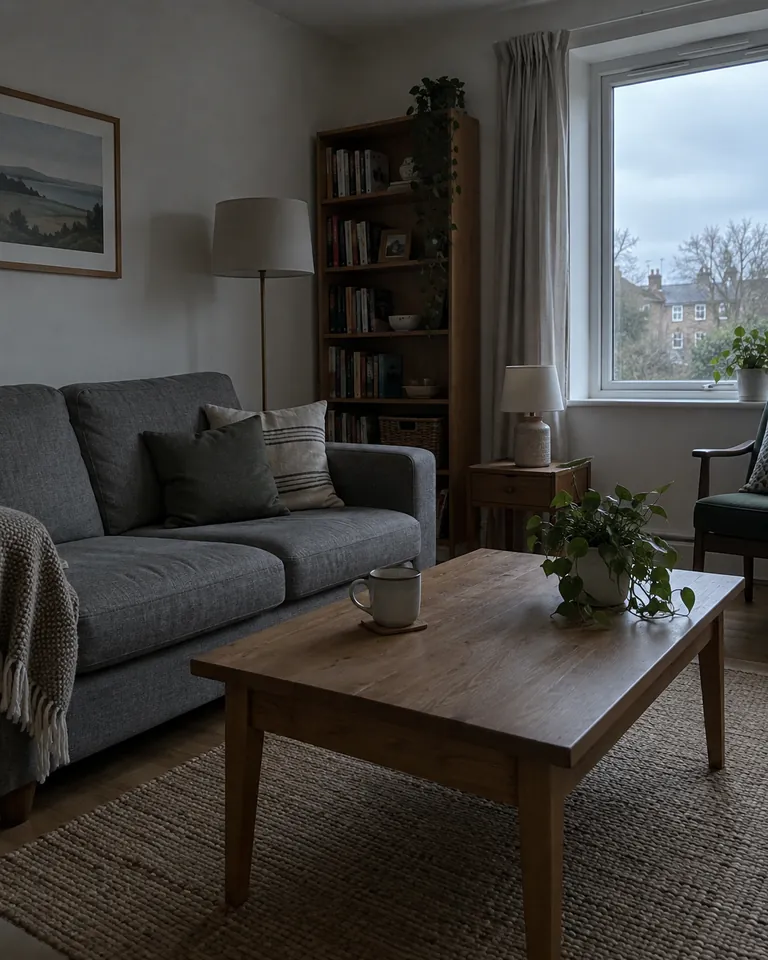
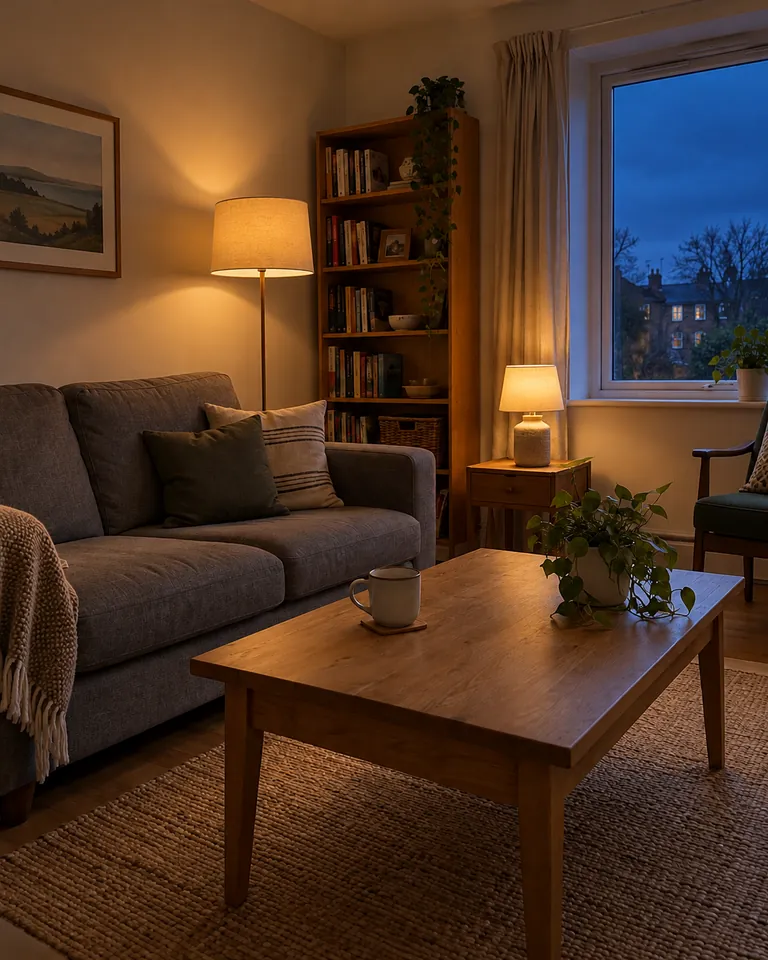
Room: dull afternoon → cozy evening with lamps on
A living room photographed on an overcast afternoon looked flat and blue. The Cozy evening preset turned the window to blue hour, switched the floor and table lamps on and added warm pools of light. Furniture and layout did not move.
Example images were made with ChatGPT's image model in a web chat from fictional people, products and rooms, using the same lighting instructions this tool sends. Your own results will look different.
Eight AI Relight presets for photo lighting
Every preset below was applied to the same portrait shown in the tool above, so you can compare the photo lighting side by side before you spend a credit.
Golden hour
Low, warm sun with long soft shadows and a glow on hair and skin. Add sunlight to a photo taken indoors or at noon.
Best for: portraits, travel photos, lifestyle posts

Studio softbox
A big soft key light from the side with a gentle fill, like a studio lighting simulator online but on your own photo.
Best for: headshots, product shots, profile photos

Soft window light
Diffused daylight from one side, quiet shadows and natural skin tones.
Best for: portraits, food, interiors

Even overcast
Shadowless, even lighting for an image taken in harsh sun or mixed light.
Best for: product catalogs, real-estate shots, group photos
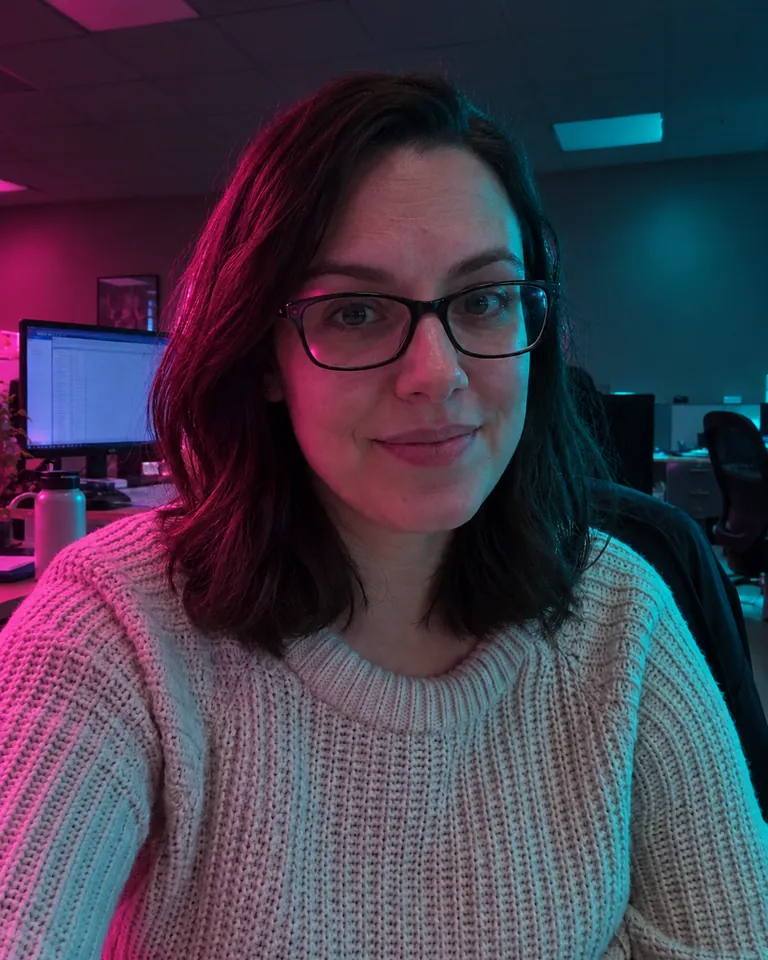
Neon night
Pink and teal neon from opposite sides with a dark night ambience.
Best for: social posts, album art, gaming avatars

Cozy evening
A blue-hour sky outside and warm lamps switched on inside.
Best for: rooms, cafés, holiday photos
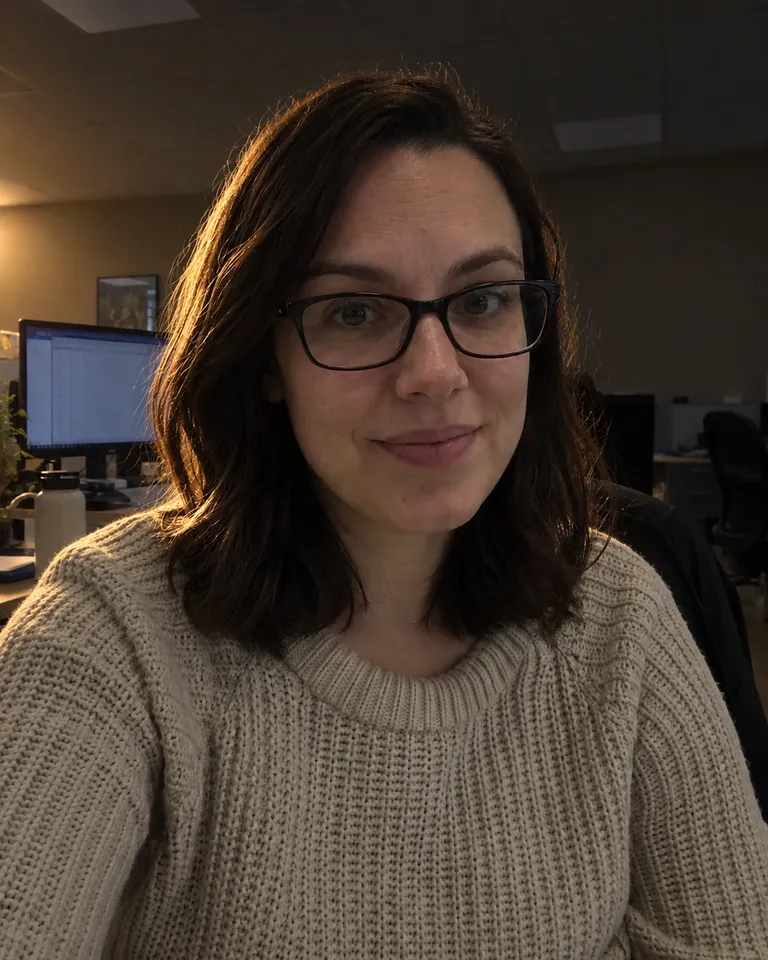
Dramatic rim light
Low-key light with a bright edge around the subject and deep shadows.
Best for: moody portraits, sports, product hero shots
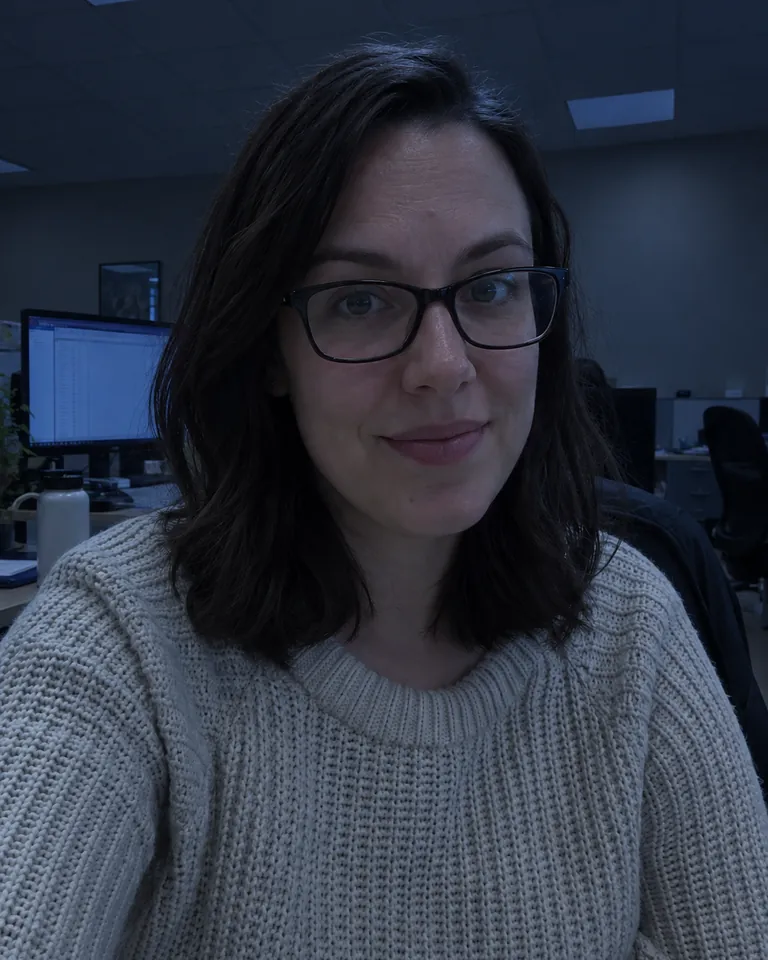
Moonlight
Cool, dim blue light from above with soft contrast.
Best for: night scenes, fantasy edits, posters
How to relight a photo with AI in three steps
- 1
Upload the photo
Add a JPG, PNG or WebP up to 20 MB. AI Relight works on portraits, products, food, rooms and landscapes, so you can add light to a photo online without installing anything. A sharp photo gives a cleaner result than a blurry one.
- 2
Pick the light and where it comes from
Choose a preset or describe the lighting in your own words, then set the direction (left, right, front, behind or above) and how strong the change should be. Leave the direction on Auto to let the AI follow the scene.
- 3
Relight and download
Click Relight photo. The result appears next to your original with a comparison slider, and every image is saved to your generation history so you can download it or relight it again with another light.
Fix lighting in a photo without a reshoot
Most bad photo lighting falls into a few patterns. Here is how to fix lighting in a photo with AI Relight for each one, and which settings improve image lighting the most.
| Lighting problem | What it looks like | What to choose |
|---|---|---|
| Flat overhead or fluorescent light | Grey skin, no shadow shape, dull eyes | Soft window light or Golden hour, direction Left or Right |
| Phone or on-camera flash | Shiny hot spots, hard shadow behind the subject | Studio softbox, strength Subtle or Natural |
| Harsh midday sun | Squinting, dark eye sockets, hard nose shadow | Even overcast |
| Backlit subject | Bright sky, dark face | Soft window light, direction Front |
| Grey, gloomy day | Blue cast, no contrast | Golden hour or Cozy evening |
| Mixed color light | Yellow lamp on one side, blue daylight on the other | Custom: "one neutral soft light from the left, neutral white balance" |
If a photo is only too dark and the light already looks right, brightness and exposure sliders are faster and cost nothing. AI Relight is for when you want a different kind of light, not only a brighter photo.
How to describe the light for AI Relight
A Custom description works best when it names four things. You do not need photography terms; plain words are fine.
Direction
Where the light comes from: "from the left window", "from behind", "from above".
Softness
"Soft and diffused" for gentle shadows, "hard and crisp" for sharp ones.
Color
"Warm orange", "neutral white", "cool blue", or two colors such as "pink and teal neon".
Time or source
"Golden hour", "blue hour", "candlelight", "a desk lamp", "a ring light".
AI Relight prompts you can copy
- Soft warm afternoon sun through blinds from the right, striped shadows on the wall.
- Replace the harsh flash with a large soft light from the left and a neutral white balance.
- Night scene: one red neon sign on the left, dark background, faint blue fill on the right.
- Single candle in front of the face, warm flicker, everything else dark.
- Bright, even catalogue lighting, no shadows, preserve original colors.
AI Relight already tells the model to keep the subject, faces, objects and composition the same, so you only need to describe the light.
AI Relight vs other ways to change photo lighting
There are four common ways to change the lighting of a photo. If you are weighing up the best AI relight option for a single image, here is where this AI lighting editor fits.
| AI Relight | Brightness & color sliders | Photoshop or plugin relight | Reshoot with new lights | |
|---|---|---|---|---|
| Changes where the light comes from | Yes | No | Yes, with manual light placement | Yes |
| New shadows and highlights | Drawn by the AI | No | Partly, depends on masks | Real |
| Turn on lamps or change the time of day | Yes | No | Hard | Only by waiting or adding lights |
| Skill needed | Pick a preset or write a sentence | Low | High | High |
| Pixel-exact original | No, the image is redrawn | Yes | Mostly | — |
| Cost | 1–17 credits per image | Included in most editors | Software subscription | Equipment and time |
What AI Relight does not do
- It redraws the image instead of adding a light layer, so tiny details such as small text, jewellery or hair strands can shift. Compare with the original before you use the result.
- It works on still images only. It does not relight video or footage.
- It is not an After Effects, DaVinci Resolve or Photoshop plugin; it runs in your browser.
- It does not remove objects, change outfits or replace the background. Use the Headshot Background Changer for backgrounds.
- One photo per run; there is no batch mode yet.
- Sign-in and credits are required: Fast, HD, Ultra HD and Studio cost 1 to 17 credits per image, HD and above are for subscribers, and credits are refunded if the image fails.
AI Relight FAQ
What is AI relighting?
AI relighting changes the lighting of a photo after it was taken. Instead of only making pixels brighter, an AI Relight tool redraws where the light comes from, how soft it is, the shadows it casts and its color, so image relighting looks as if the photo had been shot under different light.
How do I relight a photo with AI?
Upload the photo to AI Relight at the top of this page, pick a lighting preset or describe the light, choose a direction and click Relight photo. The relit image appears next to the original with a comparison slider and is saved to your generation history.
Will AI Relight change my face or my product?
The AI is told to change only the light, shadows and color of the light and to keep faces, objects, labels and composition the same. Because the whole image is redrawn, small details can still shift, so compare the result with your original before you use it.
Can it fix dark or backlit photos?
Yes. For a backlit portrait choose Soft window light with the direction set to Front; for a dull, dark room try Cozy evening or Golden hour. If the photo is only too dark and the light already looks right, a brightness slider is the quicker fix.
What lighting can I create?
Golden hour, studio softbox, soft window light, even overcast, neon night, cozy evening lamps, dramatic rim light and moonlight are one click away. With Custom you can describe anything else, such as candlelight, sun through blinds or a single red neon sign.
Does AI Relight work on videos?
No. This AI Relight works on still images only. It is a browser tool, not the After Effects or DaVinci Resolve plugin with a similar name, and it does not process footage.
Can I relight drawings or AI art?
Yes. Illustrations, digital paintings and AI-generated images can be relit the same way as photos. Describe the light source you want and the AI adds matching highlights and shadows while keeping the art style.
How many credits does AI Relight cost?
Fast costs 1 credit per relit image, HD 4, Ultra HD 6 and Studio 17. HD and above are for subscribers. Credits are only charged when you click Relight photo, and they are refunded automatically if the image fails. See the pricing page for subscription and credit pack options.
Which AI model does it use?
AI Relight uses image-editing models that take your photo plus the lighting instruction and return a relit version. The quality option you choose (Fast, HD, Ultra HD or Studio) sets the output size and level of detail.
Can I use relit photos commercially?
You can use images you create for your own projects, including product listings and marketing, as long as you have the rights to the original photo. See the Terms of Service for details.
More photo tools
Headshot Background Changer
Swap a messy background for a studio, office or outdoor backdrop.
Image Upscale
Enlarge your relit photo 2× to 8× for print or high-resolution use.
90s Photo Generator
Restyle a photo as a 1990s film snapshot.
Turn Photo into Color Sketch
Turn a relit photo into a colored pencil drawing.
Change the light, keep the photo
Upload a photo, pick golden hour, studio or neon light and let AI Relight redraw the lighting in seconds. Fast, HD, Ultra HD and Studio from 1 to 17 credits; failed images are refunded.
Relight my photo