
Face in Hole Generator is for anyone making a funny photo stand-in picture for a party, a birthday message or a group chat. Upload one portrait to request a recognizable face in a painted board, with a new body and background. The current 1-credit signup allowance is below one generation. One 3:4 PNG costs 5–9 credits; Fast is $2.50 at the $5 pack rate, with no added watermark or download fee.
How to Make a Face-in-Hole Photo
A face-in-hole photo starts with one clear portrait and a board idea. Upload a selfie, choose the fairground astronaut or cafe gingerbread board, and pick an image quality. Custom lets you describe a different character while keeping the same painted wooden-board style. Sign in to generate one still image, then check the face, opening and background before saving the PNG to your phone or computer.
1. Upload a portrait
Use one clearly visible face. JPG, PNG or WebP, up to 10 MB; the upload is resized to fit within 2048 pixels per side.
2. Choose a cutout board
Pick Astronaut or Gingerbread, or choose Custom and describe your own board. A board reference image is optional in Custom.
3. Check and download
Review the facial likeness and fit, then download one 3:4 PNG: 768×1024, 1536×2048 or 2480×3312 pixels, depending on quality.
Before and After: Photo Stand-ins
These three comparisons show a portrait or empty face opening alongside the completed picture. The first uses a painted astronaut board at a fair; the other two show a gingerbread stand-in and a moon-scene astronaut. Look at the face size, the edge of the opening and the lighting when planning your own picture. The images illustrate different compositions, rather than a guaranteed match for your upload.

Portrait
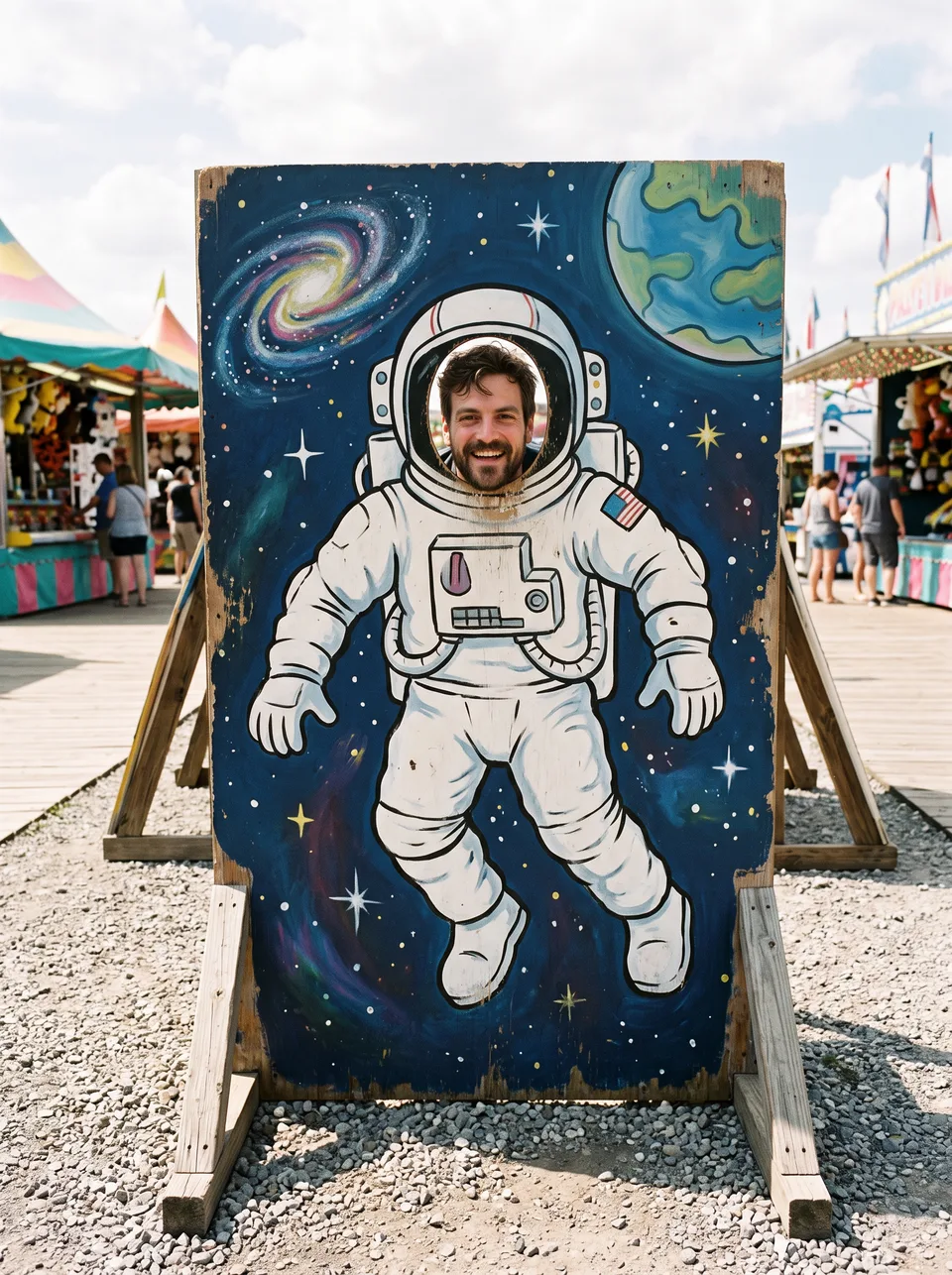
Board photo
Astronaut at the fair
A bearded selfie beside a painted wooden astronaut stand-in, with stalls and a boardwalk behind it.
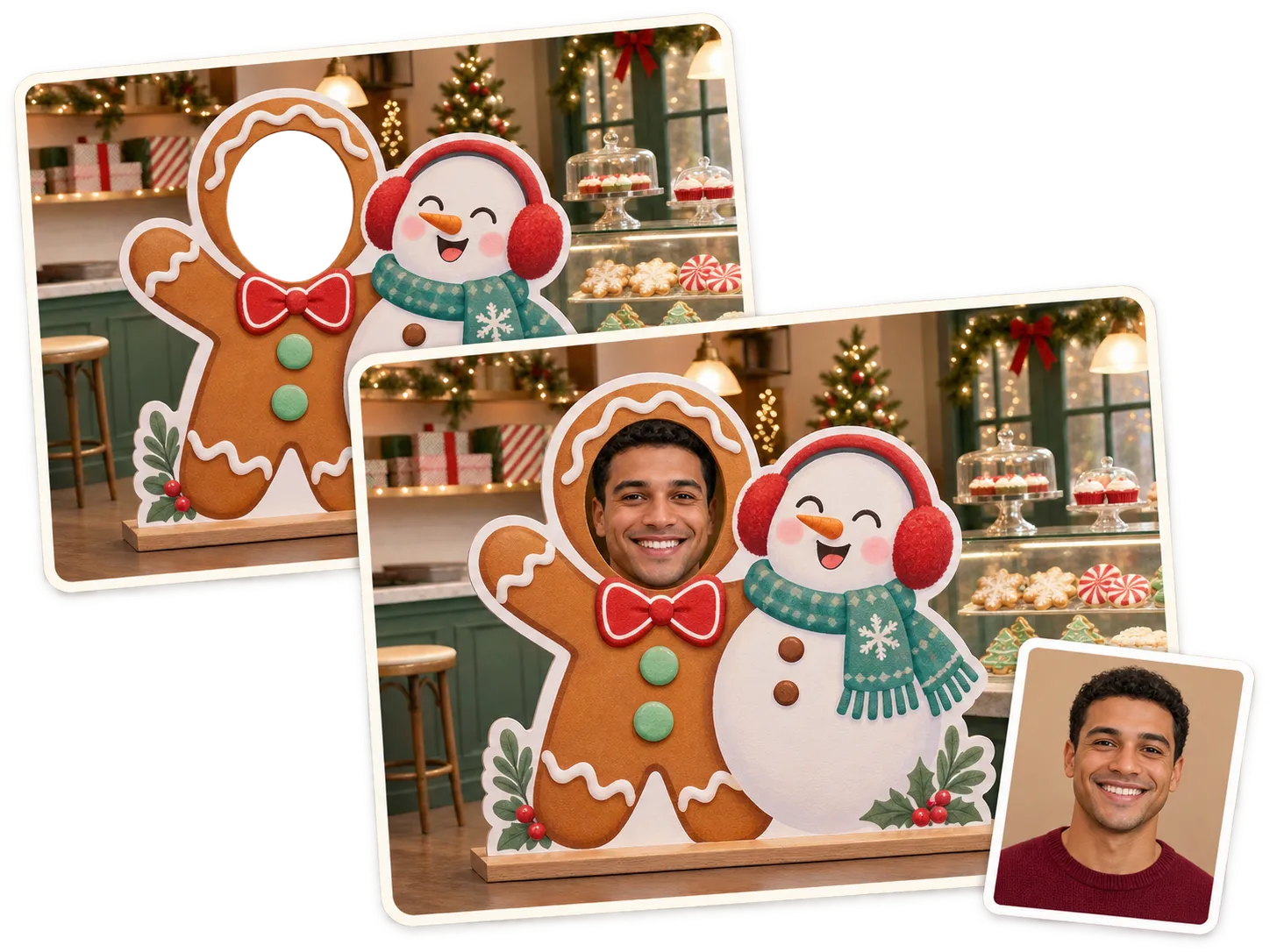
Gingerbread photo board
A portrait, an empty gingerbread opening and the filled photo board beside a snowman in a festive cafe.
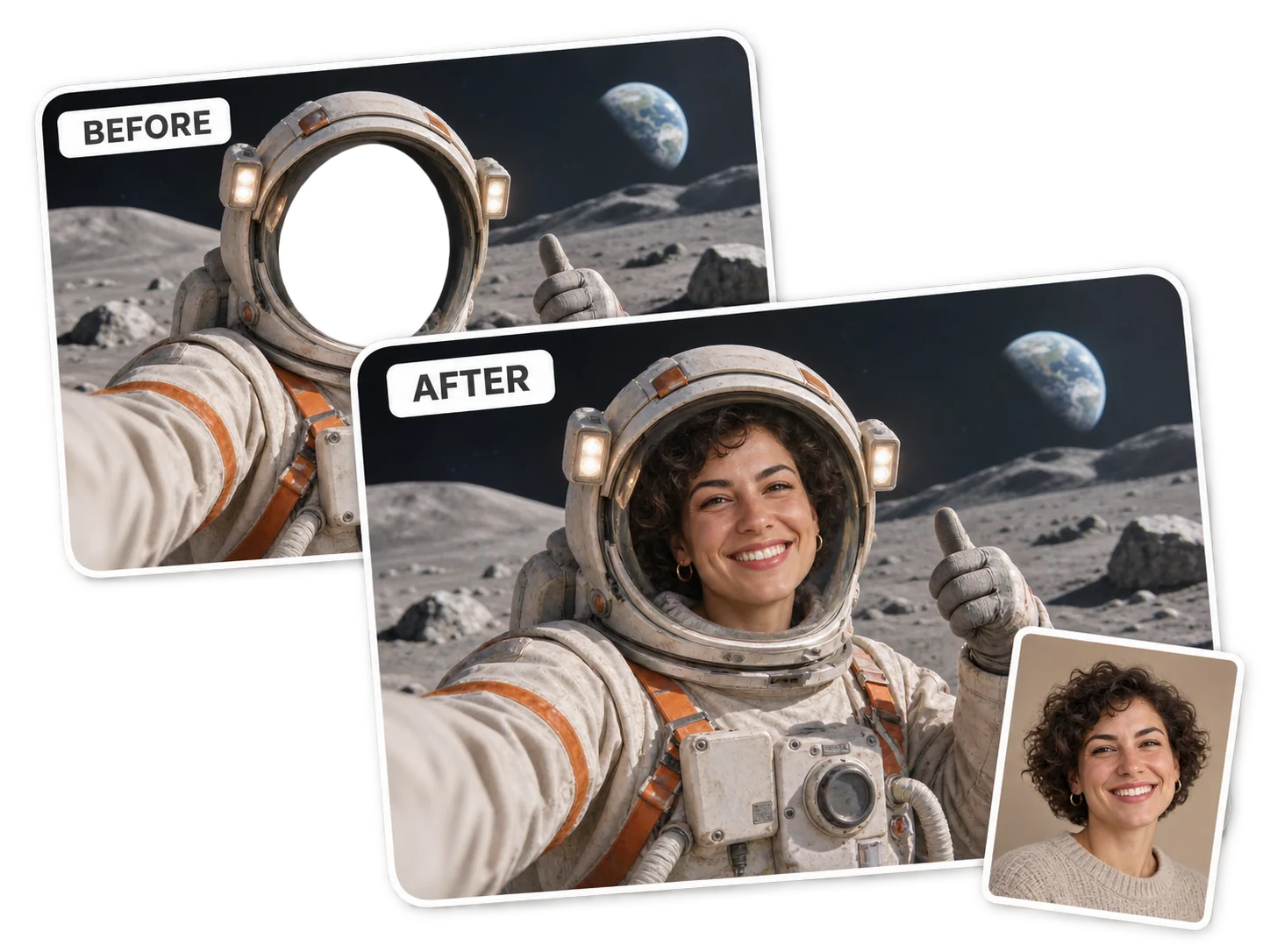
Astronaut on the moon
An empty helmet opening, a smiling portrait and the completed moon-scene image in one comparison.
Is This Face in Hole Generator Free Online?
This face in hole generator is not free with the current signup allowance. Each generated image uses at least 5 credits and requires sign-in. The current 1-credit signup allowance is below one generation. From a zero balance, the smallest purchase is a one-time $5 pack with 10 credits; no subscription is required. Uploading a portrait and choosing settings cost nothing. The finished PNG has no added visible site watermark and no separate download charge.
Can I Create My Own Face-in-Hole Board?
Custom face-in-hole boards start with a character, painted costume and setting described in the Custom option. For example, ask for a pirate on a seaside wooden stand-in. An optional reference image can guide the layout, while the portrait remains the identity reference. The prompt asks the model to keep a single opening and a painted board body; a supplied design is guidance, not a pixel-exact template or transparent mask.
Do I Need a Face in Hole App Download?
A face in hole app download is unnecessary for this tool. Open this page in a current phone browser, choose a selfie from your camera roll, select a board and download the finished PNG. The same form works on desktop. Generation happens through an online image service, so you need an internet connection, a signed-in account and enough credits; this is a still-photo tool rather than a live camera filter.
Pricing & Credits
One face-in-hole picture costs 5, 7, 8 or 9 credits, depending on the selected quality. From a zero balance, the smallest purchase is the one-time $5 Trial Pack with 10 credits. At that pack rate, a Fast image is $2.50; the figures below are credit equivalents, not separate per-image purchases. Higher-quality options need eligible purchased credits. Choosing a different board does not change the credit cost.
| Quality | Output | Credits | Pack equivalent |
|---|---|---|---|
| Fast | 1K · PNG | 5 | $2.50 |
| HD | 2K · PNG | 7 | $3.50 |
| Ultra HD | 4K · PNG | 8 | $4.00 |
| Studio | 2K · PNG | 9 | $4.50 |
| Item | What is included |
|---|---|
| Free generation allowance | The current 1-credit signup allowance is below one generation. |
| Smallest purchase | $5 once · 10 credits · no recurring subscription |
| Download | One PNG; no separate download charge |
| Watermark | No added visible site watermark |
| Access | Phone or desktop browser; sign in to generate |
| Unfinished requests | Confirmed provider failures return credits. Saving a delivered result is retried without another generation charge. |
What a Photo-in-a-Hole Edit Cannot Promise
A photo-in-a-hole edit redraws the scene rather than pasting original face pixels into a fixed mask. The prompt asks for recognizable features, a well-sized opening and consistent light, but likeness, alignment and details vary with the model and portrait. A board reference may also change. The tool does not provide an exact crop editor, a transparent printable template, group-face matching, an animated GIF or a video.
Face-in-Hole Photo FAQ
Prepare one clear portrait before making a funny face-in-hole picture. The questions below cover the input photo, meme export and what to know before uploading someone else’s face. For custom board design, phone access and free-credit terms, the answer sections above describe this tool’s options.
Which photo should I use to put someone’s face in a photo hole?
Use a sharp, well-lit portrait with one visible face, ideally looking towards the camera. Avoid sunglasses, heavy filters and hands covering facial features. A group photo is a poor identity reference for a single-opening board.
Can I use this as a face in hole meme generator for GIFs?
You can make a still face-in-hole meme here, but the output is one PNG. This page does not export animated GIFs or video. If you want meme text, add it after downloading; the generation prompt requests no added captions.
What should I know before uploading my friend’s photo?
Use a photo only with the person’s permission. Portraits and results are stored by this site, and portraits are sent to the image provider for processing. Result routes check account ownership, but anyone holding a direct storage link may be able to open the file. Do not upload a sensitive portrait or present a fictional board photo as a real event.
More Photo Tools
Multiple Face Swap assigns a face to each person in a photo you already have. Choose it for an existing group picture. This page creates a new carnival photo stand-in from one portrait instead, with a painted body and a new background.