
Big Eyes Filter edits an uploaded selfie or pet photo into a still picture with larger eyes, from a gentle doe-eye look to an exaggerated reaction meme. One photo produces a 3:4 PNG; the current 1-credit signup allowance is below one generation. Generation costs 5–9 credits, with Fast at $2.50 using the $5 pack rate. Downloads have no added visible watermark or extra fee. AI can change other details, so compare the result with your original.
How the Big Eyes Filter Works
Upload one clear photo, choose Soft, Doll or Comic eyes, and select image quality. Each preset changes eye enlargement and expression while asking the model to retain the subject and setting. Custom lets you describe a different eye effect and optionally attach an eye-style reference. Sign in to generate one PNG, then compare both eyes, the mouth and any glasses before downloading. This is photo editing rather than a live camera effect.
1. Upload a clear face
Choose a JPG, PNG or WebP up to 10 MB and 2048 pixels per side. Keep both eyes visible; use one person, cat or dog.
2. Pick the eye effect
Soft requests a subtle lift, Doll larger irises and lashes, and Comic exaggerated eye size. Custom requires an eye description; a second style photo is optional.
3. Compare and save
Inspect pupils, eyelids, glasses and the rest of the face. Download one 3:4 PNG: 768×1024, 1536×2048 or 2480×3312 pixels, depending on quality.
Big Eyes Filter Before and After Examples
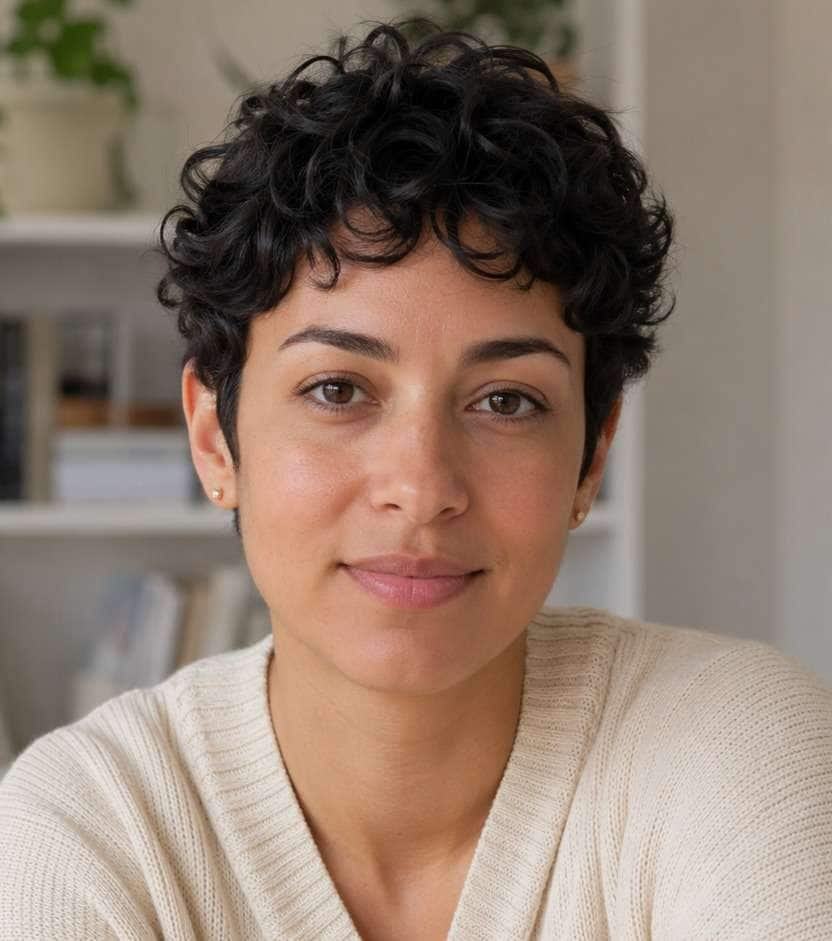
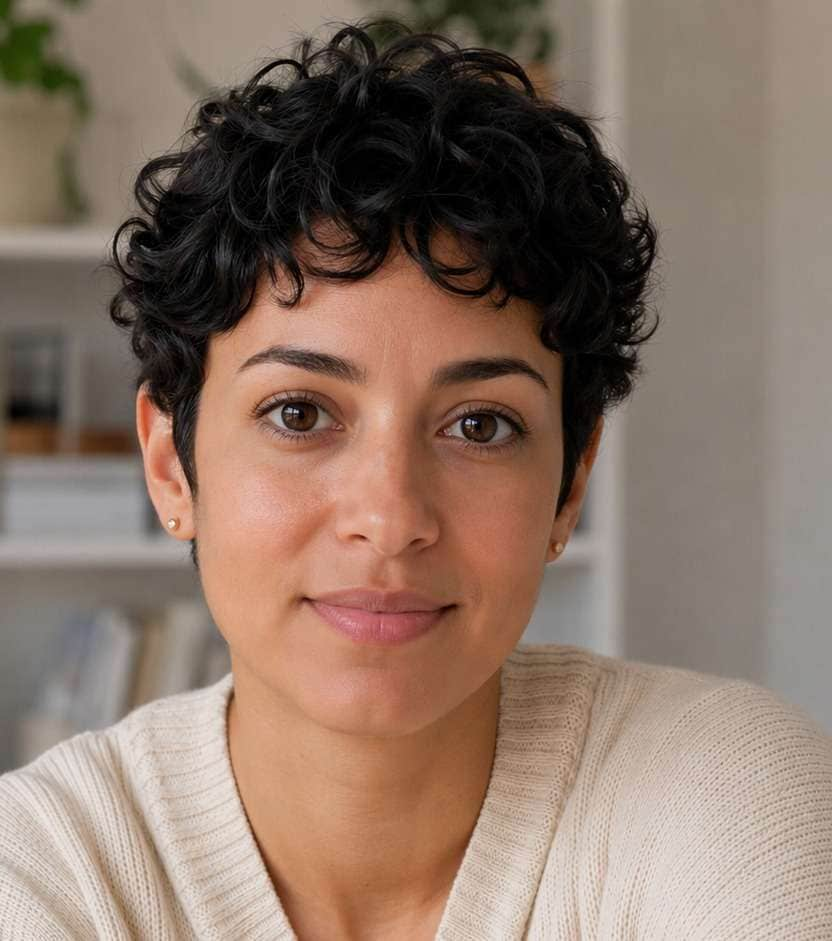
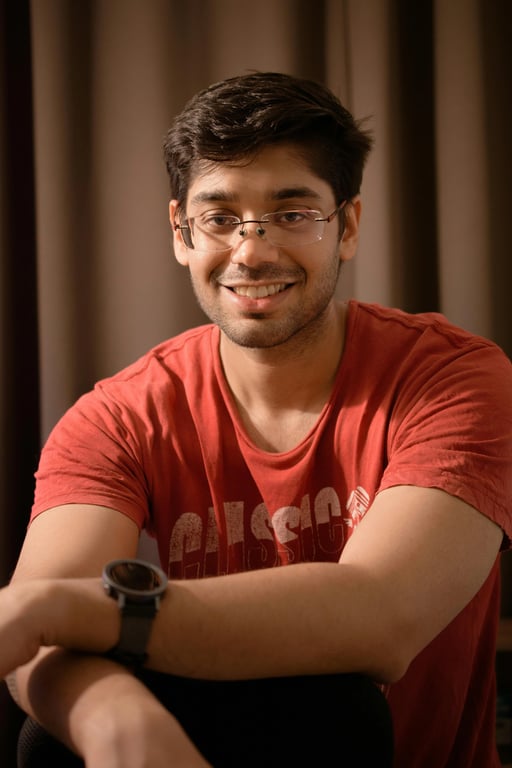
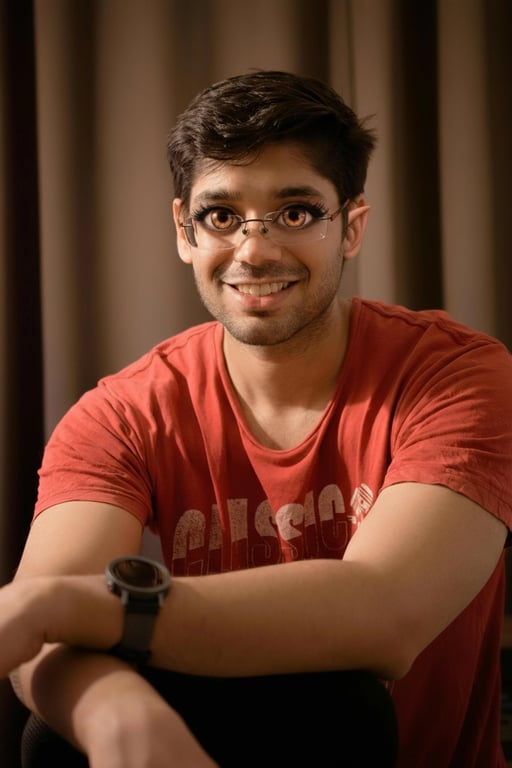
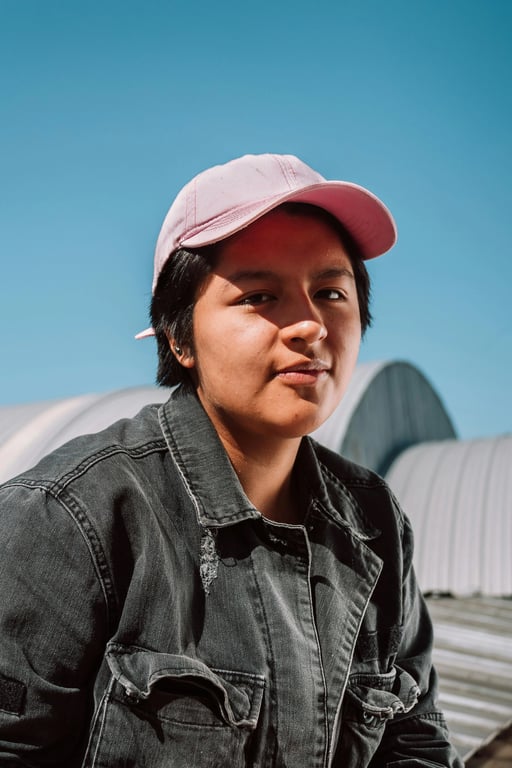
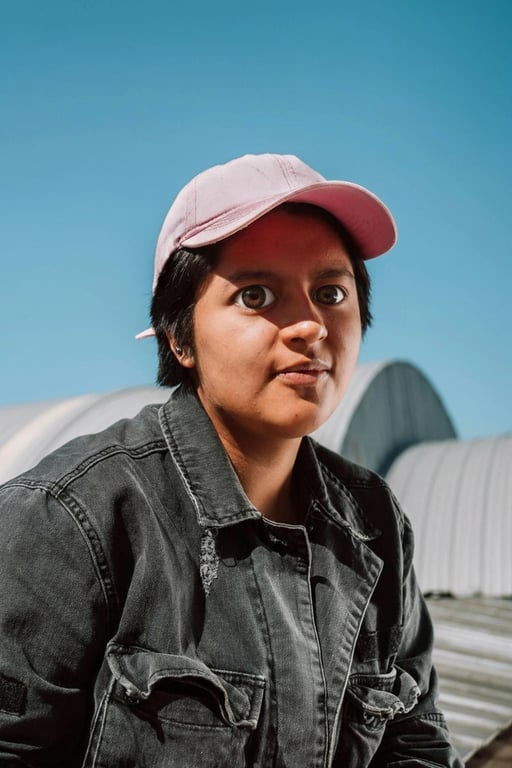
The comparisons show three ways larger eyes can change a portrait: a restrained lift on a close-up, a doll-like treatment with more visible lashes, and a comic expression under a cap. Check the nose, mouth, glasses and background as well as eye size. These are separate photos with different effects, not repeated tests of one face. They illustrate possible looks; your photo and selected settings determine the result.
Original photo
Big eyes photo
Gentle doe-eye look
A short-haired portrait with modestly larger eyes and the same light cardigan and indoor setting.
Original photo
Big eyes photo
Doll eyes with glasses
Larger irises and lashes on a red-shirt portrait. Compare the glasses: fine frame details also change.
Original photo
Big eyes photo
Comic reaction eyes
Round, exaggerated eyes beneath a pink cap, with the denim jacket and outdoor scene still visible.
Is This Big Eyes Filter Free?
This big eyes filter is not free with the current signup allowance. Viewing examples and choosing settings is free, but creating an image costs at least 5 credits. The current 1-credit signup allowance is below one generation. Starting from zero balance, the smallest purchase covering a generation is the one-time $5 pack with 10 credits. It requires no subscription. Completed PNG downloads have no added visible site watermark and no extra export fee; other big eyes tools and live camera filters have their own terms.
Can I Make a Cat or Dog Big Eyes Filter Meme?
You can upload a single cat or dog photo and choose Comic for a big eyes filter meme or Soft for a gentler look. The prompt asks the model to retain the pet’s species, muzzle, ears, coat markings and pupil shape while enlarging the eyes. This is an intended editing instruction, not a tested guarantee. The comparisons above show people; pet output is not demonstrated. Start with a sharp, evenly lit photo with both eyes visible.
Is This the Same as the Snapchat Big Eyes Filter?
This big eyes filter online edits an existing photo and returns a PNG. A Snapchat big eyes filter is a camera lens applied while filming or taking a picture in that app. This page does not install a lens, track a moving face or export a video. Names such as Big Eyes describe several effects, so there is no single universal filter name. Use this page when you already have the photo you want to edit.
Big Eyes Filter Pricing & Credits
One big eyes image costs 5, 7, 8 or 9 credits, depending on quality. The one-time $5 Trial Pack includes 10 credits, enough for two Fast images from zero balance. Fast is $2.50 per image at that pack rate; other purchases change the cash equivalent. Higher-quality choices require eligible paid credits. The tables below state the signup allowance, exact image dimensions, watermark policy and what happens when a request cannot finish.
| Quality | Output | Credits | Pack equivalent |
|---|---|---|---|
| Fast | 1K · PNG | 5 | $2.50 |
| HD | 2K · PNG | 7 | $3.50 |
| Ultra HD | 4K · PNG | 8 | $4.00 |
| Studio | 2K · PNG | 9 | $4.50 |
| Item | What is included |
|---|---|
| Signup allowance | The current 1-credit signup allowance is below one generation. |
| Smallest purchase | $5 once · 10 credits · no recurring subscription |
| Download | One 3:4 PNG; no extra download fee |
| Watermark | No added visible site watermark |
| Access | Mobile or desktop browser; sign-in required to generate |
| Unfinished requests | Confirmed provider failures return credits; saving a delivered result is retried without another generation charge |
What the Big Eyes AI Filter Cannot Preserve
An AI big eye filter redraws image details instead of moving only selected pixels. It can alter the nose, mouth, skin texture, glasses or background even when the prompt asks to retain them. Side views, bangs, reflections and tiny faces can produce uneven pupils or warped frames. This tool does not provide an eye mask, exact size slider, group-face control or pixel-perfect identity lock. It outputs a flat PNG, not a live lens, animated GIF or video.
Big Eyes Photo Filter FAQ
Choose the effect according to the photo you want to make: a small eye lift for a portrait, larger irises for doll styling, or a clearly exaggerated reaction picture. Custom describes changes within the same eye-editing task. The answers below cover mouth combinations, anime-inspired eyes, image formats and phone use. Free allowances, purchase prices and pet limitations are explained in their own sections above.
Can I make big eyes and a small mouth?
Choose Custom and describe “large round eyes and a slightly smaller mouth; keep my nose and background.” Presets ask to keep the existing mouth. A big eyes and mouth filter combination can also be requested in Custom; its mouth shape and proportions are not precisely controlled.
Can I make big anime eyes without changing my whole face?
Doll asks for larger irises and defined lashes; Custom can request anime-inspired eyes with photographic skin. The rest of the face may still change. Start with Soft for a more restrained edit, and inspect eye symmetry, gaze and glasses rather than assuming only the eyes were redrawn.
Can I download a big eyes filter meme GIF?
This page downloads one still PNG per generation. It does not animate a face, create a GIF or record a reaction video. Use the PNG as a reaction image or add it to your own editing workflow; no animation or video export is included here.
Does it work on my phone without an app?
Yes. Use a current mobile browser to upload a photo, choose the effect and save the PNG. Sign-in and sufficient credits are required to generate. Images are sent to this site and its image provider; account checks protect result routes, but anyone holding a direct storage link may be able to open it.
More Photo Tools
Fix Closed Eyes in Photo asks AI to open a blinked eye rather than enlarge it. Pet to Cartoon reimagines the whole pet as an illustrated character. Choose the page that matches your intended change; each tool has its own credit costs and output limits.