
Durga Puja AI photo editor · upload a selfie, pick a scene
Durga Puja AI Photo: Turn Your Selfie into a Puja Portrait
Upload one selfie, couple photo or family photo and get a realistic Durga Puja portrait: a glowing Kolkata pandal, sindoor khela, dhunuchi dance, Maa Durga idol in the background or a wishes card. Your faces stay the same, and you never have to write a prompt.
Most Durga Puja AI photo editing trends start with a long prompt pasted into Gemini or ChatGPT. This Durga Puja AI photo generator does that part for you: choose one of six Puja scenes and an outfit such as a laal paar saree, a Banarasi silk saree or a panjabi, and the AI redraws everything around you while keeping each face, skin tone and expression from your photo.
Updated for Durga Puja 2026 · Shashthi Oct 17 to Bijoya Dashami Oct 21
Example result
Pandal evening portraitSame faces as your photo
Six Puja scenes
No prompt to write


Drag the slider to compare. Example made with ChatGPT's image model from a fictional selfie; your result will differ.
Durga Puja AI photo examples: before and after
Each pair starts from an everyday phone photo of fictional people and uses one scene from the tool. Compare the faces side by side: the clothes, light and setting change, the people do not.
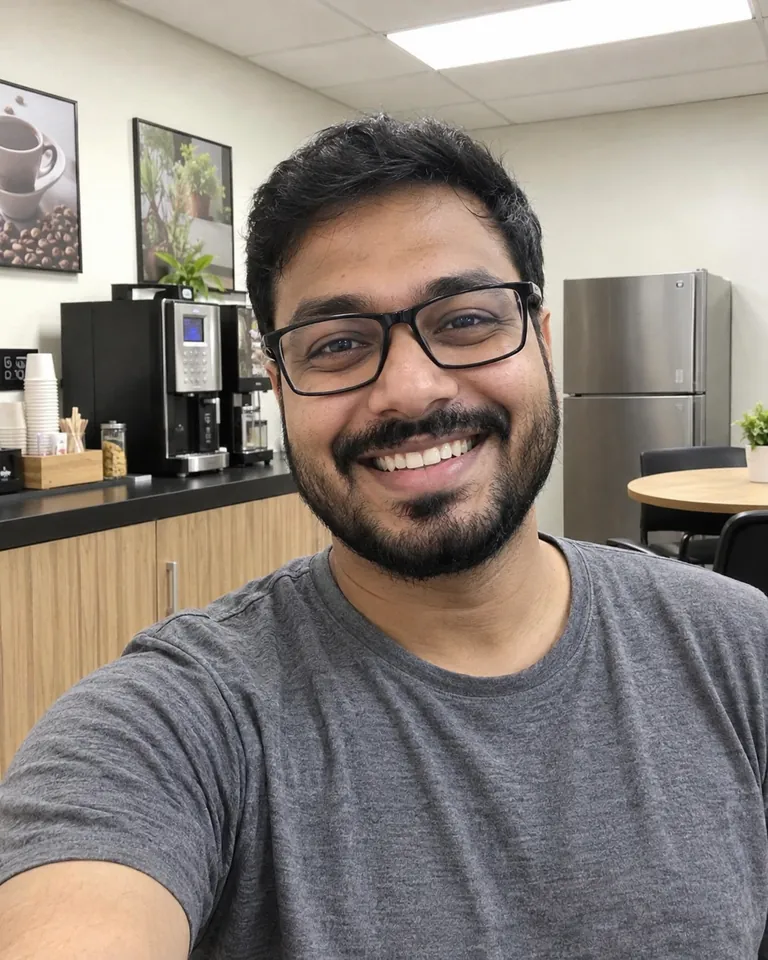
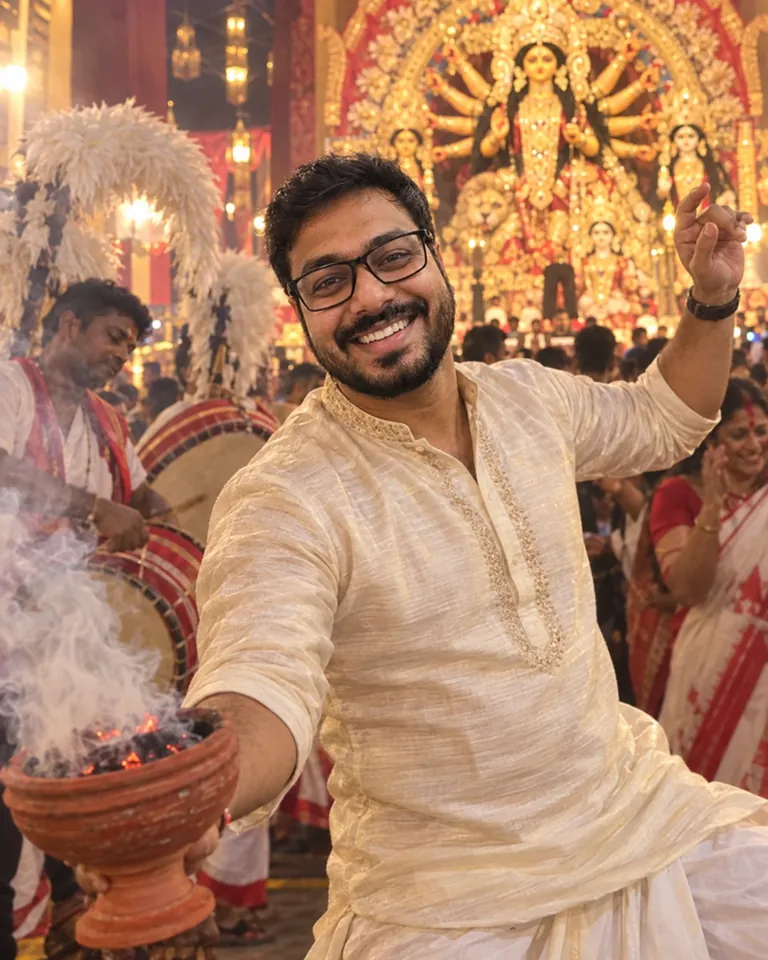
Office selfie → dhunuchi dance in a panjabi
A plain selfie in a grey T-shirt became a night-time dhunuchi dance: an ivory panjabi, a clay dhunuchi with glowing embers, dhakis drumming behind him and smoke catching the pandal lights. His beard, glasses and grin carry over, which is what most Durga Puja AI photo editing for boys gets wrong.
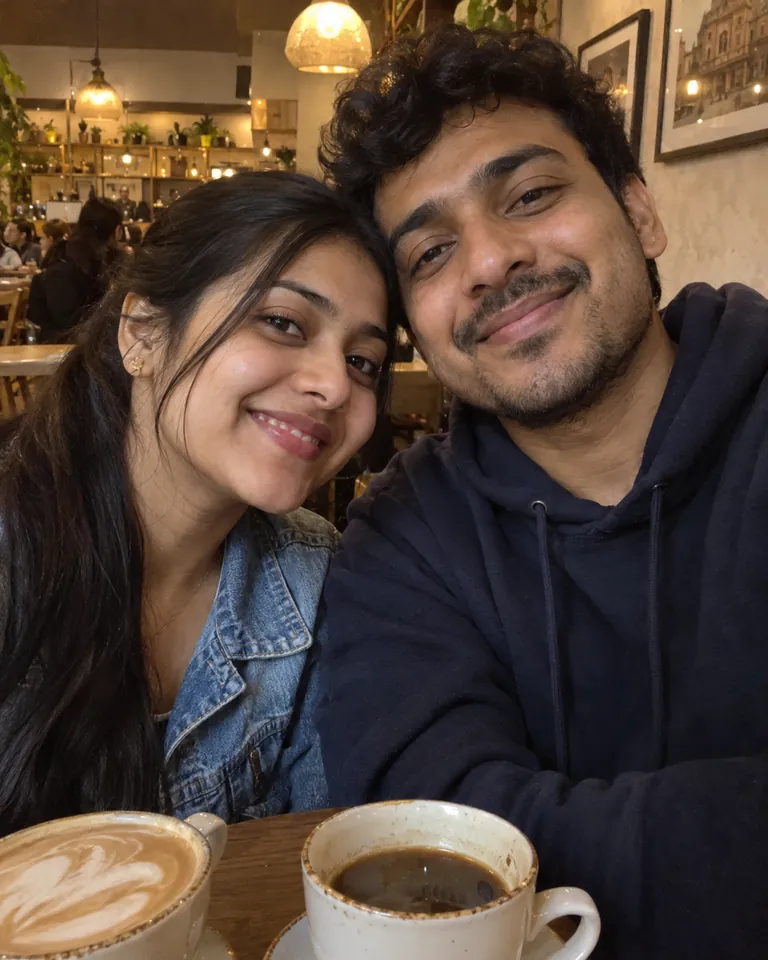
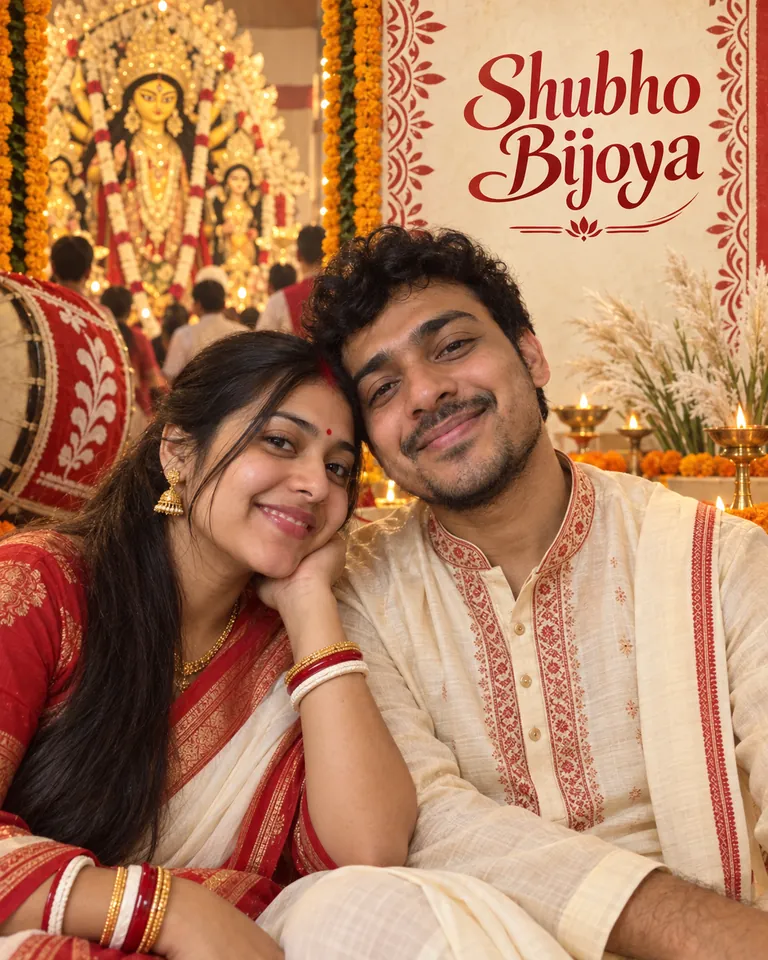
Couple photo → Shubho Bijoya wishes card
A couple selfie from a cafe turned into a Durga Puja wishes card with marigolds, diyas, white kash flowers and an alpana border. The greeting “Shubho Bijoya” was typed into the tool and written on the card. Both faces stay recognisable, so it works as a WhatsApp greeting from the two of you.
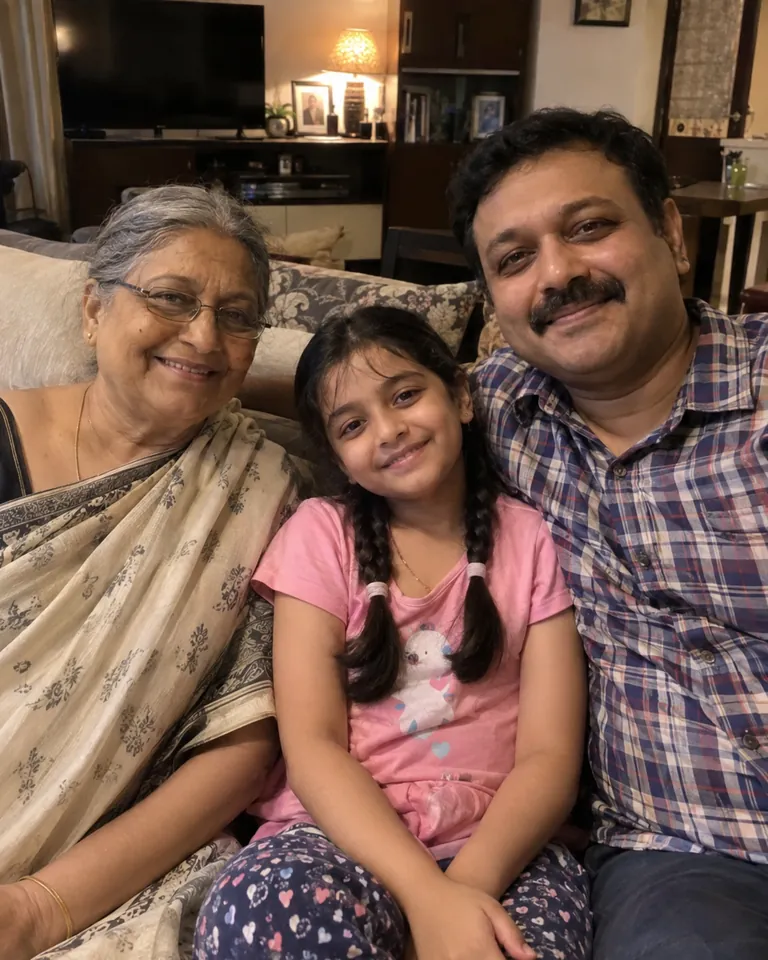
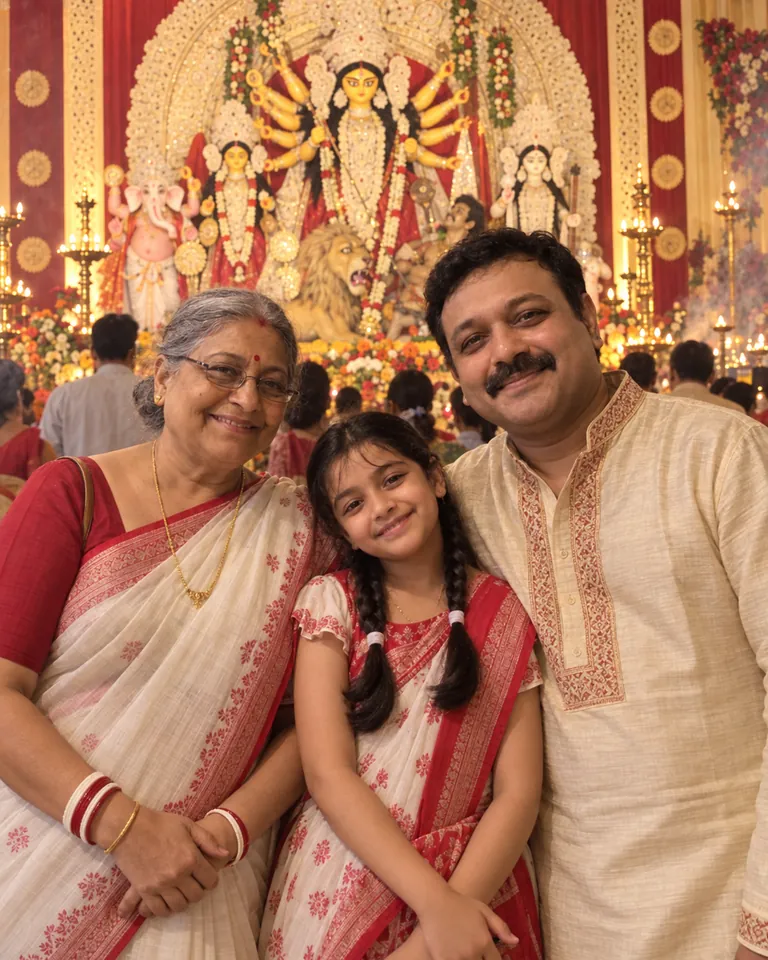
Family photo at home → in front of the Maa Durga idol
Three generations on a living-room sofa became a pandal visit: everyone in Puja clothes, standing together with the traditional ek-chala Maa Durga idol and lamps behind them. The idol keeps its own face; the tool never turns a person into the goddess. Grandmother's grey hair and the child's age are kept as they were.
All example images were made with ChatGPT's image model in a web chat, using the same scene instructions this tool sends. The people are fictional. Your own result will differ in detail.
Six Durga Puja AI photo scenes
Every scene below was applied to the same selfie shown in the tool, so you can compare the settings alone. Pick one in the tool; the outfit choice works with every scene.
Pandal evening portrait
A decorated Kolkata pandal entrance at dusk with warm string lights, lamps and marigold garlands, and the festive crowd blurred behind you.
Best for: Instagram posts, profile pictures, pandal-hopping memories
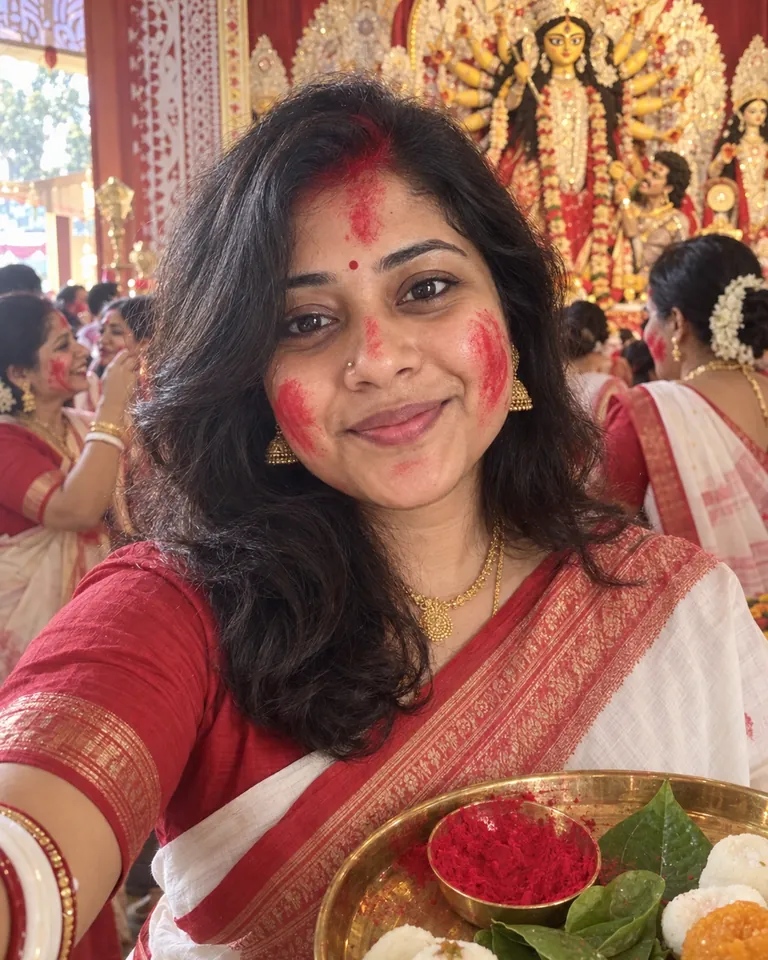
Sindoor khela
Bijoya Dashami in the pandal: red sindoor on the cheeks and forehead, a brass plate with sindoor, betel leaves and sweets, and women celebrating behind you.
Best for: Married women, Dashami posts, sindoor khela AI photos
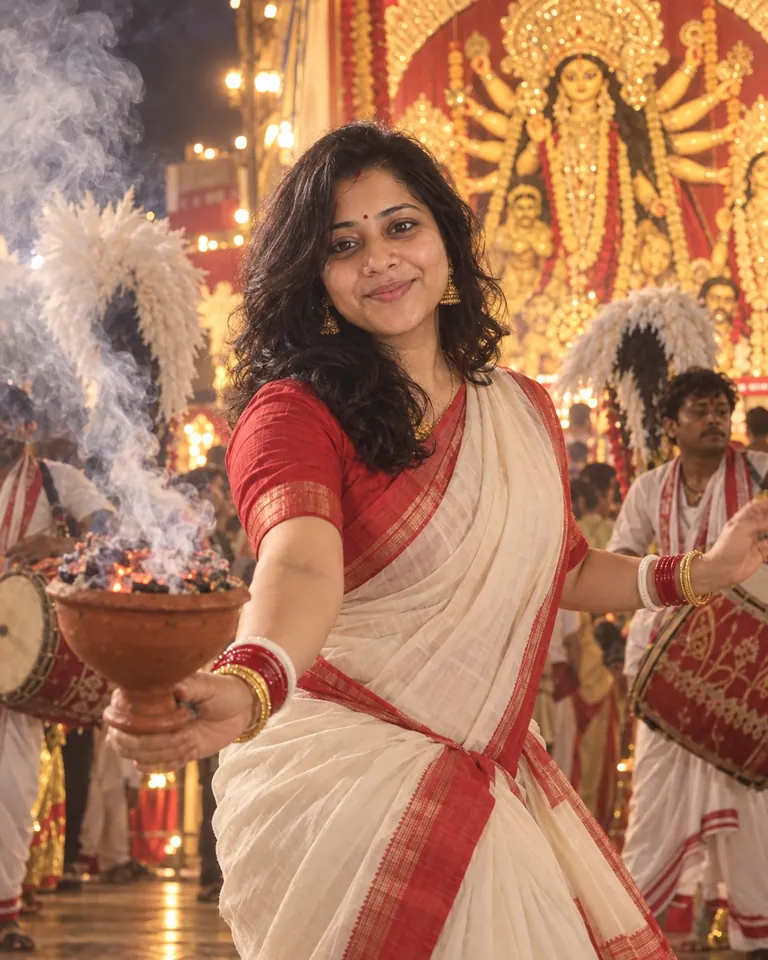
Dhunuchi dance
Night-time dhunuchi naach: a clay burner with glowing embers, rising smoke, dhakis with kash-flower plumes and lamp light.
Best for: Boys and men, dancers, Navami night reel covers
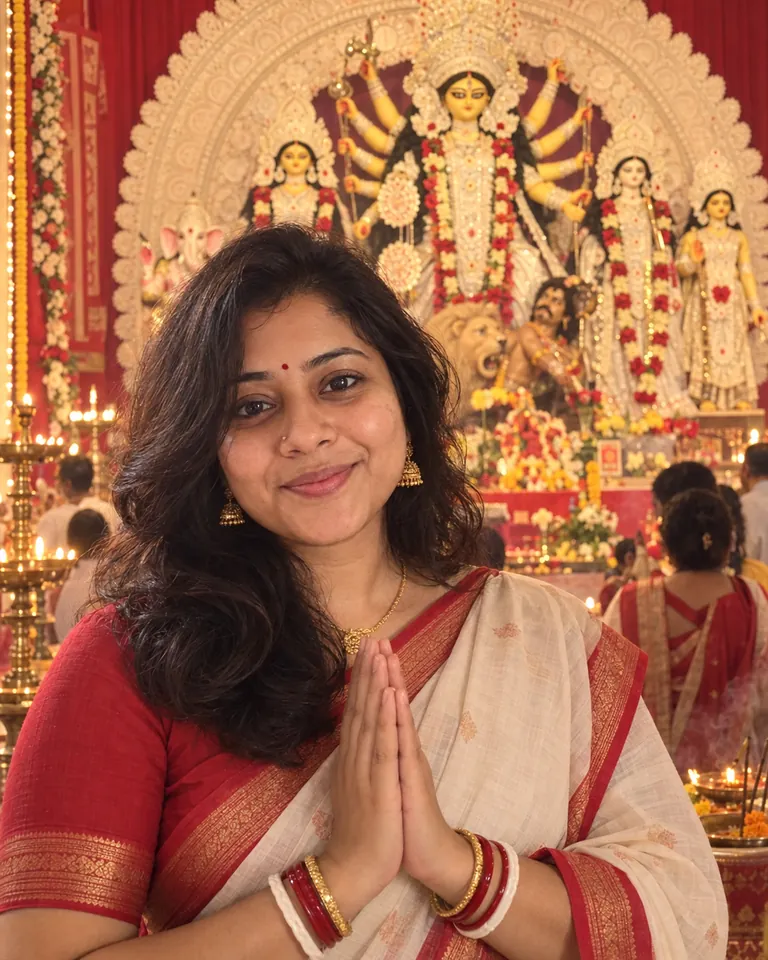
Maa Durga idol backdrop
You in front of the pandal stage with a traditional ek-chala idol of Maa Durga with Lakshmi, Saraswati, Ganesha and Kartik behind, softly out of focus.
Best for: Family photos, parents and grandparents, anjali day
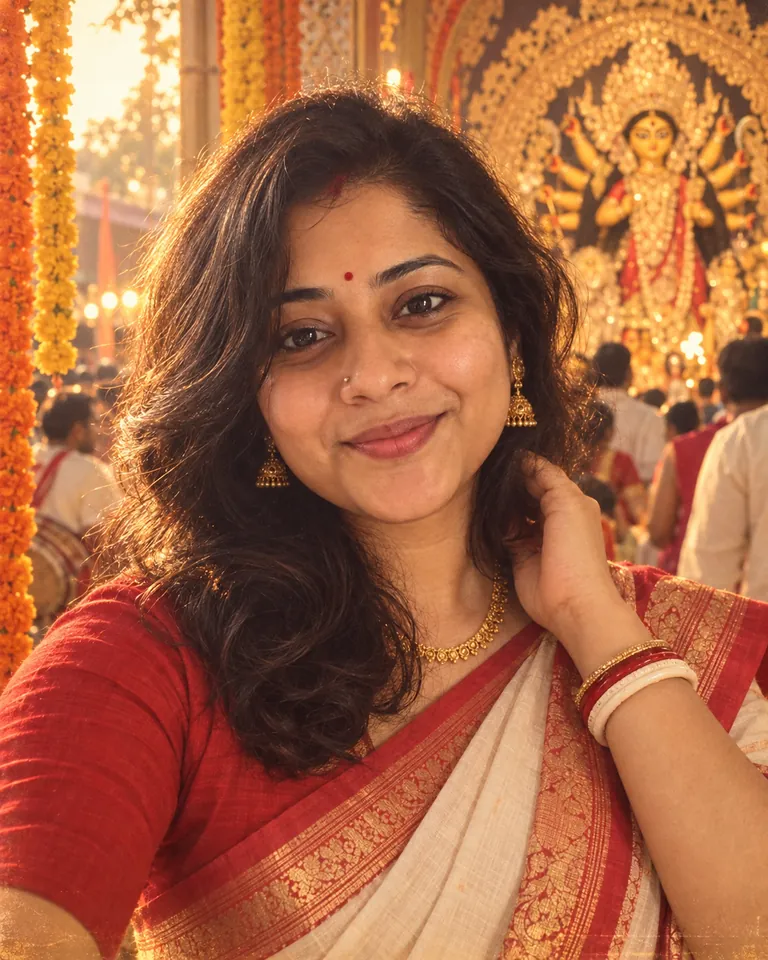
Retro golden portrait
The look of a 1970s Bengali film photograph: golden tones, soft grain, a gentle vignette and a glowing pandal behind.
Best for: The retro saree trend, couples, printed frames
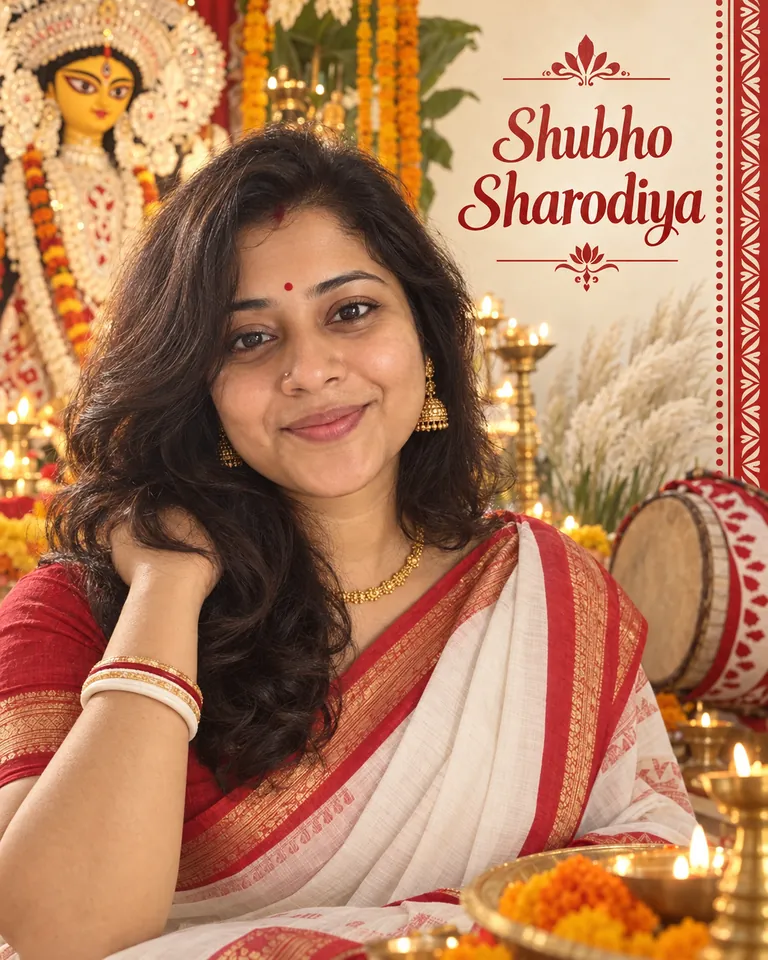
Durga Puja wishes card
Your portrait framed by marigolds, diyas, a dhak, kash flowers and an alpana border, with the greeting you type written on the card.
Best for: WhatsApp wishes, Shubho Bijoya messages, family greetings
Outfit choices
- Auto
- Laal paar saree for women, silk panjabi for men, festive clothes for children.
- Laal paar saree
- White saree with a wide red border, gold jewellery and shakha pola.
- Banarasi silk
- Red or maroon silk saree with gold zari and layered jewellery.
- Panjabi
- Ivory silk panjabi with a dhoti or pajama for men and boys.
- Keep mine
- Keep the clothes from your photo, for example your own saree.
How to make a Durga Puja AI photo in three steps
- 1
Upload a selfie, couple or family photo
Choose a JPG, PNG or WebP up to 20 MB. Faces that are sharp, well lit and facing the camera give the closest likeness. Group photos work too; keep everyone fully in frame.
- 2
Pick a Puja scene and outfit
Choose pandal, sindoor khela, dhunuchi dance, Maa Durga idol, retro golden or wishes card, then Auto, laal paar saree, Banarasi silk, panjabi or your own clothes. For a wishes card, type the greeting, such as Shubho Bijoya.
- 3
Generate and download
Choose Fast, HD, Ultra HD or Studio and a size such as 4:5 for Instagram posts or 9:16 for stories. The Durga Puja AI photo usually appears in about a minute next to your original. Download the PNG or find it later in your generation history.
Does the Durga Puja AI photo keep my face the same?
That is the question people ask most about Durga Puja AI photo editing. This tool edits your actual photo instead of generating a new person from a description, and every request tells the model to keep each face recognisable. Here is what it is told to keep and what it is allowed to change.
Kept from your photo
- Face shape and features, skin tone and apparent age
- Expression, hairstyle, glasses and beard
- Body shape and the number of people
- Your own clothes, if you choose Keep mine
Changed by the scene
- Background, pandal decoration and crowd
- Clothing and jewellery, unless you keep your own
- Light and colour to match the scene
- Pose details such as folded hands or holding a dhunuchi
Likeness is strongest for one to four people with clear faces. Small faces in a large group photo can drift, so compare the result with your original before posting.
Durga Puja AI photo prompts for Gemini and ChatGPT
Prefer to make it yourself? Upload your photo to Gemini (Nano Banana) or ChatGPT and paste one of these Durga Puja AI photo prompts. They follow the same rules as the tool above: keep the face, describe a real Kolkata scene and leave out text. Or skip the prompt and choose a scene in the tool.
Durga Puja AI photo prompt for girls and women
Turn my uploaded photo into a realistic Durga Puja portrait. Keep my face, skin tone, age and expression exactly the same. Dress me in a white laal paar saree with a red border, gold jewellery, shakha pola bangles and a small red bindi. Place me at the lit entrance of a Kolkata Durga Puja pandal in the evening with marigold garlands and warm lamps, the crowd softly blurred. Natural DSLR photo, no text or watermark.
Durga Puja AI photo prompt for boys and men
Use my uploaded photo and keep my face, beard, hair and glasses exactly the same. Show me doing the dhunuchi dance at a Durga Puja pandal at night, wearing an ivory silk panjabi with a white dhoti, holding a clay dhunuchi with glowing embers and rising smoke. Dhakis play dhak drums with white kash-flower plumes behind me. Warm lamp light, realistic photo, no text.
Durga Puja AI couple photo prompt
Turn this couple photo into a romantic Durga Puja portrait. Keep both faces exactly as they are. She wears a red Banarasi silk saree with gold jewellery; he wears a cream silk panjabi. They stand close together inside a decorated pandal at dusk, fairy lights and marigolds behind them, smiling at the camera. Realistic festival photography, no text or watermark.
Durga Puja family photo prompt with the Maa Durga idol
Turn this family photo into a Durga Puja pandal visit. Keep every face, age and the number of people the same. Dress everyone in traditional Bengali Puja clothes. They stand with folded hands in front of the pandal stage, where a traditional Maa Durga idol is softly out of focus behind them. Do not change the idol's face and do not dress anyone as the goddess. Warm lamps, realistic photo.
Sindoor khela AI photo prompt
Edit my photo into a realistic sindoor khela scene on Bijoya Dashami. Keep my face exactly the same. I wear a white saree with a red border; red sindoor is playfully smeared on my cheeks and forehead. I hold a brass plate with sindoor and betel leaves, and other women in red-and-white sarees celebrate behind me in the pandal. Joyful, natural daylight, no text.
Retro golden Durga Puja portrait prompt
Turn my photo into a retro golden Durga Puja portrait that looks like a 1970s Bengali film photograph. Keep my face exactly the same. Classic saree drape, flowers in the hair, warm golden tones, soft film grain, a gentle vignette and a glowing pandal with marigolds behind. Elegant, realistic, no text or watermark.
Chatbots can restyle your face or ignore part of a long prompt. If the face drifts, start a new chat, upload a sharper photo and repeat “keep my face exactly the same”. Create my Puja photo
Ways to make a Durga Puja AI photo compared
There are four common ways to get a Durga Puja AI photo. They differ mostly in how many selfies you need, how much you write and how closely the result looks like you.
| This tool | Gemini or ChatGPT with a prompt | One-click template apps | Trained portrait packs | |
|---|---|---|---|---|
| What you upload | One photo: selfie, couple or family | One photo plus a written prompt | One photo, often one person only | 6–20 selfies of one person |
| Face likeness | Edits your real photo and keeps faces | Varies by chat; faces can be restyled | Varies by app | Strong after training |
| Durga Puja scenes | Six scenes and five outfit choices | Anything you can describe | Usually one fixed look | A set of looks per pack |
| Writing a prompt | Not needed | Required | Not needed | Not needed |
| Cost | 1–17 credits by quality; refunded on failure | Within the chatbot's plan and daily limits | Per-photo credits | One-time pack price |
| Time to the first photo | About a minute | Depends on the queue and retries | Seconds to a minute | Hours of training first |
Durga Puja AI photo generator at a glance
| Input | One JPG, PNG or WebP photo up to 20 MB: a selfie, a couple or a family |
|---|---|
| Scenes | Pandal evening portrait, sindoor khela, dhunuchi dance, Maa Durga idol backdrop, retro golden portrait, wishes card |
| Outfits | Auto, laal paar saree, Banarasi silk saree, panjabi, or keep your own clothes |
| Output | One PNG at 1K, 2K or 4K in 4:5, 3:4, 9:16 or 1:1 |
| Price | 1 to 17 credits with Fast, HD, Ultra HD or Studio; failed images are refunded automatically |
| Time | Usually about a minute |
| Watermark | None added |
| Model | AI photo editing with four quality options |
| Your photo | Stored with your account and sent to the image model provider only to create the result; results stay in your generation history |
Making Durga Puja AI photos respectfully
Durga Puja is a religious festival, and Durga Puja in Kolkata is on UNESCO's list of Intangible Cultural Heritage. The scenes are written to look like real moments at a pandal, not a costume party. A few things to keep in mind:
The idol stays as it is
The Maa Durga idol appears only behind you, unchanged. The tool never puts a person's face on the goddess or dresses anyone as her.
Sindoor khela has its own meaning
Sindoor khela is played by married women on Bijoya Dashami as they bid Maa Durga farewell. The scene applies sindoor only to adult women; men and children are shown celebrating beside them.
Ask before you edit someone else
Only upload photos of yourself or of people who agreed. Ask everyone in a couple or family photo before posting their Durga Puja AI photo.
Call it an AI photo
A generated pandal scene is not a photo of a real event. Mention that it was made with AI when that matters, for example in news, contests or community groups.
Tips for a better Durga Puja AI photo
Start with a clear face
Daylight from the front, eyes visible and no heavy beauty filter. Sunglasses, masks and strong shadows give the model less of your face to keep.
Keep everyone in frame
For couple and family photos, use a picture where every face is at least the size of a thumbnail on your screen and nobody is cut off.
Pick the size for where you post
4:5 fills an Instagram feed post, 9:16 suits stories and WhatsApp status, 1:1 works for profile pictures and 3:4 prints well.
Wear your own saree
Already wearing your Puja outfit? Choose Keep mine and only the setting changes. It is the closest look to a real pandal photo.
Short greetings read best
On a wishes card, two to four words such as Shubho Bijoya or Happy Durga Puja are spelled most reliably. Check the text before you share.
Try a second scene
The same photo in pandal, dhunuchi and retro scenes gives you a small Puja series for a carousel post.
What to expect
- This is an AI redraw. Fine details such as jewellery, hands and the dhunuchi can come out differently from a real photo, so check them before posting.
- Faces are kept closely but not pixel for pixel, and small faces in large groups can drift.
- Greeting text on the wishes card can occasionally be misspelled. Bengali script is supported but is less reliable than English letters.
- One image per generation, with no video. Sign-in and credits are required.
Durga Puja AI photo FAQ
How do I make a Durga Puja AI photo from my selfie?
Upload your selfie in the tool at the top of this page, choose a scene such as pandal portrait, sindoor khela, dhunuchi dance or Maa Durga idol backdrop, pick an outfit and click Create Puja photo. The finished Durga Puja AI photo usually appears in about a minute and can be downloaded as a PNG. You do not need to write a prompt.
What is the best AI app for Durga Puja photos in 2026?
It depends on how you want to work. If you want to upload one photo and get a finished Puja portrait that keeps your face, use a dedicated Durga Puja AI photo generator such as this one. If you enjoy writing prompts, Gemini or ChatGPT with the prompts on this page work well. If you want dozens of portraits of one person, trained portrait packs that use 6–20 selfies give the most variety.
Which AI tool keeps my face the same in a Durga Puja photo?
Tools that edit your actual photo keep faces better than tools that generate a new person from a description. This page edits your upload and tells the model to keep each face, skin tone, age and expression unchanged. Use a sharp, front-lit photo for the closest likeness.
Does the Durga Puja AI photo editor work for boys and men?
Yes. Choose Panjabi or Auto as the outfit and the tool dresses men and boys in an ivory silk panjabi with a dhoti or pajama. The dhunuchi dance and pandal scenes are the most popular choices for Durga Puja AI photo editing for boys.
Can AI make a sindoor khela photo of me?
Yes. Pick the Sindoor khela scene and the photo becomes a Bijoya Dashami celebration with red sindoor on the cheeks and forehead, a brass plate and other women celebrating behind you. Sindoor is applied only to adult women, in keeping with the tradition.
Can I make a Durga Puja AI photo with my partner or family?
Yes. Upload a couple or family photo and every person is kept and dressed for Puja. Likeness is strongest with one to four clearly visible faces; in big groups, small faces can change, so check the result.
Can I put the Maa Durga idol in the background?
Yes. The Maa Durga idol backdrop scene places a traditional ek-chala idol with Lakshmi, Saraswati, Ganesha and Kartik behind you, softly out of focus. The idol is never changed or given anyone's face, and no one is dressed as the goddess.
Can I create a Durga Puja wishes image with my own photo?
Yes. Choose the Wishes card scene and type a greeting of up to 40 characters, for example Shubho Bijoya, Shubho Sharodiya or Happy Durga Puja. The card shows your portrait with marigolds, diyas and an alpana border. Short English greetings are spelled most reliably.
What prompt should I use for a Durga Puja AI photo in Gemini or ChatGPT?
Start with “keep my face exactly the same”, then name the outfit, the place and the light, and end with “no text or watermark”. The six copy-and-paste Durga Puja AI photo prompts above cover girls, boys, couples, families, sindoor khela and the retro golden look.
How much does a Durga Puja AI photo cost here?
Fast costs 1 credit per photo, HD 4, Ultra HD 6 and Studio 17. HD and above are for subscribers. You need to sign in, and credits come from the plans on the pricing page. Credits are only charged when you click Create Puja photo and are refunded automatically if the image fails.
Is my photo private, and can I post the result on Instagram?
Your upload is stored with your account and sent to our image model provider only to create the result; finished images appear in your generation history. No watermark is added, so you can post your Durga Puja AI photo on Instagram, Facebook or WhatsApp, as long as you have the right to use the original photo. See our Privacy Policy and Terms of Service for details.
More AI photo tools
Headshot Background Changer
Swap the background behind a portrait for a studio, office or any scene you describe.
AI Relight
Relight a photo with golden hour, studio or neon light without retaking it.
90s Photo Generator
Turn a selfie into a 90s film photo, yearbook portrait or retro mall studio shot.
Make AI Photo Realistic
Give an AI image natural skin, light and camera detail so it looks like a real photo.
Make your Durga Puja AI photo before Shashthi
One selfie, one scene, about a minute. Make your pandal portrait, dhunuchi shot or Shubho Bijoya wishes card now and share it with family this Puja.
Create my Puja photo