
Photo to watercolor is an AI image tool for anyone who wants a hand-painted look for a card, print or keepsake without painting. It repaints the whole photo in one of three watercolor styles, or your own description, and asks the model to keep faces, pets and composition. The current 1-credit signup allowance is below one painting. One PNG starts at 5 credits, about $2.50 at the $5/10-credit pack rate, up to 4K, with no added watermark.
How to make an image look like a watercolor painting
To make an image look like a watercolor painting here, upload one clear photo, pick Loose, Detailed or Ink & wash, choose a portrait, landscape or square shape, and press Generate. The model repaints the photo with washes, color bleeds and paper grain in about a minute, and you download one PNG. Custom lets you describe your own palette or brushwork instead. Results vary with the photo.
1. Upload a photo
Choose one JPG, PNG or WebP up to 10 MB and 2048 pixels per side. Portraits, couples, family photos, pets, houses and travel shots all work; use a photo you may edit.
2. Pick a watercolor style and shape
Loose gives airy washes and white paper, Detailed keeps faces crisp, Ink & wash adds thin outlines. Pick 3:4, 4:3 or 1:1 and an image quality, then check the credits on the button.
3. Compare and download
Slide between your photo and the painting, check faces and small details, then download the PNG. If a request is unconfirmed, check the same request instead of paying again.
Photo to watercolor examples: portraits, pets and places
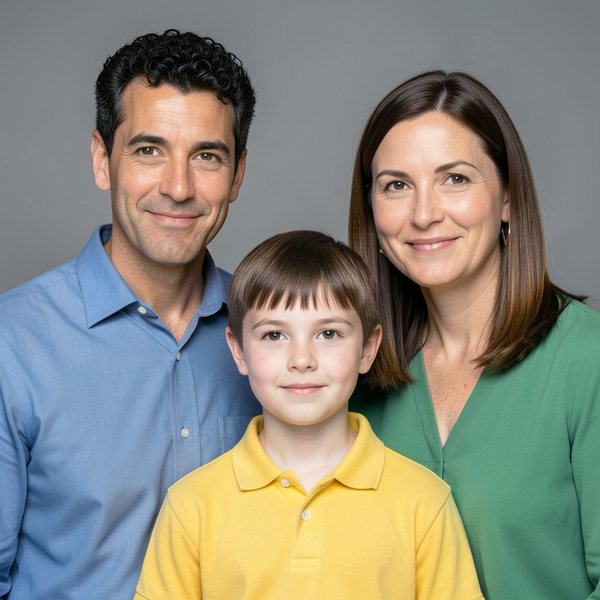
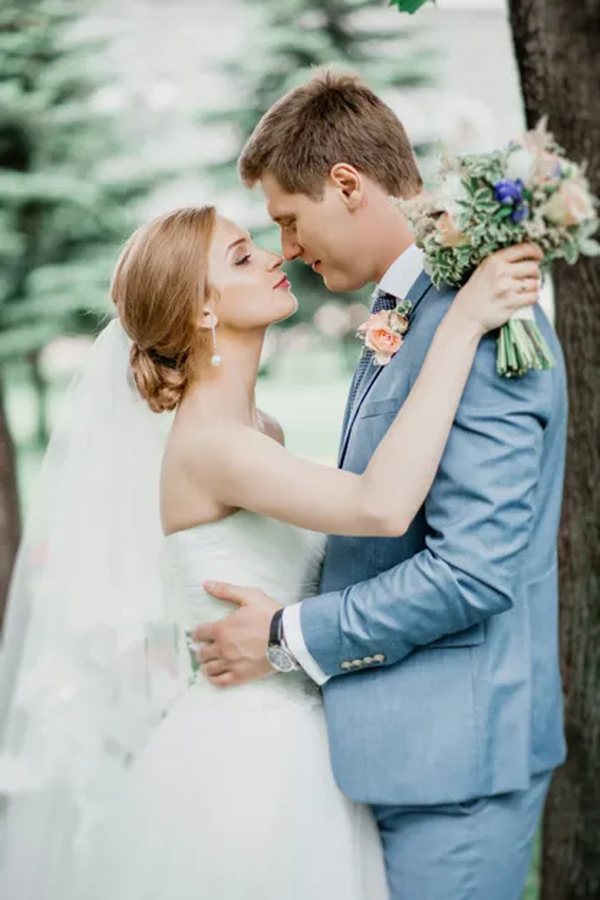
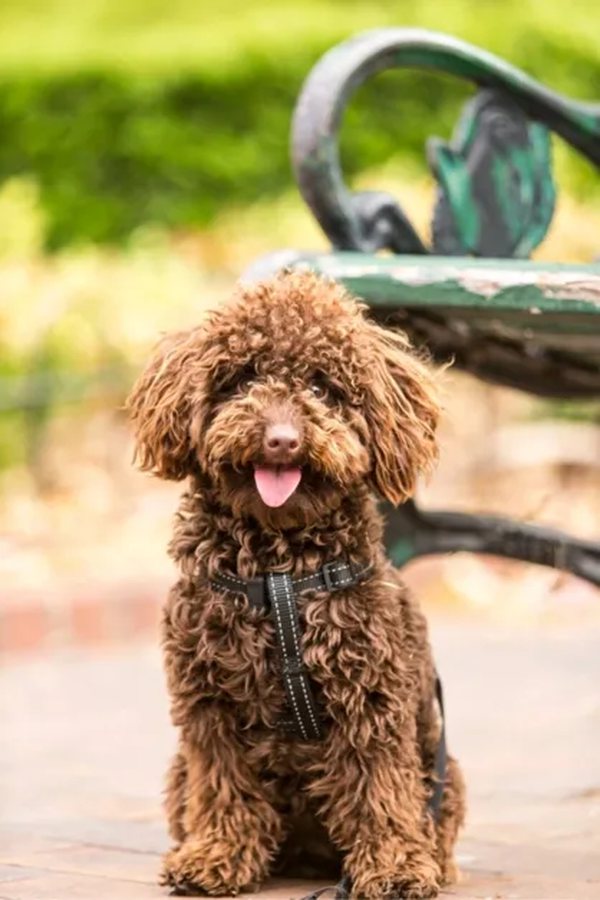
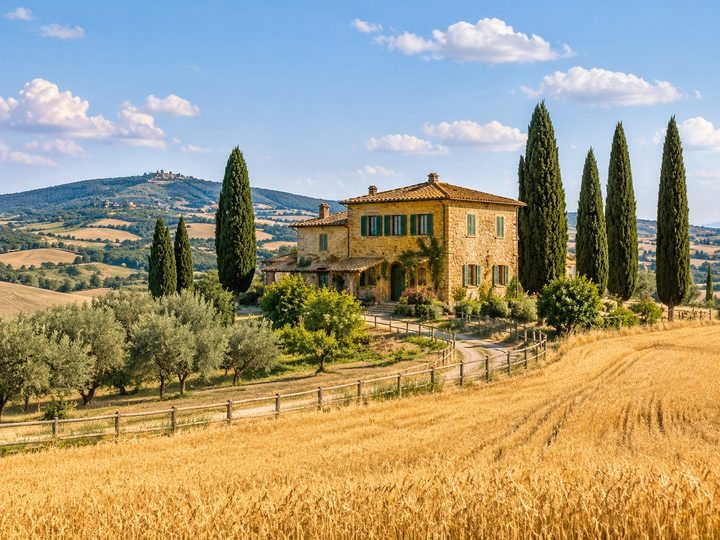
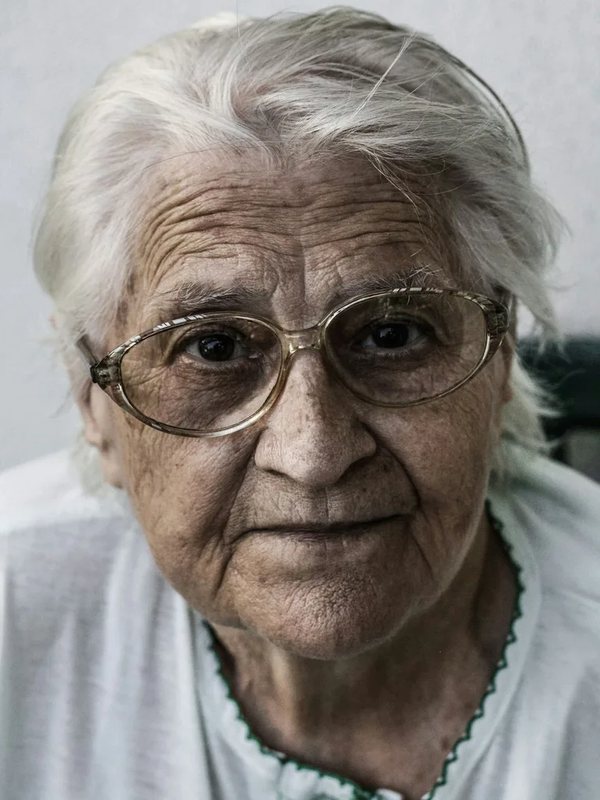
These five pairs show ordinary photos next to watercolor versions: a wedding couple, a family portrait, a poodle, a farmhouse landscape and an older woman with glasses. Compare how faces, glasses, fur and the house stay in place while skin, clothes and sky turn into washes. They show the look of each style; a result from your own photo will differ.
Photo
Watercolor
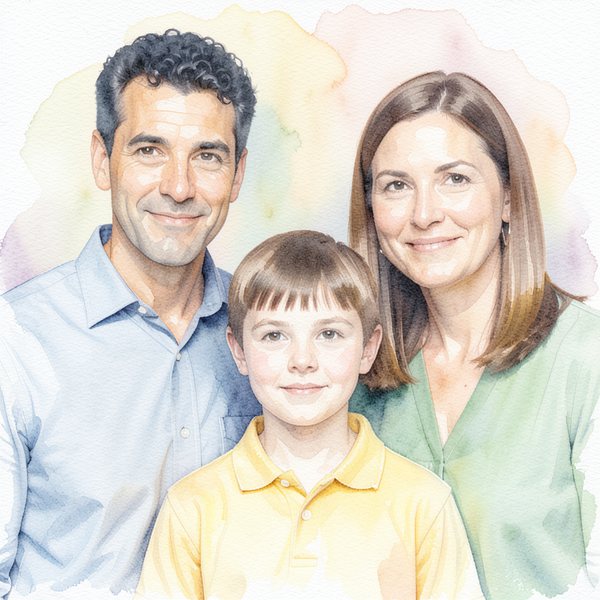
Family portrait, detailed watercolor
Three faces kept recognizable while the gray studio backdrop turns into a pale pastel wash.
Photo
Watercolor
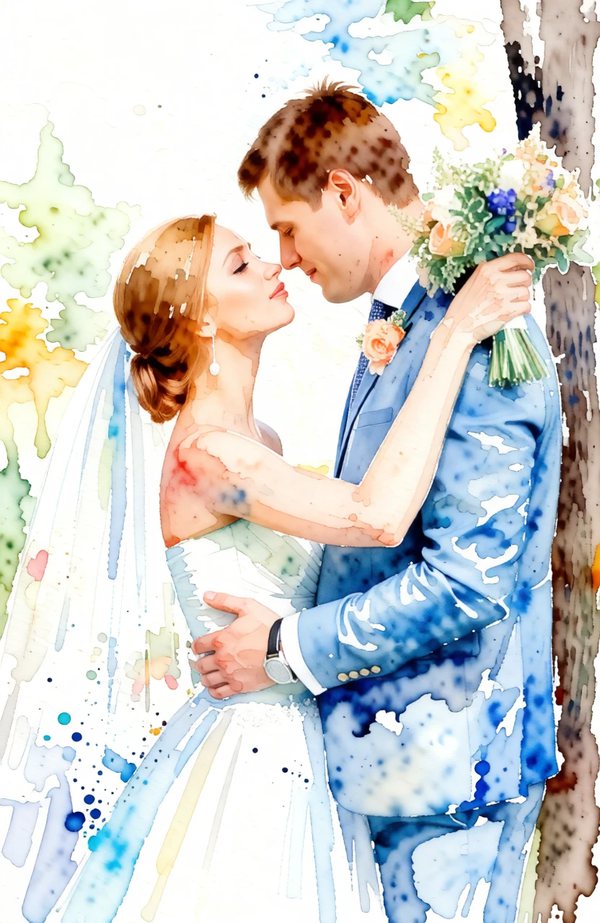
Wedding photo, loose watercolor
A bride and groom by a pine tree repainted with loose blue washes, splashes and white paper around them.
Photo
Watercolor
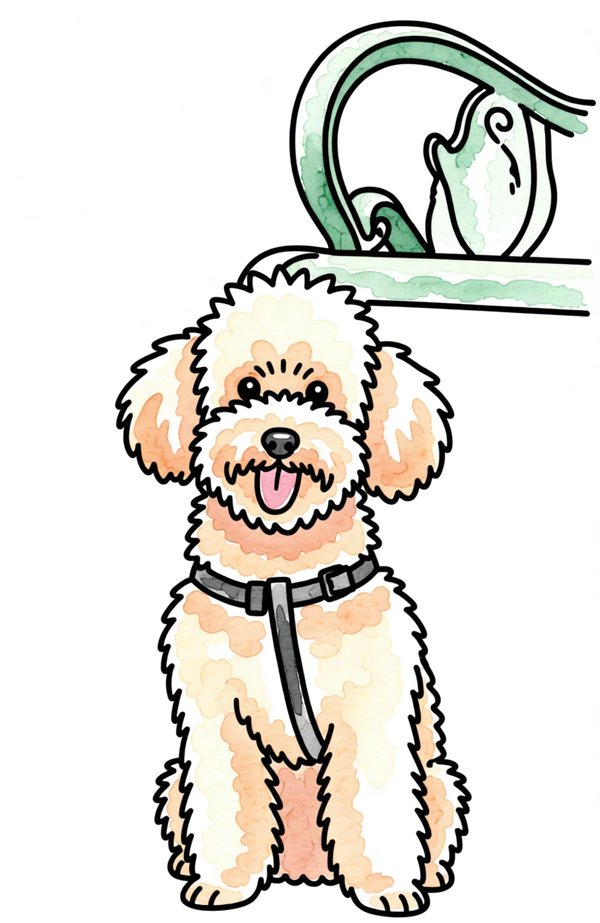
Pet photo, ink and wash
A curly brown poodle on a park path redrawn with ink outlines, peach washes and the bench as a few lines.
Photo
Watercolor
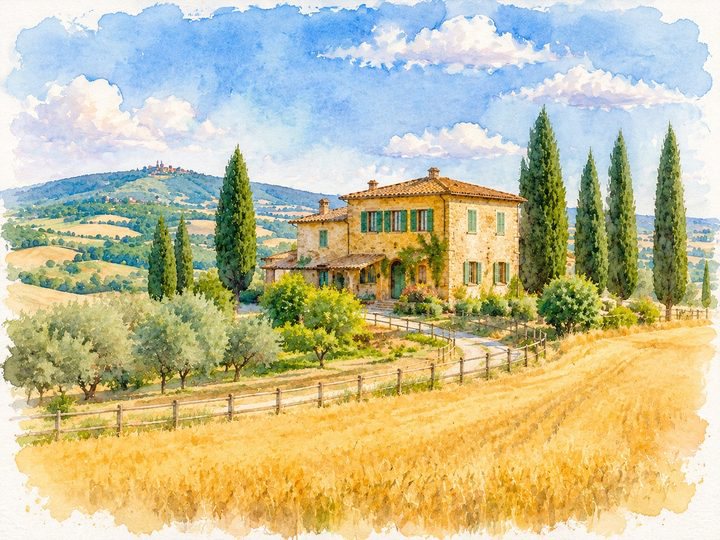
Travel landscape, loose watercolor
A Tuscan farmhouse with cypress trees and a wheat field, painted with wet-edged skies and a white border.
Photo
Watercolor
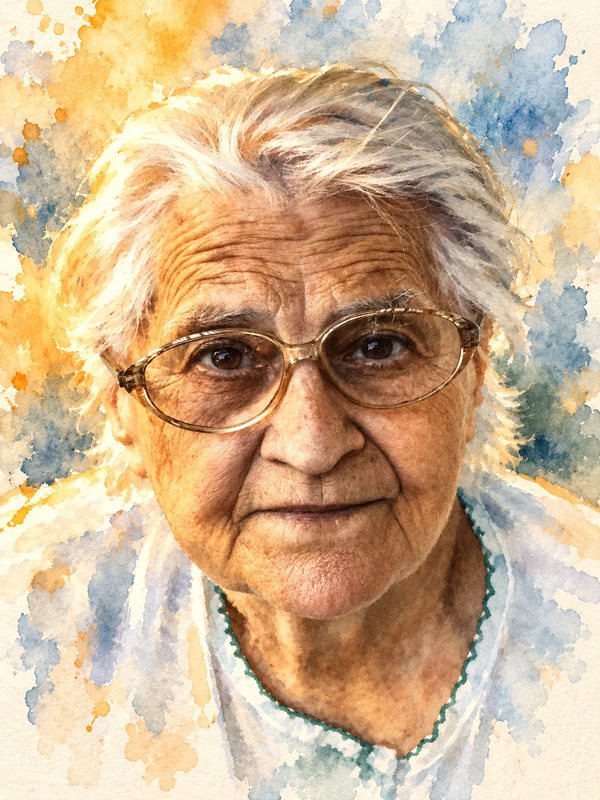
Close-up portrait, detailed watercolor
An older woman with glasses, her wrinkles and frames kept, painted with warm ochre and blue washes.
Can I make an image watercolor for free?
This photo to watercolor tool is not free with the current signup allowance. Browsing the examples and choosing styles cost nothing, but each painting costs at least 5 credits. The current 1-credit signup allowance is below one painting. From zero balance, the smallest purchase is the $5 one-time pack with 10 credits, about $2.50 per Fast painting. There is no daily free quota here, no added visible watermark and no extra charge to download the PNG.
Some other photo to watercolor tools do have daily free runs. The table lists what each official page said when checked; our tool is listed first and is not affiliated with the others.
| Tool | How it works | Free use | Download |
|---|---|---|---|
| This photo to watercolor tool | AI repaints your photo; 3 styles + Custom; sign-in required | This photo to watercolor tool is not free with the current signup allowance. Fast is 5 credits, about $2.50 at the pack rate. | PNG, 1K to 4K, no added watermark |
| SandBase Photo to Watercolor | AI repaints your photo; Loose, Detailed, Ink and wash, Soft pastel | 10 runs a day without signing in, 30 with a free account, shared across its AI image tools | JPG, no watermark |
| PetalPic Photo to Watercolor | AI repaints your photo; one style, no prompt | One free picture a day, no sign-up; credits after that | Full-resolution image; format not shown |
| EaseMate AI Photo to Watercolor | AI restyle with a watercolor style among 18 styles | Page says free with no account; credits shown before generating | Download without watermark |
Can you make an image watercolor in Canva or Photoshop?
Yes, but Canva and Photoshop mostly lay a watercolor filter, texture or overlay on top of your photo, so the result keeps every photographic detail and can still look like a filtered photo. An AI photo to watercolor tool repaints the picture instead: real washes, bleeds and white paper, with simplified backgrounds. The trade-off is that a repaint can shift small details, so check faces and hands before printing.
Use a filter when exact pixels matter, such as a logo or a product label. Use a repaint when you want it to look painted by hand, for a card, a wedding invitation or wall art.
Is there a photo to watercolor app?
You do not need an app for this one: the photo to watercolor tool on this page works in Safari or Chrome on iPhone and Android. Sign in, pick a photo from your camera roll, generate and save the PNG to your phone. The painting is made on our servers, so an older phone gets the same result. Offline filter apps keep photos on the device; here the photo is uploaded to this site and its image provider.
Photo to watercolor pricing, credits and print sizes
Photo to watercolor pricing is per painting, for any style, shape or Custom description. Fast costs 5 credits, equivalent to $2.50 at the $5/10-credit pack rate, and the one-time pack needs no subscription. HD (2K) and Ultra HD (4K) give larger files for printing, Studio renders 2K at the higher quality setting for finer brushwork, and all three need paid access. Downloading a finished PNG costs nothing extra.
| Quality | Output | Credits | Pack-rate equivalent |
|---|---|---|---|
| Fast | 1K · PNG | 5 | $2.50 |
| HD | 2K · PNG | 7 | $3.50 |
| Ultra HD | 4K · PNG | 8 | $4.00 |
| Studio | 2K · PNG | 9 | $4.50 |
| Quality | Pixels (3:4) | Print at 300 DPI |
|---|---|---|
| Fast | 768×1024 | 2.6×3.4 in |
| HD | 1536×2048 | 5.1×6.8 in |
| Ultra HD | 2480×3312 | 8.3×11.0 in |
| Studio | 1536×2048 | 5.1×6.8 in |
An 8×10 in print needs about 2400×3000 pixels, so pick Ultra HD for framed prints; Fast and HD suit phones, cards and social posts.
| Item | What you receive |
|---|---|
| Signup allowance | The current 1-credit signup allowance is below one painting. |
| Minimum purchase | $5 one-time Trial Pack · 10 credits. No subscription required. |
| Download | One PNG included; no second download charge. |
| Visible watermark | This tool adds no visible watermark. Supplier provenance metadata is not removed. |
| Quality access | Fast requires sign-in and enough credits. HD, Ultra HD and Studio require paid access. |
| Unfinished requests | Confirmed provider failure or an invalid output returns the charged credits. Lost confirmation or temporary saving delays keep the same request for recovery; do not pay again. |
What this photo to watercolor tool cannot do
Photo to watercolor here is a generative repaint, not a filter, so it cannot promise an identical face, every strand of hair or the exact text on a sign. Busy backgrounds get simplified, and dark, blurry or tiny faces in group shots may drift. It returns one PNG in 3:4, 4:3 or 1:1, so other shapes are recomposed. It does not batch many photos, export layers or a transparent background, or animate the painting.
Photo to watercolor FAQ
Photo to watercolor makes one still painting per request. These answers cover pet portraits, line-and-wash looks, old black-and-white photos and selling prints. Review each result against your photo before downloading; the same photo can give a slightly different painting each time.
Can I make a watercolor portrait from a photo of my pet?
Yes. Use a sharp photo where the eyes are visible and the pet fills much of the frame. The prompt asks the model to keep markings, coat color and pose; dark fur shows more detail with Detailed or Ink & wash than with Loose.
Can I get a line and wash watercolor effect?
Yes. Ink & wash draws thin dark outlines over pale, flat washes, the look sketchbook and urban-sketch painters use. Choose Custom if you want brown ink, thicker lines or less color.
Does it work on old black-and-white photos?
It can. The model invents colors for a black-and-white photo, which may not match the real ones; add them in Custom, for example "navy dress, red barn". Scratches and heavy grain can turn into stray marks, so use the cleanest scan you have.
Can I sell watercolor prints made from my photos, for example on Etsy?
Check the rights first: you need permission for the photo you upload and from anyone recognizable in it, including customer photos. Copyright protection for AI-generated images is limited in many countries, and marketplace rules on AI art vary, so read them before listing prints.
More photo-to-art tools
For colored pencil instead of paint, try Turn Photo Into Color Sketch. For bold black carved lines, use the Linocut Generator. For a pet painted in other styles and new scenes, open the AI Pet Portrait Generator. Each is a separate request with its own price.