
Consistent Character AI’s AI hair color changer helps anyone test a new dye shade online before visiting a salon. Upload one front-facing portrait to generate a vertical 3:4 PNG from 768 × 1024 (Fast, 5 credits, $2.50 at the $5 for 10 credits pack rate) up to 2480 × 3312, with no added site watermark. Eligible new accounts get 1 signup credit; one Fast try-on needs 5 credits, covered by the $5 Trial Pack.
How the hair color changer works
Our online hair color changer takes one front-facing photo and either a preset shade or a custom color brief. The server sends your photo to a hosted image-editing model with instructions to recolor only the hair strands while leaving your face, eyebrows, haircut, clothes, and background unchanged. Because generative models re-render the portrait, likeness and shade accuracy vary by photo and paid output quality has not been live-tested.
1. Upload a sharp, evenly lit photo
Pick a clear front-facing portrait of one person in natural daylight with the full hairline and lengths visible. JPG, PNG, or WebP up to 10 MB (128 to 2048 px per side).
2. Choose a shade preset or describe any color technique
Select Copper balayage, Platinum blonde, or Pastel pink for one-click presets, or pick Custom to describe highlights, ombre, shadow roots, or fantasy colors and optionally add a hair color reference photo.
3. Select quality, generate, and download the PNG
Pick Fast, HD, Ultra HD, or Studio, confirm photo permission, sign in, and generate. Inspect the side-by-side preview and download your vertical 3:4 PNG with no added site watermark.
Hair color try-on examples: same face, new shade
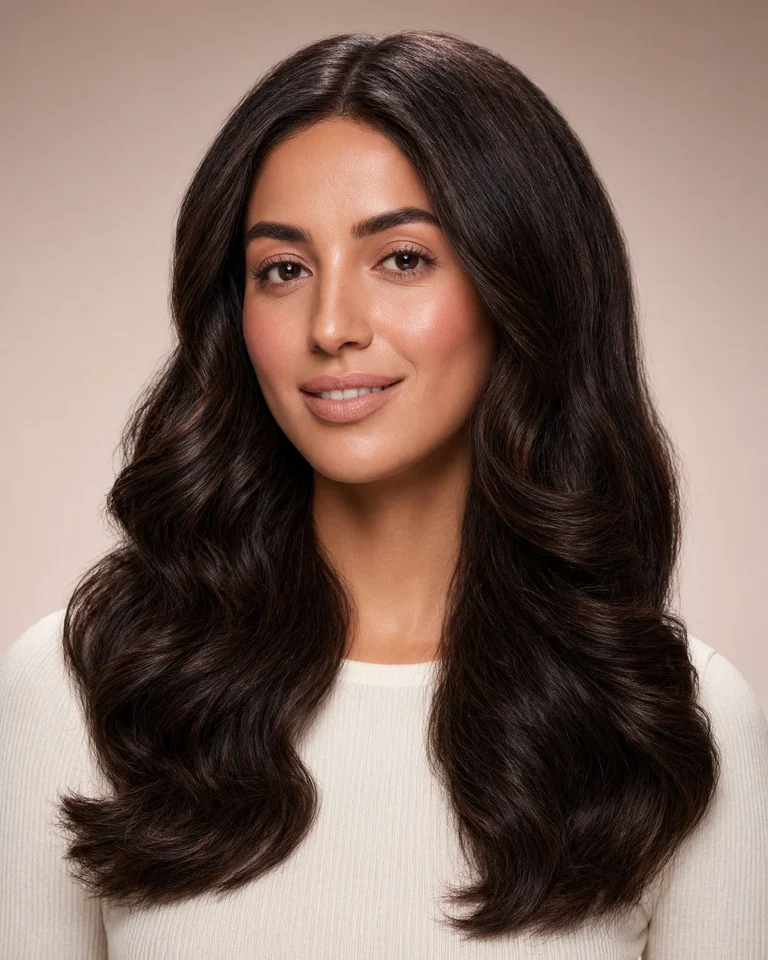
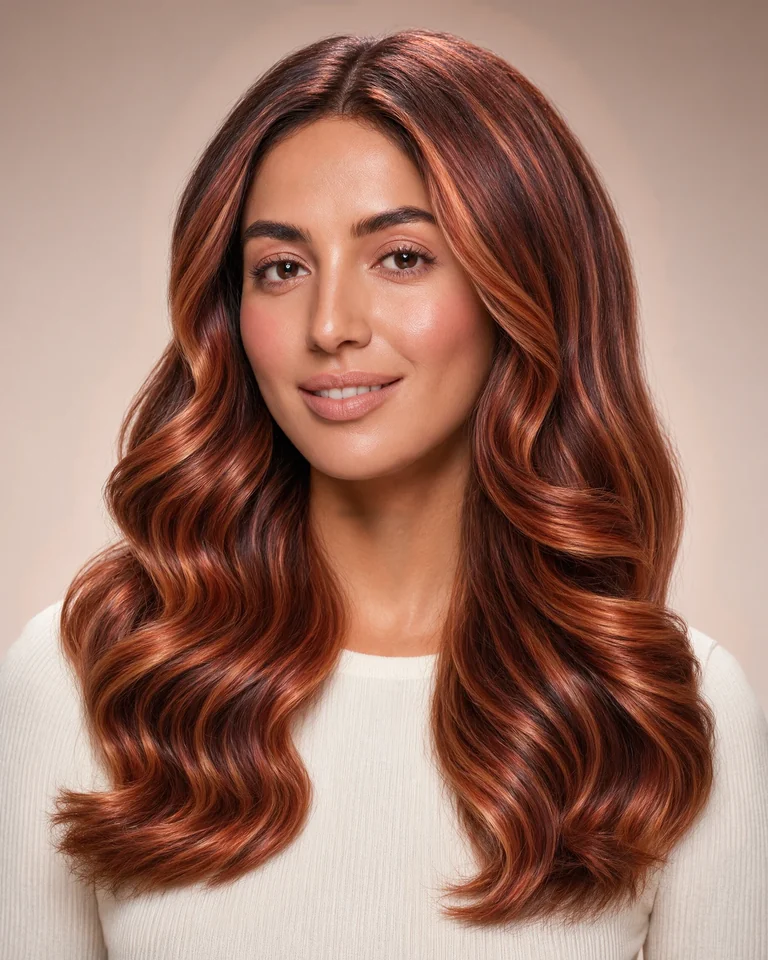
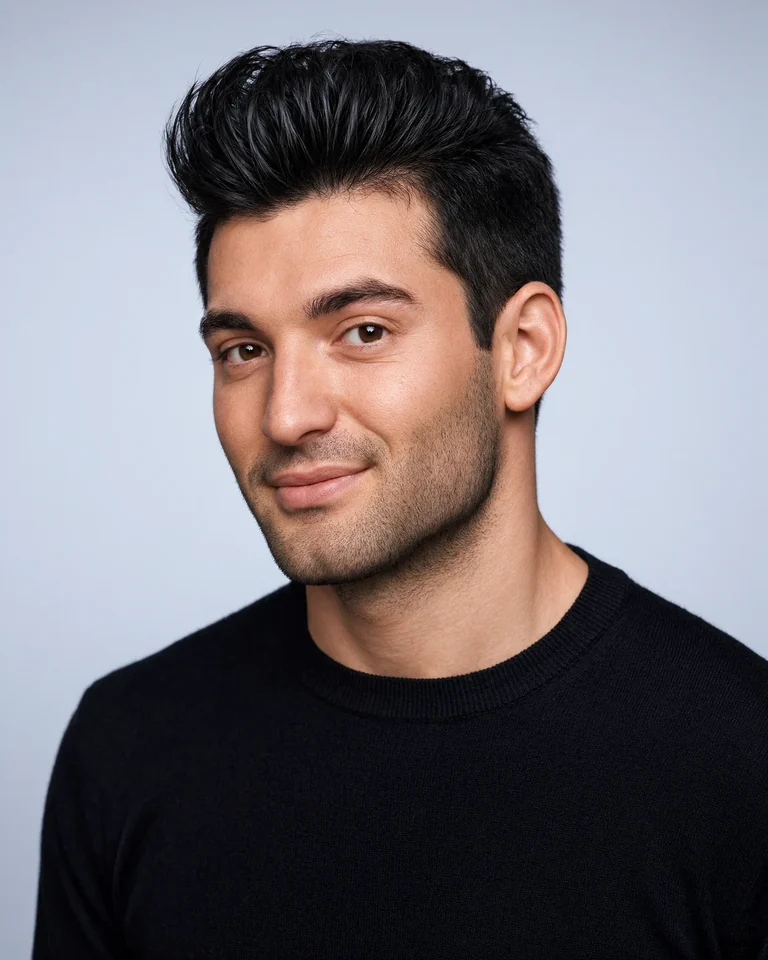
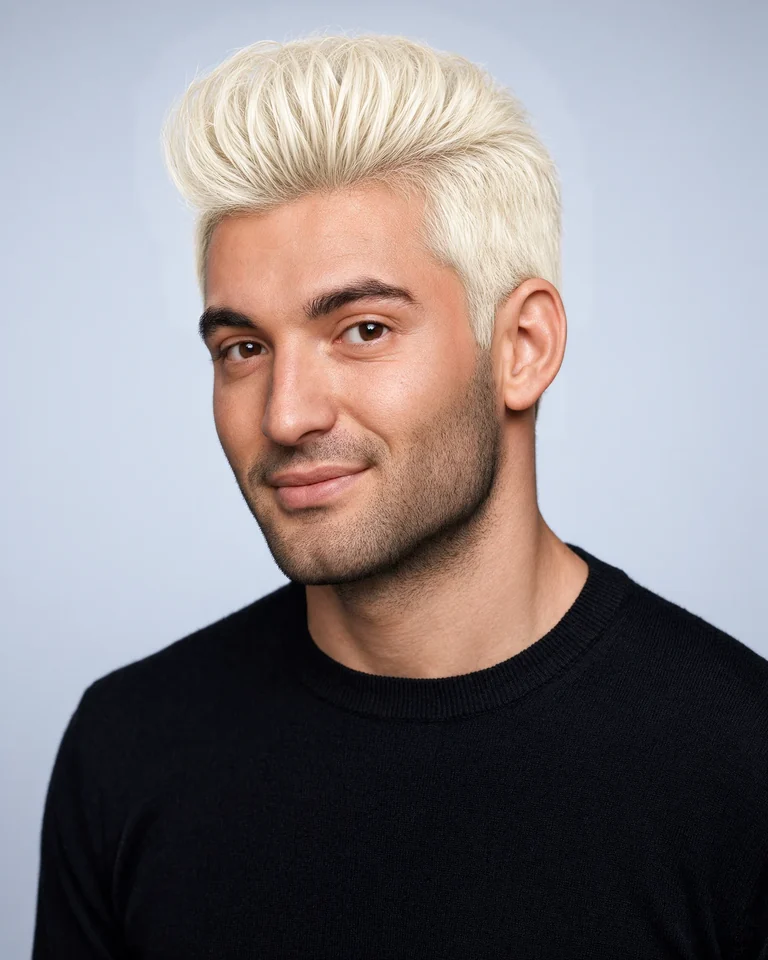
Each before-and-after pair below shows one starting portrait beside a different hair color on the same person, covering copper balayage with dark roots, black-to-platinum on short men’s hair, pastel pink on a bob, silver gray and burgundy on the same waves, and cherry red on natural curls. The first three pairs display at their 4:5 ratio (768 × 960) and the last three at 1:1 (768 × 768); downloads from this generator are vertical 3:4 PNGs.
Before
After
Copper balayage
Balayage · Dark rootsLong dark brown waves shift to dimensional warm copper-auburn balayage with darker roots and bright face-framing strands while the face, eyebrows, cream sweater, and beige backdrop stay consistent.
Color prompt
dimensional warm copper-auburn balayage with natural darker roots, hand-painted copper highlights along the lengths, and soft face-framing ribbons. Keep the exact same face, haircut, length, hair texture, eyebrows, skin tone, lighting, and background unchanged.
Before
After
Platinum blonde (men)
Dark to blonde · ShortShort jet-black styled hair shifts to cool icy platinum blonde with visible strand texture while the dark eyebrows, stubble, black crewneck, and cool gray backdrop remain intact.
Color prompt
cool icy platinum blonde hair with crisp neutral-cool tone, realistic individual strand texture, natural shadow depth, and no brassy yellow cast. Keep the exact same face, haircut, length, hair texture, eyebrows, skin tone, lighting, and background unchanged.
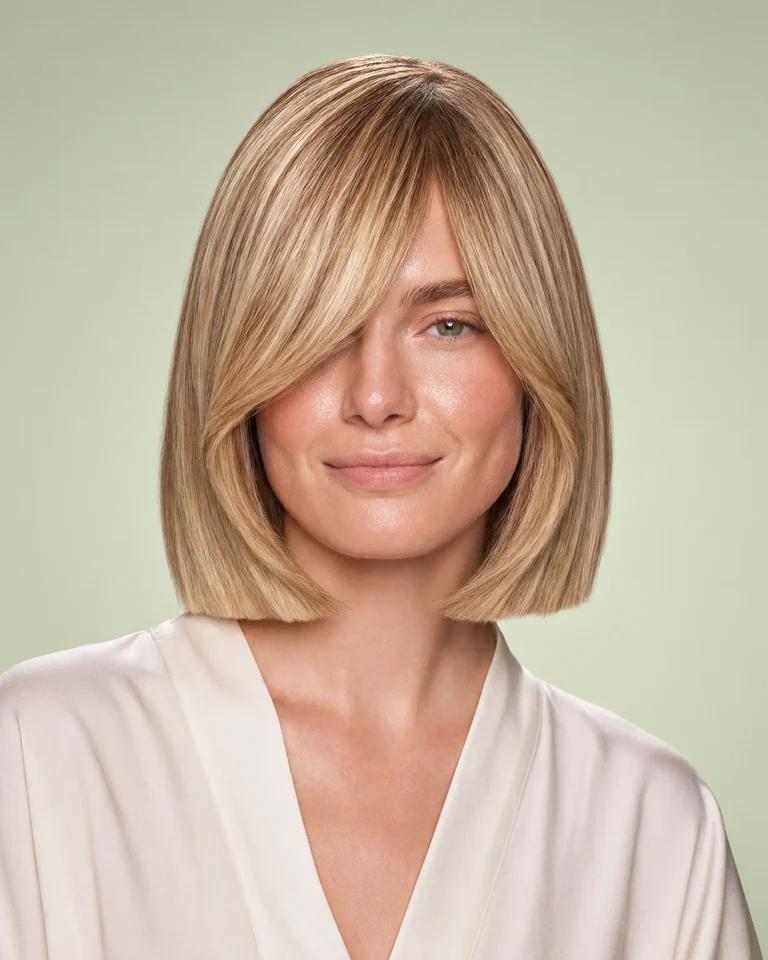
Before
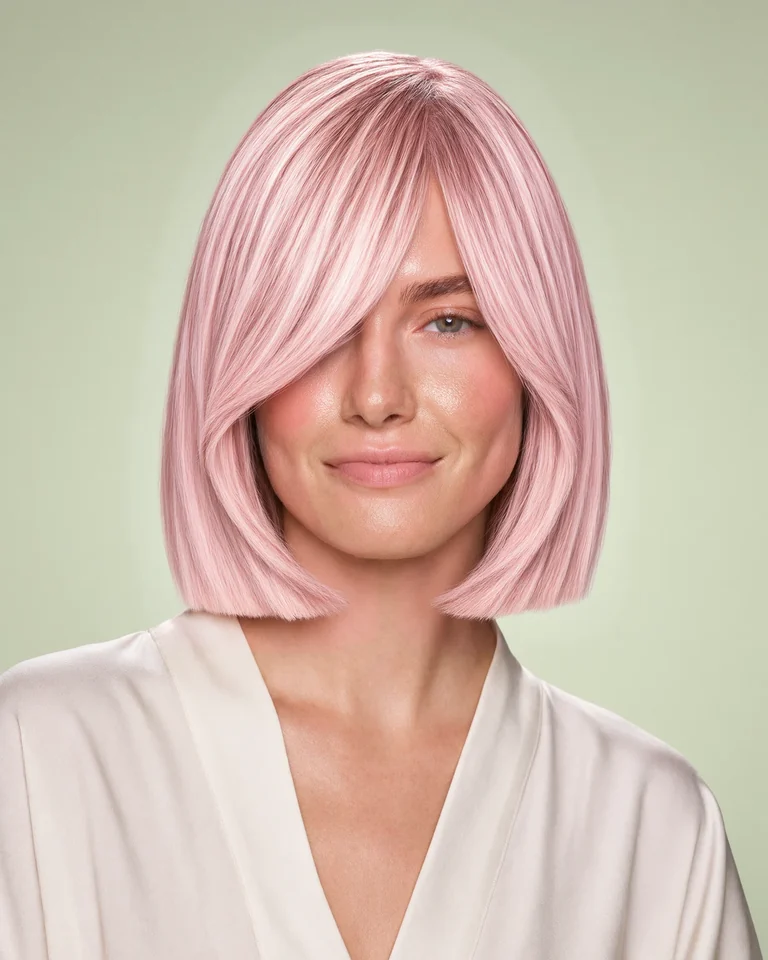
After
Pastel pink bob
Fashion shade · BobA honey-blonde chin-length bob shifts to soft dimensional pastel pink with natural crown depth and subtle highlights rather than a flat single-tone wash.
Color prompt
soft dimensional pastel pink hair with gentle crown root depth, silky light-catching highlights, and realistic strand separation. Keep the exact same face, haircut, length, hair texture, eyebrows, skin tone, lighting, and background unchanged.
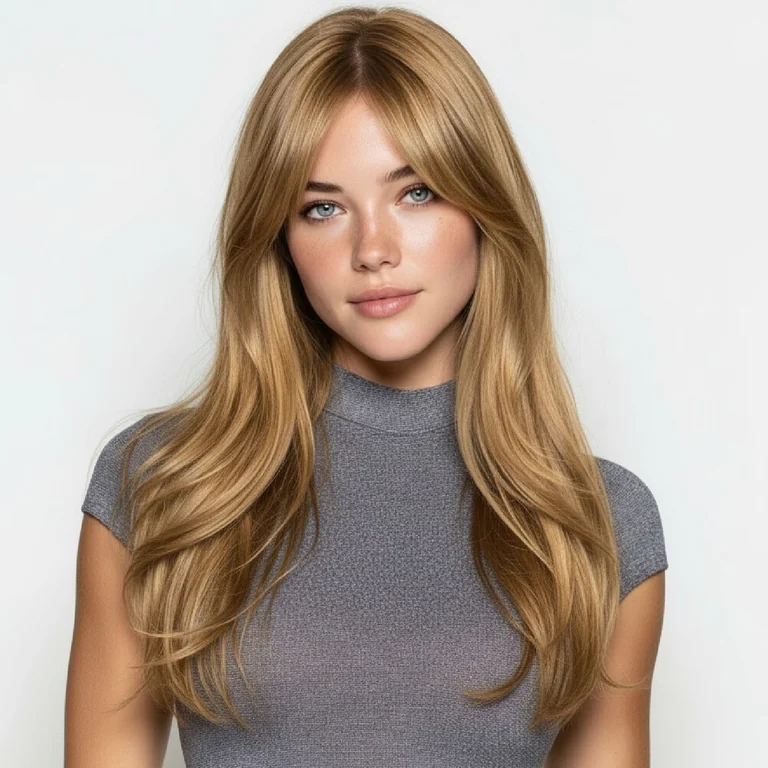
Before
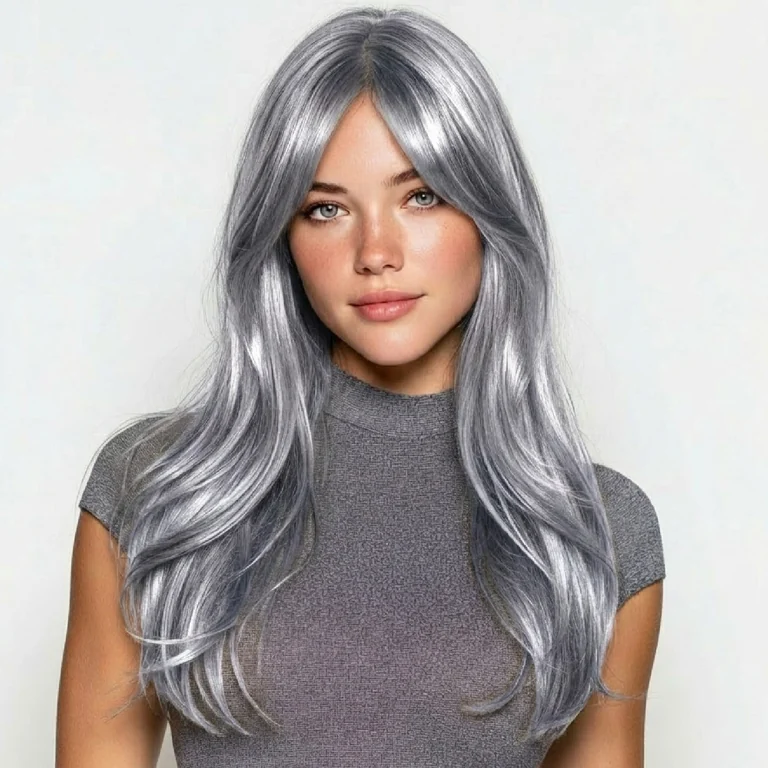
After
Silver gray waves
Cool tone · Long hairLong golden-blonde waves transition to cool metallic silver-gray with multi-tonal highlights and shadowed strands while keeping the same face, freckles, eyebrows, and gray top.
Color prompt
cool metallic silver-gray hair with fine multi-tonal pewter and ice-silver strands, natural light reflection, and soft root depth. Keep the exact same face, haircut, length, hair texture, eyebrows, skin tone, lighting, and background unchanged.
Before
After
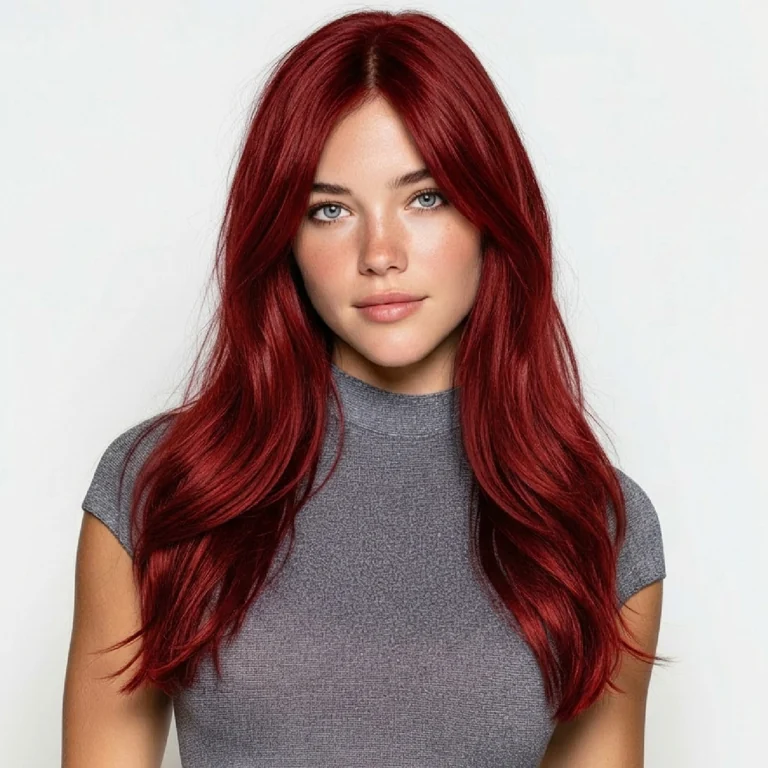
Burgundy wine red
Rich red · Same portraitShown on the same golden-blonde portrait as the silver example above, shifting only the hair to deep burgundy wine red to illustrate comparing multiple shades on one face.
Color prompt
deep rich burgundy wine-red hair with glossy dark-ruby undertones, natural shadow depth near the part, and realistic strand shine. Keep the exact same face, haircut, length, hair texture, eyebrows, skin tone, lighting, and background unchanged.
Before
After
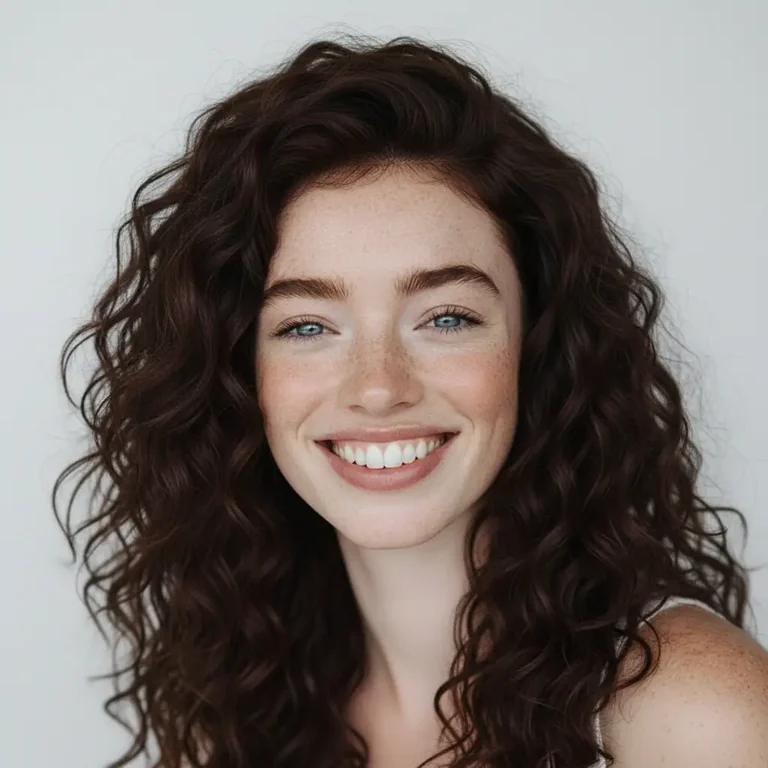
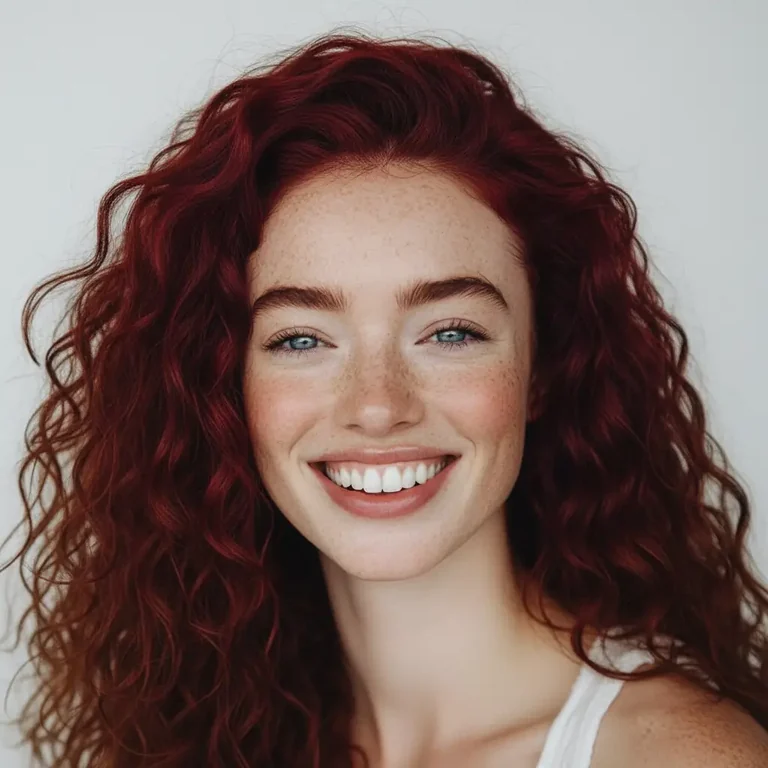
Cherry red natural curls
Curly hair · High contrastEspresso natural curls shift to vibrant cherry red while preserving individual curl spirals, freckles, smile, and eyebrows without flattening the hair volume.
Color prompt
vibrant deep cherry-red hair color applied cleanly across the natural curl pattern with rich berry highlights and natural root shadows. Keep the exact same face, haircut, length, hair texture, eyebrows, skin tone, lighting, and background unchanged.
Copy-and-paste hair color prompts to open in Custom
Each prompt below names the shade, placement, and a face-and-haircut lock clause. Click any card to load it directly into Custom, or copy the text for your stylist.
Balayage · Warm
Honey blonde balayage
Natural dark roots melting into warm honey-blonde ribbons through the mid-lengths and ends.
Copyable prompt
Change only the hair color to warm honey blonde balayage with natural dark shadow roots, soft blended mid-lengths, and sunlit golden ends. Keep the exact same face, haircut, length, hair texture, eyebrows, skin tone, lighting, and background unchanged.
Highlights · Face-framing
Caramel money piece
Bright caramel face-framing front pieces paired with subtle warm highlights over brunette hair.
Copyable prompt
Add bright warm caramel money-piece face-framing highlights along the front hairline and subtle caramel babylights through the brunette base. Keep the exact same face, haircut, length, hair texture, eyebrows, skin tone, lighting, and background unchanged.
Dark to light · Cool
Cool ash blonde (no brass)
Neutral-cool ash blonde with misty beige lowlights and soft roots to avoid orange or yellow tones.
Copyable prompt
Change only the hair color to cool neutral ash blonde with soft natural shadow roots and delicate beige-ash strand dimension, avoiding warm yellow or orange brassiness. Keep the exact same face, haircut, length, hair texture, eyebrows, skin tone, lighting, and background unchanged.
Ombre · Low upkeep
Dark-to-chestnut ombre
Deep espresso roots graduating smoothly into warm chestnut-brown ends with natural shine.
Copyable prompt
Apply a soft dark espresso to warm chestnut-brown ombre fade starting below the cheekbones with natural glossy strand movement. Keep the exact same face, haircut, length, hair texture, eyebrows, skin tone, lighting, and background unchanged.
Gray transition · Soft
Natural gray root blending
Salt-and-pepper silver blending designed for previewing a natural grow-out from dyed brown hair.
Copyable prompt
Blend the hair into natural salt-and-pepper silver gray with soft charcoal lowlights and seamless gray roots so it looks like a natural grow-out. Keep the exact same face, haircut, length, hair texture, eyebrows, skin tone, lighting, and background unchanged.
Dark gloss · Solid
Glossy jet black
Rich blue-black or neutral jet-black shine with visible strand reflections rather than flat darkness.
Copyable prompt
Change only the hair color to rich glossy jet black with subtle natural light reflections along the hair waves and soft hairline edges. Keep the exact same face, haircut, length, hair texture, eyebrows, skin tone, lighting, and background unchanged.
Is this AI hair color changer free, or does it need sign-in?
The AI hair color changer on Consistent Character AI is not free to generate: every color preview costs 5–9 credits after signing in, and the current 1 signup credit does not cover one run. Browsing all before-and-after pairs and copying the hair color prompts is free without signing in, and downloading a finished PNG adds no extra fee and no visible site watermark.
From zero credits, the lowest purchase that covers a full generation is the one-time Trial Pack ($5 for 10 credits), which covers 2 Fast try-ons ($2.50 per image at that pack rate) with no subscription. If you specifically want a free tool with no sign-up or server upload, public browser-based tools such as DrawCue (12 shades + ombré, free no watermark) and WaveSpeed AI (free on-device color filter) run locally at $0, as summarized in the comparison table below.
Can an AI hair color changer do balayage, highlights, and dark-to-blonde previews?
Yes. This AI hair color changer supports multi-dimensional salon techniques—including copper balayage, honey blonde balayage, caramel money-piece highlights, ombre fades, and shadowed roots—rather than applying one flat tint over your entire head. Copper balayage and Platinum blonde are built-in presets, while Custom accepts detailed placement prompts plus an optional hair color reference photo.
Keep in mind that an AI preview is a visual reference, not a real bleaching formula. Going from naturally black or dark brown hair to cool platinum blonde or silver gray often requires multiple salon lightening sessions, toner upkeep, and healthy hair elasticity, whereas an image model renders the target look in one pass without measuring underlying warm pigment or prior box dye.
How do you keep your face, eyebrows, and curls unchanged when changing hair color?
Generative hair color editors can subtly shift faces, stain eyebrows, or relax curls because they redraw the portrait rather than masking pixels. To give the model the cleanest reference, upload a sharp, eye-level portrait in soft natural daylight without beauty filters, sunglasses, or hats, and keep your hair separated from busy backgrounds.
Our prompt explicitly instructs the model to preserve your exact face, eyebrows, eyelashes, curl pattern, hair length, clothes, and background, and to render individual strand highlights instead of a painted color block. If a dark-to-platinum preview leans brassy yellow in Custom, add terms like "cool neutral ash tone, no yellow or orange brassiness, natural shadow roots" or step up to HD or Studio quality; minor facial drift can still occur.
How does an AI hair color editor compare to brand virtual try-on tools?
Hair dye brands such as Madison Reed, L’Oréal, and Garnier offer free camera or photo try-on tools designed to match their own box-dye shade catalogs, making them convenient when buying a specific boxed kit. A generative AI hair color editor is not tied to one brand’s SKU list, so you can test custom balayage, money-piece highlights, pastel fashion colors, or a reference photo from a stylist.
On-device browser filters (such as DrawCue or WaveSpeed AI) are fast, free, and never upload your selfie, but pixel recoloring struggles with dramatic dark-to-platinum lifts or hand-painted balayage placement. Server-side generative AI edits handle complex multi-tone color shifts more naturally, at the cost of per-image credits and uploading your photo to hosted processing.
Pricing, credits and hair color tool comparison
Hair color changer pricing is 5–9 credits per 3:4 PNG ($2.50–$4.50 at the $5 for 10 credits pack rate), with one-time credit packs available without a subscription. Studio uses the model’s high-detail setting at 1536 × 2048, so it costs more credits than Ultra HD despite fewer pixels.
| Quality | Pixels | Credits | Pack-rate equivalent |
|---|---|---|---|
| Fast | 768 × 1024 | 5 | $2.50 |
| HD | 1536 × 2048 | 7 | $3.50 |
| Ultra HD | 2480 × 3312 | 8 | $4.00 |
| Studio | 1536 × 2048 | 9 | $4.50 |
| Feature | Details |
|---|---|
| Free access | Browse examples and copy prompts free without signing in. Eligible new accounts get 1 signup credit; one Fast try-on needs 5 credits. |
| Generation | Sign in with enough credits. HD, Ultra HD, and Studio require an active subscription or eligible paid credits. |
| Download | One vertical 3:4 PNG per try-on. No separate download fee. |
| Watermark | No visible watermark added by this site. |
| Processing | Works online in mobile and desktop browsers; uploaded photos are processed on our server via a hosted image model. |
Consistent Character AI is our own tool; the other four services below are independent products with their own accounts, privacy rules, and pricing. Every figure below comes from their public pages (Checked 2026-11-23).
| Tool | Free access | Paid price | Watermark | Output |
|---|---|---|---|---|
| Consistent Character AI | 1 signup credit on signup (below 5-credit Fast run) | 5–9 credits per 3:4 PNG; one-time Trial Pack $5 for 10 credits | No added visible site watermark | Generative AI 3:4 PNG in browser (balayage/shade presets, custom prompt, optional reference) |
| DrawCue | Free with no sign-up or usage limit | $0 (free browser tool) | No watermark | On-device browser PNG (12 preset shades, ombré, custom color) |
| WaveSpeed AI | Free with no sign-up and no upload | $0 for color changer (separate AI generators pay-as-you-go) | No watermark | On-device browser color filter (hair, eyes, and lips) |
| AIChangeHair | 10 signup credits + 10 daily claim credits (= 1 1K edit/day) | $14.99/mo, $6.99/mo billed yearly ($83.88 first year), or packs from $9.90 (300 credits) | Not published on pricing page | Generative AI 1K / 2K / 4K hair color & hairstyle edits in browser |
| Krea | Free Krea account (100 compute units/day on Free plan) | Paid subscriptions from $9/month on pricing page | Not published on hair color tool page | Prompt-based generative AI hair color edits in browser |
What this virtual hair color try-on can’t do
Consistent Character AI’s hair color changer edits one person in one still photo at a time. It does not offer a live webcam AR filter, video hair color replacement, multi-shade batch grids in one click, or a chemical salon color formulation. Because generative editing cannot inspect hair porosity, previous box dye, or bleach lift limits, real-life dye results—especially dark-to-platinum or vivid pastels—may differ from the preview. Always review the image for subtle face, eyebrow, or lighting shifts before sharing or showing it to a colorist.
Want to test a new haircut or bangs alongside color? Try the AI Hairstyle Changer, or compare six cuts matched to your face shape in What Hairstyle Suits Me.
Hair color changer FAQ
Can men use this hair color changer on short hair or black hair?
Yes. The Platinum blonde preset is shown on short black men’s hair above, and Custom works for men’s buzz cuts, fades, curly tops, frosted tips, ash silver, or jet black. The prompt asks the model to recolor only the scalp hair and leave eyebrows, beard, and stubble untouched, though results vary by lighting and photo clarity.
Can I upload a hair color reference photo to match a specific shade?
Yes. Select Custom, write a short brief describing the shade and placement (such as warm copper balayage or cool ash highlights), and attach a reference photo in the optional hair color reference slot. The prompt tells the model to borrow only the hair dye shade, undertone, and highlight placement from the second image and never its face or haircut.
Does it work on iPhone and Android without downloading an app?
Yes. The tool runs online in mobile Safari on iPhone, Chrome on Android, and desktop browsers with no app install. You upload a photo from your camera roll, sign in to generate, and save the finished 3:4 PNG straight to your device.
How are uploaded selfies stored, and are photos kept private?
Only upload photos of yourself or someone who gave permission, and confirm the consent checkbox before generating. Uploaded photos and generated outputs are stored on our cloud storage as unlisted files so the hosted image model can read them; anyone who holds a direct storage link could open it, so avoid sensitive photos. Preview and download routes check account ownership.