
GIF Face Swap — Put Your Face Into Any GIF
GIF face swap by Consistent Character AI asks a video model to put the face from your photo onto the person in a GIF, following its motion and loop.
Your face, the original GIF
GIF up to 30 s and 20 MB, or MP4 / MOV of 5 s or more. Face 1 goes on the most prominent person; add Face 2 only for a second person. Clear, front-facing photo · JPG, PNG or WebP, 10 MB, 300–6000 px.
The frame follows your source clip. Seedance 2.5 is asked to edit only the face in every frame.
0/800
Purchased credits are required; signup credits alone do not start a GIF swap. See plans. No site watermark.
Your GIF as a clip
The server measures and cuts the selected segment before generation.
This GIF face swap is for people who want their own face, or a friend's, in a reaction GIF or meme for a group chat, Discord or a post. Upload your own GIF and one clear face photo; you get a looping GIF and an MP4 back with no added watermark. It is a paid tool: a swap starts at 33 credits (about $1.54) for a 5-second 480p clip, and GIFs can be up to 30 seconds and 20 MB.
How to face swap a GIF
The swap needs two things from you: the GIF you want to change and a photo of the new face. Your browser turns the GIF into a short looping clip, the prompt asks the Seedance 2.5 video model to change only the face in every frame and to leave hair, clothes, background and motion as they are, and you download the result as a GIF or MP4. How close the new face looks depends on the GIF and the photo.
Upload your GIF
Choose any animated GIF up to 30 seconds and 20 MB, or an MP4 or MOV of 5 seconds or more. Short GIFs are looped in your browser to fill the clip.
Add the new face
Upload one clear, front-facing JPG, PNG or WebP. Add a second face only if a second person should change, and name who changes in the optional note.
Generate and download
Pick 480p, 720p or 1080p and a 5, 10, 15 or 30-second clip, check the credits on the button and generate. Download the finished swap as a looping GIF or an MP4.
Before and after: face-swapped GIFs
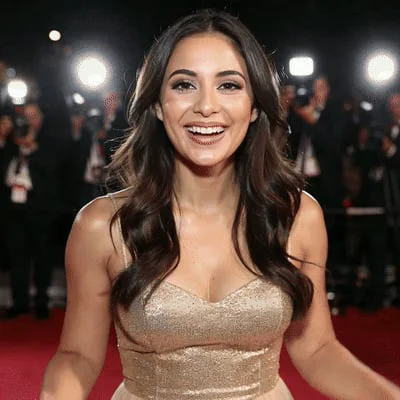
Each example puts an original GIF next to a face-swapped version of it, so you can compare the two loops side by side. In all three pairs the face shows a different person, while the expressions, head movement, hair, clothing and background match the original. They show the kind of edit this tool requests; your own result depends on the GIF and the photo you upload.
Original GIF
Face swapped
Talking selfie, new face
2.5-second looping selfie GIF: a different face, with the same smile, head tilt and plant-filled room as the original.
Original GIF
Face swapped
 Café reaction with a face photo
2.5-second café GIF swapped with one front-facing portrait; the laugh, coffee cup and bob haircut match the original.
Original GIF
Face swapped
Red carpet wave
2.3-second red carpet GIF: a different face waves at the cameras, with the same hands, dress and flashing lights.
Is this GIF face swap free, and does it add a watermark?
GIF face swap on Consistent Character AI is not free: every swap uses purchased credits, starting at 33 credits (about $1.54) for a 5-second 480p clip. In return, no watermark or logo is added to the GIF or MP4, and downloads cost nothing extra. Uploading a GIF and previewing it as a clip is free. There is no signup credit allowance; a credit purchase is required. The $5 trial pack has 10 credits, which is below the 33-credit minimum.
Can I swap two faces in one GIF?
Yes, up to two. Face 1 goes on the most prominent person in the GIF and Face 2 on the next one. When the GIF has several people, write who should change in the optional note, for example "Face 1 on the man in the blue shirt on the right"; everyone you do not mention is asked to stay unchanged. The model follows the note but can still pick the wrong person when faces are small or overlap, so check the result before sharing it.
Need more than two people changed in a still picture instead? Use Multiple Face Swap for group photos.
Can I face swap an MP4 video and get a GIF back?
Yes. The uploader also takes MP4 and MOV clips of 5 seconds to 5 minutes; you choose which 5 to 30-second window to swap. Every finished swap can be downloaded as an MP4 or converted to a looping GIF in your browser, so a short meme clip can end up as a GIF for chats. GIF downloads are made at 12 frames per second and up to 480 pixels wide to keep the file small; use the MP4 when you need full quality.
Credits for a face swap video or GIF
Every swap runs on Seedance 2.5 and is charged per clip length and resolution, as listed below. The credits include both the uploaded clip and the generated clip, because the model is billed for both. USD figures use the eligible first-purchase Max Monthly rate ($55.93 for 1,200 credits); the regular 100-credit pack costs $14.90, so credits bought that way cost more.
| Clip length | Resolution | Credits | Approx. USD |
|---|---|---|---|
| 5 seconds | 480p | 33 | $1.54 |
| 5 seconds | 720p | 71 | $3.31 |
| 5 seconds | 1080p | 173 | $8.06 |
| 10 seconds | 480p | 65 | $3.03 |
| 10 seconds | 720p | 141 | $6.57 |
| 10 seconds | 1080p | 344 | $16.03 |
| 15 seconds | 480p | 96 | $4.47 |
| 15 seconds | 720p | 211 | $9.83 |
| 15 seconds | 1080p | 516 | $24.05 |
| 30 seconds | 480p | 192 | $8.95 |
| 30 seconds | 720p | 421 | $19.62 |
| 30 seconds | 1080p | 1031 | $48.05 |
| Free preview | Uploading a GIF, converting it and watching it as a clip is free. |
|---|---|
| Signup credits | There is no signup credit allowance; a credit purchase is required. |
| Cheapest swap | 33 credits for 5 seconds at 480p (about $1.54); 10 seconds at 480p is 65 credits. |
| Watermark | None added to the GIF or MP4. |
| Downloads | GIF (12 fps, up to 480 px) and MP4 downloads cost no extra credits. |
| App needed | No. It runs in current Chrome, Edge and Safari on desktop or phone. |
When a face change in a GIF can go wrong
The model redraws the face in every frame, so this tool cannot promise a perfect likeness or a pixel-identical background. The prompt asks for the new face to follow the original expressions and head angle, but results vary with the GIF and photo. Tiny faces, fast head turns, faces covered by hands or hair, and cartoon or animal faces give the model less to work with. Check the whole loop before you share it.
- GIF input: up to 30 seconds and 20 MB, converted in your browser (current Chrome, Edge or Safari). MP4 or MOV input: 5 seconds to 5 minutes, up to 50 MB.
- Face photo: one clear face, JPG, PNG or WebP, up to 10 MB and 300–6000 pixels per side. Up to two faces per swap.
- The swapped clip is 5, 10, 15 or 30 seconds. A 2-second GIF is looped to fill 5 seconds, so you pay for at least 5 seconds.
- Only the face is changed. Hair, body and clothes stay from the GIF; for a whole new look use AI Character Swap.
- No live camera swap, no batch processing and no sound: GIFs are silent, and MP4 sound is kept from the source, not cloned.
- Failed or rejected generations return your credits. If the model delivered a video but our final export failed, support finishes the saved video instead of refunding.
FAQ
Do I need an app to swap a face in a GIF?
No download is needed. The tool works in the browser on an iPhone, Android phone or computer, as long as it is a current Chrome, Edge or Safari. Saving the GIF on a phone works like saving any download, and you can then share it in iMessage, WhatsApp or Discord.
Can I use a long GIF?
GIFs up to 30 seconds and 20 MB are accepted, and you pick a 5, 10, 15 or 30-second window to swap. Longer clips cost more credits, so trim a long GIF to the moment you need before uploading.
What happens to my GIF and face photo?
Your files are sent to the video model only to make your swap. Task history, previews and downloads are tied to your signed-in account, but the processing files use unlisted direct storage links, and anyone who obtains such a link may be able to open it. Upload only photos you are comfortable sharing with a processing provider.
Can I post a face-swapped GIF?
Use faces you have permission to use, such as your own or a friend who agrees, and do not use a swap to mislead people or embarrass someone. A movie or TV GIF stays someone else’s footage after the swap, so buying credits does not give you rights to it.
Updated