
This weight gain filter is for fun before-and-after posts, memes and what-if comparisons: upload one photo and get a 3:4 PNG of the same person with more weight on the face, body or both. The current 1-credit signup allowance is below one generation. Each image costs 5–9 credits, Fast is $2.50 at the $5 pack rate, and downloads carry no added watermark.
How the AI Fat Filter Works
Upload one clear photo, choose how much weight to add, and pick an image quality. Subtle, Balanced and Strong change the whole body by increasing amounts. Custom lets you describe the change yourself, for example a chubby face and double chin with the body left as it is. Sign in to generate one PNG, then compare the face, hands and clothes with your original before you download or share it.
1. Upload one clear photo
JPG, PNG or WebP up to 10 MB and 2048 pixels per side. A front-facing waist-up or full-body shot gives the model the most to work with.
2. Choose the weight level
Subtle, Balanced or Strong for the whole body, or Custom to describe it in your own words, such as a face-only double chin.
3. Compare and download
Check the face, hands and outfit, then save one 3:4 PNG: 768×1024, 1536×2048 or 2480×3312 pixels depending on quality.
AI Fat Filter Before and After Examples
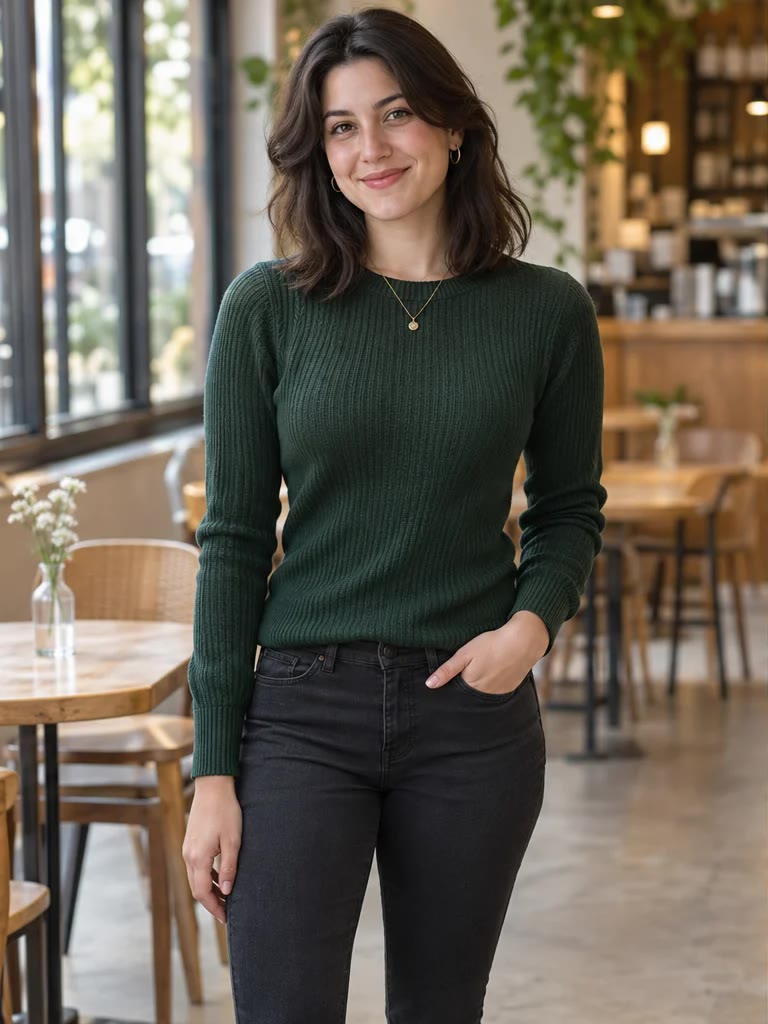
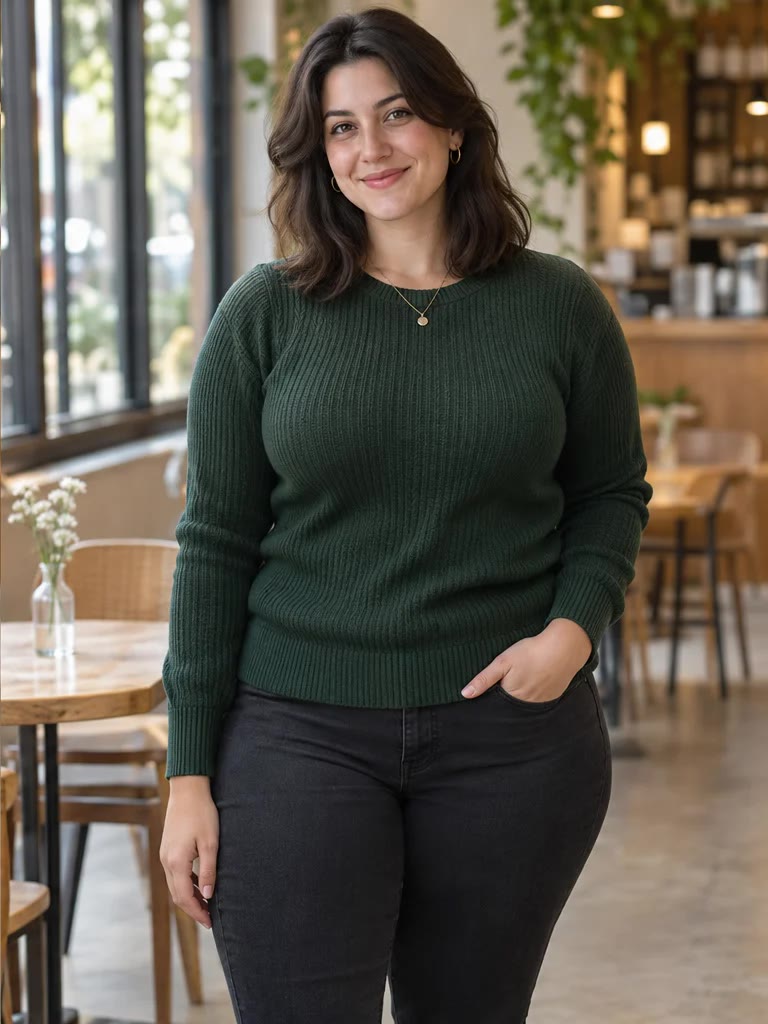
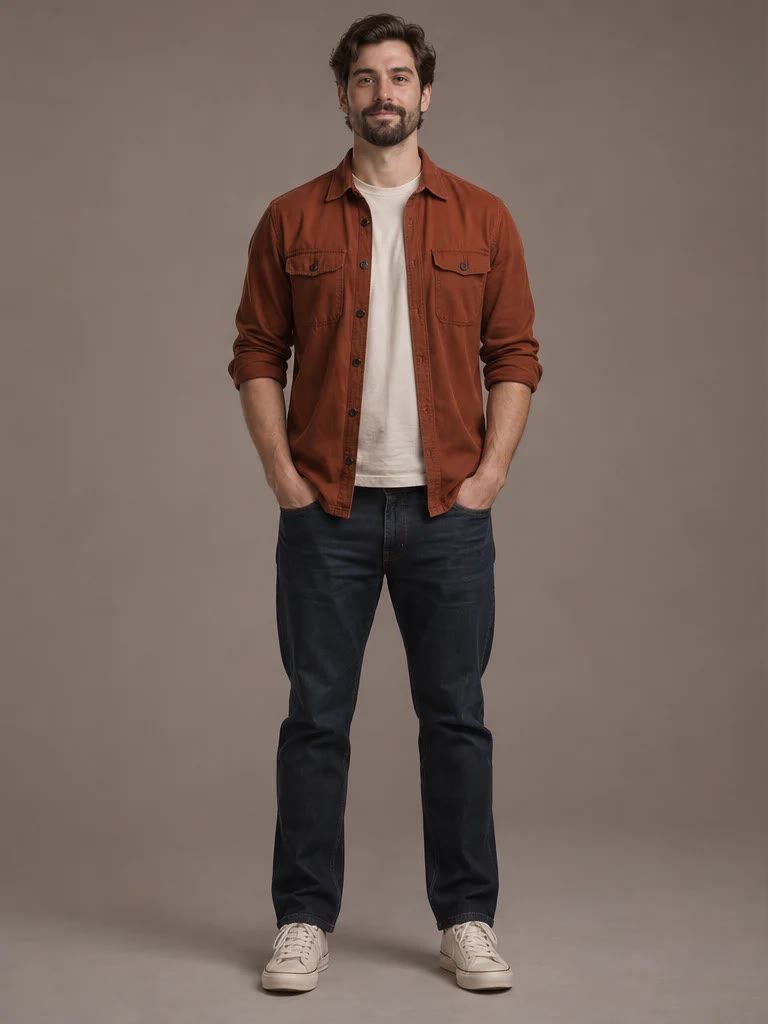
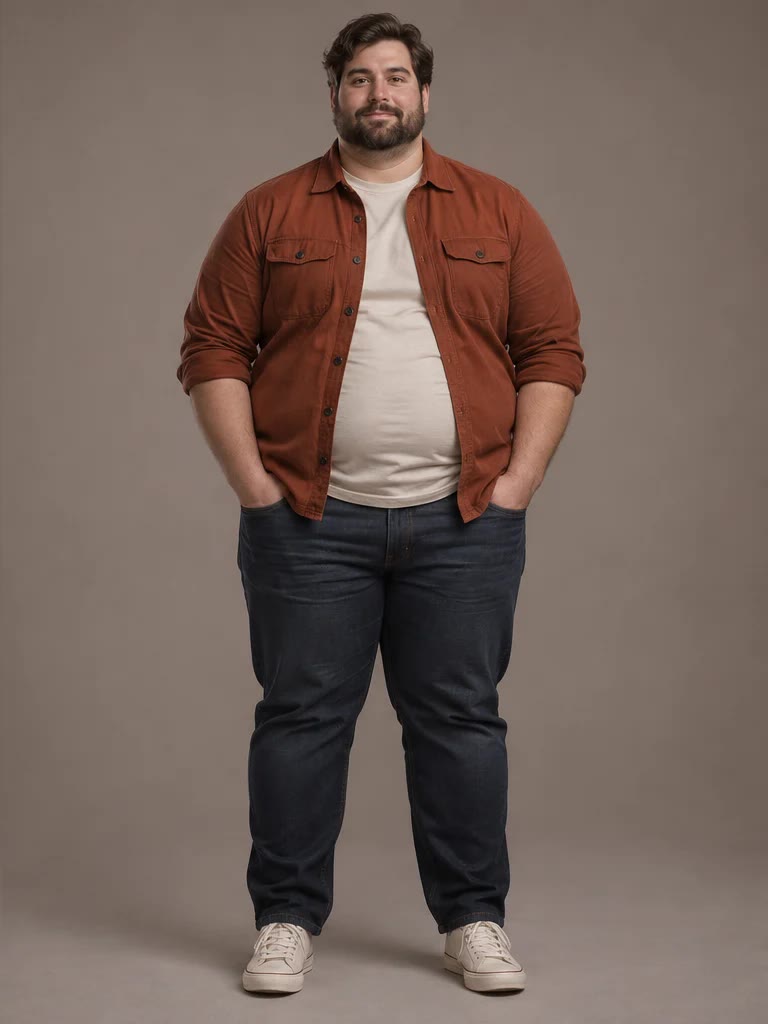
Each pair shows an original portrait of a fictional adult next to a heavier version, illustrating how far apart subtle, balanced and strong weight gain look. In these pairs the outfit, pose, hairstyle and room match while the face, arms, belly and legs are fuller. They illustrate possible looks; your photo and selected level determine the result.

Original photo

With AI fat filter
Subtle weight gain
A man in a navy shirt and khakis gains a little weight around the face and waist; the living room is unchanged.
Original photo
With AI fat filter
Balanced, face and body
A woman in a green sweater in a café: fuller cheeks, arms and hips, same pose with a hand in her pocket.
Original photo
With AI fat filter
Strong weight gain
A bearded man in a rust shirt with a much rounder face, larger belly and thicker legs, same studio backdrop.
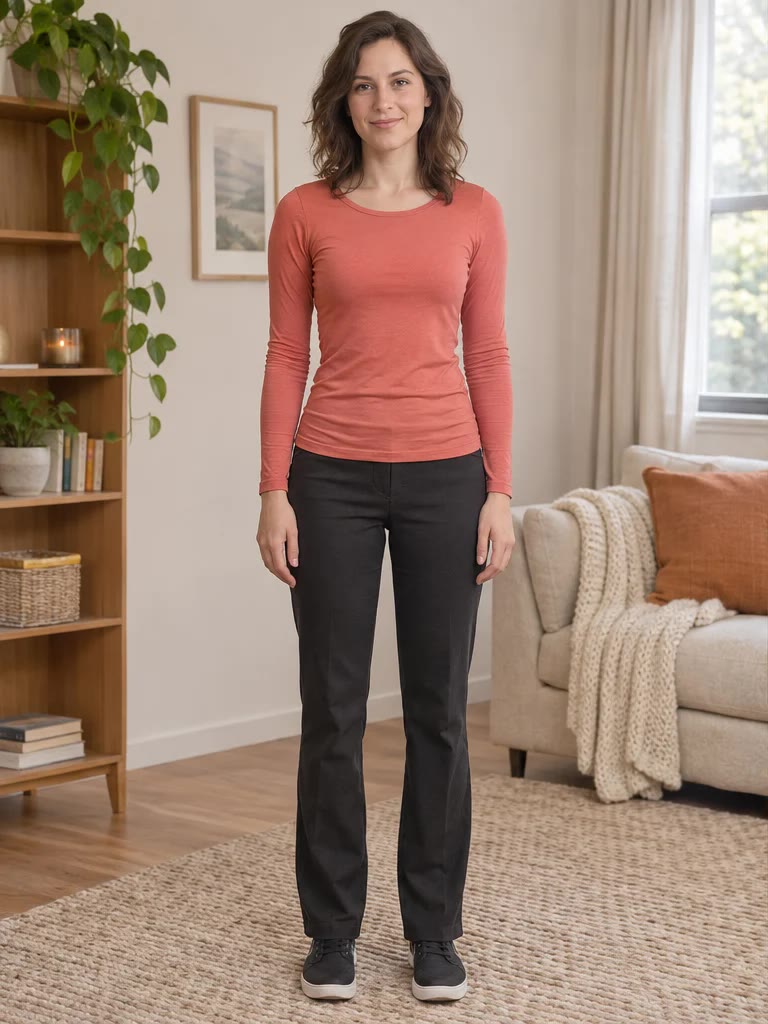
Original photo
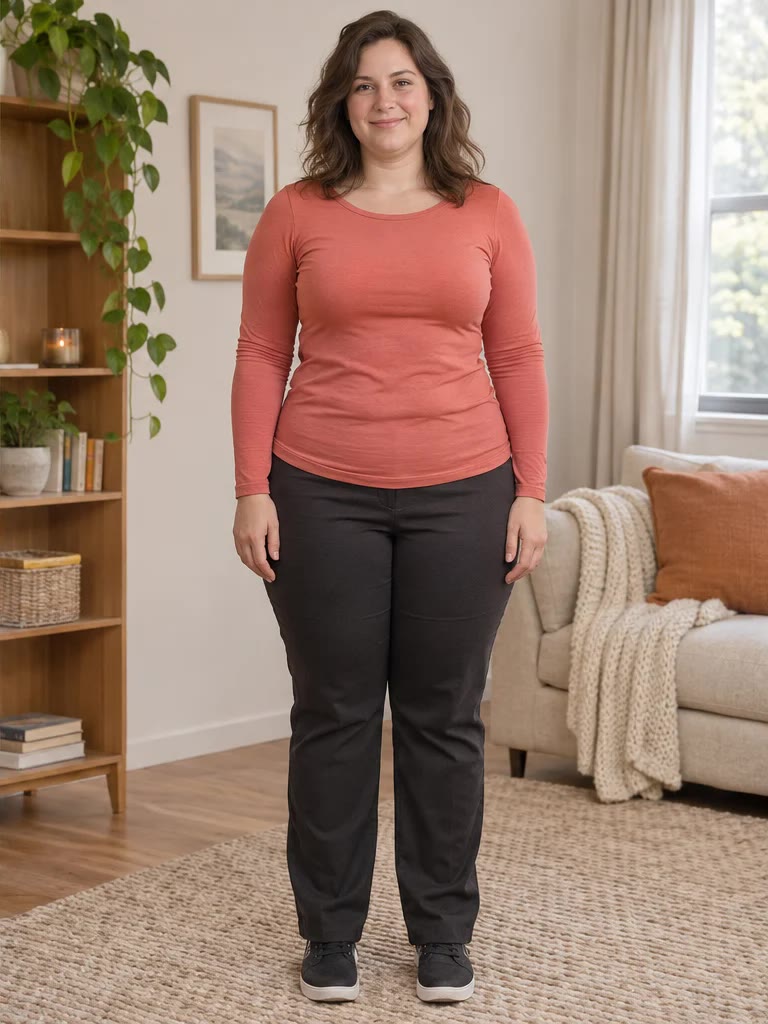
With AI fat filter
Balanced, full-length
A woman in a coral top at home: a fuller face, waist and legs, with the same bookshelf and sofa behind her.
Is This AI Weight Gain Filter Free Online?
This AI weight gain filter is not free with the current signup allowance. Uploading, viewing examples and choosing settings cost nothing, but each generated image costs at least 5 credits and needs a signed-in account. The current 1-credit signup allowance is below one generation. From a zero balance, the smallest purchase is the one-time $5 pack with 10 credits, with no subscription or card on file afterwards. Finished PNGs have no added watermark and no extra download fee.
Can AI Make Someone Look Fat Without Changing Their Face?
Yes, within limits. The prompt asks the model to keep the person’s eyes, expression, skin tone, hairstyle, pose, outfit and background, and to change only the amount of weight. How recognizable the result looks varies with the model and the photo; the face itself gets rounder, so it is never pixel-identical, and small details can drift. Only edit photos of people who agreed to it, and do not present the result as a real photo of them.
Is There a Fat Filter App for iPhone or Android?
You do not need to install a fat filter app. This page works in Safari, Chrome and other current mobile browsers: pick a photo from your camera roll, choose a level, and save the PNG back to your phone. Store apps that make you look fat work as live camera effects or local editors; this tool edits a photo you already have and needs an account and credits to generate.
Can I Use It as a Fat Face Filter Only?
Yes. Choose Custom and write something like “only my face: fuller cheeks and a double chin, keep my body and clothes”. The tool then asks the model to keep the shoulders, torso, arms and the fit of the clothes exactly as they are, which suits close-up selfies. Results vary with the model and the photo, and the body may still change because the model redraws the whole image.
AI Fat Filter Pricing & Credits
One AI fat filter image costs 5, 7, 8 or 9 credits depending on quality. The one-time $5 Trial Pack includes 10 credits, enough for two Fast images from zero balance, so Fast works out to $2.50 per image at that rate. Higher-quality choices require eligible paid credits. The tables below list exact sizes, the signup allowance, watermark policy and what happens when a request cannot finish.
| Quality | Output | Credits | Pack equivalent |
|---|---|---|---|
| Fast | 1K · PNG | 5 | $2.50 |
| HD | 2K · PNG | 7 | $3.50 |
| Ultra HD | 4K · PNG | 8 | $4.00 |
| Studio | 2K · PNG | 9 | $4.50 |
| Item | What is included |
|---|---|
| Signup allowance | The current 1-credit signup allowance is below one generation. |
| Smallest purchase | $5 once · 10 credits · no recurring subscription |
| Download | One 3:4 PNG; no extra download fee |
| Watermark | No added visible site watermark |
| Access | Mobile or desktop browser, no app; sign-in required to generate |
| Unfinished requests | Confirmed provider failures return credits; saving a delivered result is retried without another generation charge |
What the AI Fat Filter Cannot Do
The filter redraws the picture rather than stretching selected pixels, so hands, clothing patterns, jewelry and background edges can change even when the prompt asks to keep them. Results vary with the model and the photo, and the prompt cannot correct a face that is too small, hidden or turned away. There is no kilogram slider, body-part brush or slimming mode, and it outputs a still PNG, not a video. It is entertainment, not a health or weight prediction.
AI Fat Filter FAQ
These answers cover the questions people ask after trying a weight gain filter once: whether it works on video files, what happens with group photos, whether the result predicts real weight gain, and whether it can go the other way. Free terms, phone use, face-only edits and keeping someone recognizable each have their own section above.
Can I use the fat filter on an MP4 video?
No. This page only edits still photos and returns a PNG. To use it with a clip, save a frame as an image, run it here, and add the result to your own video edit.
Will it make everyone in a group photo look fat?
The prompt asks for the same change on every visible person while keeping each one in place. How evenly that works varies with the model and the photo, so check every face in the result.
Does it predict how I would look after gaining weight?
No. The result is an AI illustration for fun and creative use. Real weight gain depends on your body, age and health, and this tool does not measure or forecast any of that.
Can it make me look slimmer instead?
No, this page only adds weight. Fat-to-fit or weight-loss previews need a different prompt and are not offered here.
More Body and Photo Tools
Body Shape Visualizer previews small changes to waist, hips, shoulders or legs instead of overall weight. Full Body AI Generator extends a half-body photo into a head-to-toe picture, which gives this filter more of the body to work with. Each tool has its own credit costs.