
This AI eye bag remover edits a portrait photo into one 3:4 PNG for a selfie, profile picture, or headshot. Choose a gentle or more noticeable under-eye correction, then compare eyelids and skin detail before sharing; generated edits can change details. Each image costs 5–9 credits, from $2.50 using the $5 pack of 10 credits; the current 1-credit signup allowance is short of the 5-credit minimum. Output ranges from 1K to 4K, without an added visible watermark.
How the eye bag remover photo editor works
Upload a sharp portrait where the under-eye area is visible, choose the correction and image quality, and generate one edited photo. This is a server-based image edit rather than a brush tool: it sends your photo for processing and asks the model to keep the rest of the portrait. Review the result against the original before downloading or sharing it.
1. Upload one portrait
Use JPG, PNG, or WebP, up to 10 MB and 2048 pixels per side. A single clear face works best.
2. Choose the correction
Gentle aims for a light reduction. Natural asks for a clearer correction. Custom requires your own under-eye editing brief.
3. Compare and download
Check eyelids, shadows, and pores against your original. Download the PNG if you like the result; keep your original too.
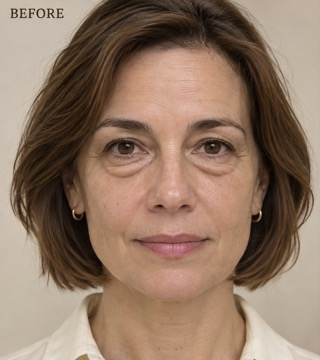
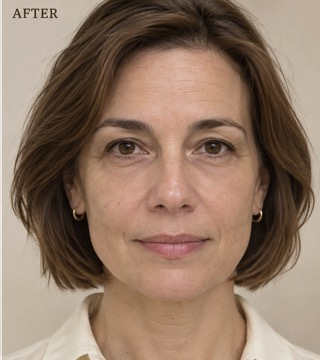
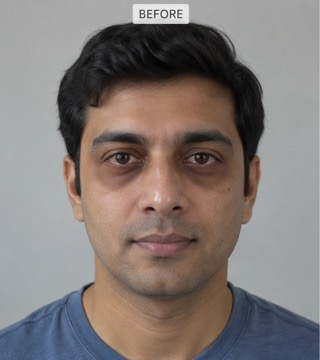
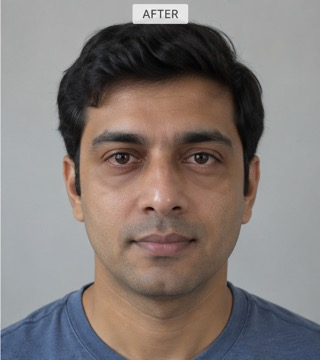
Eye bag remover before-and-after photos
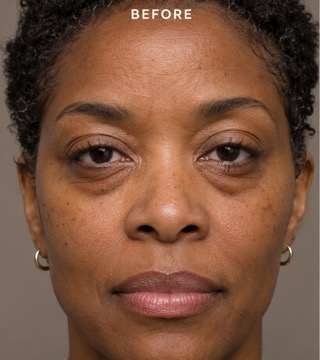
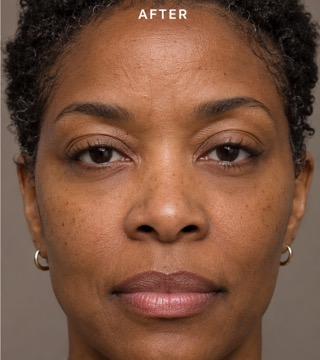
Compare each original portrait with its edited version, then look at the same under-eye area enlarged below. The pairs show a reduction in shadows and visible bags, along with the texture and facial details you should inspect. These examples illustrate possible visual changes; they do not guarantee identical results or pixel-for-pixel preservation in your own portrait.
Original
Retouched
Under-eye detail · Original
Under-eye detail · Retouched
Softening a pronounced under-eye contour
A short-haired portrait with less contrast between the under-eye area and cheek. Compare the lower eyelids and remaining skin texture.
Original
Retouched
Under-eye detail · Original
Under-eye detail · Retouched
Reducing dark under-eye shadows
A dark-haired portrait with a brighter under-eye area. Check the gaze and cheek shading as well as the reduction in shadows.
Original
Retouched
Under-eye detail · Original
Under-eye detail · Retouched
Checking texture in a close portrait
A close portrait with softer under-eye shadows. The enlarged views help you compare skin detail and spot unintended changes.
Is this eye bag remover online free?
The 1-credit signup allowance does not cover the 5-credit minimum. On this site, browsing the examples and choosing settings is free, but producing a personal edit costs 5 credits on Fast and up to 9 on Studio. A $5 pack includes 10 credits; it is a pack purchase, not a $2.50 single-image checkout. Sign-in is required. There is no recurring daily free quota, separate export fee, or added visible watermark.
Can I use an eye bag remover app without installing one?
You can use this eye bag remover in a phone or desktop browser without installing an app. Choose a photo from your device, select the correction and output quality, and sign in to submit it. After processing, download the PNG to your device. This is not an offline app: your photo is uploaded for processing, and a stable internet connection is needed to submit and retrieve the result.
What does the eye bag remover filter change?
The eye bag remover filter asks the model to soften visible bags, puffiness, and dark shadows below the eyes. Gentle requests a small change; Natural requests a more noticeable reduction while retaining some realistic shading. Both ask to preserve eye shape, eyelids, gaze, age, expression, skin tone, pores, freckles, and the scene. These are editing instructions rather than a hard pixel mask, so compare the generated face carefully.
Eye bag remover pricing and credits
Each submission produces one image and costs the credits shown below, regardless of which correction you choose. The dollar examples use the $5 pack of 10 credits; larger packs or subscriptions can have a different price per credit. Fast is available with sufficient credits after sign-in. HD, Ultra HD, and Studio also require paid access. A confirmed failed generation returns the original credits.
| Quality | Output | Credits | Pack-equivalent cost |
|---|---|---|---|
| Fast | 1K · PNG | 5 | $2.50 |
| HD | 2K · PNG | 7 | $3.50 |
| Ultra HD | 4K · PNG | 8 | $4.00 |
| Studio | 2K · PNG | 9 | $4.50 |
| Condition | What applies here |
|---|---|
| Signup allowance | The current 1-credit signup allowance is short of the 5-credit minimum. |
| Minimum pack | $5 for 10 credits; enough for two Fast edits at 5 credits each. |
| Download | One PNG per successful edit; no separate download charge. Output quality follows your selected tier. |
| Visible watermark | No visible watermark is added. Existing marks in the uploaded photo are not a removal target. |
| Account and payment | Sign-in and enough credits required; paid access required for HD, Ultra HD, and Studio. No card needed to browse examples. |
| Failed or unconfirmed request | Confirmed failures refund credits. If submission is unconfirmed, check the same request instead of paying for another attempt. |
What this eye bag remover cannot do
This tool changes a photograph, not the person’s actual skin or health. It cannot treat eye bags, recover missing detail, guarantee unchanged facial features, or match the original pixel dimensions. There is no manual brush mask or batch upload: it edits one portrait at a time. Heavy blur, sunglasses, tiny faces, or harsh shadows can make results less reliable. The fixed 3:4 output may extend the background to fit.
Eye bag remover FAQ
The editor accepts one portrait and offers a fixed default correction or a custom under-eye brief. Check the upload requirements before choosing your file, and keep the original photograph so you can assess the result. The answers below explain the custom input, suitable photos, the difference from skincare products, and where your photo goes during processing.
What should I write in the eye bag remover editor’s Custom box?
Describe only the under-eye change you want, such as “reduce the shadow slightly; keep my eyelid folds and freckles.” A description is required, up to 500 characters. An optional second image can guide the local retouching look; it is not a face-swap reference.
Which eye bag remover photos work best?
Use a clear, well-lit portrait with visible eyes and under-eye skin. JPG, PNG, and WebP are accepted up to 10 MB and 2048 pixels on either side. Avoid sunglasses, motion blur, heavy beauty filters, and distant faces.
Is this eye bag remover a cream or a treatment?
No. This page is a photo editor that changes the appearance of under-eye bags in an image. It is unrelated to eye creams, patches, or medical procedures, and does not change or assess your real skin.
Where are my portrait photos sent?
Your uploads go to this site’s storage and its image-processing provider. Result viewing and downloading require the owning account, but anyone holding a direct storage link may be able to open it. This page does not promise automatic deletion after a fixed period; avoid uploading sensitive photos or photos you lack permission to edit.
Related portrait tools
For a different problem in your portrait, choose a tool that targets that task. Face Retouch offers broader blemish and tone cleanup, while AI Relight requests changes to portrait lighting. The eye bag remover keeps its instructions focused below the eyes; it does not combine all of these edits into one preset.