
Tattoo Stencil Maker is built for tattoo artists, apprentices and clients preparing a photo, sketch or tattoo reference for thermal transfer paper instead of inventing a new design. Choose Outline, Fine line, Shading or Custom to export one vertical 3:4 PNG from 768 × 1024 (5 credits, $2.50 at the $5 for 10 credits rate) up to 2480 × 3312 with no added site watermark. Eligible new accounts receive 1 signup credit; one Fast stencil needs 5 credits.
How to turn a photo into a tattoo stencil
Turning a photo, hand-drawn sketch or existing tattoo into a printable stencil takes three steps: upload a clear image, pick a line style and generate one black-on-white 3:4 PNG. Each preset adds fixed prompt instructions asking the image model to keep the original silhouette and remove gray shading, skin texture or paper grain; because AI redraws the pixels, results vary with photo clarity and should be reviewed before printing.
1. Upload a photo, sketch or tattoo reference
Add one JPG, PNG or WebP (up to 10 MB, 128–2048 px per side). Use a well-lit front portrait for memorial pieces, photograph pencil sketches flat under even daylight to avoid shadows, or crop closely around an existing tattoo design.
2. Pick Outline, Fine line, Shading or Custom
Select Outline for clean closed contours, Fine line for thin single-needle detail, or Shading for primary outlines plus shadow-mapping guides. Choose Custom to specify bold traditional lines, stipple hints or background removal, with an optional style reference.
3. Generate, inspect and prepare for transfer
Pick Fast (768 × 1024), HD (1536 × 2048), Ultra HD (2480 × 3312) or Studio, sign in and generate. Inspect facial likeness and spacing, download the PNG, clean any stray lines in Procreate if needed, then size and mirror once before thermal printing.
Workflow tip for Procreate and sketches: import the downloaded PNG onto a white canvas, set the layer blend mode to Multiply to check alignment over your original photo, erase unnecessary hair or background marks with a hard monoline brush, and lock the final centimeter width before printing.
Photo to tattoo stencil examples
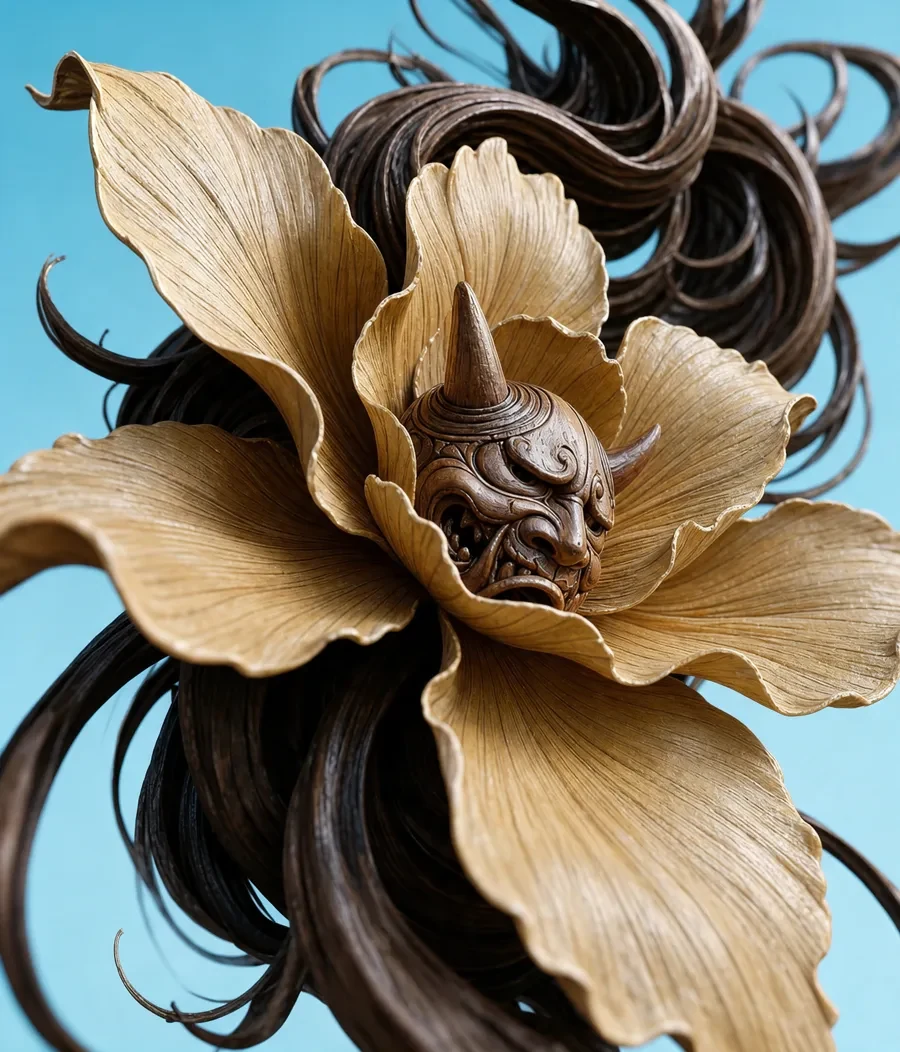
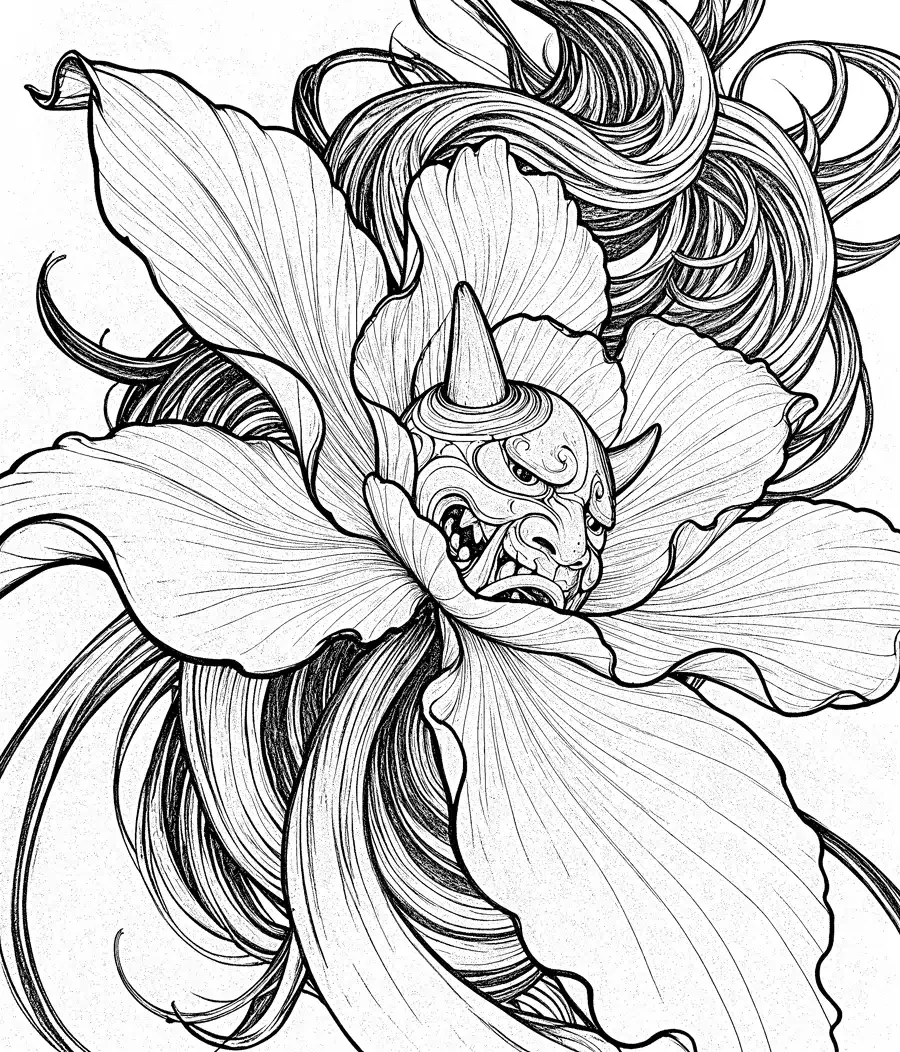
Each pair shows a reference image next to a black-and-white transfer stencil, starting with the same portrait across Outline, Fine line and Realism shadow-map treatments followed by shaded tattoo artwork and a bold-line example. Examples are shown in their original proportions (1:1, 4:5 and 3:5) so nothing is cropped, while the generator outputs one vertical 3:4 PNG per run.
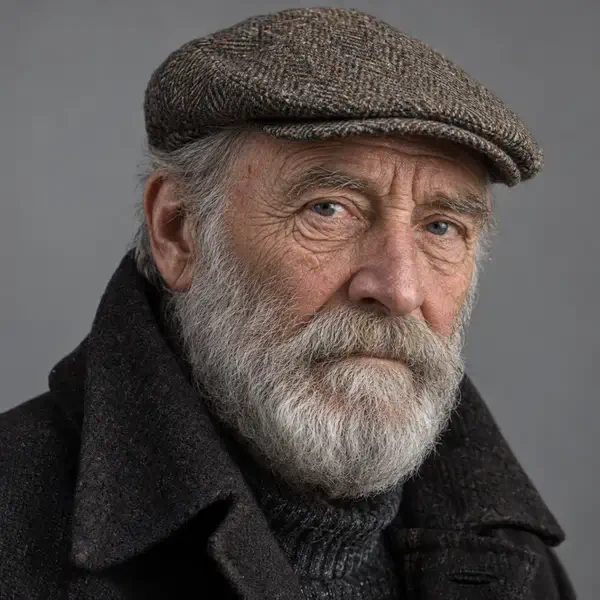
Before
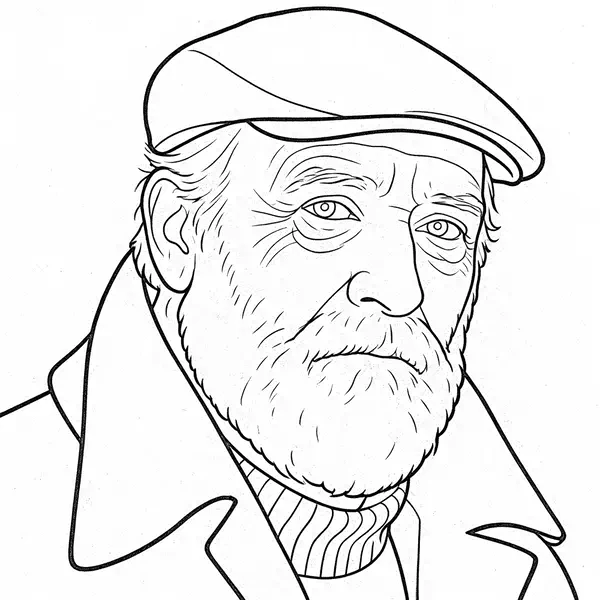
Stencil
Portrait photo to clean outline stencil
A studio portrait of an older bearded man in a flat cap becomes a simplified contour stencil: coat lapels, cap seams, nose, eyes and beard boundary appear as crisp black lines on a flat white sheet.
Before
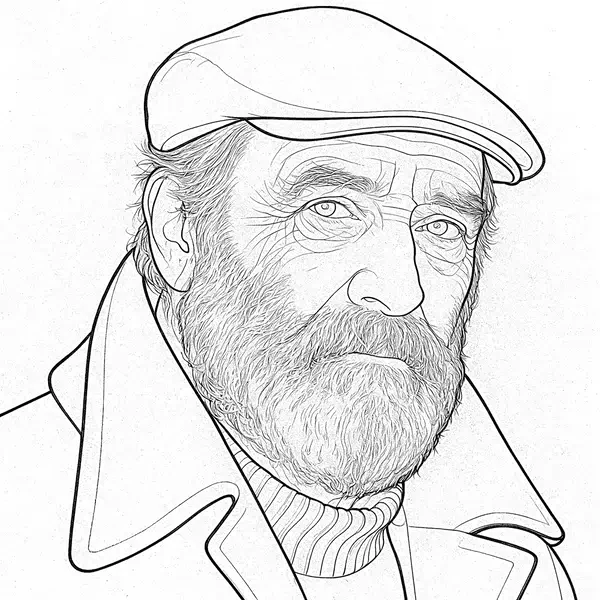
Stencil
Portrait photo to fine line stencil
The same portrait rendered with thinner, more detailed strokes for fine-line work: brow creases, eyelid folds and layered beard hair lines stay lighter and finer than a standard bold outline.
Before
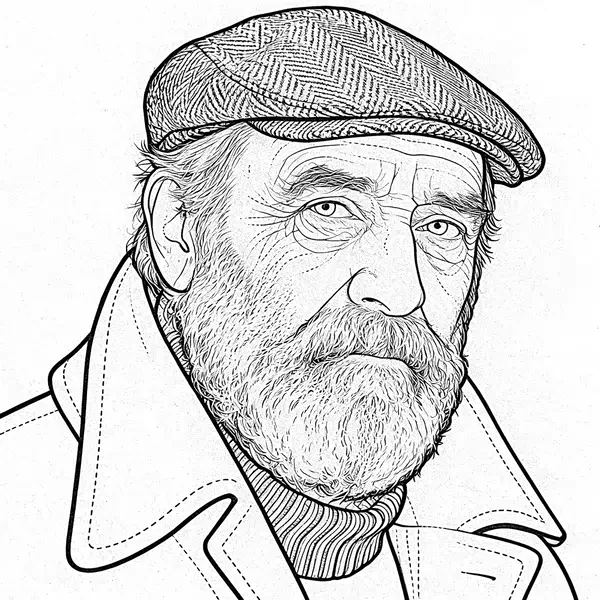
Stencil
Portrait photo to realism shadow map
The same portrait paired with shadow-boundary cues and tweed cap texture lines, giving a black-and-gray realism artist clear contour markers without solid gray wash.
Before
Stencil
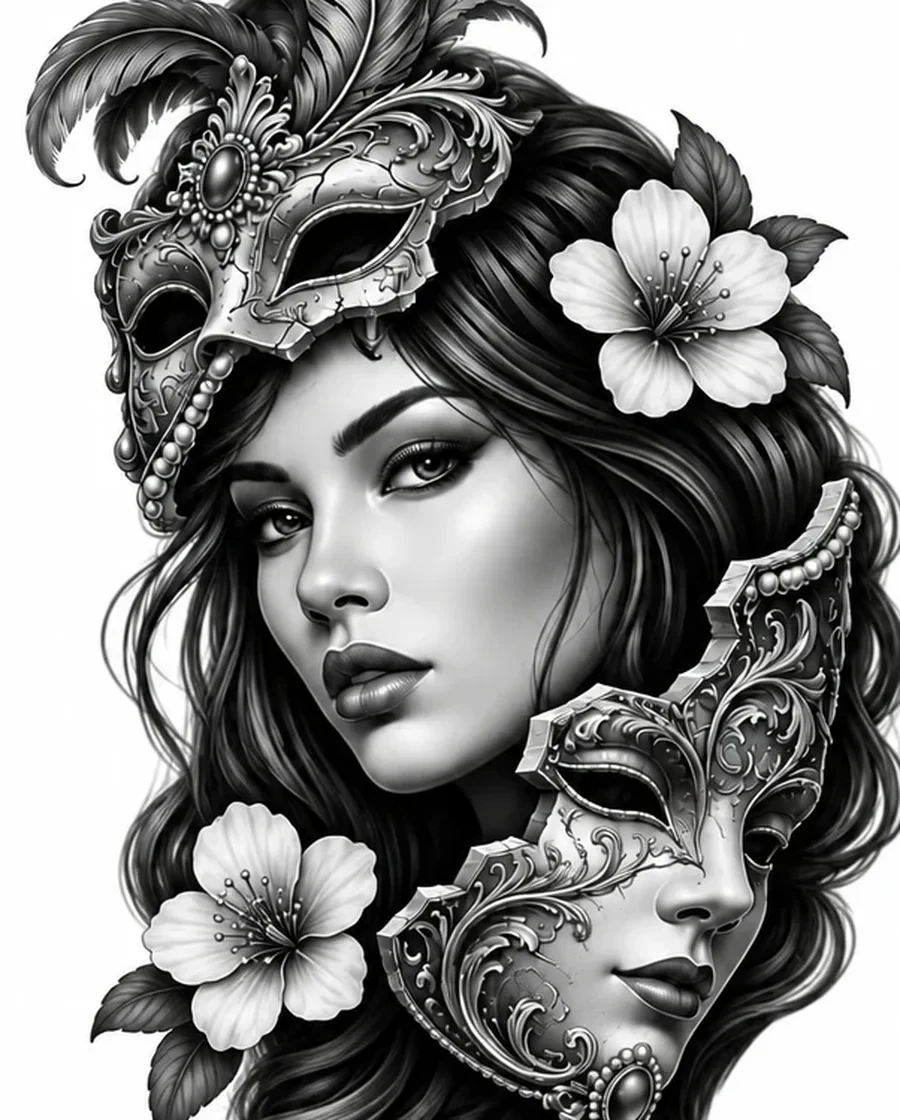
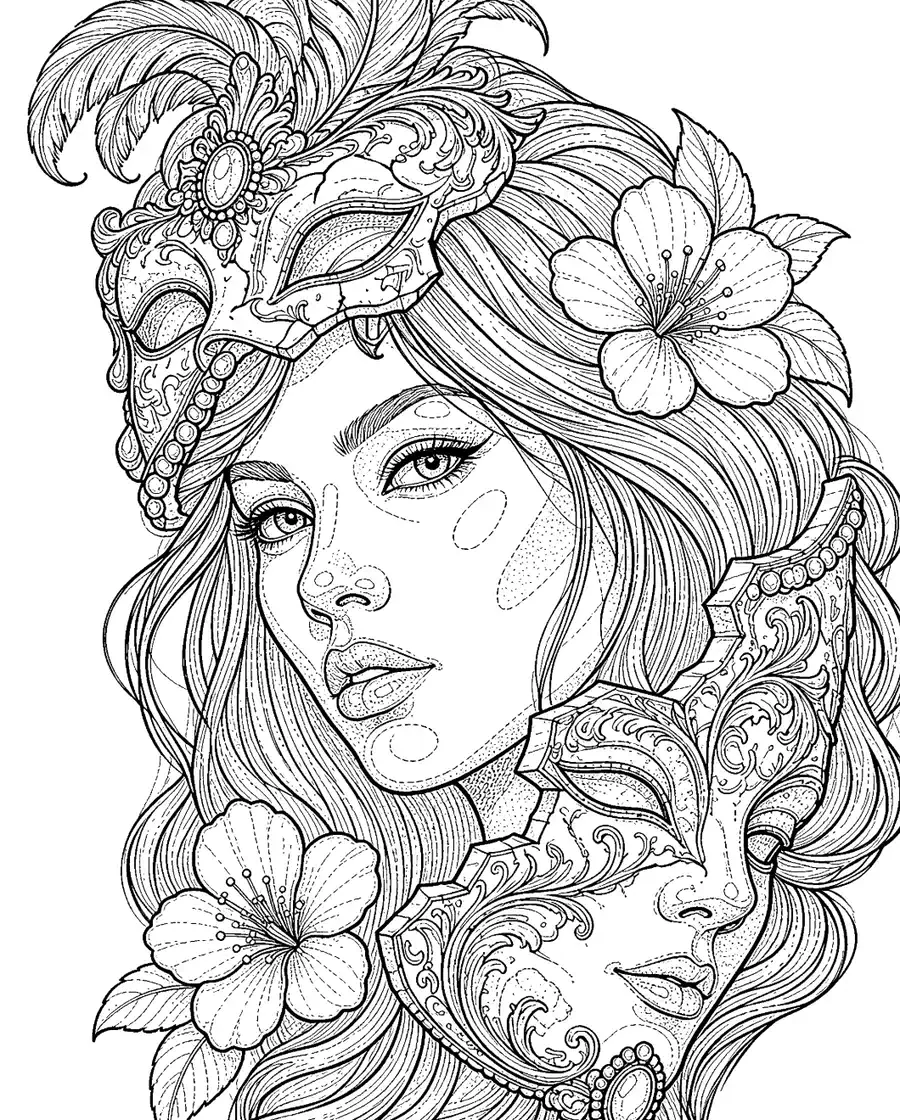
Ornate portrait artwork to dotted shadow stencil
A heavily shaded black-and-gray masquerade portrait with blossoms becomes clean fine linework: filigree mask details remain intact while soft cheek and nose shadows turn into dotted guide zones.
Before
Stencil
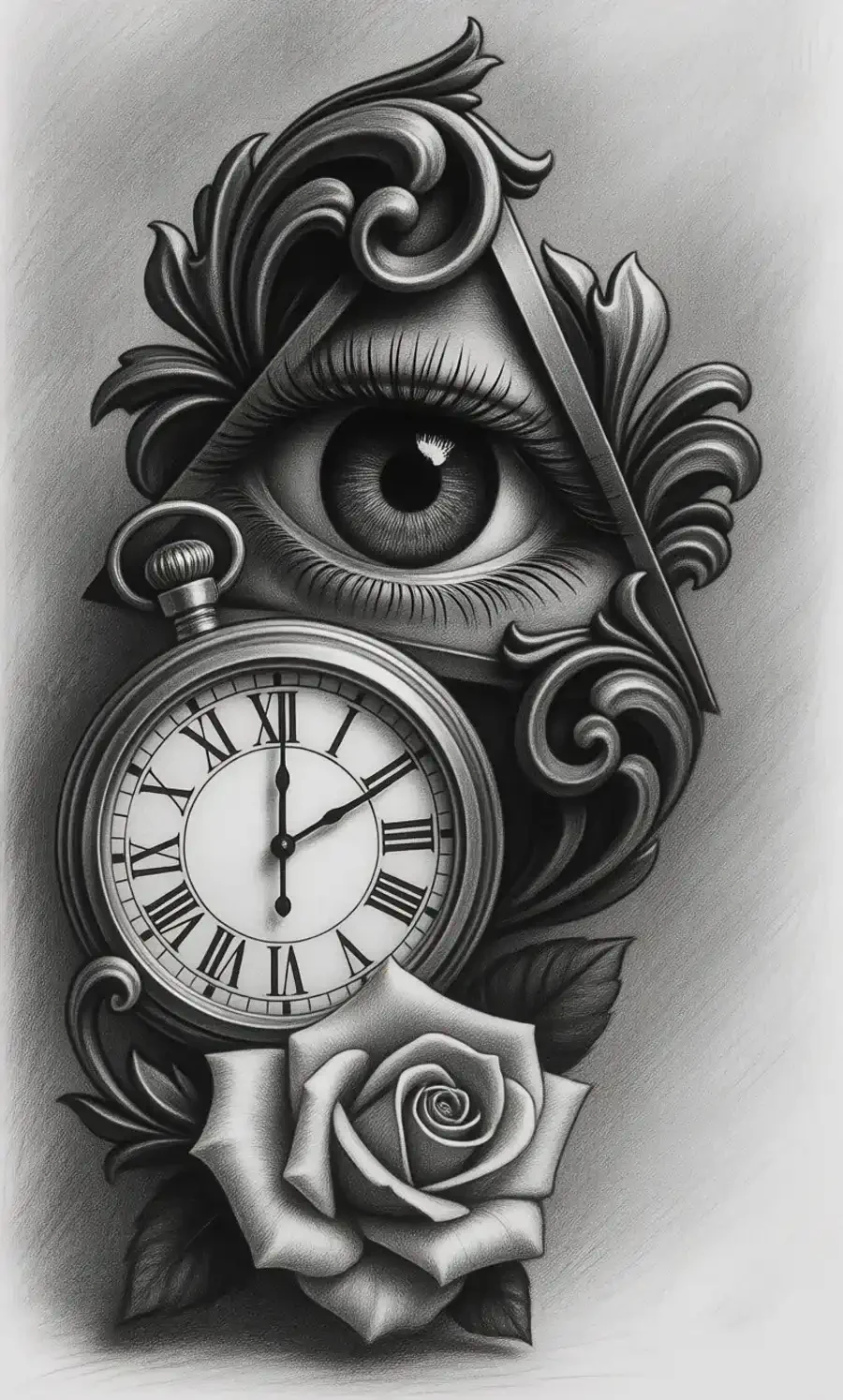
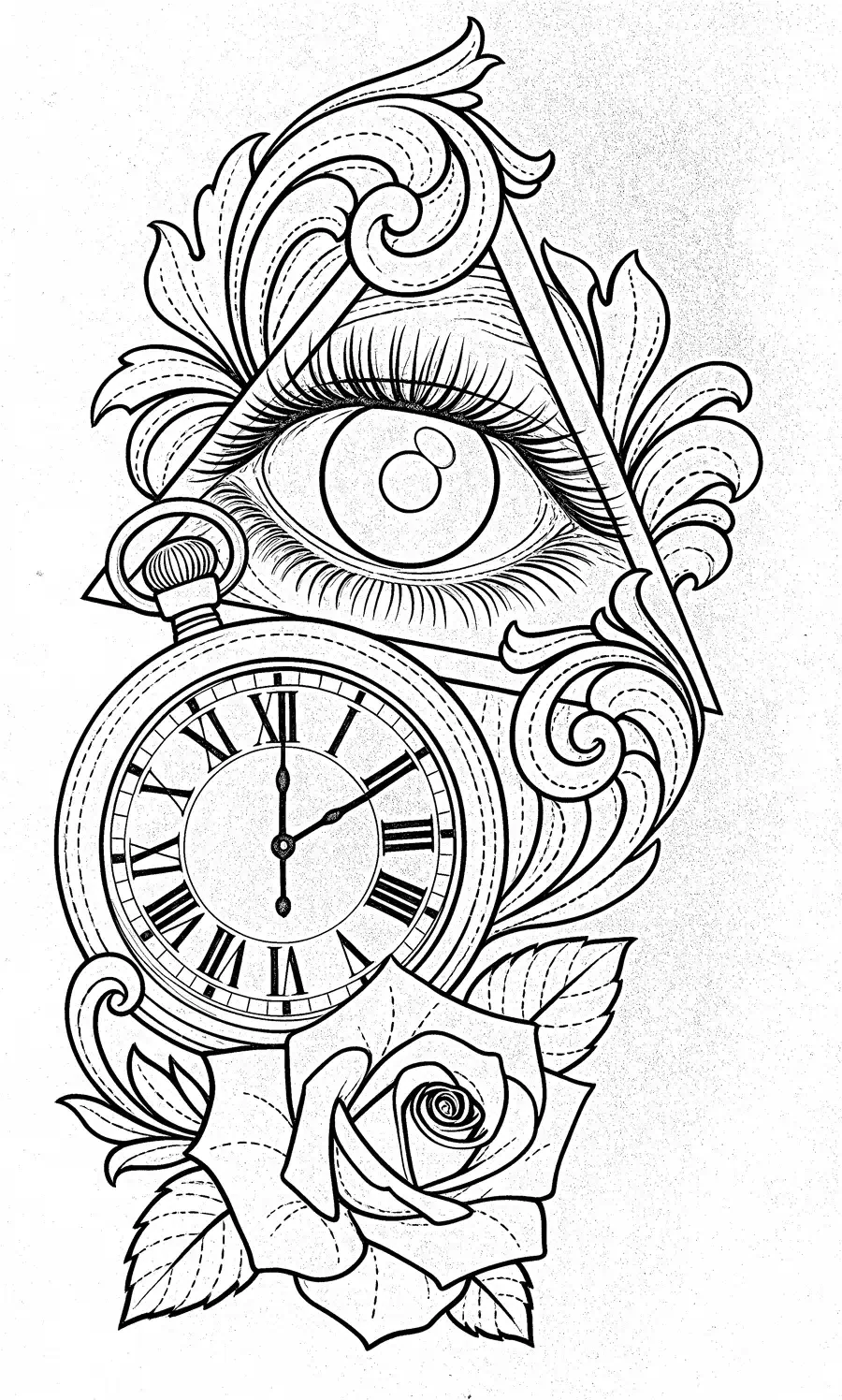
Shaded tattoo design to clean transfer linework
A black-and-gray shaded artwork featuring an all-seeing eye, Roman-numeral pocket watch and rose is stripped of soft shading so every petal, eyelash and filigree scroll reads as transfer-ready black lines.
Before
Stencil
Carved sculpture photo to bold line stencil
A color photograph of a wooden lotus sculpture with a carved mask center becomes bold black linework against a flat white sheet, showing the heavier stroke weight you can ask for in Custom.
Is this tattoo stencil maker free online?
Consistent Character AI Tattoo Stencil Maker is not free to generate: each conversion costs 5–9 credits per image ($2.50–$4.50 at the $5 for 10 credits pack rate), and the current signup allowance of 1 signup credit does not cover a run. The smallest purchase that covers a stencil is the one-time Trial Pack ($5 for 10 credits, enough for 2 Fast stencils). If you need a free browser filter without an account, StencilSnap and StencilPad provide free local tracing with different export limits.
The comparison below lists our own tool first alongside four other photo-to-stencil websites we checked directly on their public pages; we have no affiliation with any of them. Local browser filters are free and keep photos on your device, while AI redraw services charge credits or monthly plans to remove background clutter and skin texture.
| Tool | Free tier | Paid pricing | Watermark | Output formats |
|---|---|---|---|---|
| Consistent Character AI (this site) | 1 signup credit (below 5-credit min) | One-time Trial $5 (10 credits); packs from $14.90 | No site watermark | 3:4 PNG (up to 2480 × 3312) |
| StencilPad | 3 local stencils/day + 1 AI redraw preview/day, no sign-up | Pro listed at $14.99/mo or $99.99/yr (not yet purchasable) | Corner mark on free; none on Pro | PNG, true-size PDF |
| InstantStencil | Not shown on public pricing page | €9.90/mo (30), €19.90/mo (100), €39.90/mo (250) | No watermark on paid plans | 300 DPI PNG, real-size PDF |
| StencilSnap | Unlimited local PNG & PDF, no sign-up | 7-Day Pass $4.99 or Lifetime $29 (for SVG/DXF) | No watermark | PNG, PDF (free); SVG, DXF (paid) |
| Tattoo Stencil Generator | 3 free AI pictures on new accounts | One-time packs: $3.99 (20), $7.99 (60), $19.99 (200) | Not stated on pricing page | AI image download (formats not listed) |
Checked 2026-11-23 from each provider’s public pages.
How does a portrait tattoo stencil maker handle facial features?
A portrait tattoo stencil maker using an AI image model redraws the photo as new black linework rather than running a rigid pixel edge filter. Our prompt instructs the model to follow the original eye placement, nose, mouth, hairline and expression while dropping background clutter and gray wash, but AI redraws can still shift subtle facial proportions depending on lighting and photo sharpness.
For memorial portraits, upload a sharp, well-lit face photo rather than a blurry distant crop, and compare the generated stencil side by side with your reference before printing. Many tattoo artists generate an Outline or Shading stencil here to establish clean contours quickly, then overlay the PNG at low opacity over the original photo in Procreate to verify exact eye and mouth alignment before transferring to skin.
Can you print these stencils on a thermal tattoo stencil printer?
Yes, you can send the downloaded PNG to thermal stencil printers such as Brother PocketJet or Phomemo Bluetooth models, or print on plain paper for a thermal copier, because the prompt requests solid black ink lines on a pure white sheet with no gray wash. Choose HD (1536 × 2048, up to 13 × 17 cm at 300 DPI) or Ultra HD (2480 × 3312, up to 21 × 28 cm at 300 DPI) so lines stay crisp at real skin size.
This tool exports an unmirrored PNG without a built-in centimeter ruler or PDF tiler. Set the exact print width in your thermal printer app, Procreate or Photoshop at 100% scale, and check whether your printer driver flips the image automatically—mirror it in only one place so text or asymmetrical portraits are not reversed twice. For hand-drawn pencil sketches, photograph the drawing straight-on under even light before uploading so paper creases and shadows do not turn into stray lines.
Is there a tattoo stencil maker app for iPhone or Android?
You do not need to install a tattoo stencil maker app or Android APK to use this tool. It runs directly online in Safari on iPhone, Chrome on Android, iPad browsers and desktop computers: upload a photo from your camera roll, pick a line style and save the finished PNG straight to Photos or Files.
Browser access is convenient when you want to test a photo-to-stencil idea during a consultation or import the PNG directly into Procreate on an iPad Air without adding another subscription app. Sign-in and credits are still required to run a generation, and images are processed on our server through the hosted image model rather than offline on your phone.
Tattoo stencil generator pricing, export specs and watermark
Each conversion uses 5–9 credits per image ($2.50–$4.50 at the $5 for 10 credits pack rate), above the current 1 signup credit signup balance. The smallest purchase covering a stencil is the one-time Trial Pack at $5 for 10 credits, enough for 2 Fast stencils. Studio runs the model’s high-detail setting at 1536 × 2048, so it uses more credits than Ultra HD despite fewer pixels.
| Quality | Pixels | Max print at 300 DPI | Credits | Pack-rate equivalent |
|---|---|---|---|---|
| Fast | 768 × 1024 | 6.5 × 8.7 cm (2.6 × 3.4 in) | 5 | $2.50 |
| HD | 1536 × 2048 | 13.0 × 17.3 cm (5.1 × 6.8 in) | 7 | $3.50 |
| Ultra HD | 2480 × 3312 | 21.0 × 28.0 cm (8.3 × 11.0 in) | 8 | $4.00 |
| Studio | 1536 × 2048 | 13.0 × 17.3 cm (high detail) | 9 | $4.50 |
| Feature | Details |
|---|---|
| Free access | Eligible new accounts receive 1 signup credit; one Fast stencil needs 5 credits. |
| Account & tiers | Sign-in required to generate. HD, Ultra HD and Studio require eligible paid credits or an active subscription. |
| Export format | One vertical 3:4 PNG per generation (no extra download fee). No SVG, PDF, transparent-background toggle or auto-mirror export. |
| Watermark | No visible watermark added by this site. |
| Failed runs & refunds | Pre-generation prompt rejections, provider submission rejections, provider failures and invalid/corrupt provider images refund credits automatically. Once the provider delivers a valid image, credits stay charged while our storage copy completes. |
| Privacy & storage | Uploaded images and results are stored in our cloud bucket as unlisted files so the image model can read inputs; anyone holding a direct storage link could open them. Downloads on this site require your account. |
What this tattoo to stencil converter cannot do
This tattoo to stencil converter outputs one raster 3:4 PNG per generation—it does not export editable SVG vectors, multi-page tiled A4 PDFs, transparent-background files or automatic physical centimeter scaling, and it does not mirror images automatically for thermal paper. It also requires a reference image (it is not a text-only tattoo idea or font generator), will not reliably typeset custom tattoo lettering or names, and blocks celebrities, public figures and explicit imagery. Because AI redraws linework, a licensed tattoo artist should still review line spacing and skin placement before tattooing.
For carved black-and-white block-print artwork, try the Linocut Generator. For simpler line pages meant to color in, use the Coloring Page Generator, or convert a photo into textured sketches with Photo to Crayon Drawing.
Tattoo stencil maker FAQ
How can I extract a tattoo from a photo of an existing tattoo?
Crop closely around the tattoo in your photo, upload it here and pick Outline or Shading (or Custom with “extract only the tattoo ink lines, remove skin texture, glare and limb contours”). Good lighting and a straight-on camera angle help the model separate ink from skin shadows, though warped body curves may still need manual flattening in Procreate.
Can I use this as a tattoo font, lettering or name stencil maker?
Not for clean typography from scratch. This tool traces uploaded images and tells the model not to invent new text or brand logos, so small script or handwritten names can thicken or distort when redrawn. For lettering or name stencils, typeset the text cleanly in a vector or design app first, or inspect handwritten memorial script carefully before printing.
What should I write in a custom tattoo stencil prompt?
Describe the line weight, shading treatment and cleanup you want in one or two sentences—for example “bold traditional black outlines, keep the rose petals and dagger clean, remove background clutter, pure white background, no shading”. You do not need to write safety or white-sheet rules; the system prompt already includes them.
Should a tattoo artist review an AI stencil before tattooing?
Yes. Automated stencils can pack fine lines too tightly to heal cleanly over time, drop subtle anatomical landmarks or leave stray dots from background shadows. Treat the PNG as a time-saving starting stencil that a tattoo artist checks for line weight, spacing, mirroring and placement on the body before transferring it to skin.