
ChatGPT image prompts on Consistent Character AI (an independent site not affiliated with OpenAI) let social creators copy trending prompts free or run them online on a selfie. Each generation returns one vertical 768 × 1024–2480 × 3312 PNG from 5 credits ($2.50 at the $5 Trial Pack rate) with no added site watermark. New accounts get 1 signup credit; the $5 Trial Pack covers a Fast run.
How to use ChatGPT image prompts with your own photo
Upload one clear photo, choose a ready-made preset or paste a prompt into Custom, and generate a still 3:4 PNG in your browser. Every prompt below is also free to copy without signing in if you prefer running it directly in ChatGPT Images or Google Gemini. Because hosted image models reinterpret every pixel, results and facial resemblance vary by photo.
Start with one sharp photo
Choose a well-lit front-facing photo where eyes and hair are unobscured. Upload a JPG, PNG, or WebP up to 10 MB and 128–2048 pixels per side.
Pick a preset or paste a prompt
Select Editorial, Headshot, or Anime for a one-click look, or choose Custom to paste any viral prompt up to 800 characters with an optional style reference photo.
Generate, compare, and download
Select Fast, HD, Ultra HD, or Studio quality, confirm photo permission, and sign in. Compare the original and output side by side, then download one 3:4 PNG.
Before-and-after examples and copy-paste prompts
These four pairs show how structured photo prompts shift setting, wardrobe, or illustration style while aiming to keep the same subject recognizable. Each card includes the full English prompt to copy free or load into the tool above. Displayed examples keep their original framing, while generations here output a vertical 3:4 PNG.
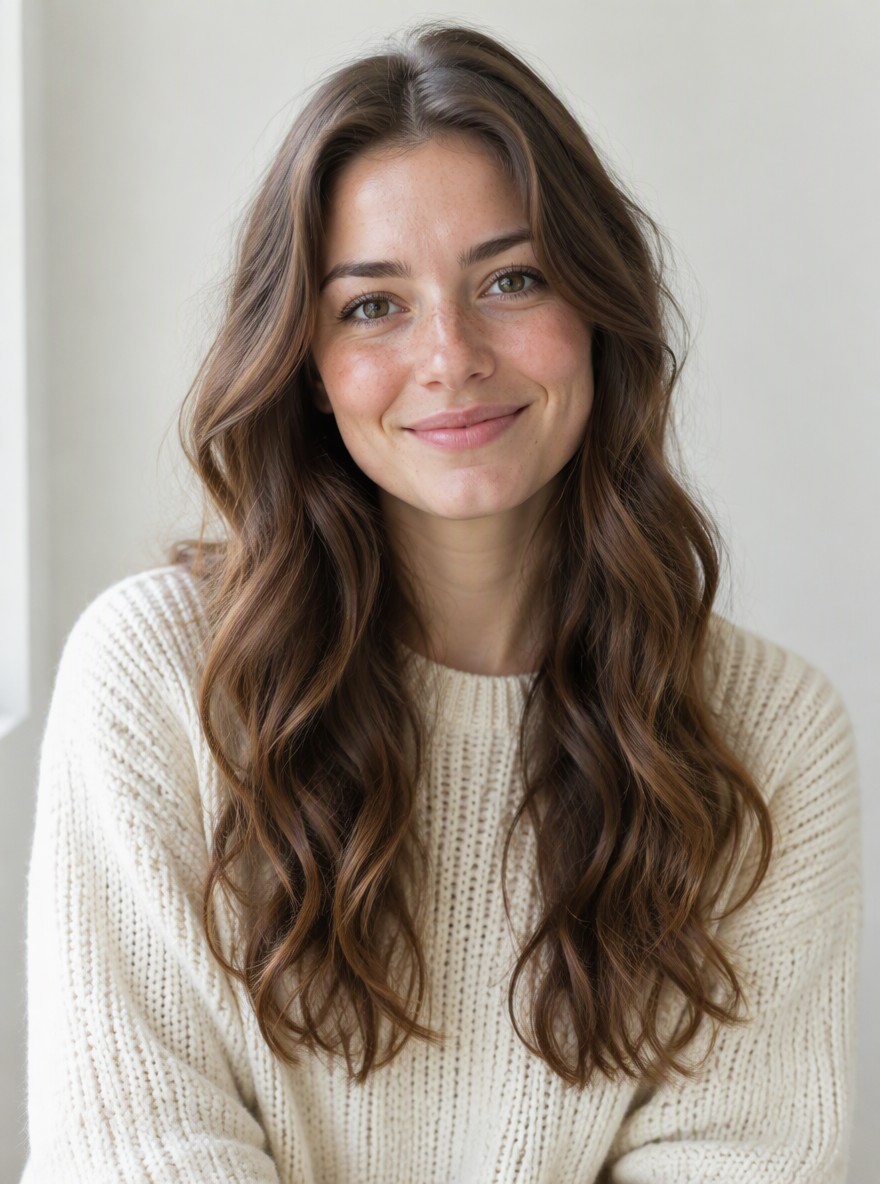
Before
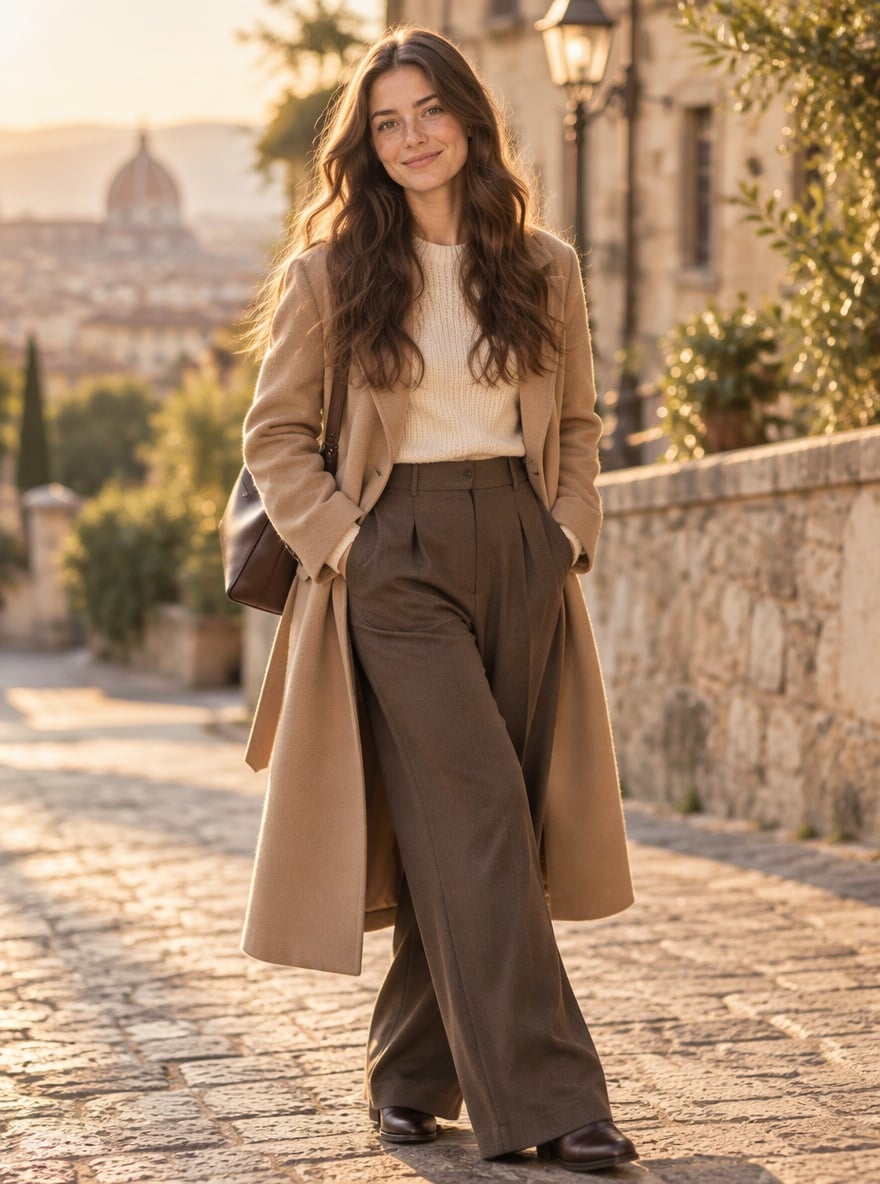
After
Golden-hour European street editorial
3:4 verticalIndoor sweater portrait restyled into a full-length cobblestone street look with a camel coat, brown pleated trousers, and warm sunset rim light.
ChatGPT Images · Gemini · This tool
Turn the uploaded photo into a candid golden-hour street editorial portrait in a historic European city. Keep the exact same face, freckles, eyes, nose, natural smile, and long wavy hair. Style in a camel wool overcoat over a cream knit sweater and brown pleated trousers, warm sunset rim lighting, shallow depth of field, realistic skin texture, no text or watermarks, 3:4 vertical.
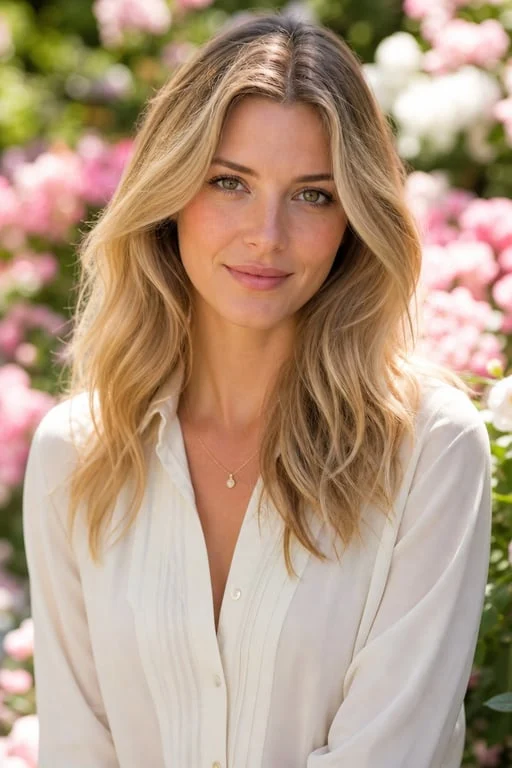
Before
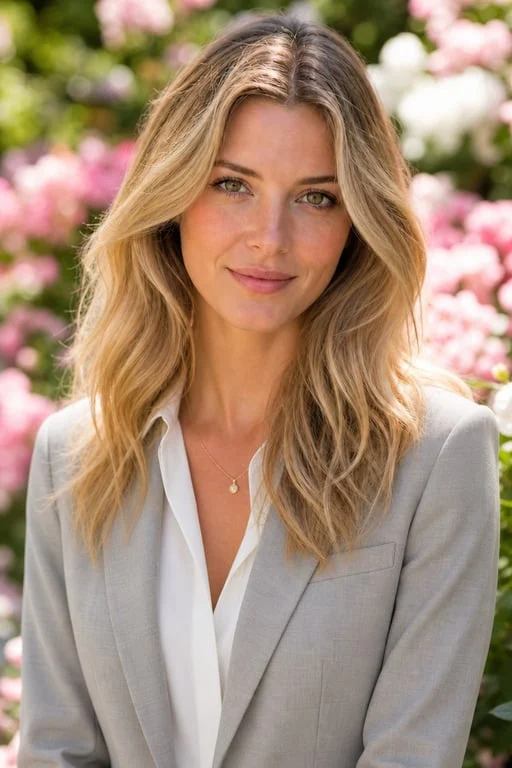
After
Natural tailored blazer headshot
3:4 verticalCasual white button-down portrait dressed with a light-grey blazer while preserving the face, loose blonde waves, and soft floral daylight backdrop.
ChatGPT Images · Gemini · This tool
Create a realistic professional portrait from the uploaded photo. Keep the person’s exact facial features, skin tone, natural expression, hairstyle, and daylight lighting unchanged. Add a tailored light-grey blazer neatly layered over the white shirt, crisp focus on the eyes, natural skin texture with no heavy airbrushing, no logos or watermarks, 3:4 vertical.
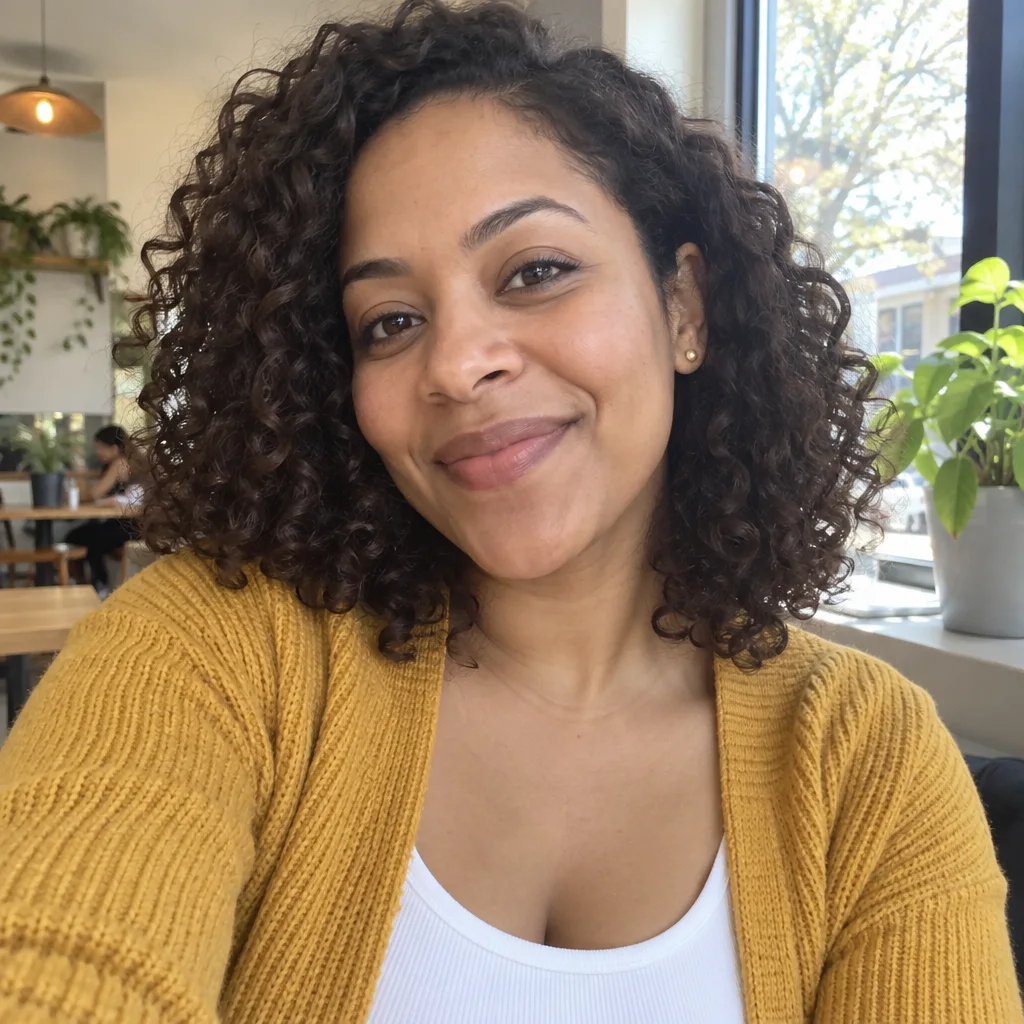
Before
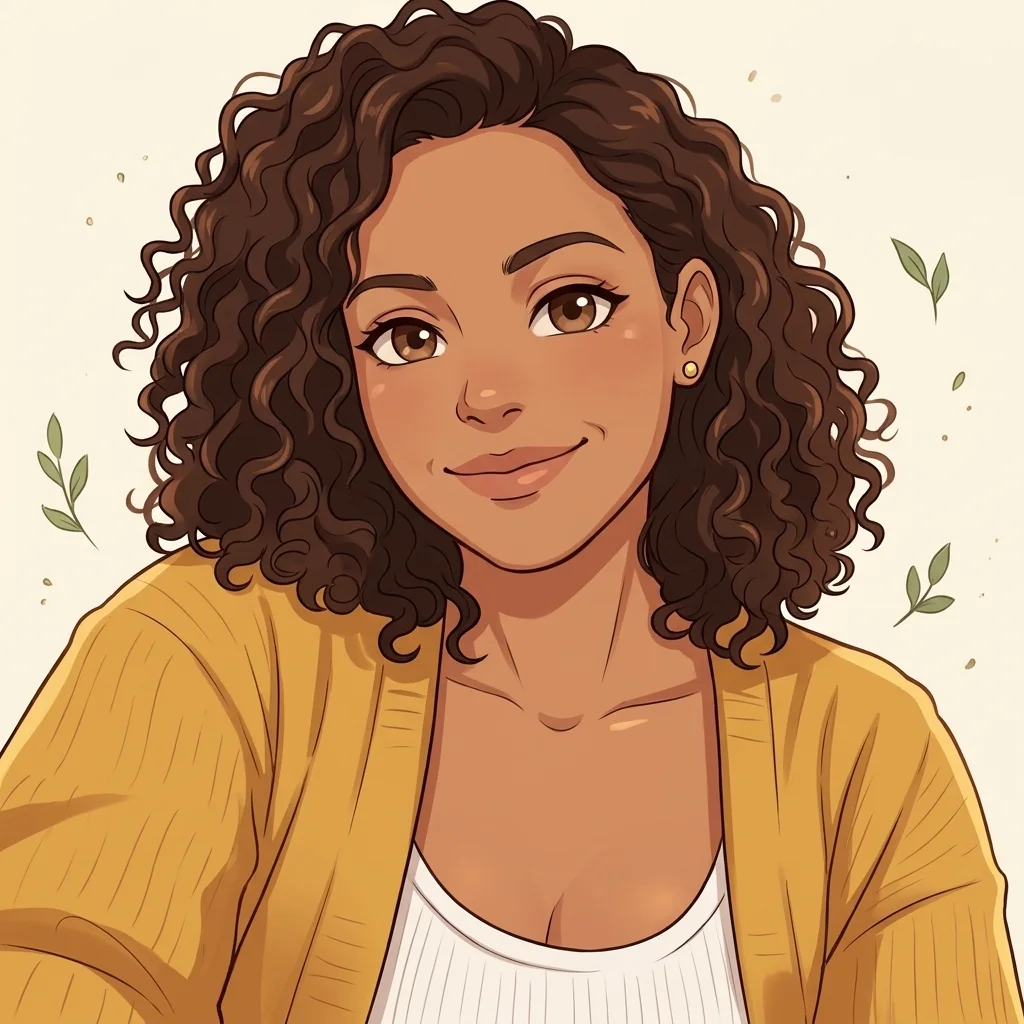
After
Warm cel-shaded anime portrait
1:1 or 3:4Cafe selfie translated into clean cel-shaded illustration preserving curly hair volume, gold stud earrings, and mustard knit cardigan on a cream backdrop.
ChatGPT Images · Gemini · This tool
Transform the uploaded selfie into a warm hand-drawn cel-shaded anime portrait illustration. Keep the person’s recognizable face shape, eyes, warm smile, dark curly hair, earrings, and mustard cardigan colors. Use clean dark-brown linework, soft blush shading, and a light cream background with tiny green botanical leaves, no text or watermarks.
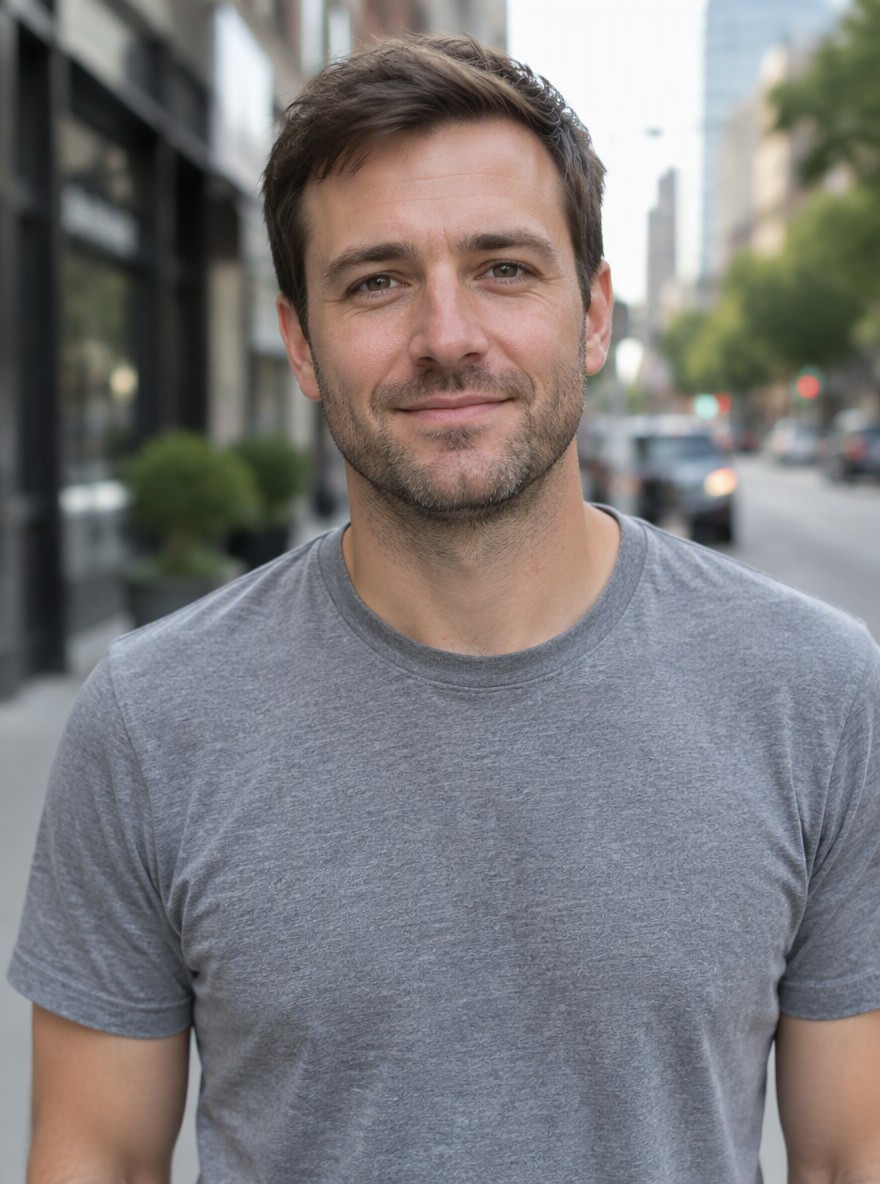
Before
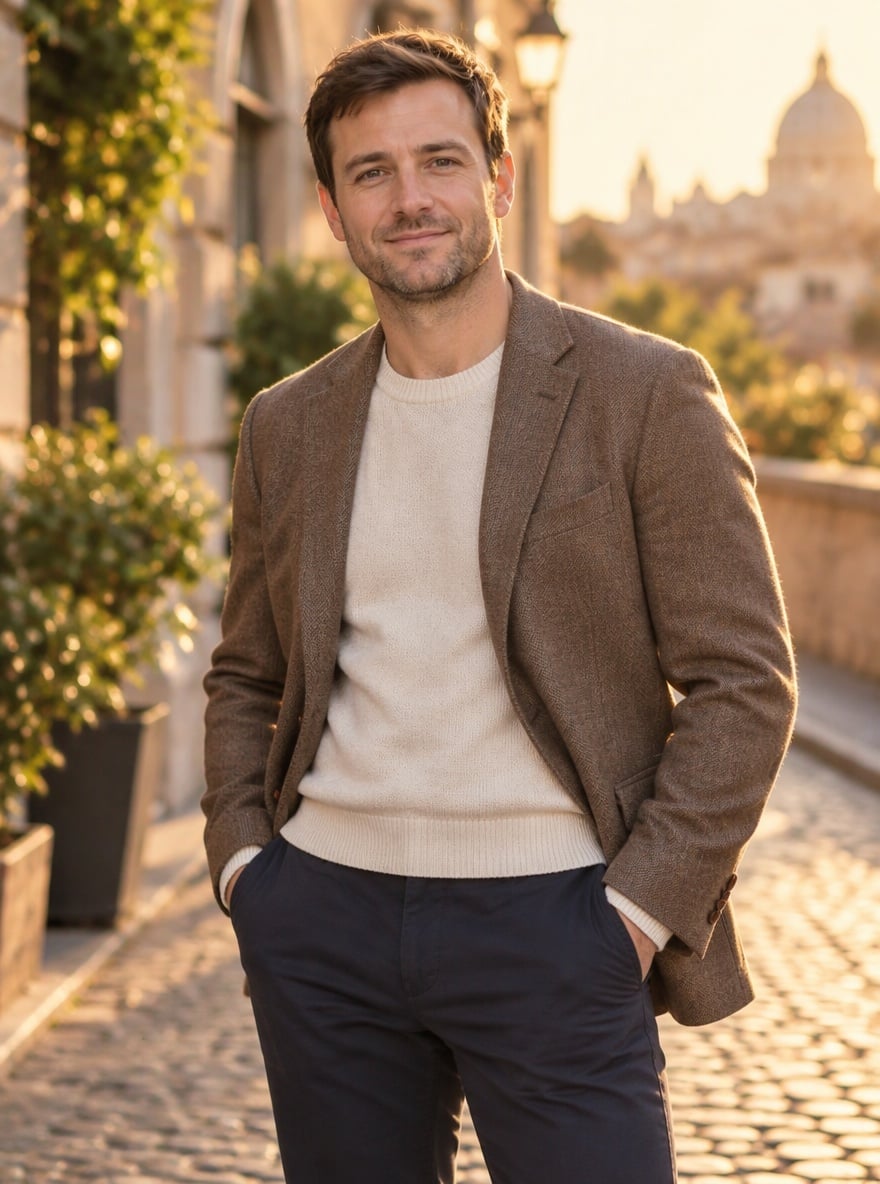
After
Golden-hour blazer street portrait
3:4 verticalCasual grey T-shirt sidewalk snapshot restyled into a warm sunlit portrait wearing a brown textured blazer over a cream knit sweater.
ChatGPT Images · Gemini · Custom mode
Restyle the uploaded casual portrait into a warm golden-hour street photo on a sunlit European avenue. Keep the man’s exact face, eyes, short brown hair, light beard stubble, and natural smile unchanged. Dress him in a brown herringbone blazer over a cream crewneck sweater and dark navy trousers, natural skin texture, shallow depth of field, 3:4 vertical, no text or logos.
More trending ChatGPT photo prompts to copy and paste
Four additional viral photo templates—1990s disposable-camera flash, collectible action figure box, childhood-and-adult two-photo reunion, and vintage couple studio—are ready to copy free. Every template includes an explicit identity-preservation sentence and recommended aspect ratio for sharing to Instagram or TikTok.
1990s disposable-camera flash portrait
ChatGPT Images · Gemini · Custom mode
Restyle the uploaded photo as a candid 1996 disposable-camera flash snapshot indoors. Keep the exact same face, expression, hairstyle, and apparent age without beautifying. Use direct on-camera flash, soft shadows behind the subject, subtle 35mm film grain, slightly muted print colors, realistic skin texture, and no invented date stamp or logos.
Works with one clear portrait. Prompt asks for natural skin texture instead of heavy orange sepia.
Studio collectible action figure in blister box
ChatGPT Images · Gemini · Custom mode
Turn the person in the uploaded photo into a realistic collectible vinyl action figure displayed inside a clear molded blister-pack toy box photographed in a bright studio. Preserve their recognizable facial features, glasses, and hairstyle in stylized toy form. Include three neat molded accessories beside the figure: [LAPTOP], [COFFEE CUP], and [HEADPHONES]. Print clean header text "[YOUR TITLE]" at the top of the cardboard backing, crisp product lighting, no brand logos.
Swap the three bracketed accessories and title before pasting into Custom or ChatGPT.
Adult self with younger childhood self (2-photo ChatGPT template)
ChatGPT Images · Gemini (2-photo upload)
Create one realistic candid 1990s photograph placing the adult from Image 1 sitting side by side with their younger childhood self from Image 2 on a living-room sofa. Keep the adult’s exact face, hairstyle, and age from Image 1, and keep the child’s exact face, hair, and proportions from Image 2 without merging features. Match both under the same warm indoor lamp light, natural 35mm film grain, authentic candid smiles, no cartoon styling, no text or watermarks.
Label each uploaded image by number so the model does not swap ages or blend faces.
Vintage studio couple portrait
ChatGPT Images · Gemini · Custom mode (single couple photo)
Transform the uploaded couple photo into a warm 1990s analog studio portrait against a muted textured backdrop. Preserve both people’s exact faces, hairstyles, heights, and affectionate natural expressions without swapping features. Dress them in coordinated classic denim and knitwear, soft studio key light, subtle film grain, true-to-life skin tones, no text or watermarks.
Best with one photo showing both people clearly; for separate photos, number Image 1 and Image 2.
How do you keep your face recognizable with viral photo prompts?
ChatGPT prompts for pictures of yourself hold likeness better when you name fixed traits upfront—face shape, eyes, nose, skin texture, glasses, and hairstyle—and explicitly instruct the model not to beautify or reshape them. For two-person or childhood reunion prompts, upload sharp separate photos and label each subject by number ("adult in Image 1", "child in Image 2") before describing wardrobe and shared lighting so faces do not blend.
Can you run ChatGPT image prompts for free on ChatGPT, Gemini, or here?
You can copy every prompt on this page free without sign-in, and both ChatGPT Free and Google Gemini offer free image runs with dynamic limits; generating on Consistent Character AI is paid. Eligible new accounts receive 1 signup credit, below the 5 credits needed for a Fast image. From a zero balance, the one-time $5 Trial Pack (10 credits) covers a Fast image. Paid generations here include one watermark-free 3:4 PNG with no separate download fee.
Disclosure: Consistent Character AI is our own independent tool and is not affiliated with OpenAI or Google. Third-party plan details below come from public OpenAI and Google help pages (Checked 2026-11-24).
| Tool | Free tier & limits | Paid entry | Watermark & output |
|---|---|---|---|
| Consistent Character AI (this tool) | Browse & copy prompts free. Eligible new accounts receive 1 signup credit, below the 5 credits needed for a Fast image. | From $5 one-time Trial Pack (10 credits; Fast = 5 credits) | No visible site watermark · 3:4 PNG (768×1024 to 2480×3312) |
| ChatGPT Images (OpenAI) | Limited free image creation on Free tier (no fixed daily cap published; in-app reset timer) | ChatGPT Go from $8/mo; ChatGPT Plus $20/mo | No visible watermark · still images in chat/library |
| Google Gemini Apps | Free personal Google account with dynamic compute-based image generation limits | Paid Google AI plans raise quotas (regional pricing) | Invisible SynthID watermark embedded in pixels · still images |
Pricing and credits for running prompts here
Running a prompt at Fast quality costs 5 credits ($2.50 at the $5 Trial Pack rate), with one-time packs available without a subscription. HD, Ultra HD, and Studio tiers cost 7–9 credits and require an active subscription or eligible paid credits. Every run returns one vertical 3:4 PNG with no added site watermark.
| Quality | PNG size | Credits | At the Trial Pack rate |
|---|---|---|---|
| Fast | 768 × 1024 | 5 | $2.50 |
| HD | 1536 × 2048 | 7 | $3.50 |
| Ultra HD | 2480 × 3312 | 8 | $4.00 |
| Studio | 1536 × 2048 | 9 | $4.50 |
| Option | Details |
|---|---|
| Prompt library | Browse and copy all 8 prompts free without sign-in. |
| Signup allowance | Eligible new accounts receive 1 signup credit, below the 5 credits needed for a Fast image. |
| One-time purchase | From a zero balance, the one-time $5 Trial Pack (10 credits) covers a Fast image. Subject to Trial Pack eligibility; failed provider runs refund credits automatically. |
| Watermark & export | One 3:4 PNG per run; no visible site watermark or extra download fee. |
See pricing for credit packs and monthly plans.
Limits of viral AI photo prompts
AI image models redraw the entire frame rather than applying a deterministic camera filter, so facial likeness, hands, jewelry, and printed text inside toy-box prompts can still shift between runs. This generator takes one main subject photo plus an optional style reference in Custom mode—it does not merge two separate people into a single childhood reunion photo (use the numbered two-photo prompt in ChatGPT Images or Gemini for that workflow). Outputs are still images only, not videos.
For dedicated single-style tools, explore our 90s Photo Generator, AI Suit Photo Generator, Caricature Generator, or Self-Hug AI Photo.
ChatGPT image prompts FAQ
Can I copy and run these viral photo prompts on an iPhone or Android browser?
Yes. This page works in mobile Safari and Chrome with no app install. You can tap Copy prompt to paste into the ChatGPT or Gemini mobile app, or upload a photo from your camera roll and download the 3:4 PNG right in your browser.
What is the difference between a photo filter and a ChatGPT image prompt?
A photo filter only shifts color, contrast, or overlays graphics on top of your existing pixels. A ChatGPT image prompt instructs a generative image model to redraw lighting, wardrobe, background, or illustration style from scratch while aiming to keep your face recognizable.
Can I upload a second photo as a lighting or style reference in Custom mode?
Yes. Select Custom, paste or write your required prompt (up to 800 characters), and optionally attach a second reference image. The tool instructs the model to borrow palette, lighting, or mood from the second image without copying its person or logos.
Who can see the personal photos I upload here?
Uploaded photos are sent to a hosted image model for processing and stored in project cloud storage under unlisted links. In-app preview and download check account ownership, but anyone holding a direct storage link could open the file, so upload only photos you have permission to use.