
The blonde hair filter helps people with dark or brown hair compare shades before dyeing. Upload a selfie to get one vertical 768 × 1024 PNG at Fast quality for 5 credits ($2.50 at the Trial Pack rate), with no added watermark. Eligible new accounts get 1 signup credit and the one-time $5 Trial Pack covers a Fast preview.
How to try blonde hair on your photo
Upload a clear selfie, choose a blonde shade, and generate a still preview. The filter asks the image model to change the hair color while keeping your face, eyebrows, haircut and surroundings as close to the photo as possible. Try a second shade on the same selfie to compare both results under the same lighting.
Choose one clear photo
Use a front-facing selfie with your hairline and ends visible. Upload a JPG, PNG or WebP up to 10 MB and 128–2048 pixels per side.
Pick a blonde shade
Start with Honey, Golden or Platinum. Choose Custom to describe a shade and where it should go, and optionally add a color reference photo.
Generate and compare
Pick an image quality, confirm permission to use the photo and sign in. Compare the new color with the original and download the 3:4 PNG.
Blonde hair before and after
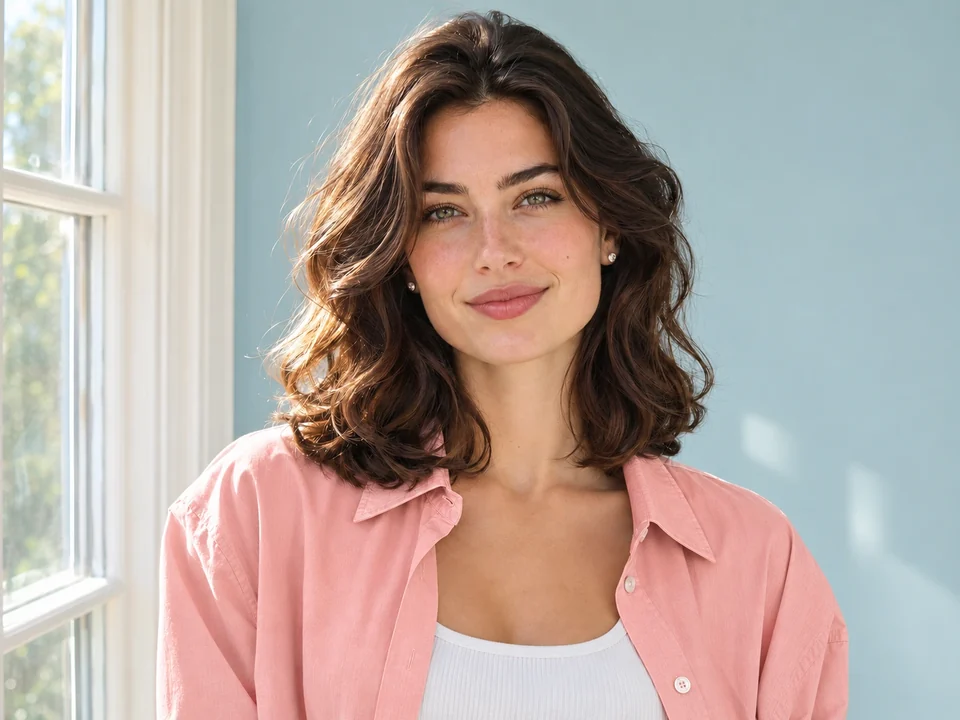
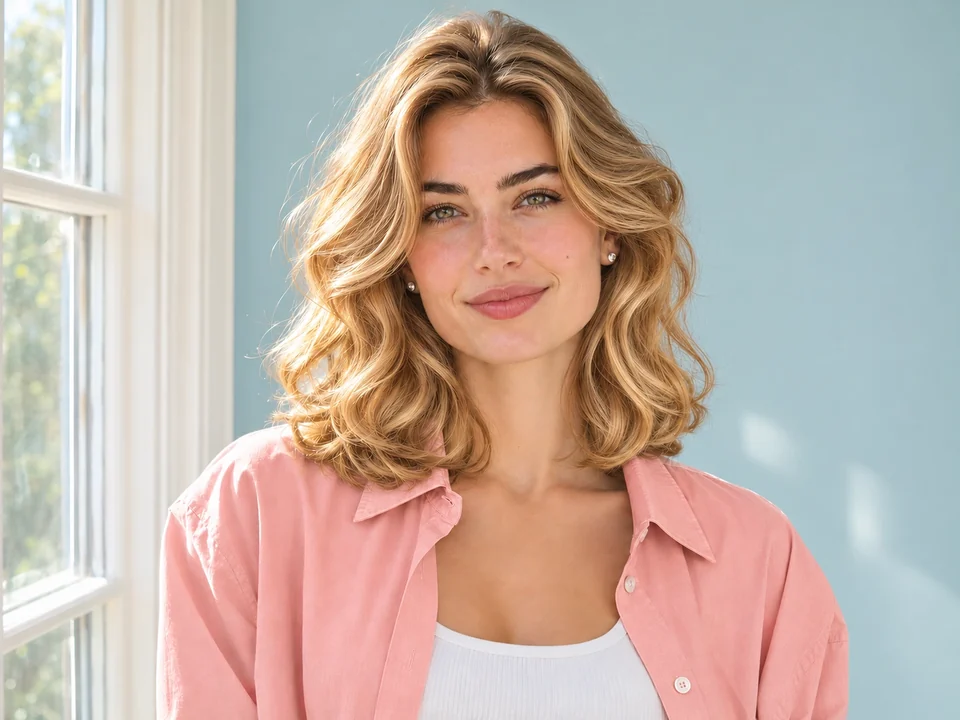
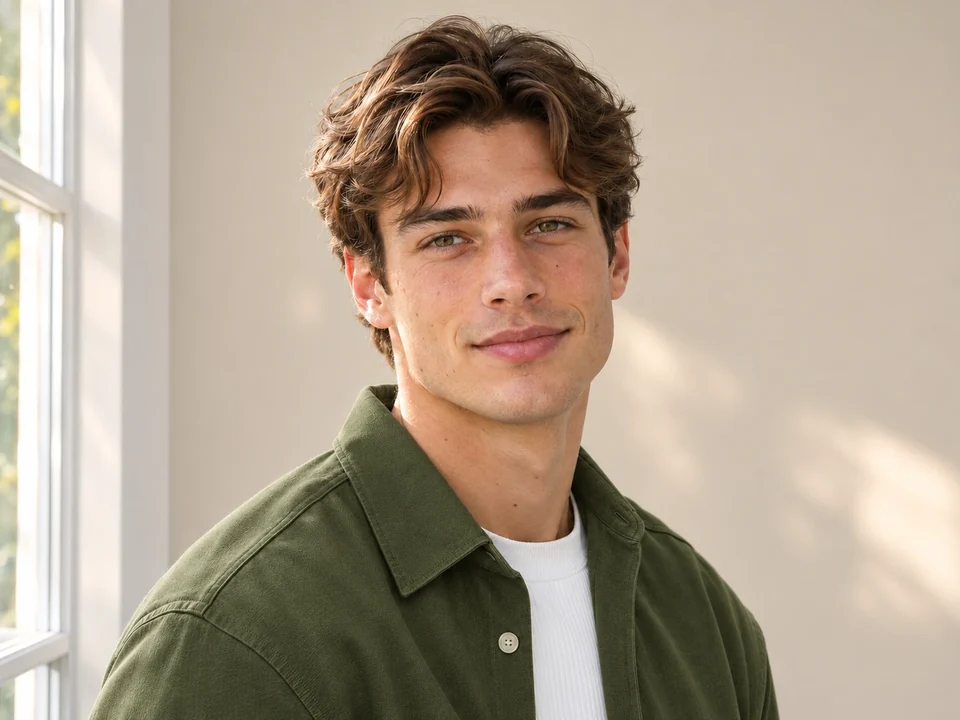
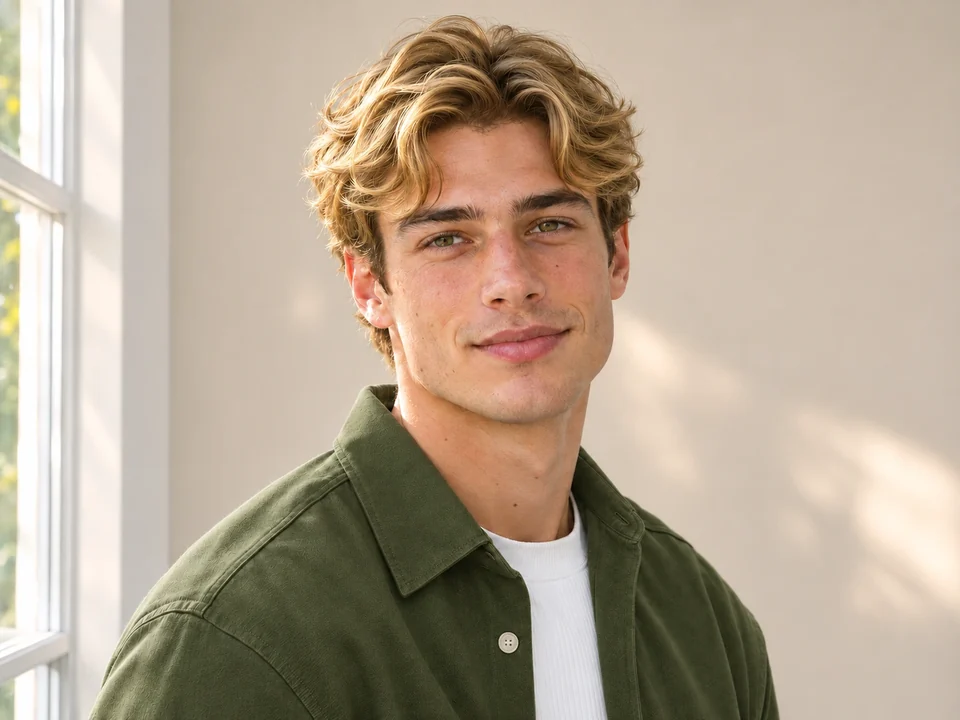
These three pairs show what warm honey, brighter gold and cool platinum look like on different starting hair colors. Look at the roots, the strands around the face and the hair in shadow. Those areas make it easier to judge how bold or subtle each change looks. The examples keep their original framing. Your generated PNG has a vertical 3:4 frame.
Before
After
Honey blonde on dark brown waves
Golden-beige ribbons soften dark waves around the face, with depth still visible near the part.
Before
After
Golden blonde on short brown hair
Warm gold catches the light on the top and sides of the same short, wavy haircut.
Before
After
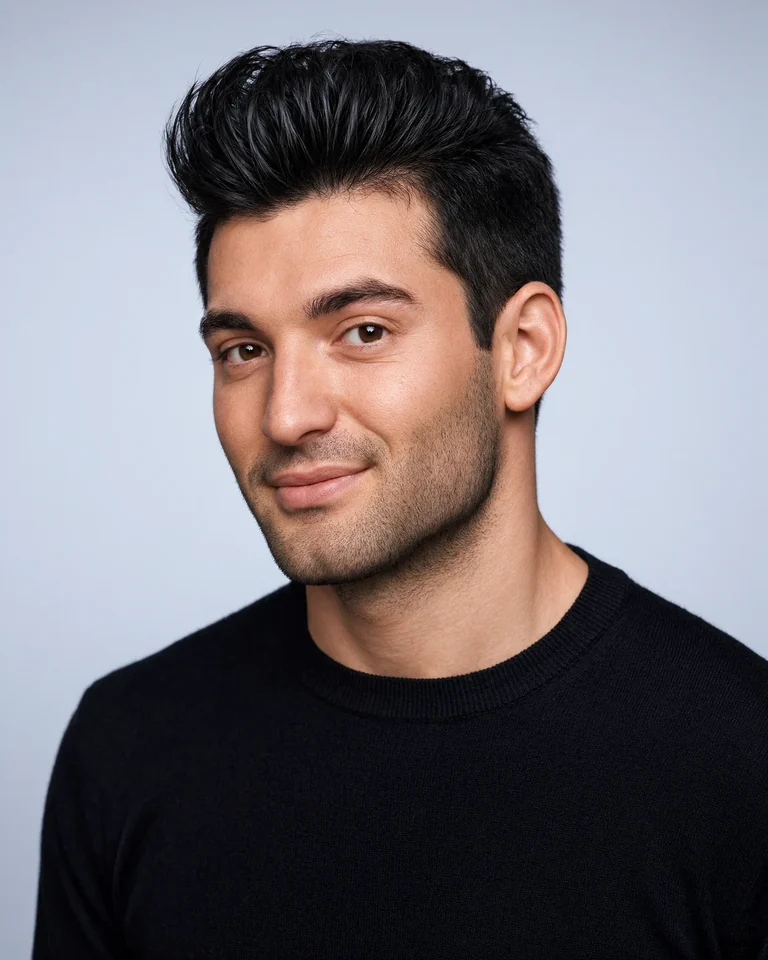
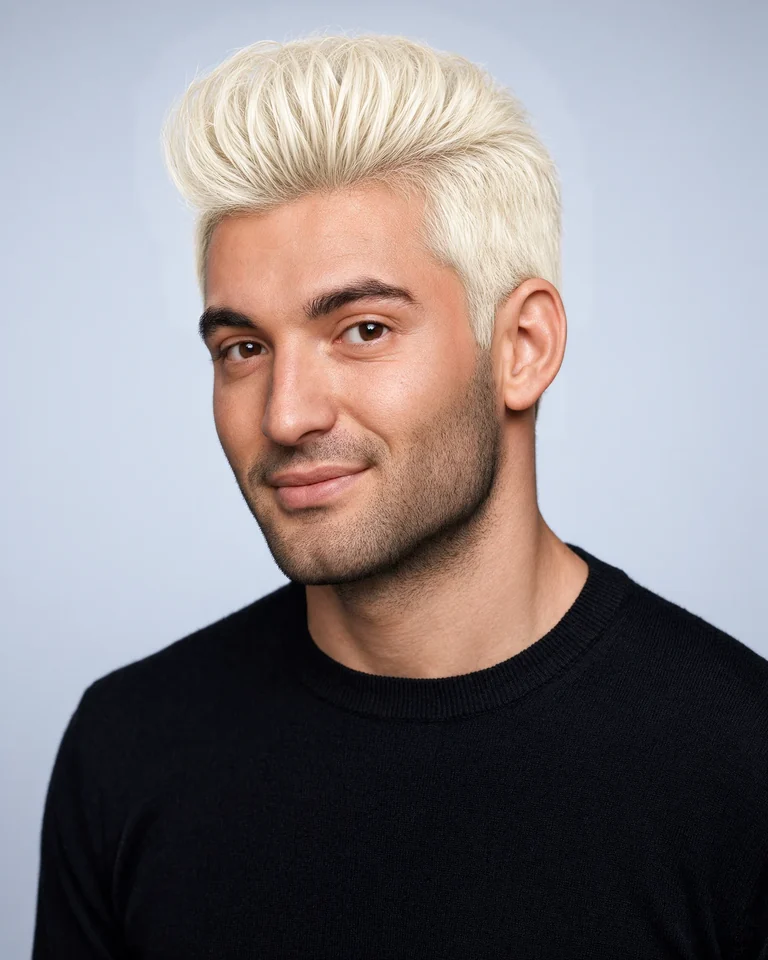
Platinum blonde on short black hair
Cool, pale blonde brings out the shape of the waves while keeping the contrast of dark eyebrows.
What would I look like with honey, golden or platinum blonde hair?
A blonde hair filter lets you compare soft honey blonde, brighter golden blonde and pale, cool platinum on the same selfie. If you want a smaller change from brunette, describe dirty blonde with natural roots in Custom and compare it with your favorite preset.
Can you try blonde highlights on black or brown hair?
The blonde hair filter can preview highlights on dark hair in Custom. Describe which strands should lighten, such as a few around the face or ribbons from mid-length to ends. Ask to keep your natural root color and most of the dark base if you want to see a softer transition before trying all-over blonde.
A prompt for highlights with dark roots
Add delicate beige-blonde highlights around the face and through the ends. Keep the natural dark roots and most of the brunette base.
Can I try a blonde hair filter online for free?
The blonde hair filter offers free before-and-after examples without sign-in. Eligible new accounts get 1 signup credit, below the 5 credits needed for a Fast preview. Generating a new preview requires an account and at least 5 credits. From a zero balance, the one-time $5 Trial Pack covers a Fast preview. Downloading the finished PNG costs no extra credits and adds no visible site watermark.
See the hair color tool comparison for free browser-based options.
Blonde hair filter pricing and credits
A Fast blonde hair preview costs 5 credits ($2.50 at the $5 Trial Pack rate), and one-time credits are available without a subscription. Higher-quality previews cost 7–9 credits and require an active subscription or eligible paid credits. Each generation returns one vertical PNG with no added site watermark.
| Quality | PNG size | Credits | At the Trial Pack rate |
|---|---|---|---|
| Fast | 768 × 1024 | 5 | $2.50 |
| HD | 1536 × 2048 | 7 | $3.50 |
| Ultra HD | 2480 × 3312 | 8 | $4.00 |
| Studio | 1536 × 2048 | 9 | $4.50 |
| Option | Details |
|---|---|
| Free access | Browse examples without signing in. Eligible new accounts get 1 signup credit, below the 5 credits needed for a Fast preview. |
| One-time purchase | From a zero balance, the one-time $5 Trial Pack covers a Fast preview. It contains 10 credits, subject to Trial Pack eligibility. |
| Watermark | No visible watermark added by the site. |
| Download | One 3:4 PNG per run. No separate download fee. |
See pricing for subscription plans.
Limits of a blonde hair preview
Use the preview to compare how lightness, warmth and root contrast look in your photo. Real dye results depend on your starting color, previous dye and hair condition, which the filter cannot assess. The edit can also shift fine hair edges or facial details. Check those areas before sharing the image or using it as a reference for a colorist.
Try the AI Hair Color Changer for shades outside blonde or the AI Hairstyle Changer to preview a different cut.
Blonde hair filter FAQ
Can men use this blonde hair filter on short hair?
Yes. The Golden and Platinum examples show short hair. Use a photo where the hairline and sides are clearly visible. The filter asks the model to keep eyebrows, beard and stubble unchanged.
Is this a live blonde filter for Snapchat or a photo tool?
This is a photo tool that works in a mobile or desktop browser. Upload a still photo from your camera roll on iPhone or Android and save the edited PNG after generating. You can use it without installing an app.
Can I match a blonde shade from another photo?
Yes. Select Custom, describe the blonde shade you want, and attach an optional reference photo. The edit uses your first photo as the portrait and is instructed to borrow only the color or highlight placement from the reference.
Who can see my uploaded photo?
Your photo is sent to a hosted image model and stored at an unlisted link. The result preview and download in the app check account ownership. Anyone who obtains a direct storage link could open the file, so upload only photos you have permission to use and are comfortable sharing for processing.