
Matcha Filter turns a portrait into a still image for a profile picture, post, or story. Examples are free to browse. After sign-in, a Fast edit costs 6 credits ($3.00 at the one-time rate of $5 for 10 credits), and you can download one PNG in 3:4, 16:9, or 9:16 up to 3840 pixels on the long edge, with no added site watermark.
How to apply the Matcha Filter
Upload one portrait, choose the green treatment you want, then set the shape and quality for your post. The preset directs the model to paint around features such as the eyes and mouth, so your expression can stay legible amid the swirls. Check the preview against your original before downloading.
1. Upload a portrait
Pick a well-lit selfie or portrait you have permission to edit. Choose a photo with a clear view of the face if likeness is important.
2. Choose a look and frame
Pick Soft Wash, Liquid Swirl, or Painted Grain. For a specific palette or texture, choose Custom, describe the look, and optionally add a style reference. Pick 3:4 for a portrait or 9:16 for a story.
3. Generate and download
Choose a quality, confirm you have permission to use the photos, and sign in to generate. Compare the result with the original, then download the PNG.
Matcha Filter photo examples
Each pair shows a photo and a matcha-style treatment of the same subject. Look for the shifts from ordinary light to green and yellow tones, the painted edges, and how strongly the texture shows around the subject. Each new edit depends on the photo and settings.

Before

After
Soft café portrait
A sunlit café portrait shifts to softer tea greens, with small ripples around the table and window.
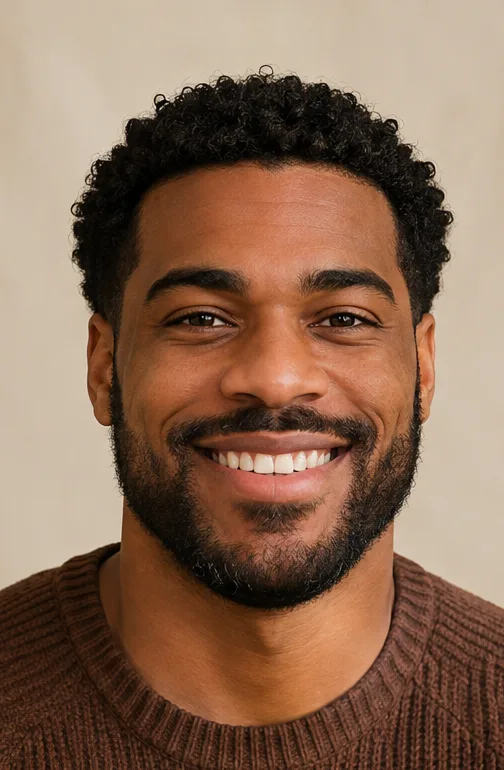
Before
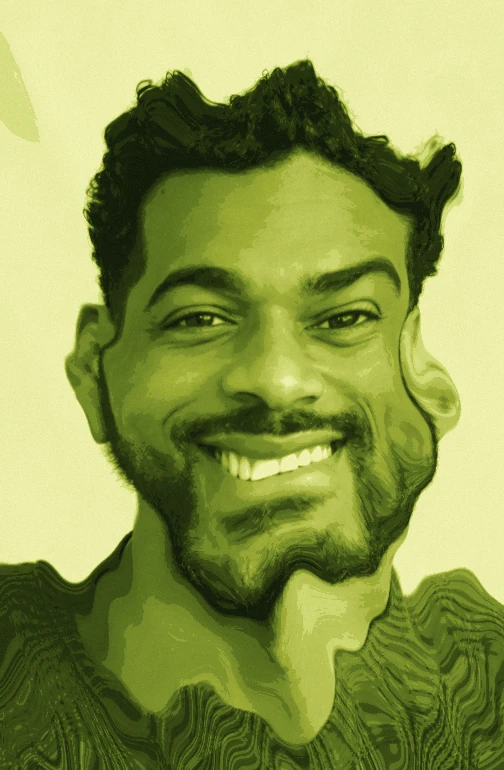
After
Liquid studio portrait
Olive greens and stronger ripples trace the sweater and hair of a smiling man.

Before

After
Grainy window portrait
Olive highlights and grain give a window-lit portrait a painted finish, especially in the shadows.
What does the Matcha Filter effect do?
The Matcha Filter effect gives a photo an olive or jade palette and a painted surface, with swirls that resemble liquid brushstrokes. Soft Wash asks for a pale green tint and gentle ripples. Liquid Swirl calls for stronger bands around hair, clothes, and the background. Painted Grain emphasizes small brush marks and a lighter olive palette.
The matcha trend filter also appears as a moving camera effect. This editor works on a saved photo and uses a still-image edit so you can choose how strongly the model should treat the edges and background.
Can I use a Matcha Filter app on my phone?
You can apply the Matcha Filter in Safari, Chrome, or another mobile browser. Open the tool, pick a portrait from your phone’s photo library, and choose 3:4 for a portrait post or 9:16 for a vertical story. Download the PNG when ready and open it in the app where you want to post. There is no separate editor to install.
Matcha Filter pricing and credits
Matcha Filter examples are free to view. Generating and downloading a new photo costs 6–9 credits after sign-in, depending on the quality you select. Dollar equivalents use the one-time rate of $5 for 10 credits. HD, Ultra HD, and Studio require an active subscription or eligible paid credits. Every frame shape costs the same at a given quality. Each edit uses GPT Image 2.6 Flare.
| Quality | 3:4 | 16:9 | 9:16 | Credits (pack equivalent) |
|---|---|---|---|---|
| Fast | 768 × 1024 | 1536 × 864 | 864 × 1536 | 6 ($3.00) |
| HD | 1536 × 2048 | 2048 × 1152 | 1152 × 2048 | 7 ($3.50) |
| Ultra HD | 2480 × 3312 | 3840 × 2160 | 2160 × 3840 | 8 ($4.00) |
| Studio | 1536 × 2048 | 2048 × 1152 | 1152 × 2048 | 9 ($4.50) |
| Feature | Details |
|---|---|
| Preview | Browse example edits without signing in. |
| Signup allowance | Eligible new accounts get 1 credit. A Fast image needs 6 credits, so the signup allowance is below the amount needed. |
| Download | One PNG per generation, included with the edit. |
| Watermark | No visible watermark added by this site. |
| Tool | Output | Free access and price | Watermark |
|---|---|---|---|
| Consistent Character AI | AI photo edit, PNG | Free examples. A Fast edit costs 6 credits ($3.00 at the trial rate). | No added site watermark |
| MatchaFilter.art | Browser photo filter, PNG | Free photo edits and downloads | No watermark |
| Fotor | Photos and videos | Free credits to try. Matcha edit price undisclosed. | Undisclosed |
Checked
View pricing and credit packsWhere the matcha trend filter works best
Start with a sharp, well-lit portrait when you want recognizable eyes, nose, and mouth. The edit asks the model to leave those areas readable, but details can shift, especially when the face is small or in shadow. The tool edits one still image per run. A wider frame may add scenery at the sides, and the 9:16 frame can extend the scene above or below the original.
For a hand-painted look with lighter color, try Photo to Watercolor. For a pink color treatment, try Pink Photo Filter.
Matcha Filter FAQ
A clear portrait and a short description give the Matcha Filter a starting point. If you choose Custom, you can describe the color, the ripple strength, and where you want the brush marks to concentrate. Check the upload requirements and make sure you can share the photo before starting the edit.
What Matcha Filter prompt should I use?
Try “Use a soft olive wash with pale yellow highlights and gentle liquid ripples around the hair and background. Keep the swirls away from the eyes and mouth.” Change the color or ripple strength to suit your photo.
Which photo files can I upload?
Upload a JPG, PNG, or WebP up to 10 MB, with each side between 128 and 2048 pixels. If your camera saves HEIC photos, convert the photo to JPG first.
What happens to the photo I upload?
The site sends the photo to its image provider to make the edit. The site keeps uploaded photos permanently unless you request removal. Your generated preview and download require your account, and someone with a direct storage link may be able to open the file.