
Laser Eyes Meme Maker turns a selfie, avatar or pet photo into a square reaction image. A Fast 1024 × 1024 PNG uses 5 credits ($2.50 at the $5 for 10 credits pack rate) and includes download without an added site watermark. Browsing the effect previews is free and generation needs credits.
How the laser eyes filter works
The laser eyes filter uses one uploaded photo and a preset or written description of the light. The prompt asks the model to place the light on the visible eyes of the main subject. A clear portrait makes it easier to see where each beam should start, and a square source gives the model less reframing to do.
1. Upload a photo
Choose a JPG, PNG or WebP up to 10 MB. A sharp portrait or pet photo with both eyes visible gives the model a clear starting point.
2. Choose the red light
Pick Classic, Long beams or Soft glow. In Custom, describe the light and optionally add a photo that shows the effect you want.
3. Generate and download
Choose an image quality, confirm you have permission and sign in. Compare the result with your photo and download the square PNG.
Laser eyes effect previews
A tight red halo, a horizontal flare and long beams all start at the eyes. Compare how far the light extends in these previews to choose a preset for your photo. The lighting, crop and placement in a generated result depend on the image you upload.

Original photo
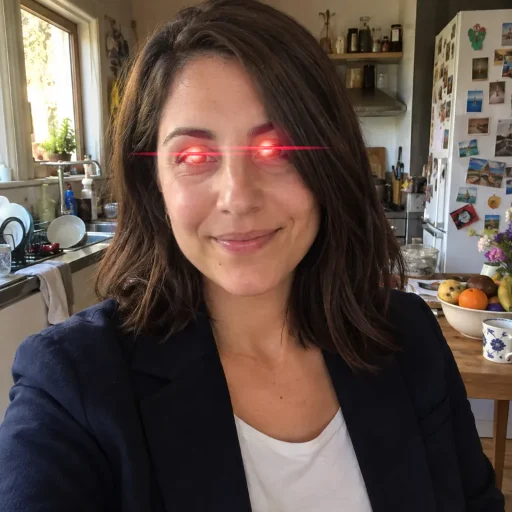
Effect illustration
Classic
Thin red streaks and a bright core along the eye line.

Original photo
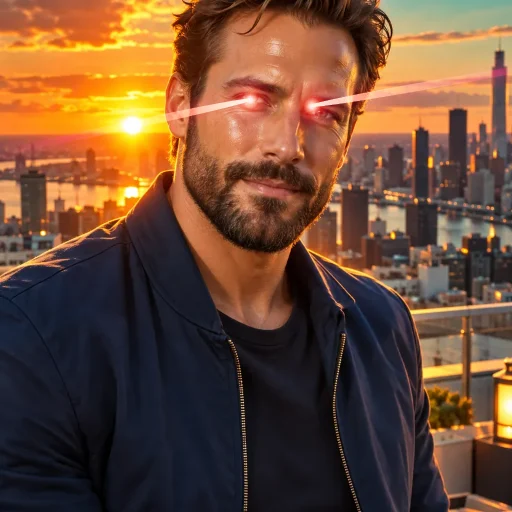
Effect illustration
Long beams
Long red rays leave each pupil and fade toward the edges.

Original photo
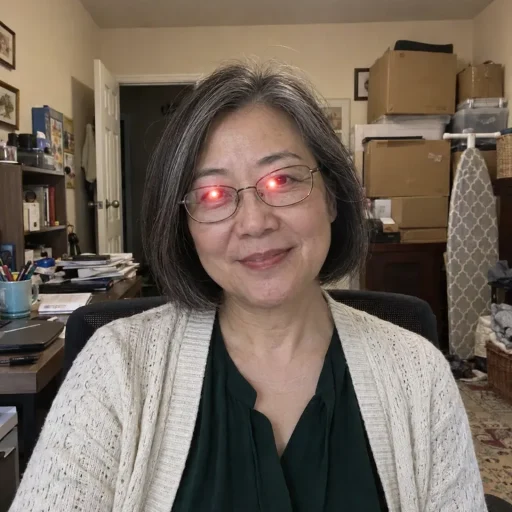
Effect illustration
Soft glow
A small halo of red light stays close to each eye.
How do I add a laser eyes effect while keeping the face recognizable?
The laser eyes filter asks the image model to center a red highlight on each visible pupil and keep the face, expression and background recognizable. Start with a sharp, front-facing photo in even light. Soft glow keeps the requested lighting close to the eyes, which is useful when the face needs to remain the focus.
Can I use this laser eyes meme maker for free?
Laser Eyes Meme Maker charges 5–9 credits per generated image. Eligible new accounts get 1 signup credit, and one Fast image uses 5. Previewing the effect styles is free. The smallest purchase is the $5 for 10 credits trial pack, and each generated PNG includes download without an added site watermark.
Can I make a laser eyes meme GIF here?
Laser Eyes Meme Maker exports a single square PNG per run. Use the PNG for a still reaction post, a profile photo or as a frame in a separate animation editor. For flashing beams, live face tracking or a moving GIF, use an editor that supports a sequence of images or video.
Pricing and credits
One Fast effect costs 5 credits for a 1024 × 1024 PNG. The smallest purchase is a one-time $5 for 10 credits trial pack, equivalent to $2.50 per Fast image when using the pack. HD, Ultra and Studio use 7, 8 and 9 credits and require an active subscription or eligible paid credits.
| Quality | Pixels | Credits | Pack-rate equivalent |
|---|---|---|---|
| Fast | 1024 × 1024 | 5 | $2.50 |
| HD | 2048 × 2048 | 7 | $3.50 |
| Ultra HD | 2880 × 2880 | 8 | $4.00 |
| Studio | 2048 × 2048 | 9 | $4.50 |
| Feature | Details |
|---|---|
| Effect previews | Free to browse |
| Signup credits | Eligible new accounts get 1 signup credit, and one Fast image uses 5. |
| Image generation | Sign-in required · 5–9 credits |
| PNG download | Included with generation · no added site watermark |
Which photos work best with glowing eyes?
Use a clear photo with visible pupils and room around the face. Sunglasses, closed eyes and tiny faces can make it harder for an AI edit to place the light accurately. The model can change some photo details, and a non-square input may be cropped or reframed for the square PNG.
Explore other photo effects with the AI Face Editor or add a caption with Speech Bubble Meme Generator.
Laser eyes filter FAQ
The filter runs in a mobile or desktop browser. Save the original photo separately so you can compare the eye placement and crop after exporting. See the answers below for phone use, pet photos, beam colors and how uploads are handled.
Do I need a mobile app to add glowing eyes?
Use the filter in a browser on your phone or computer. Choose a JPG, PNG or WebP photo, then save the result as a square PNG.
Can I make a cat laser eyes meme?
Yes. Upload a sharp cat photo with the eyes visible. The same presets work for pet portraits, with light placement depending on pose and image clarity.
Can I make yellow or blue laser eyes?
Choose Custom and describe the color and glow you want. You can add an effect reference photo to show the intended palette.
What happens to the photo I upload?
The photo is uploaded to our storage and sent to the image provider for editing. Someone with the direct storage link may be able to open it. The result preview and download in the tool require the account that started the request.