
The AI cinematic photo generator from Consistent Character AI is for creators who want a selfie, portrait or group photo to look like a frame from a film. It returns one PNG in 16:9, 3:4 or 9:16, up to 3840 pixels on the longest edge, with no added site watermark. One image costs 6–9 credits; at the one-time trial rate ($5 for 10 credits) a Fast image is $3.00.
How to use the AI cinematic photo generator
The AI cinematic photo generator works from one photo you already have. Pick a look and a frame, check the credit quote under the button, then generate. The prompt asks the model to keep faces, clothing and poses while it changes the light, color grade and background; results vary with the photo, so compare the result with your original before you download.
1. Upload a clear photo
Choose a JPG, PNG or WebP up to 10 MB and 2048 pixels per side. A sharp, front-lit face gives the model the most detail to work from.
2. Pick a look and a frame
Select Dark drama, Golden hour or Epic grade, or choose Custom and describe the light, setting and color you want. Then choose a 16:9, 3:4 or 9:16 frame.
3. Generate and download
Choose a quality, confirm you have permission to use the photo, and sign in to generate. Open the result and download the PNG.
Cinematic photo examples, before and after
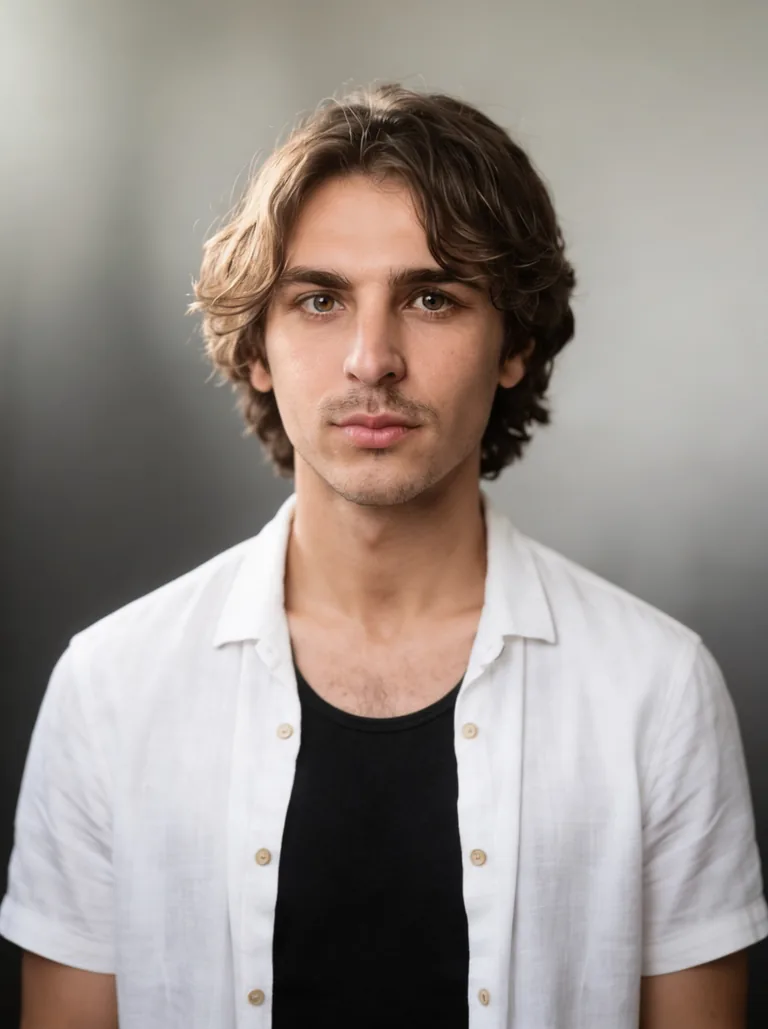
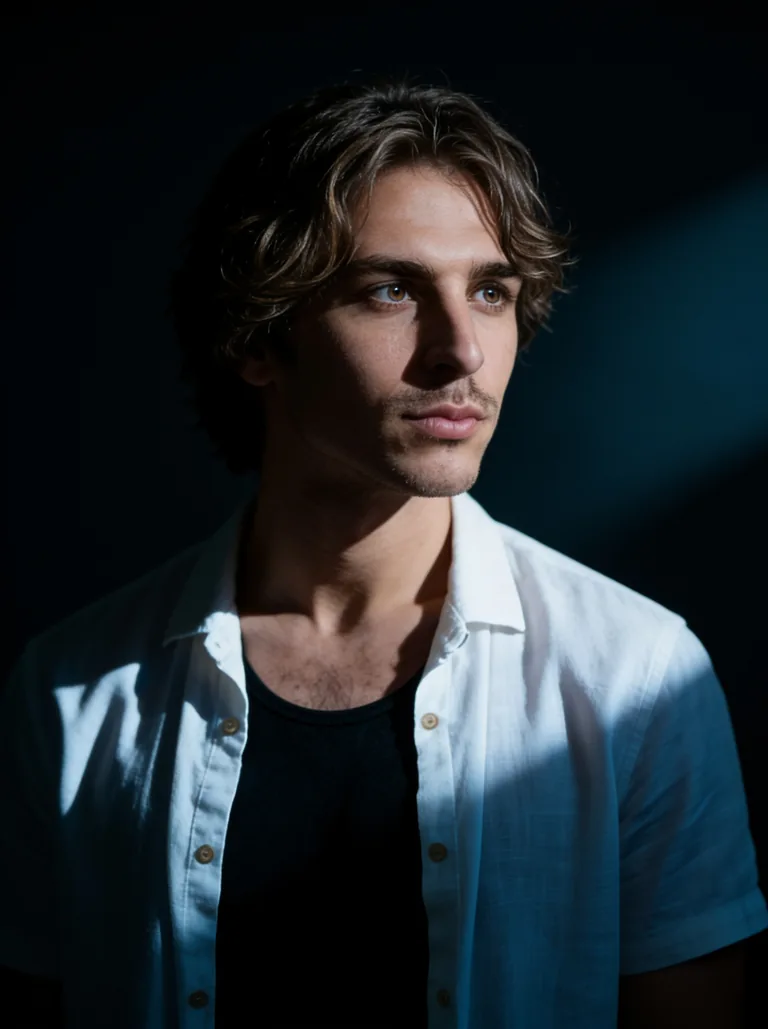
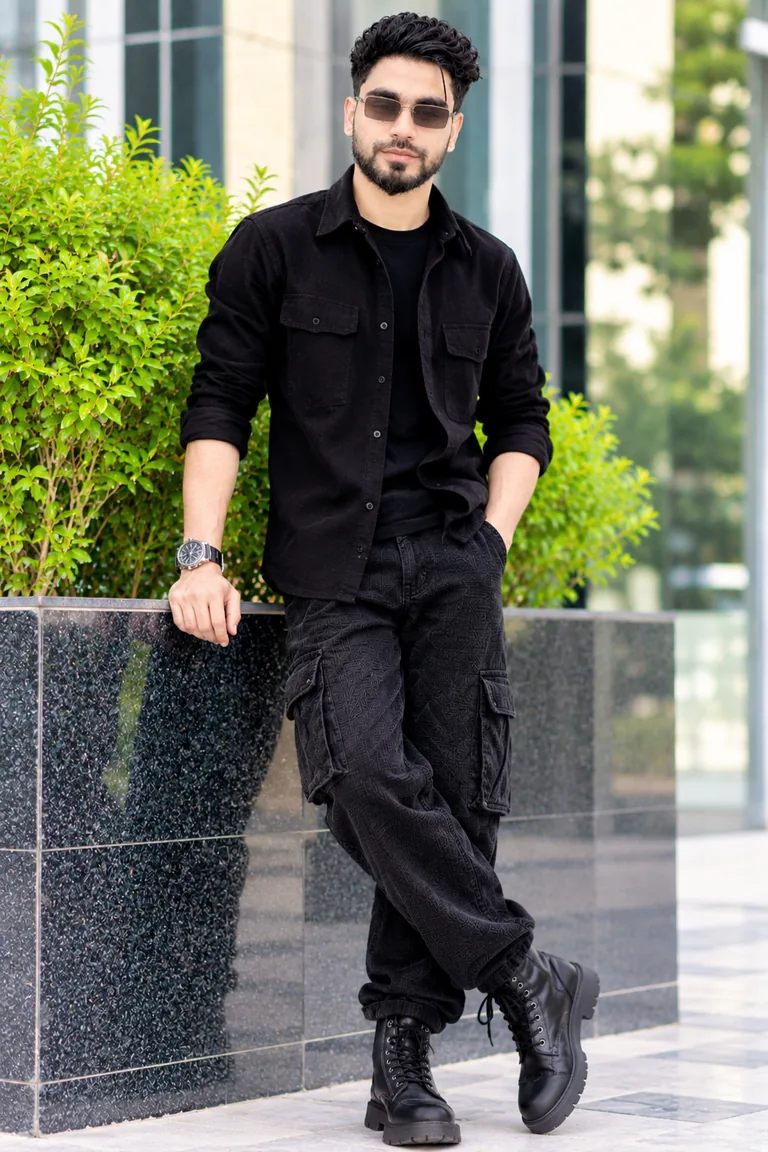
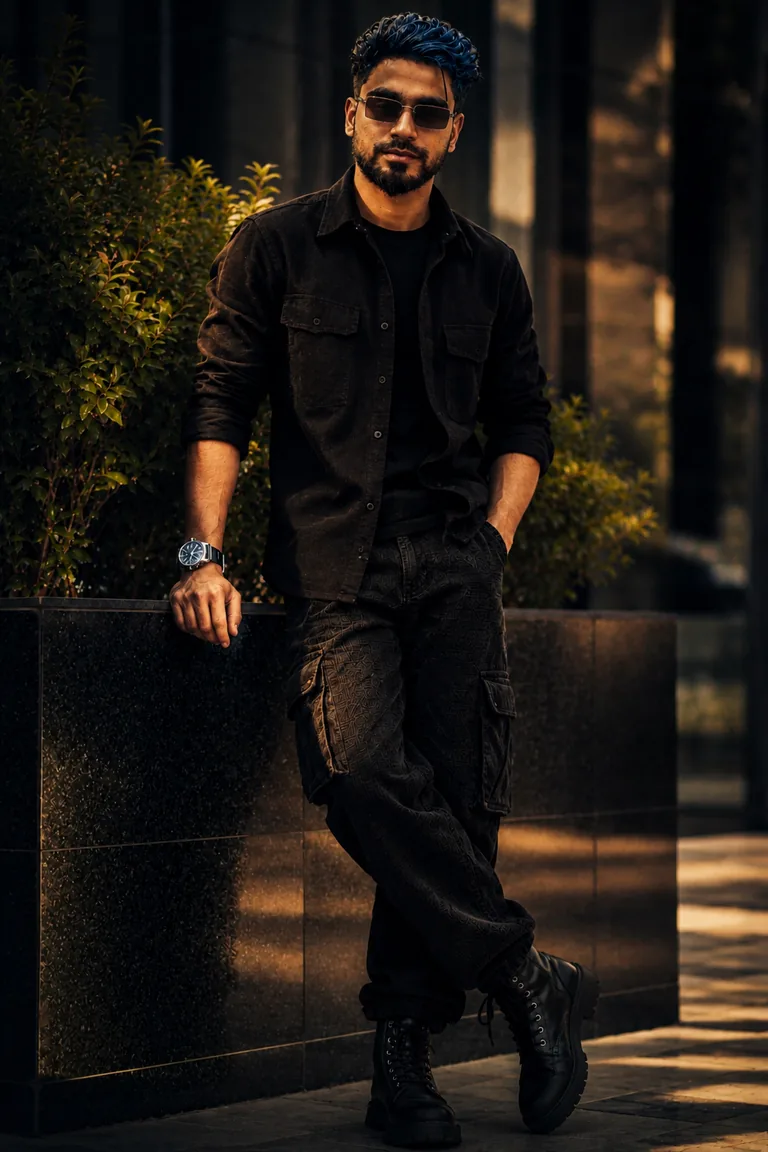
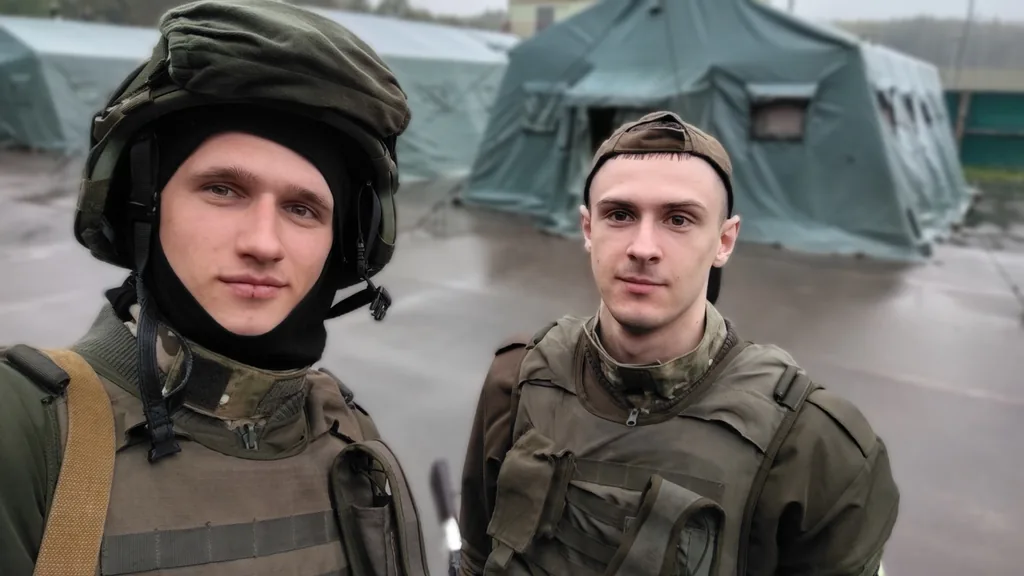
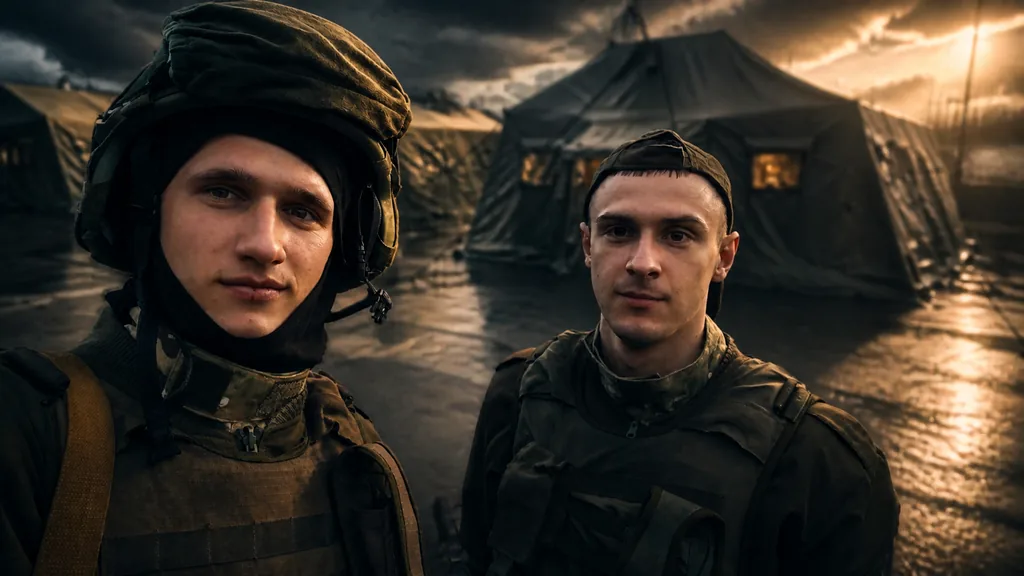
Each pair shows an everyday photo on the left and a cinematic edit of the same picture on the right: a studio headshot relit with hard side light and teal shadows, a daytime street photo turned into warm low sunlight, and a rainy camp selfie given a stormy, high-contrast grade. Look at how much the light and color change while the people stay in the same pose.
Before
After
Studio headshot to dark drama
A softly lit studio headshot of a young man becomes a low-key portrait: hard light from one side, a near-black background and teal shadows on the shirt.
Before
After
Daytime street photo to golden hour
A flat daytime photo of a man leaning on a granite planter becomes a warm evening scene, with low sunlight across the pavement and deep shadows behind him.
Before
After
Camp selfie to epic war-film still
A grey, rainy selfie of two men in helmets and body armor gets a stormy sky, wet ground catching warm light and a high-contrast teal-and-orange grade in a 16:9 frame.
Is this AI cinematic photo generator free?
No. The AI cinematic photo generator needs sign-in and 6 credits for one Fast PNG, which is $3.00 at the one-time trial rate. Eligible new accounts get 1 credit. A Fast image needs 6 credits, so the signup credit does not cover one. The smallest purchase is the trial pack at $5 for 10 credits, enough for 1 Fast image. Browsing the examples and presets costs nothing, and downloads carry no added site watermark.
Do I need an AI cinematic photo app on my phone?
No app is needed. The AI cinematic photo generator works online: open the page in Safari, Chrome or another mobile browser on iPhone or Android, or on a desktop computer. Pick a photo from your camera roll, generate, and tap Download to save the PNG. On iPhone the file lands in Files, where Share and Save Image copies it to Photos. Convert HEIC photos to JPEG first and keep each side under 2048 pixels.
What makes a photo cinematic?
A photo reads as cinematic when its light, color and frame look planned like a film shot: one motivated key light with deep shadows, a consistent color grade such as teal shadows against warm skin, shallow depth of field that separates the subject, a wide frame, and a little film grain. The presets here describe those settings in the prompt, so you do not need camera settings or editing software.
Camera settings that photographers use for the same effect are a wide aperture (around f/1.4 to f/2.8) for background blur, a low ISO to keep grain controllable, and exposure set for the highlights so shadows stay dark. Writing your own Gemini or ChatGPT prompt works the same way: name the light direction, the color grade, the lens feel and the setting, and say that the face must stay unchanged.
For copy-and-paste photo prompts with face-keeping wording, see ChatGPT Image Prompts.
Cinematic photo credits and PNG sizes
One cinematic photo costs 6–9 credits depending on quality, and the price is the same for every frame shape. Dollar amounts use the one-time $5 for 10 credits rate. Studio renders at 2K with higher detail. HD, Ultra HD and Studio require an active subscription or eligible paid credits.
| Quality | 16:9 | 3:4 | 9:16 | Credits (pack equivalent) |
|---|---|---|---|---|
| Fast | 1536 × 864 | 768 × 1024 | 864 × 1536 | 6 ($3.00) |
| HD | 2048 × 1152 | 1536 × 2048 | 1152 × 2048 | 7 ($3.50) |
| Ultra HD | 3840 × 2160 | 2480 × 3312 | 2160 × 3840 | 8 ($4.00) |
| Studio | 2048 × 1152 | 1536 × 2048 | 1152 × 2048 | 9 ($4.50) |
| Feature | Details |
|---|---|
| Browse | Examples and presets are free to view without signing in. |
| Signup allowance | Eligible new accounts get 1 credit. A Fast image needs 6 credits, so the signup credit does not cover one. |
| Download | One PNG per generation. The download is included. |
| Watermark | No visible watermark added by this site. |
Where this cinematic photo editor falls short
The generator redraws one photo into one still image. It does not make video or animate the frame, and it cannot merge people from separate photos into one scene. Because the model repaints the whole picture, faces, hands and small text can still shift, and a big change of frame, such as a vertical selfie turned into a 16:9 shot, means the model invents the extra background. Old, blurry or very dark photos give it less to keep.
To change only the lighting and keep the background, use AI Relight. For a styled fashion shoot from one photo, try AI Photoshoot.
Cinematic photo FAQ
Short answers to questions people ask before they upload a photo.
Does the AI cinematic photo editor change my face?
The prompt tells the model to keep each face, age, skin tone and hairstyle exactly as in your photo and to change only the light, grade and setting. Results vary with the photo: a sharp, well-lit face at a normal distance gives the model the most to keep. Compare the result with your original before you download.
Can I download cinematic images in 4K?
Yes, with paid access. Ultra HD costs 8 credits and needs an active subscription or eligible paid credits; it returns a 3840 × 2160 PNG in 16:9, 2160 × 3840 in 9:16 or 2480 × 3312 in 3:4. Fast (6 credits) is 1536 × 864 in 16:9.
Is this different from a cinematic photo filter?
A filter or LUT shifts the colors of the pixels you already have. This tool repaints the photo, so it can also move the light, darken or replace the background and widen the frame. That is why the result can look more like a film still, and also why small details can change.
Who can see the photos I upload?
The site sends your photo to its image provider to make the edit. The preview and download need your account, and anyone who has a direct storage link may be able to open the file. Only upload photos you have permission to use.