
Photo to LEGO is an AI image tool for people who want a toy-brick version of themselves, friends or a pet for a profile picture, card or gift, with no prompt to write. Pick classic yellow, real skin tone or all-brick. New accounts get a 1-credit signup gift, less than one image. One PNG starts at 5 credits, about $2.50 at the $5/10-credit pack rate, with no added watermark.
How to convert a photo to a LEGO minifigure
To convert a photo to a LEGO minifigure here, upload one clear photo, pick Classic, Real skin or Bricks, choose a portrait, landscape or square shape, and press Generate. The prompt asks the model to rebuild each person as a toy figure with the same hair, glasses and outfit colors, and the background in bricks; you get one PNG. Results vary with the photo.
1. Upload a photo
Choose one JPG, PNG or WebP up to 10 MB and 2048 pixels per side. Selfies, couples, small groups and pets work best when every face is clear; use a photo you may edit.
2. Pick a brick style and shape
Classic gives yellow minifigure heads, Real skin uses each person's own skin tone, Bricks builds the whole picture from bricks. Pick 3:4, 4:3 or 1:1 and an image quality, then check the credits on the button.
3. Compare and download
Slide between your photo and the brick version, check that nobody is missing and the outfits look right, then download the PNG. If a request is unconfirmed, check the same request instead of paying again.
AI LEGO filter examples: selfies, couples, pets and places
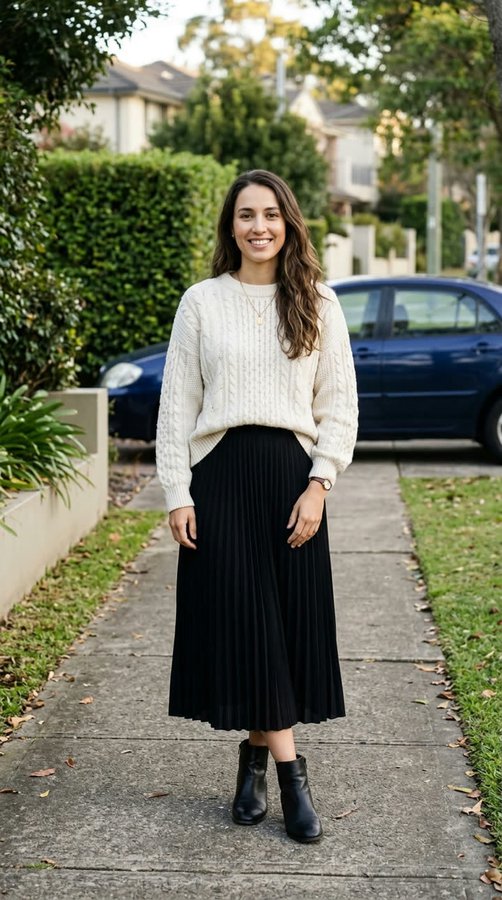
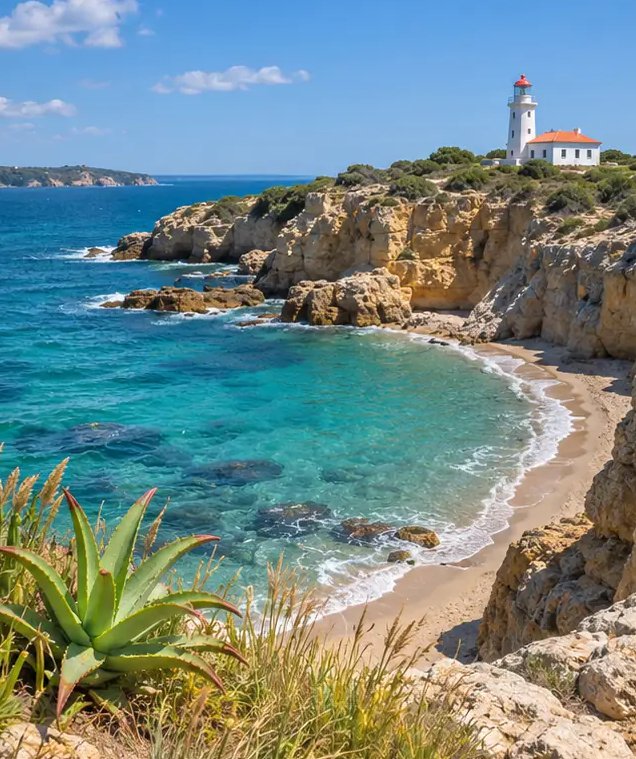
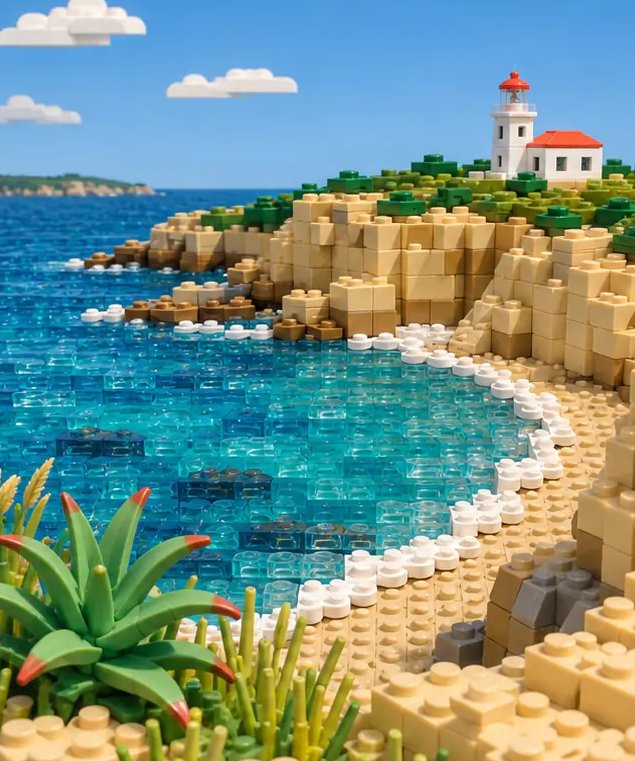
These six pairs put an ordinary photo next to a brick version: two selfies as minifigures in each person's own skin tone, a couple and a full-length street photo as classic yellow minifigures, and a beagle and a seaside cove rebuilt entirely from bricks. In these pairs the hairstyles, the red hoodie, the striped top and the lighthouse carry over. They illustrate each look; results from your own photo vary.
Photo

Brick version

Selfie, real skin minifigure
A young man in a red hoodie becomes a brown-skinned minifigure with molded locs, the same smile and a brick-built living room behind him.
Photo

Brick version
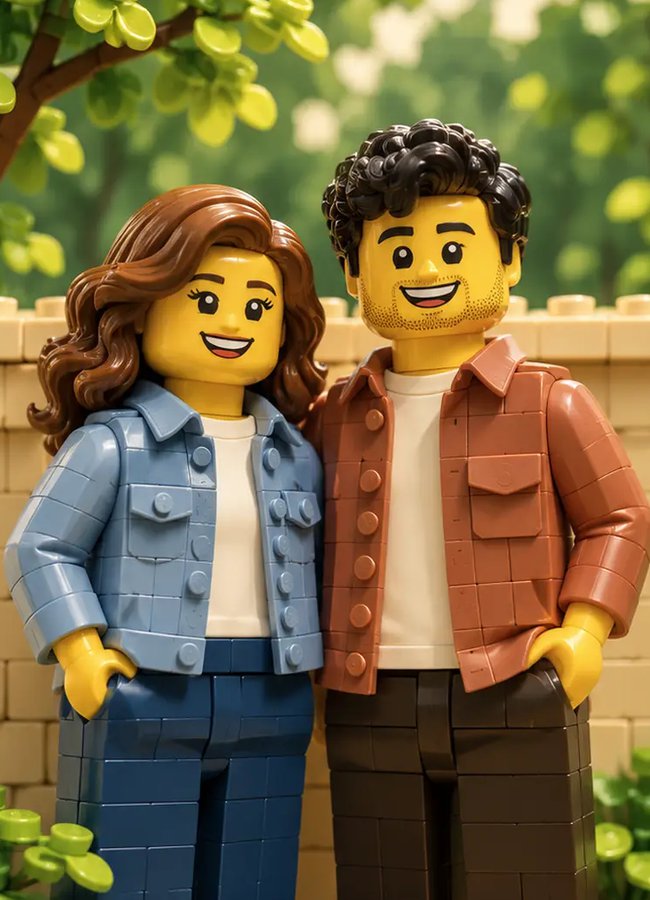
Couple photo, classic minifigures
Two people in front of a garden wall turn into yellow-headed minifigures in a denim jacket and a rust shirt, standing side by side as in the photo.
Photo
Brick version
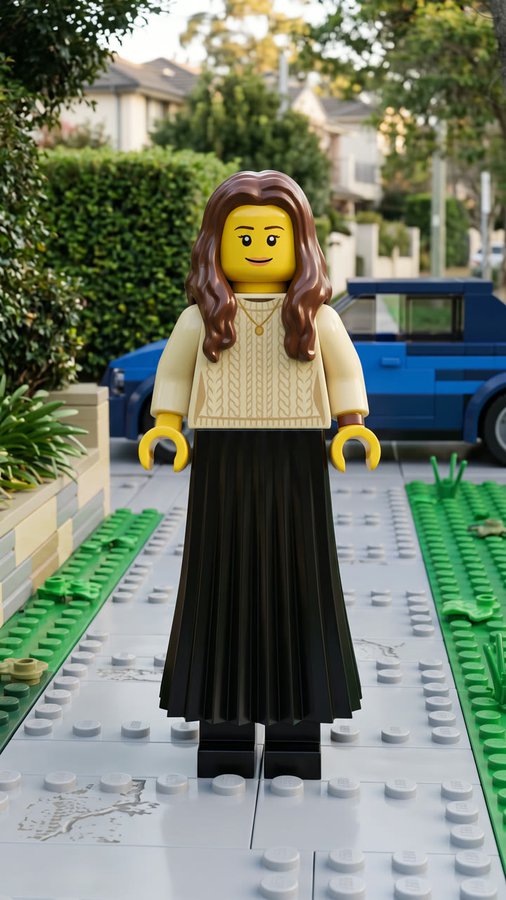
Full-length photo, classic minifigure
A woman in a cream sweater and long black pleated skirt on a sidewalk becomes a yellow minifigure on a gray baseplate, with the car and hedge still behind her.
Photo

Brick version

Kitchen selfie, real skin minifigure
An older woman with silver hair and a navy striped top becomes a light-skinned minifigure at a brick kitchen counter with a mug.
Photo

Brick version
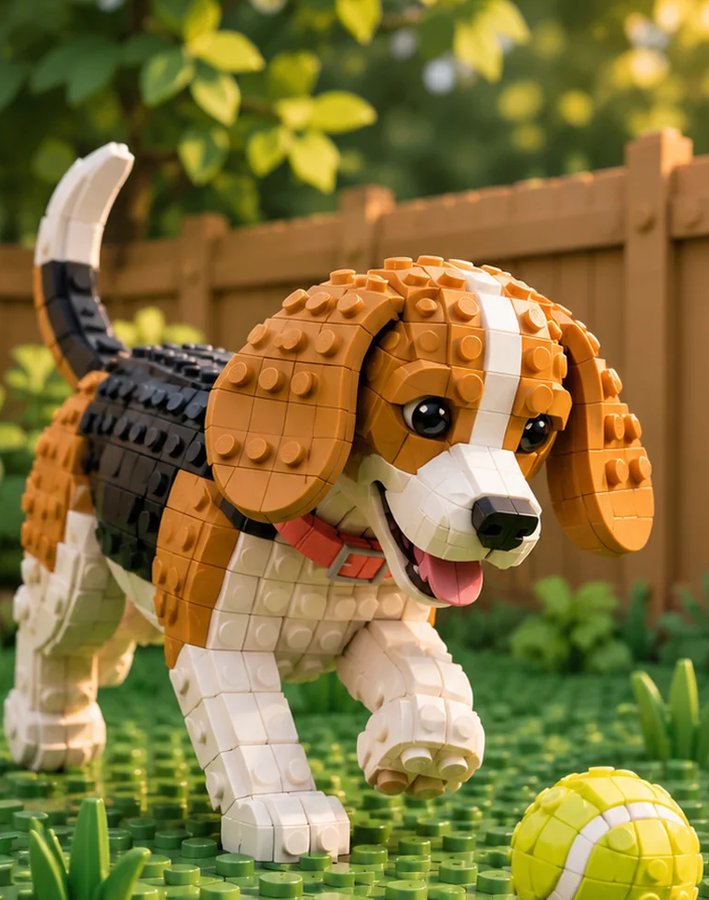
Pet photo, brick world
A beagle chasing a tennis ball on grass is rebuilt from small bricks, keeping its tricolor coat, red collar and the wooden fence.
Photo
Brick version
Travel photo, brick world
A seaside cove with cliffs, a white lighthouse and agave plants becomes a brick diorama with stepped tan cliffs and a blue brick sea.
Can I use photo to LEGO AI for free?
This photo to LEGO tool is not free with the current signup allowance. Browsing the examples and choosing styles cost nothing, but each image costs at least 5 credits. New accounts get a 1-credit signup gift, less than one image. From zero balance, the smallest purchase is the $5 one-time pack with 10 credits, about $2.50 per Fast image. There is no daily free quota here, no added visible watermark and no extra charge to download the PNG.
Some other photo to LEGO tools do offer free runs. The table lists what each official page said when checked; our tool is listed first and is not affiliated with the others.
| Tool | How it works | Free use | Download |
|---|---|---|---|
| This photo to LEGO tool | AI rebuilds your photo; 3 brick styles + Custom; sign-in required | This photo to LEGO tool is not free with the current signup allowance. Fast is 5 credits, about $2.50 at the pack rate. | PNG, 1K to 4K, no added watermark |
| SandBase Brick Minifigure Filter | AI redraws you as a minifigure in a small brick scene | 10 runs a day without signing in, 30 with a free account, shared across its AI image tools | No watermark |
| EaseMate AI Photo to LEGO | AI restyle of your photo; optional custom prompt | One image without logging in; free plan lists 30 sign-up credits and 5 images a day | Page says no watermark |
| PicLumen Photo to Lego | One brick-diorama template; people become minifigures | Free sign-up with a welcome offer; number of free images not stated | Not stated |
Can a photo to LEGO converter make a LEGO mosaic you can build?
A photo to LEGO converter like this one makes a picture of bricks, not a building plan: it gives no parts list, color counts or stud-by-stud layout, and the bricks in the image may not exist as real pieces. To build a real wall mosaic from a picture upload, use a mosaic maker that maps your photo to a fixed grid of 1×1 tiles in a small set of colors and lists the pieces to buy.
LEGO's own Mosaic Maker kit and independent LEGO mosaic maker sites work that way, usually with a 48×48 or larger grid and only a handful of tones, so faces turn into pixel art. Use the AI version when you want a toy-photo look to share or print; use a mosaic maker when you want to build it.
What is the ChatGPT prompt for photo to LEGO?
A photo to LEGO prompt for ChatGPT or Gemini needs three parts: what to rebuild (every person as a minifigure, or the whole scene in bricks), what to keep (number of people, pose, hair, glasses, outfit colors) and what to avoid (extra people, logos, text). Upload your photo in a regular chat, paste the prompt below and adjust the style line. Free plans limit image generations and the limits change, so check your plan.
Turn the attached photo into a photo of a real LEGO-style toy set. Rebuild every person as a minifigure with a cylindrical head, molded plastic hair in their own hairstyle and color, a printed face with their expression, glasses and facial hair, a torso printed with their outfit, C-shaped hands and short legs. Keep the same number of people, their positions and poses, and rebuild the background in plastic bricks. Glossy plastic, visible studs, soft studio light. No logos, text or extra people.
The tool on this page sends a longer version of this brief for you and adds the style you pick, so you do not need to paste anything.
Is there a photo to LEGO app?
You do not need an app for this photo to LEGO tool: it works in Safari or Chrome on iPhone and Android. Sign in, pick a photo from your camera roll, generate and save the PNG to your phone. The image is made on our servers, so an older phone gets the same result. Your photo is uploaded to this site and its image provider rather than processed on the device.
LEGO-style image pricing and credits
Each LEGO-style image is priced the same for any brick style, shape or Custom description. Fast costs 5 credits, equivalent to $2.50 at the $5/10-credit pack rate, and the one-time pack needs no subscription. HD (2K) and Ultra HD (4K) give larger files for posters and prints, Studio renders 2K at the higher quality setting for finer plastic detail, and all three need paid access. Downloading a finished PNG costs nothing extra.
| Quality | Output | Credits | Pack-rate equivalent |
|---|---|---|---|
| Fast | 1K · PNG | 5 | $2.50 |
| HD | 2K · PNG | 7 | $3.50 |
| Ultra HD | 4K · PNG | 8 | $4.00 |
| Studio | 2K · PNG | 9 | $4.50 |
| Item | What you receive |
|---|---|
| Signup allowance | New accounts get a 1-credit signup gift, less than one image. |
| Minimum purchase | $5 one-time Trial Pack · 10 credits. No subscription required. |
| Download | One PNG included; no second download charge. |
| Visible watermark | This tool adds no visible watermark. Supplier provenance metadata is not removed. |
| Quality access | Fast requires sign-in and enough credits. HD, Ultra HD and Studio require paid access. |
| Unfinished requests | Confirmed provider failure or an invalid output returns the charged credits. Lost confirmation or temporary saving delays keep the same request for recovery; do not pay again. |
What this AI LEGO filter cannot do
This AI LEGO filter redraws the whole photo, so it cannot promise an exact likeness, the precise print on a shirt or every person in a crowded group; tiny or blurry faces may merge or drift. It makes a picture, not a buildable model: no parts list, mosaic grid or building instructions. It returns one still PNG in 3:4, 4:3 or 1:1, with no batch mode, transparent background or video.
Photo-to-brick FAQ
These answers cover 3D models, group photos, the LEGO name and using the images. Review each result against your photo before downloading; the same photo can give a slightly different toy version each time.
Can it make a 3D LEGO model or building instructions from my photo?
No. The result is a flat PNG that looks like a photographed toy. For a printed or brick-built 3D figure you need a custom minifigure printing service or a builder who designs it from parts; the image here can serve as a visual reference for them.
Can I turn a group or family photo into LEGO figures?
Yes, upload the whole group in one photo. The prompt asks the model to keep the same number of people and their positions, but in larger groups, or with small and turned-away faces, someone can be merged or dropped, so count the figures before downloading.
Is this an official LEGO tool?
No. This is an independent AI image tool and is not made, sponsored or endorsed by the LEGO Group. LEGO and Minifigure are trademarks of the LEGO Group; the prompt asks for no logos on the bricks or figures.
Can I use these brick images commercially?
Personal use, like a profile picture or a card, is simplest. Before selling prints or using one in ads, check that you have rights to the photo and permission from anyone recognizable, and do not present the image as an official LEGO product; trademark and marketplace rules on AI art vary.
More photo-to-toy tools
For a boxed collectible figure of yourself, try the AI Action Figure Generator. For a blocky game skin, use Image to Minecraft Skin. For a flat cartoon look, open Photo to Cartoon. Each is a separate request with its own price.