
The Consistent Character AI photo face editor is for people retouching a selfie, a profile picture or a headshot who want one specific change, not a new face. It returns a vertical 3:4 PNG from 768 × 1024 (Fast, 5 credits, $2.50 at the $5 for 10 credits rate) up to 2480 × 3312, with no added site watermark. Browsing examples is free; generating needs credits.
How the AI face editor works
The AI face editor takes one portrait and one change. The prompt asks the model to apply only that change and to keep the identity, face shape, skin texture, glasses, clothes and background of the original. Results vary with the photo, so compare the edit with the original before you use it.
1. Upload a clear portrait
Use a sharp, evenly lit photo where one face is large in the frame. A group photo or a tiny face gives the model less to keep.
2. Pick or type one change
Choose Smile, Curly bob or Makeup, or choose Custom and describe the change in one sentence. Custom can also take a reference photo of a hairstyle or makeup look.
3. Generate, compare and download
Choose a quality level, sign in and generate. Compare the result with your photo, download the PNG, or run the edit again with clearer wording.
Face edit photo examples: one portrait, six changes
Every pair below starts from the same studio portrait of a fictional woman and shows one change. Under each pair is the brief this page sends for that kind of change; the prompt asks the model for that one change, and results from your own photo will differ.
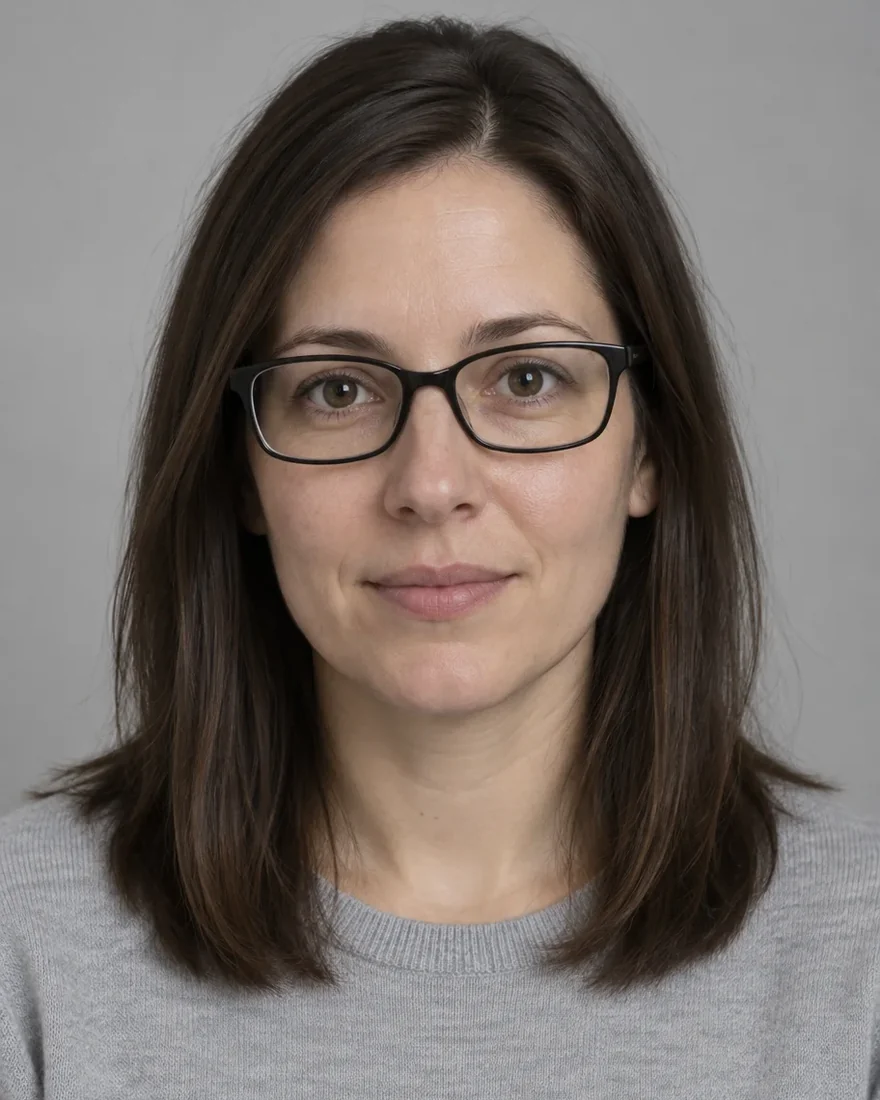
Before
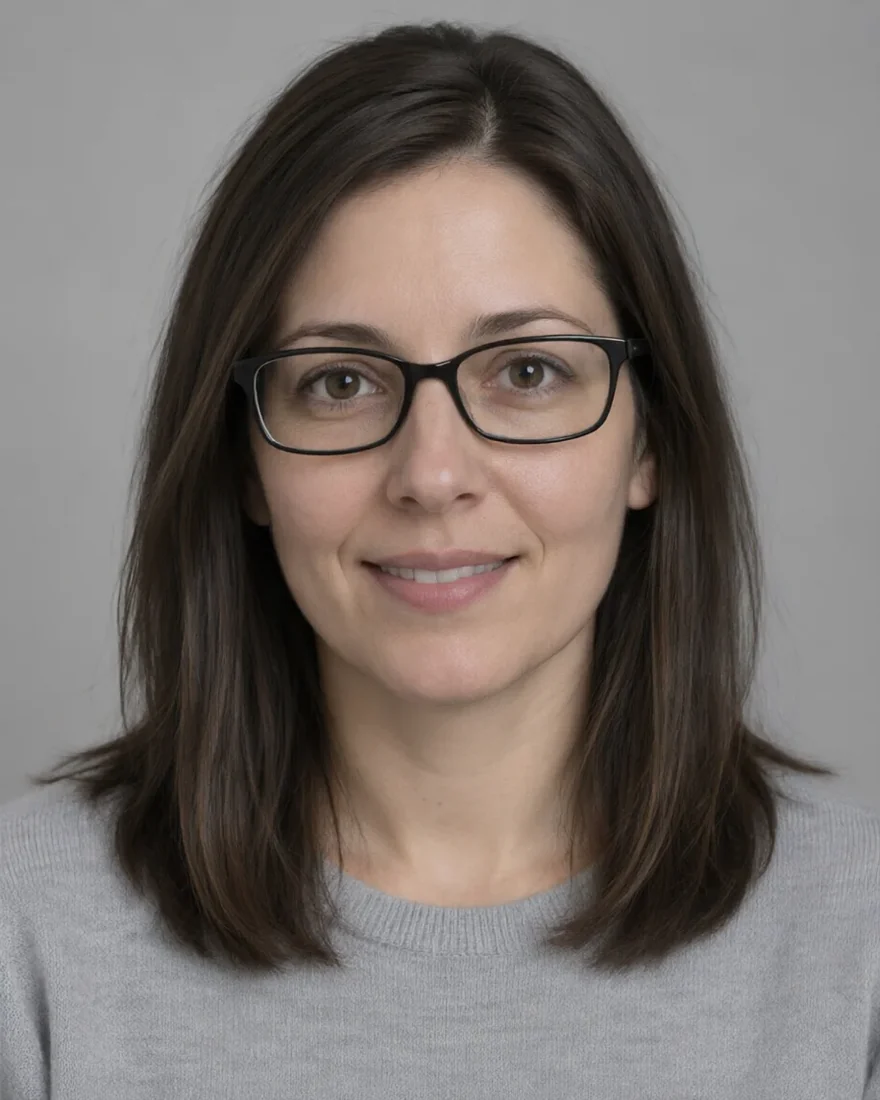
After
Expression
Neutral to a natural smile
Closed lips become a smile with the top teeth just showing; the glasses, hair and sweater match the original.
Edit brief
Change only the expression to a warm, natural smile that shows the top teeth slightly.
Before
After
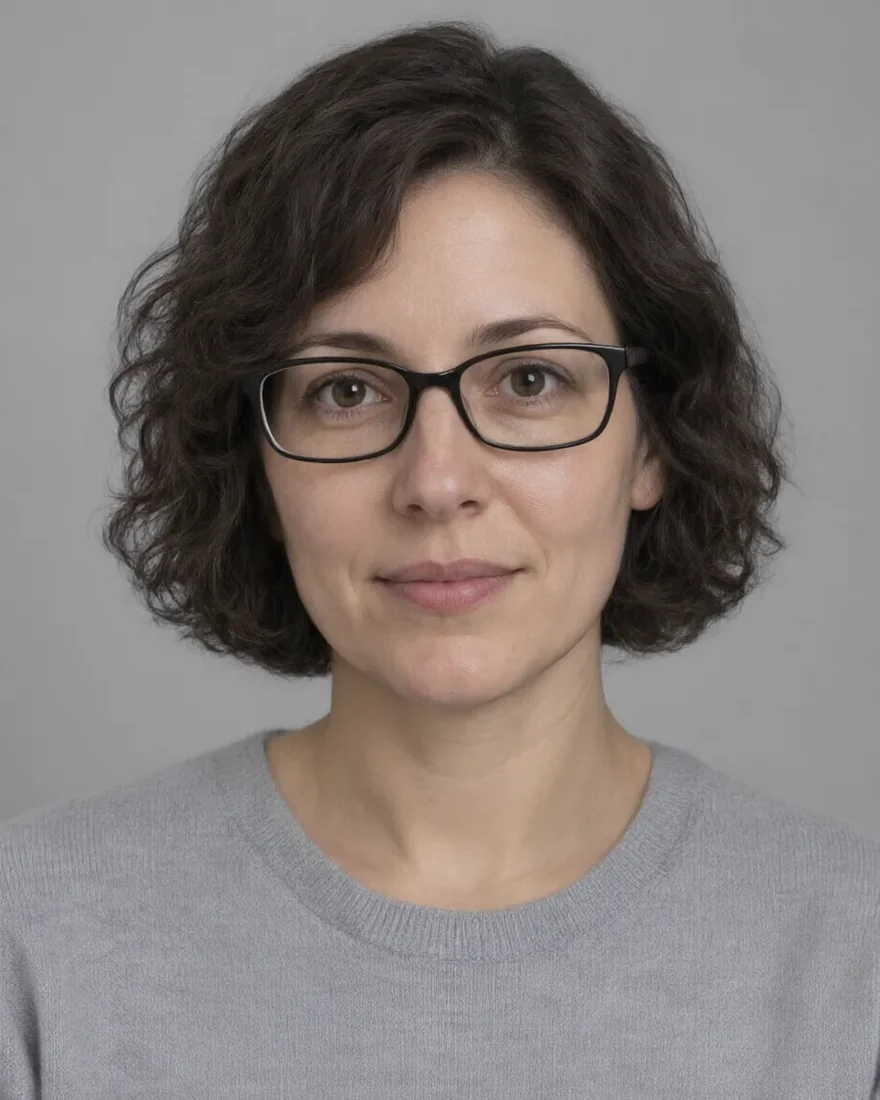
Hairstyle
Straight hair to a curly bob
Shoulder-length straight hair becomes a jaw-length curly bob in the same dark brown; the face and glasses match.
Edit brief
Change only the hairstyle to a short curly bob that ends at the jaw, in the same hair colour.
Before
After
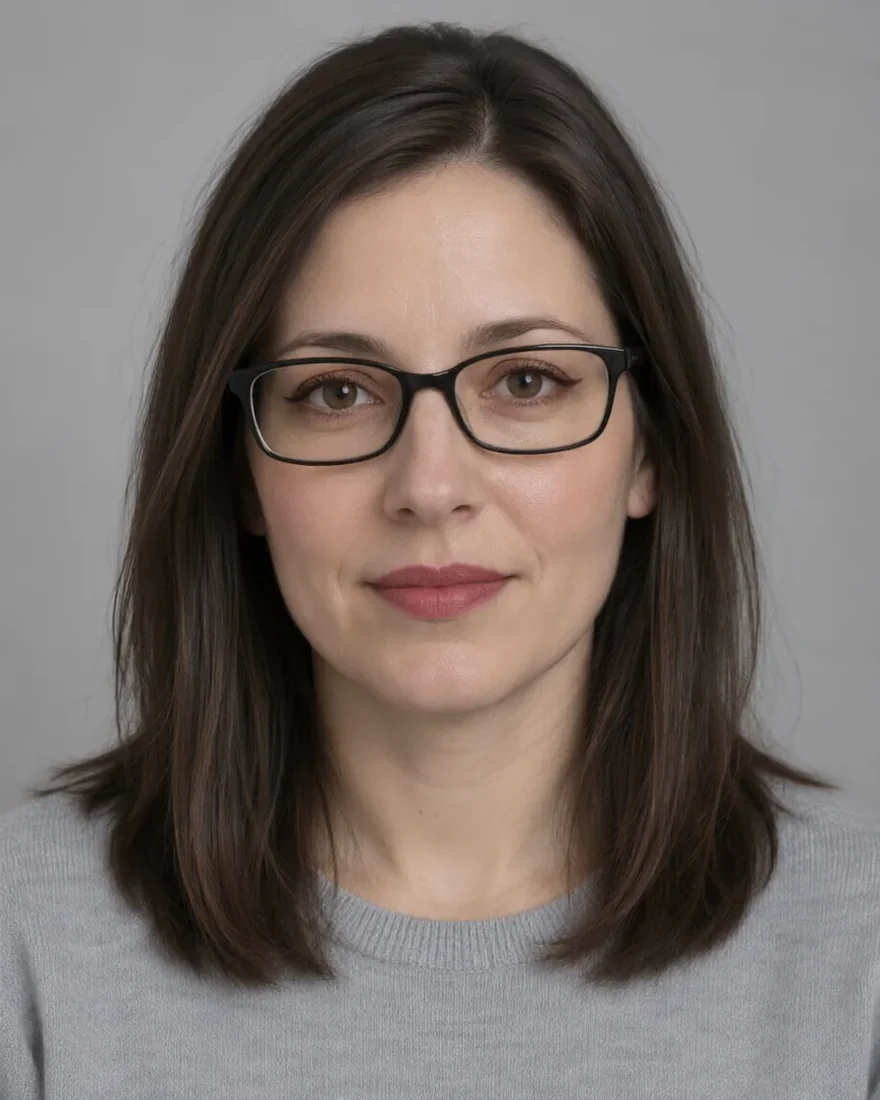
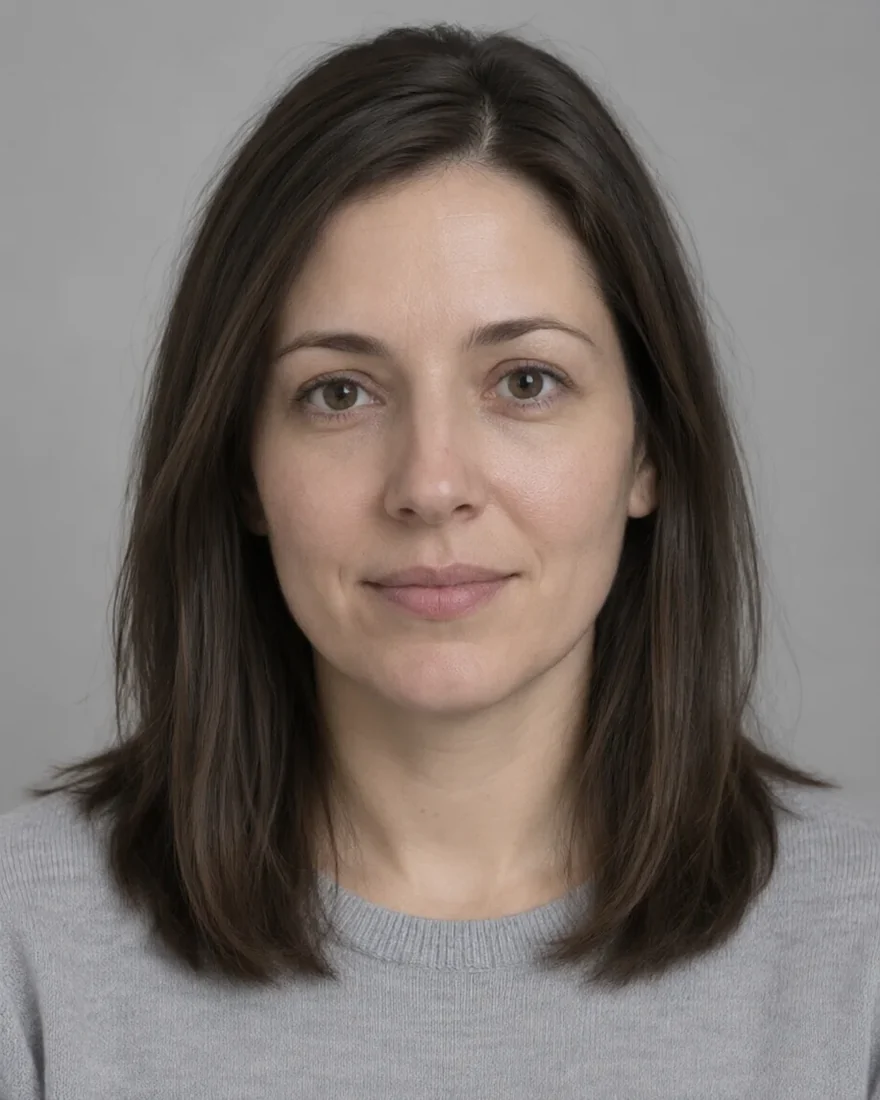
Makeup
Bare face to soft evening makeup
Rose-red lipstick, blush and mascara are visible, with only a faint line of eyeliner; the glasses and hair match the original.
Edit brief
Add soft evening makeup: brown winged eyeliner, mascara, light bronze eyeshadow, a little blush and a rose-red lipstick.
Before
After
Accessories
Glasses off
The black frames are gone with no marks on the nose; the eyes, expression and hair match the original.
Edit brief
Remove the glasses. No marks on the nose where the glasses were. Keep the same person, same face, expression, hair, clothes, lighting, background and framing.
Before
After
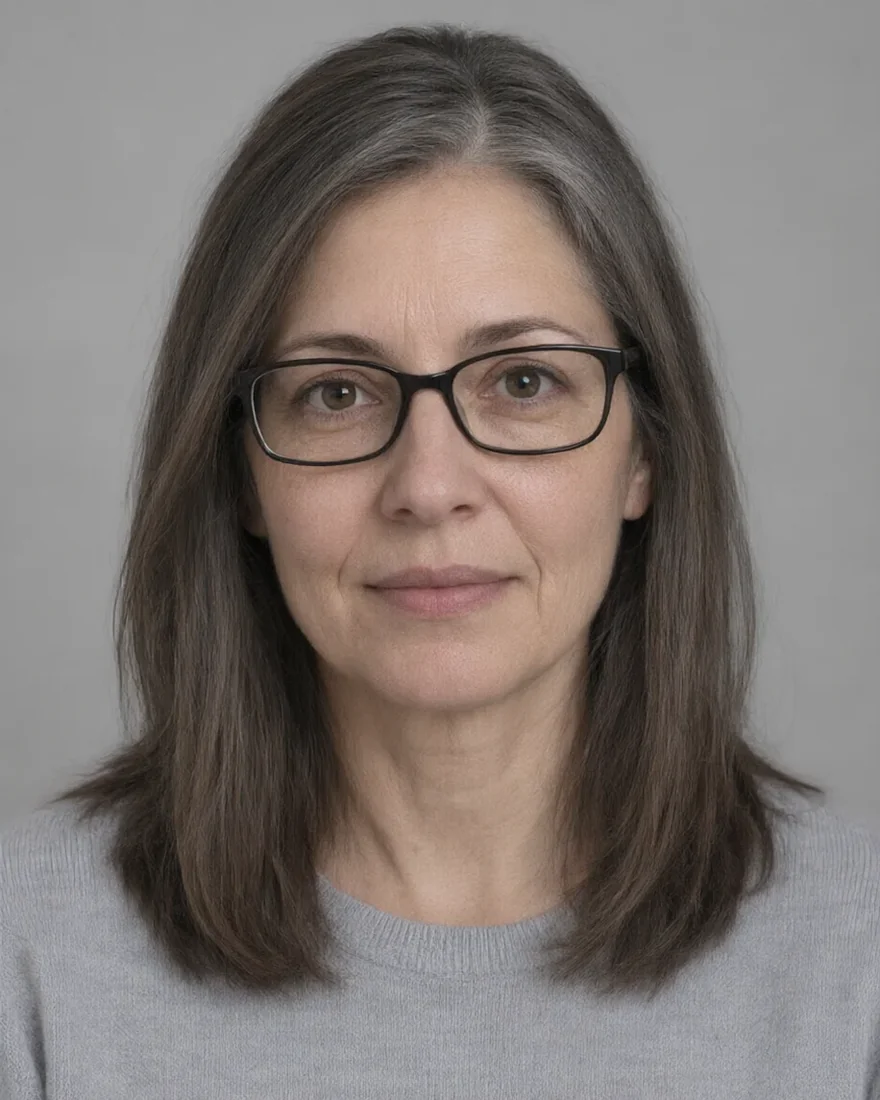
Age
Twenty-five years older
Grey streaks run through the hair and fine lines appear around the eyes and mouth; the glasses and sweater match the original.
Edit brief
Make the person look about 25 years older, around 60: grey streaks through the hair, fine wrinkles around the eyes and mouth, a slightly softer jawline. Keep the same person, same face, glasses, expression, hair, clothes, lighting, background and framing.
Before
After
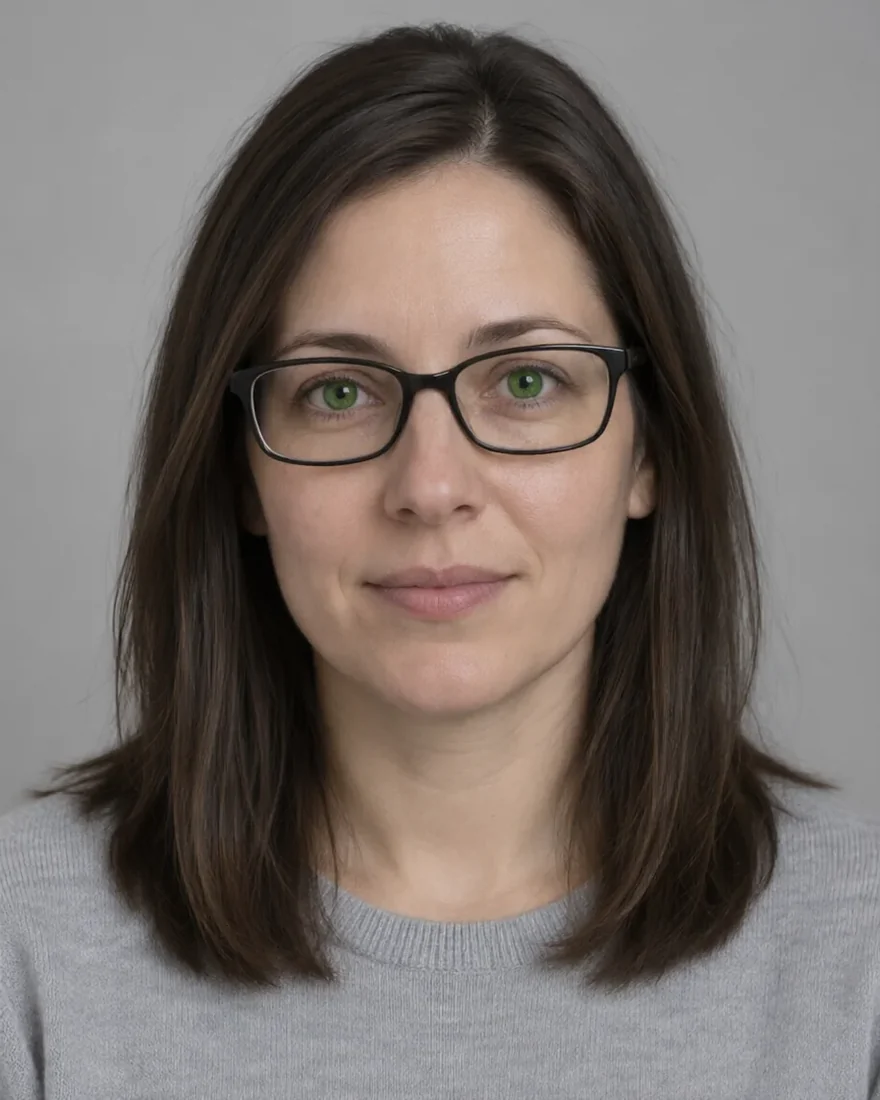
Eye colour
Brown eyes to green
Clear green irises behind the same black glasses; nothing else in the frame changes.
Edit brief
Change only the eye colour to a clear green. Keep the same person, same face, glasses, expression, hair, clothes, lighting, background and framing.
More edit briefs to start from
Clear skin, real texture
Removes temporary spots and evens redness without the airbrushed look.
Edit brief
Remove temporary blemishes and acne spots and even out redness. Keep natural skin texture, pores, freckles, moles and the same skin tone; do not airbrush or smooth the skin into plastic.
Slightly slimmer face
A small slimming of the cheeks and jawline, stated as a small change.
Edit brief
Make the cheeks and jawline very slightly slimmer, a small natural change. Keep the same face shape, eyes, nose, mouth, hair, background and proportions of the head and neck.
Raised eyebrows, surprised
Another expression change, written the same precise way.
Edit brief
Change only the expression to raised eyebrows and a surprised, slightly open mouth. Keep the same person, glasses, hair, clothes, lighting and background.
Is this AI face editor free to use online?
No, this AI face editor is not free to generate: each edit costs 5–9 credits, more than the current 1 signup credit. The smallest purchase that covers one is the $5 for 10 credits trial pack, which pays for two Fast edits ($2.50 each). Browsing the examples and copying the edit prompts is free.
The AI face editor runs in a phone or desktop browser with no download, and paid edits carry no added watermark. When you compare free plans of other face editors, check three things first: how many AI edits they allow, the export resolution and whether a watermark is added.
Can an AI face editor slim my face in a photo?
Yes, the AI face editor can be asked for a slightly slimmer face: choose Custom and use the “Slightly slimmer face” brief, which asks for a small change to the cheeks and jawline while keeping the rest. There is no slider, so the size of the change follows the wording.
Ask for a small change and say what must stay the same; large reshaping is where faces most often stop looking like the person. If the result goes too far, run it again with “very slightly” or describe one area only, such as the jawline.
Do I need a face edit photo app on my phone?
No. The AI face editor works in Safari on iPhone and Chrome on Android, and the PNG saves straight to the phone. Upload from the camera roll, pick the change and download; nothing to install.
This page has no live camera filter and no sliders. It fits a one-off edit described in words: one photo, one change, one downloaded image.
Face editor pricing, credits and watermark
A face edit costs 5–9 credits per image ($2.50–$4.50 at the $5 for 10 credits pack rate), depending on the quality level. Studio uses the model’s high-detail setting at 1536 × 2048, so it costs more than Ultra HD despite fewer pixels.
| Quality | Pixels | Credits | Pack-rate equivalent |
|---|---|---|---|
| Fast | 768 × 1024 | 5 | $2.50 |
| HD | 1536 × 2048 | 7 | $3.50 |
| Ultra HD | 2480 × 3312 | 8 | $4.00 |
| Studio | 1536 × 2048 | 9 | $4.50 |
| Feature | Details |
|---|---|
| Free | Browse the examples and copy their edit prompts without signing in. |
| Signup allowance | Eligible new accounts get 1 signup credit. One Fast edit needs 5 credits. |
| Generation | Sign in with enough credits. HD, Ultra and Studio require eligible paid access. |
| Download | One vertical 3:4 PNG per edit. No extra credits to download. |
| Watermark | No visible watermark added by this site. |
| Phone use | Runs in mobile and desktop browsers. No app to install. |
What this AI face editor can’t do
The AI face editor changes one face in one still photo per request. It does not swap in another person’s face, edit video, offer sliders or a live camera, or batch many photos at once. The model redraws the image, so a group photo may see other faces change too, and the eyes, teeth or jawline can come out slightly different; check them before you share the result.
For skin retouching only, use Face Retouch; to try several haircuts or hair colours on one photo, use the AI Hairstyle Changer; and for a smile alone, the AI Smile Generator.
AI face editor FAQ
Is this the same as a face swap?
No. A face swap puts someone else’s face into a photo; this editor only changes features of the face already there, such as the expression, hair or makeup. The prompt tells the model not to swap in another face, and the terms do not allow using it to impersonate anyone.
Can I change the hair and face in one photo?
Yes, in Custom you can describe both, for example a curly bob and a soft smile. One change per run tends to be easier to judge, so for a big makeover run two edits in a row on the result you like.
Why does my face look distorted, and how do I fix it?
Image models redraw the whole picture, so eyes, teeth or the jawline can drift even though the prompt asks the model to keep them. Use a sharp front-facing photo where the face is large, ask for one smaller change, and run it again if the likeness is off.
Is it safe to upload photos of my face?
Only upload a photo of yourself or an adult who agreed, and confirm the permission box. Photos and results are stored as unlisted files that the image provider reads, and anyone with a direct file link could open them, so avoid sensitive images. Downloads are available only to the account that made the image.