
AI Sprite Generator is an online 2D character sprite sheet tool for indie game developers, game jam teams, and hobbyists. Pick Walk, Attack, Run, or Custom—from text or an optional character image—with Side view, 4-Dir, or Top-down layouts in one 1:1, 4:3, or 3:4 PNG (768 × 1024 to 3312 × 2480) on a solid backdrop with no added site watermark. Eligible new accounts receive 1 signup credit; runs start at 5 credits ($2.50 at trial-pack rate).
How to make a character sprite sheet
Generate a 2D character sprite sheet either from a written description or by uploading an existing character portrait. Pick an action preset or Custom, select camera direction, sheet ratio, and quality tier, then sign in to download one grid-aligned PNG.
1. Upload a character image or start from text
Attach one JPG, PNG, or WebP character illustration (up to 10 MB, 128–2048 px per side) for image-to-sprite-sheet generation, or leave upload empty to design a new character from text.
2. Choose an action preset, direction, and grid shape
Select Walk, Attack, Run, or Custom for idle, jump, spell cast, or hit animations. Pick Side view, 4-Dir, or Top-down plus 1:1, 4:3, or 3:4 framing.
3. Pick quality tier and download your PNG
Choose Fast (1K), HD (2K), Ultra HD (4K), or Studio (2K high detail), sign in to generate, and download one solid-backdrop PNG ready to chroma-key and slice in your engine.
2D character sprite sheet examples
Review paired character-to-sheet walk and run grids alongside 12-frame pixel-art combat, spellcasting, archery, and hit-reaction sheets below. Notice the repeated silhouettes, locked outfits, and even spacing between frames. These visual samples illustrate target sprite sheet layouts; generation results vary by character image and prompt.
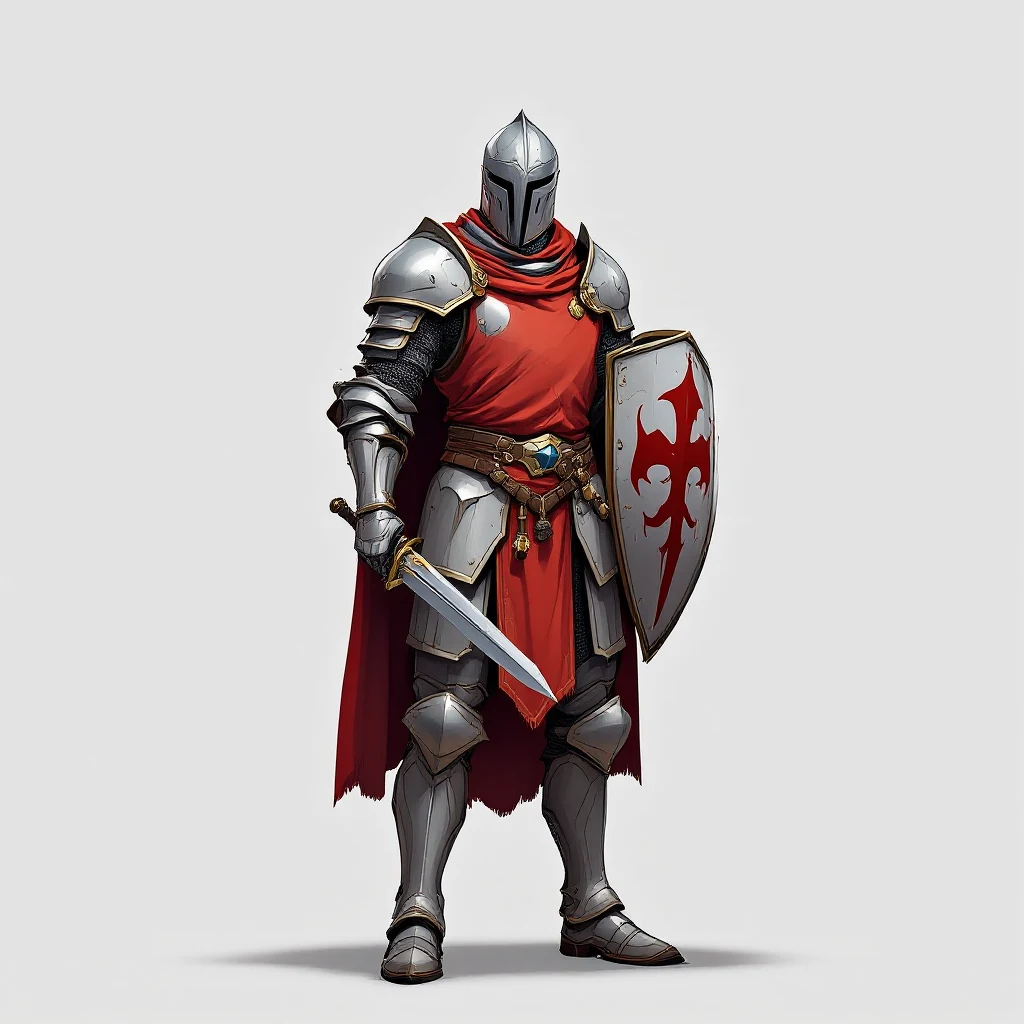
Character reference
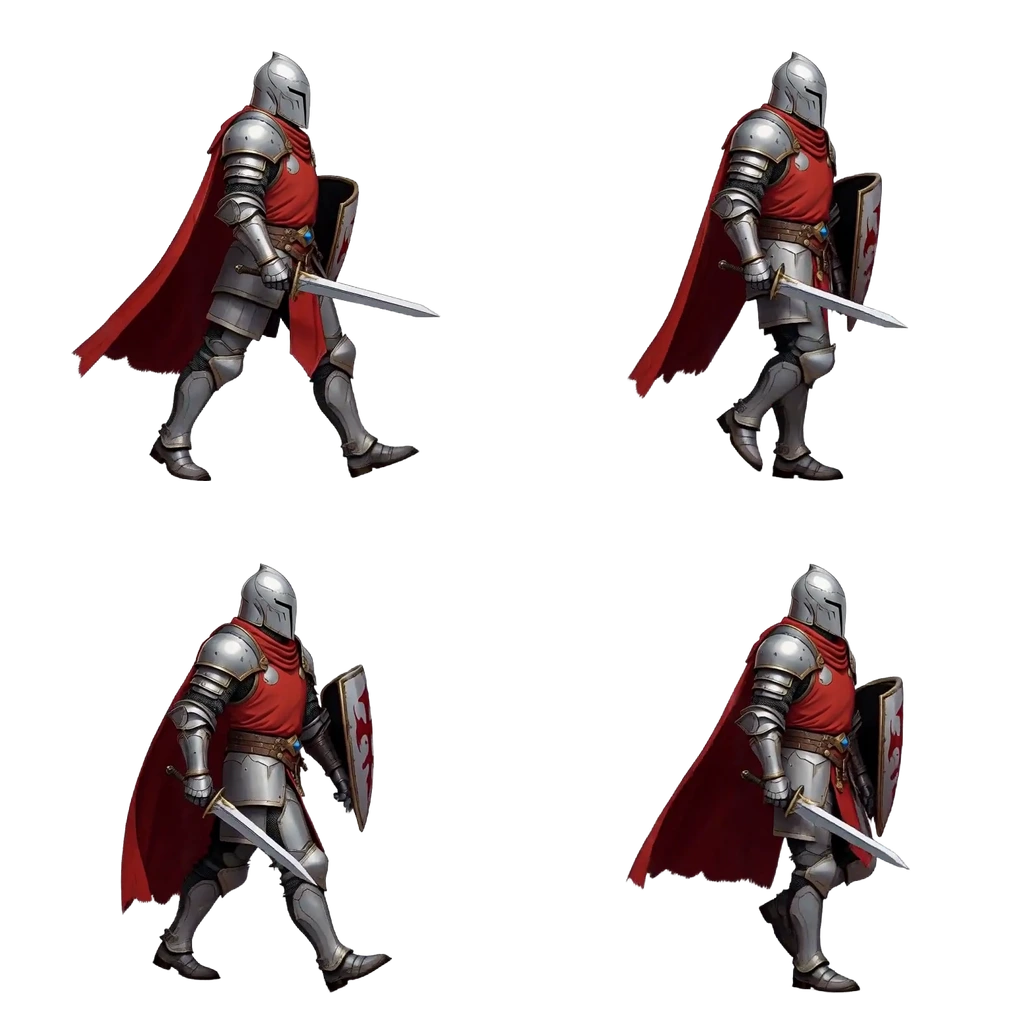
Sprite sheet PNG
Armored knight walk cycle
A standing knight character reference paired with a 2x2 four-frame side-view walk cycle sprite sheet showing alternating leg strides.
Character reference
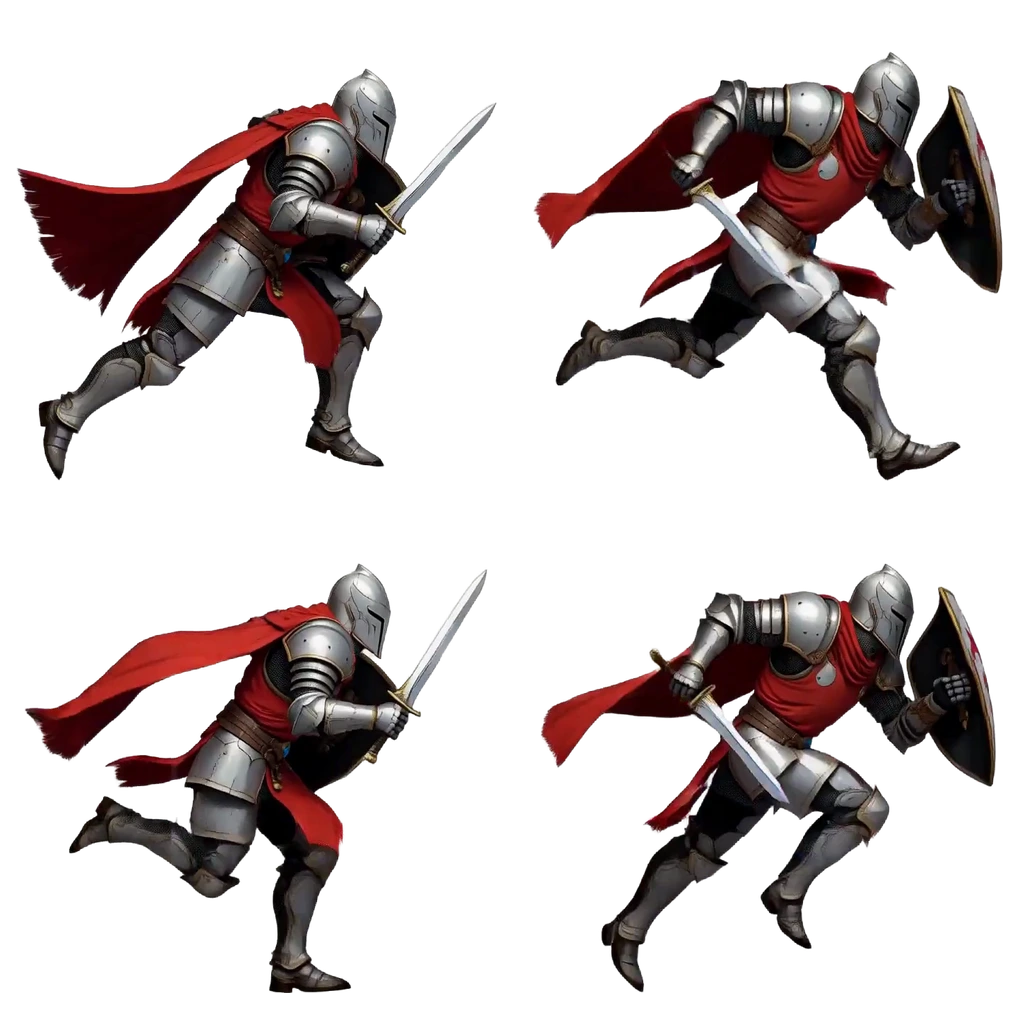
Sprite sheet PNG
Armored knight run cycle
The same knight character paired with a four-frame side-view sprint sprite sheet showing forward lean and raised shield.
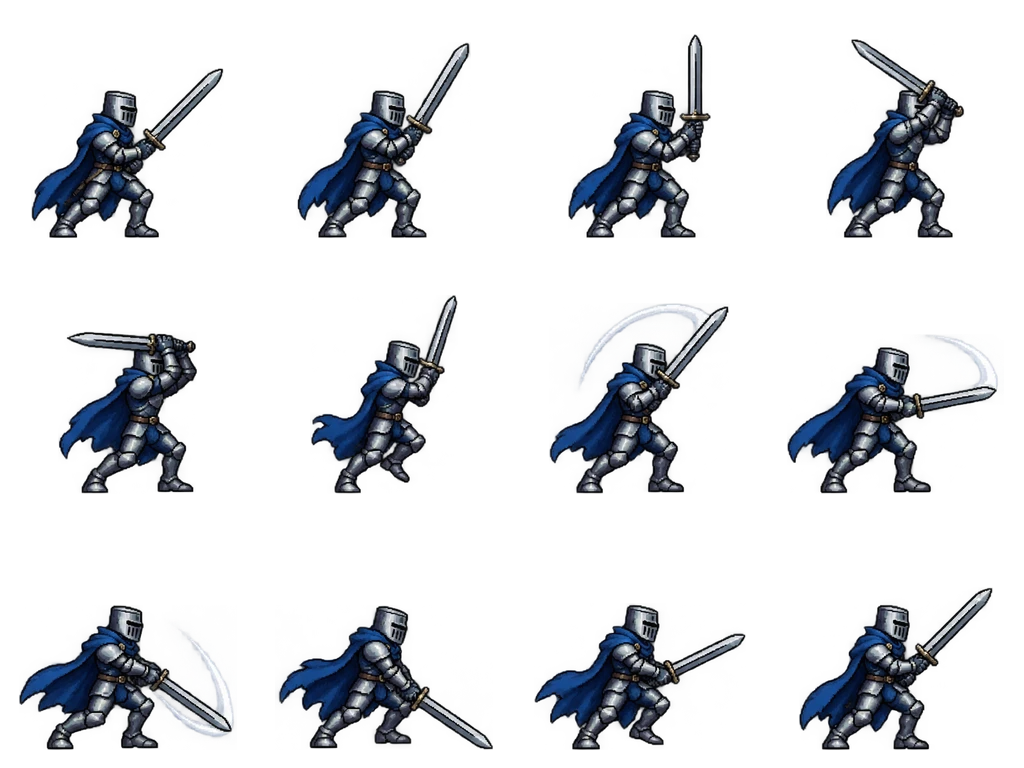
Pixel knight sword slash
A 12-frame 4x3 pixel-art combat sprite sheet moving from guard stance through overhead wind-up, slash smear, and follow-through.
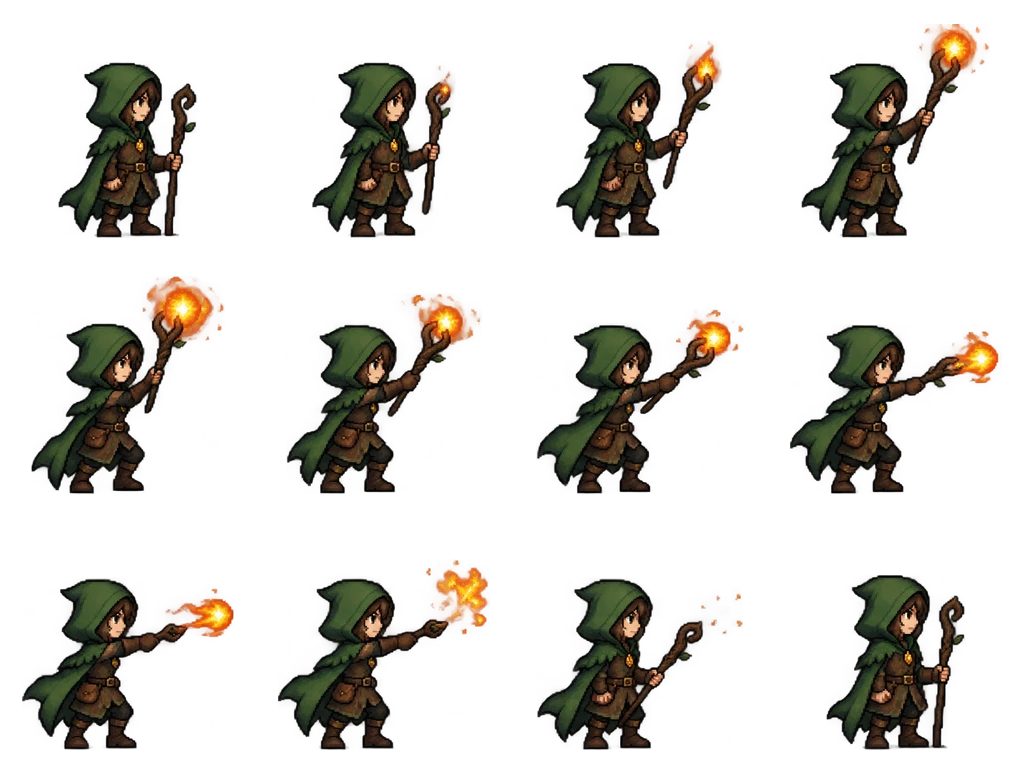
Forest mage fireball cast
A 12-frame pixel-art magic attack sprite sheet progressing from idle staff grip through flame charge, cast release, and rest pose.
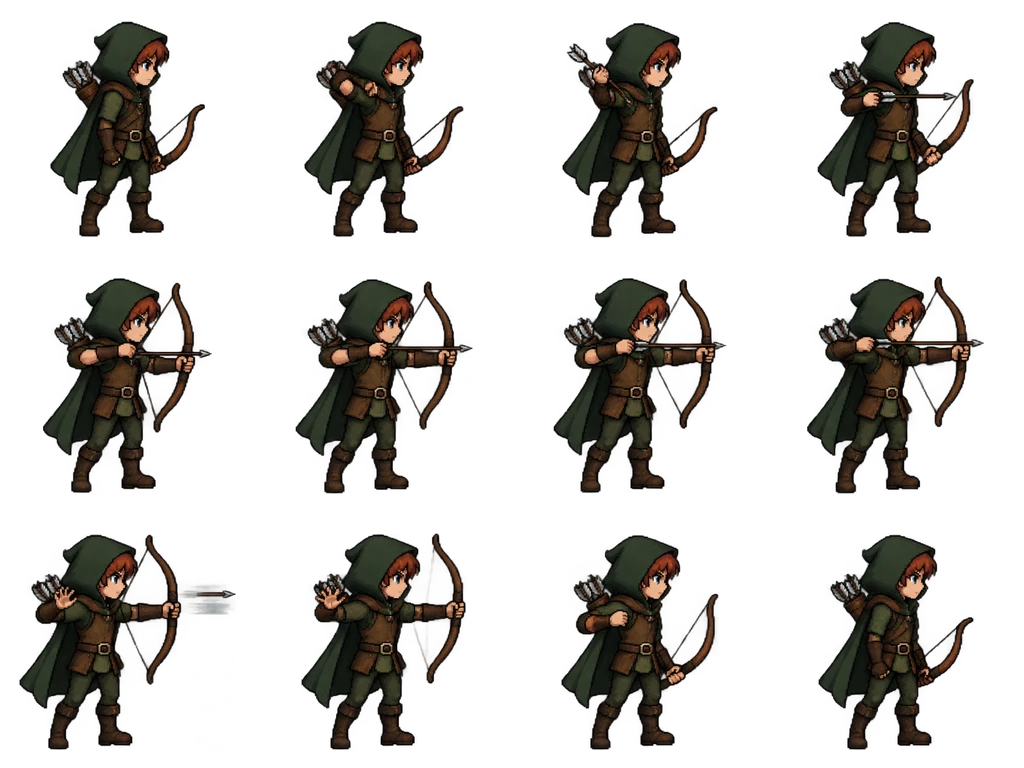
Hooded ranger bow shot
A 12-frame pixel-art archer attack sprite sheet showing quiver draw, full bowstring tension, arrow release, and recovery.
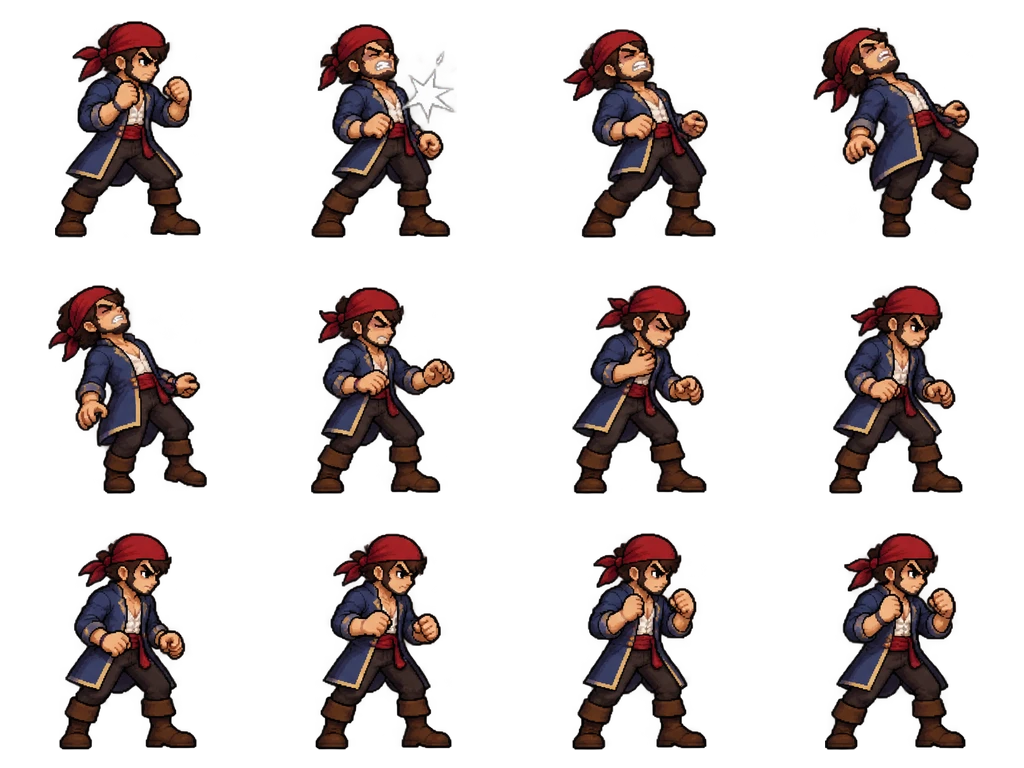
Pirate hit and recovery cycle
A 12-frame pixel-art combat damage sprite sheet showing hit spark recoil, stagger balance, and return to fists-up idle stance.
How do you generate a sprite sheet from an image?
To run this sprite sheet generator from an image, upload one clear full-body character drawing or portrait in JPG, PNG, or WebP format, choose Walk, Attack, Run, or Custom, select your camera direction, confirm upload permission, and generate. The prompt instructs the hosted model to carry over your character’s silhouette, hairstyle, armor or outfit colors, and held prop across every cell.
A full-body character standing in neutral lighting on a plain backdrop gives the cleanest starting reference. Avoid cropped busts, heavy motion blur, or busy scenery in the input image, and mention key colors or weapons explicitly if you switch to Custom mode, because exact frame-to-frame resemblance varies by model run and source art.
How do you keep a character consistent across AI sprite sheet frames?
Preventing costume drift, shifting heights, and blurry tiles requires locking grid geometry, baseline alignment, and art style in one prompt. Our server prompt asks for equal invisible grid cells, one locked character scale and foot baseline, generous frame padding, and a flat solid white backdrop with zero drawn grid lines or floor shadows.
In Custom mode, state one clear art style (such as "16-bit pixel art with crisp dark outlines" or "flat 2D vector cartoon"), limit the sheet to a single action like a 4-frame idle or 4x3 attack arc, and name exact palette anchors—for example: "16-bit pixel-art rogue with emerald hood, brown leather belt, and twin daggers, side-view 4x3 jump and slash cycle". Testing a pose at Fast (5 credits) before rendering HD or Studio helps catch limb overlap early.
Is this AI sprite generator free online?
AI Sprite Generator is not free to generate sprite sheets: runs require signing in and start at 5 credits ($2.50 at the $5/10-credit trial-pack rate). Eligible new accounts receive 1 signup credit. Browsing examples is free. For free alternatives checked on 2026-11-29, AISpriteSheet offers 30 starter credits, SpriteLab grants 10 free credits, SpriteFuse gives 20 free credits, Spritesheets.AI allows 10–20 free monthly sheets, and SpriteKiln is open source for local ComfyUI setups.
AI sprite sheet pricing and credits
Each run produces one opaque sprite sheet PNG and costs 5 to 9 credits depending on pixel size and detail level. The one-time $5 trial pack includes 10 credits ($2.50 per 5-credit Fast sheet). For a 20-character indie game with 5 animations each (100 sheets), Fast generation takes 500 credits; Ultra HD renders 4K at standard detail (8 credits) while Studio renders 2K at high detail (9 credits).
| Quality | Pixels (1:1 · 4:3 · 3:4) | Credits | Pack-rate equivalent |
|---|---|---|---|
| Fast (1K, standard detail) | 1024 × 1024 · 4:3 1024 × 768 · 3:4 768 × 1024 | 5 | $2.50 |
| HD (2K, standard detail) | 2048 × 2048 · 4:3 2048 × 1536 · 3:4 1536 × 2048 | 7 | $3.50 |
| Ultra HD (4K, standard detail) | 2880 × 2880 · 4:3 3312 × 2480 · 3:4 2480 × 3312 | 8 | $4.00 |
| Studio (2K, high detail) | 2048 × 2048 · 4:3 2048 × 1536 · 3:4 1536 × 2048 | 9 | $4.50 |
| Feature | Details |
|---|---|
| Free access | Browse examples and presets. Eligible new accounts receive 1 signup credit. |
| Account & access | Sign in to generate. HD, Ultra HD, and Studio require an active subscription or eligible paid credits. |
| Output format | One opaque sprite sheet PNG on a flat solid backdrop in 1:1, 4:3, or 3:4. |
| Watermark | No visible watermark added by this site. |
| Failed runs | Pre-generation rejections and upstream provider failures refund credits automatically; delivered valid PNGs remain charged. |
| Tool | Free use | Paid options | Watermark | Output |
|---|---|---|---|---|
| Consistent Character AI (this tool) | Browse examples (Eligible new accounts receive 1 signup credit.) | $5 trial pack (10 credits); from 5 credits/sheet | No added visible site watermark | Solid-backdrop PNG grid (1:1, 4:3, 3:4) from text or image |
| AISpriteSheet | 30 starter credits on $0 plan (no card; personal use) | Creator from $19/mo ($10/mo billed annually at $120/yr) | Commercial plans export clean lossless RGBA PNG | Transparent PNG sprite sheet, MP4 preview, engine JSON |
| SpriteLab | 10 free credits on sign-up (no card; non-commercial) | Starter £5/mo (250 credits), Pro £12/mo, Studio £25/mo | Watermark undisclosed on homepage | Transparent PNG sprites/sheets, GIF, ZIP, 4/8 directions |
| SpriteFuse | 20 free credits for 30 days (7 credits per 8-frame sheet) | Credit packs from $9 for 60 credits | Watermark undisclosed on homepage | Sprite sheets for Godot, Unity, GameMaker, Phaser, RPG Maker |
| Ludo.ai | Free trial available (exact free count undisclosed) | Indie $15/mo billed annually ($180/yr, 4,800 credits/yr) | Watermark undisclosed on pricing page | Transparent PNG sprite sheets, normal maps, Unity export |
| Spritesheets.AI | 10–20 free monthly sheets (no card) | Paid plans from $3.50/mo | No watermarks stated on free or paid output | Transparent PNG sprite sheets and atlas metadata |
Checked 2026-11-29 on each service’s public pages. Consistent Character AI is our own tool; other services are independent and listed from their public pages.
What this sprite sheet generator cannot do
This tool generates one opaque sprite sheet PNG per run through a hosted AI image model on a flat solid backdrop. It does not automatically export alpha-transparent cutouts, JSON atlas metadata files, animated GIF or MP4 loops, 3D bone rigs, or frame-by-frame pixel editors. Exact frame alignment, pixel-grid snapping, and face or weapon consistency across cells vary by model run, prompt, and uploaded reference art.
Expect light cleanup—background keying, uniform cell cropping, and pixel nearest-neighbor downscaling—before shipping in a commercial build. If you need standalone character concepts or multi-angle turnaround art first, explore our related character tools below. Try our Game Developer Tools, OC Sheet Template, or Stardew Character Creator for matching 2D character references.
AI sprite generator FAQ
How do I slice and import a PNG sprite sheet into Unity, Godot, or GameMaker?
First remove the flat solid background using a color-key or alpha cutout tool (such as Aseprite or Photoshop) and verify every cell has the same pixel dimensions. In Unity, set Sprite Mode to Multiple, open the Sprite Editor to slice by Grid By Cell Count (for example 4 × 3 or 4 × 4), set Filter Mode to Point (no filter), and disable Compression so pixel edges stay sharp. In Godot, load the PNG into a Sprite2D or AnimatedSprite2D using Hframes and Vframes with Texture Filter set to Nearest; in GameMaker, use Import Strip Image with your row and column counts.
Can I use AI-generated character sprites commercially or in a Steam game?
Outputs generated on your account have no added site watermark and can be used in indie or commercial projects, provided you own rights to any uploaded reference art and avoid copyrighted characters, franchises, or trademarks. If you publish on storefronts such as Steam, follow the platform’s current AI-generated asset disclosure policy and consult legal guidance for jurisdiction-specific copyright rules.
What happens to my uploaded character art, and does this work on mobile browsers?
Uploaded character images and generated sprite sheets are stored as unlisted files in our single cloud bucket so the hosted image model can read your input and serve authenticated downloads; anyone holding a direct storage link could open that file, so only upload artwork you have permission to share. The generator runs online through mobile Safari and Chrome on iPhone, Android, or Chromebook with no app download required.
How does an AI sprite generator compare with manual editors like Aseprite or Piskel?
An AI sprite generator creates multi-frame concept grids and pose explorations in minutes from a text brief or single character illustration, which speeds up prototyping and game jams. Manual editors like Aseprite, Piskel, or PixelMint give you pixel-exact control over palette locking, hitbox alignment, sub-pixel animation timing, and clean alpha channels—so many indie teams generate initial sprite sheets with AI and polish final frames in Aseprite.