
Character Turnaround is an online character turnaround generator for animators, game artists, 3D modelers, and comic creators. Upload an optional character image or describe one in text to request aligned multi-angle views in one 16:9, 4:3, or 1:1 PNG (1024 × 768 to 3840 × 2160) with no added site watermark. Eligible new accounts receive 1 signup credit; generating starts at 6 credits ($3.00 at trial-pack rate).
How to make a character turnaround sheet
Generate a character turnaround sheet from one reference drawing, photo, or text description in three steps. Choose 4-View, 8-View 360°, 3D A-Pose, or Custom, select 16:9, 4:3, or 1:1 and a quality tier, then sign in to generate and download one PNG.
1. Choose a turnaround layout or Custom
Select 4-View for close-up plus front, side, and back; 8-View for a 360° lineup; 3D A-Pose for orthographic modeling reference; or Custom for 5-view sheets, T-pose, head turnarounds, or expression strips.
2. Upload a character image (optional)
Attach one JPG, PNG, or WebP character image (up to 10 MB, 128–2048 px per side) to anchor face, outfit, and style, or leave it empty and build an original character from text.
3. Pick aspect ratio, quality, and generate
Keep 16:9 widescreen so full-body views fit without cutting off feet, choose Fast, HD, Ultra HD, or Studio, and sign in to generate and download the PNG.
Character turnaround examples across anime, 3D, and realistic styles
Review five horizontal turnaround sheets covering anime OCs, 8-angle stylized 3D game characters, A-pose animal mascots, realistic virtual models, and hard-surface spacesuits. Notice how head height, shoulder level, and single-side props align across views. These visual samples illustrate the layout direction; generation results vary by input and prompt.
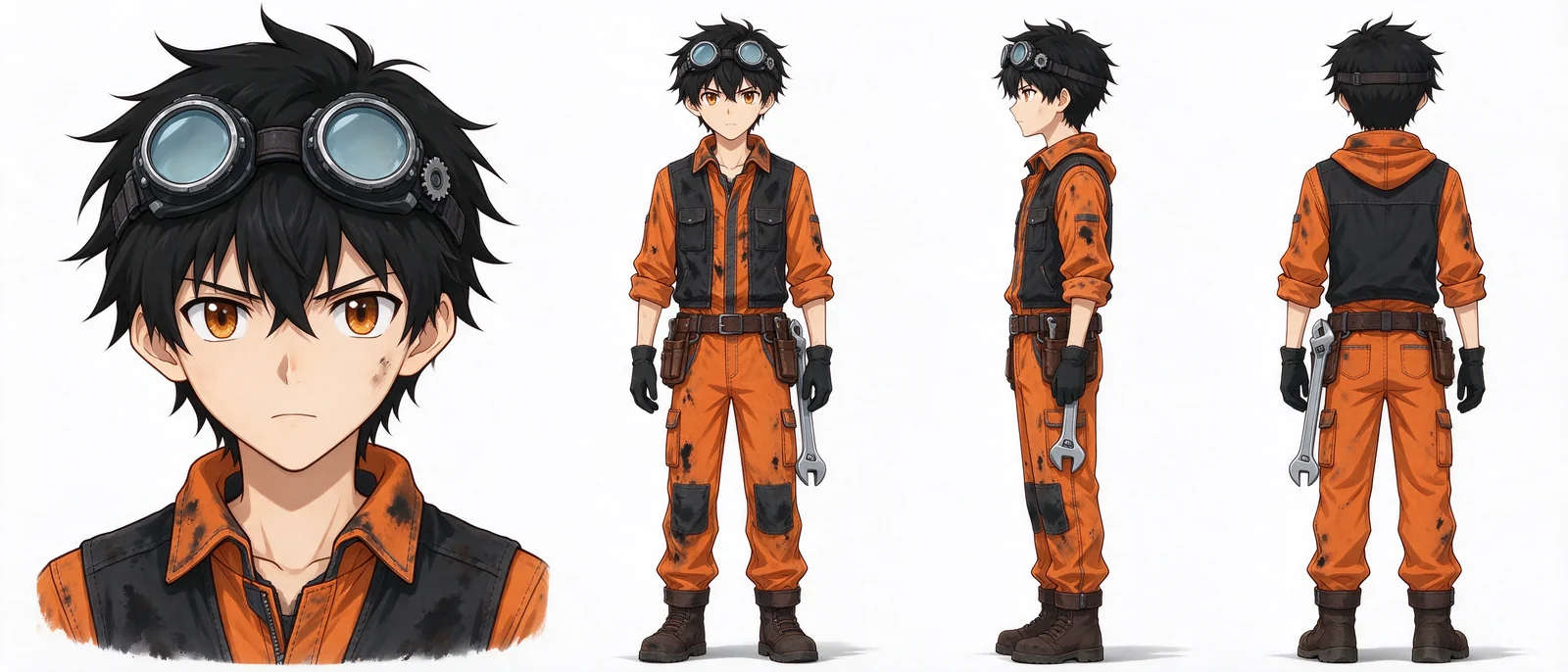
Anime mechanic 4-view turnaround
An anime mechanic character shown in close-up, front, side profile, and back views, keeping goggles, collar grease marks, dark vest seams, and the left-hip wrench aligned across every angle.
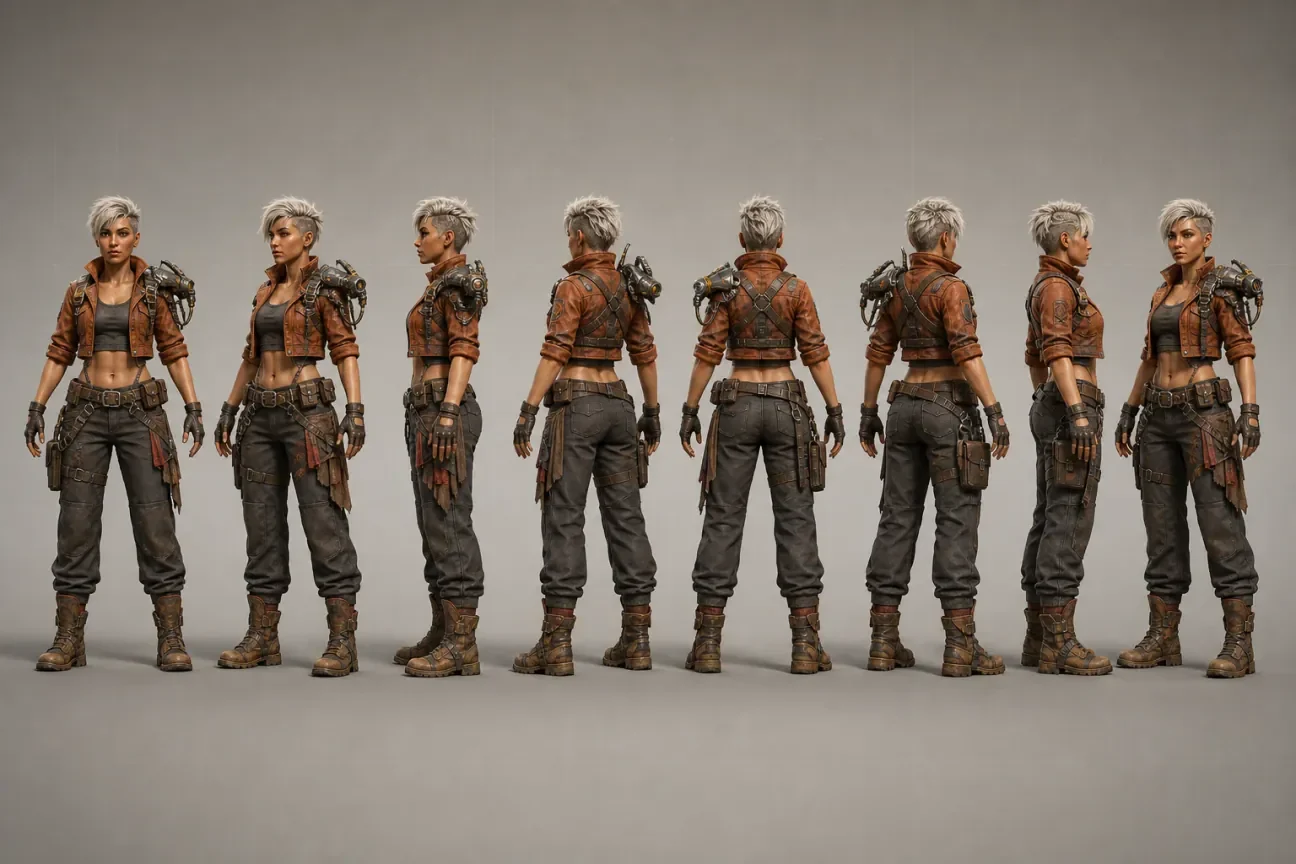
Stylized 3D 8-view 360° turnaround
A full 8-angle turnaround rotating from front through front three-quarter, side profiles, rear three-quarter, and back while keeping the asymmetric left-shoulder pack and utility belt consistent.
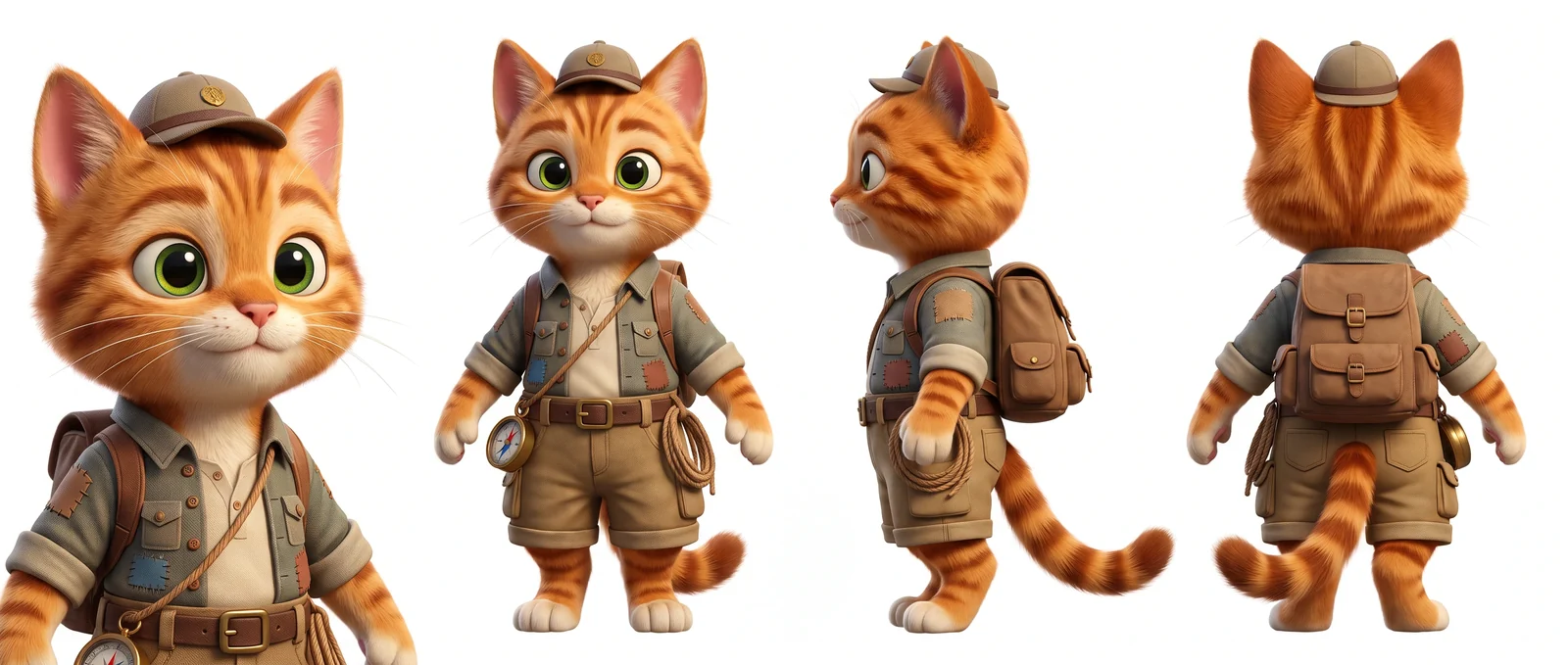
3D explorer cat A-pose turnaround
A non-human 3D explorer cat mascot standing in a relaxed A-pose with consistent right-hip compass, left-hip coiled rope, and brown canvas backpack across front, side, and back views.
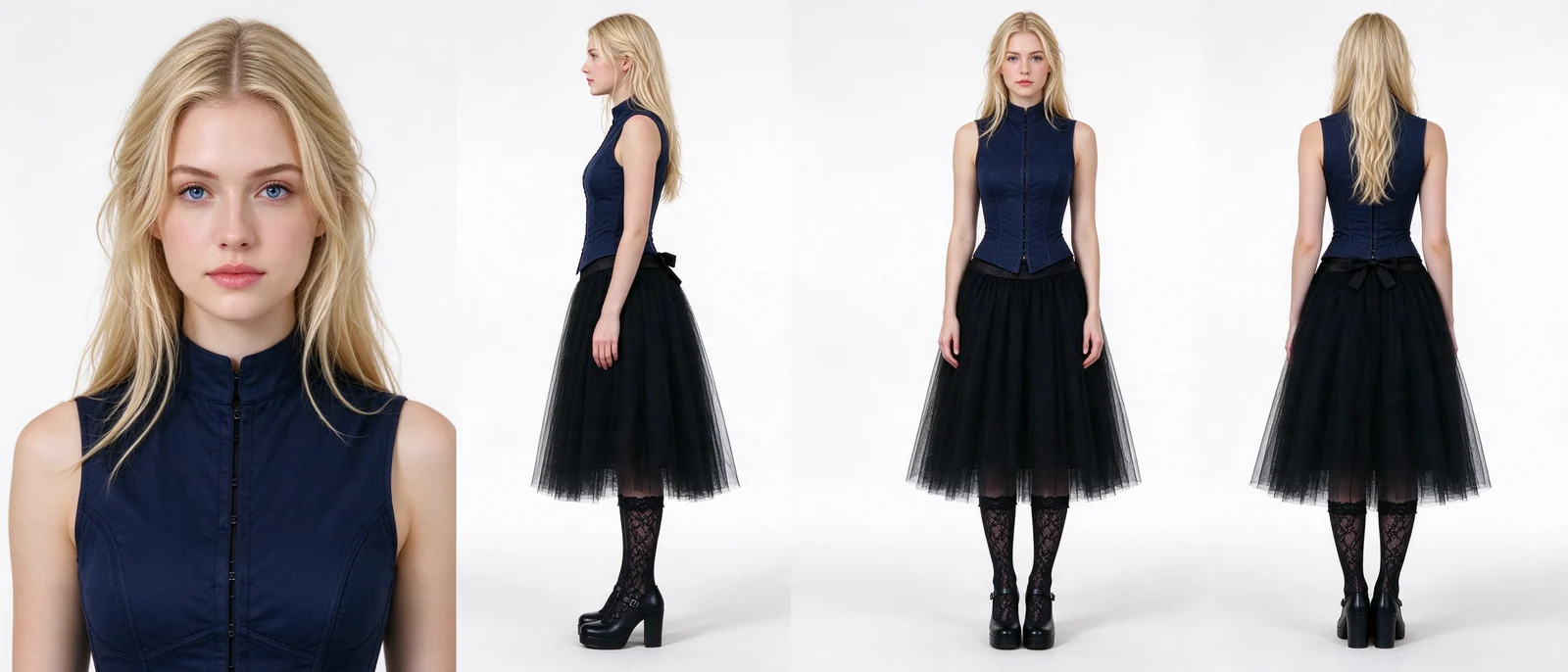
Realistic virtual model 4-view sheet
A realistic human reference sheet showing face, hairstyle, silhouette, and rear waist bow detail for virtual-model lookbooks and consistent scene generation.
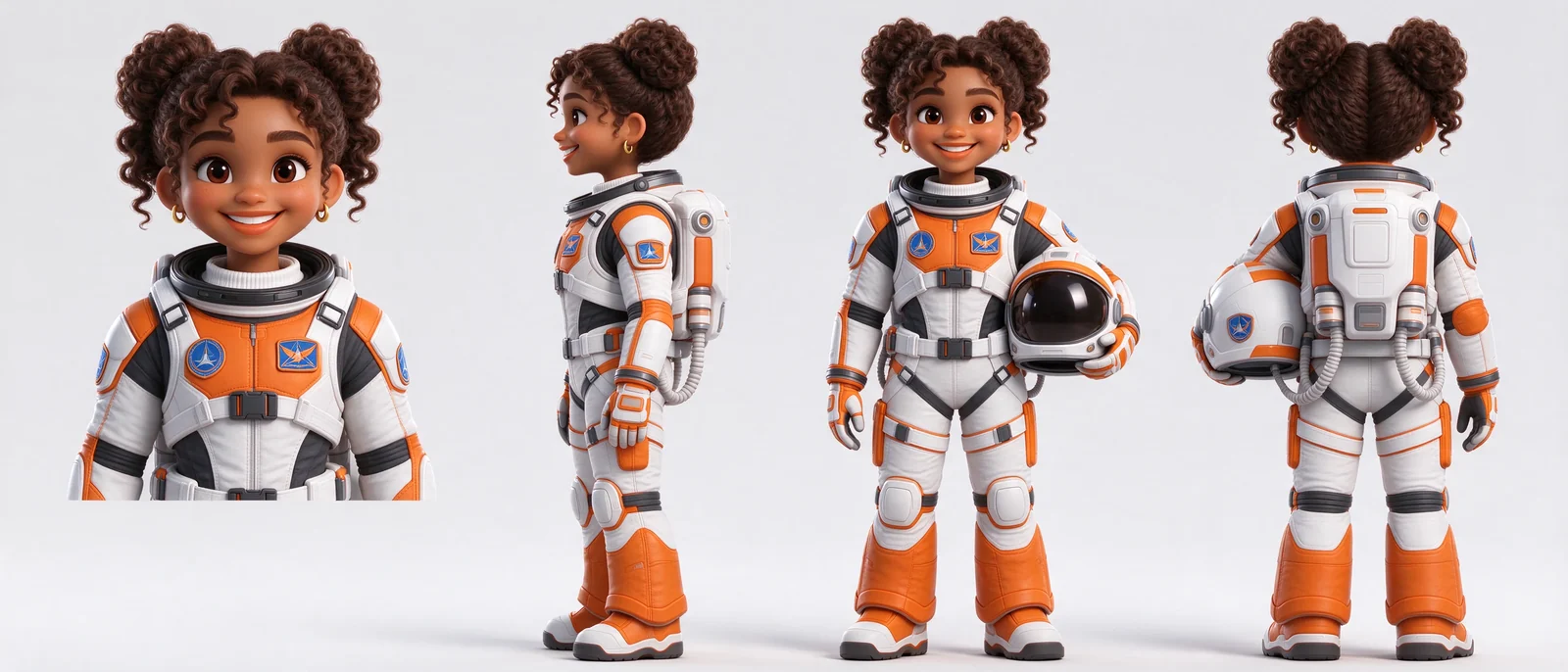
3D astronaut 4-view turnaround
A stylized 3D astronaut character demonstrating consistent suit patches, life-support pack hoses, and left-arm helmet placement across side, front, and rear angles.
What is a character turnaround sheet and how many views do you need?
A character turnaround sheet (also called a model sheet or character reference sheet) displays one character from multiple angles at the same scale and neutral pose on a plain backdrop so animators, illustrators, and 3D modelers maintain consistent proportions. A 4-view sheet (front, side profile, back, plus portrait or three-quarter) covers most comics and OC commissions, a 5-view sheet adds front and rear three-quarter views for animation, and an 8-view sheet shows a full 360° rotation for detailed 3D or game assets.
Use a wide 16:9 aspect ratio whenever you place four or more full-body figures in one row—narrow square frames squeeze figures together and often clip feet or arms. If you only need facial volume for animation or VTuber rigging, choose Custom and request a head turnaround (front, three-quarter, side, and back busts).
How do you write a character turnaround prompt that keeps details consistent?
An effective character turnaround prompt locks five things in plain language: exact view count and angles, neutral standing or A-pose, flat orthographic lighting on a plain backdrop, explicit left-right placement for asymmetric items (such as a left-hip wrench or right-shoulder strap), and a description of the unseen back view so the model does not invent conflicting jacket seams or hairstyles.
Reusable Custom prompt template: "Professional character turnaround sheet on a plain light background, five full-body views at identical head-to-foot height: front (0°), front three-quarter (45°), 90-degree side profile, rear three-quarter (135°), and back (180°). Neutral A-pose, flat orthographic lighting, no perspective distortion. [Describe hair, face, outfit, colors, shoes]. Left side carries [asymmetric prop]; back shows [backpack, hood, or seam details]." If you draw or refine by hand afterward, follow the five classic turnaround steps: lock the front silhouette first, draw horizontal guidelines across head, eyes, chin, shoulders, waist, knees, and feet, block the 90° side profile, map the back view, and fill in the 45° three-quarter angles last.
Is there a free character turnaround generator without a watermark?
Consistent Character AI is not free to generate a full character turnaround sheet: generating requires signing in and starts at 6 credits ($3.00 at the $5/10-credit trial-pack rate). Eligible new accounts receive 1 signup credit. Browsing examples is free, and paid PNGs carry no added site watermark. For free watermark-free alternatives checked on 2026-11-29, FreeArtGen allows 5 generations per IP per hour with no sign-up (publicly listed by default), Hocha lists 2 free credits without sign-up on its homepage (5 on its free plan, watermark-free), and Dream Pixel Forge grants 15 signup credits with 2-credit free-tier sheets.
Character turnaround pricing and credits
Each run produces one still PNG sheet (all selected angles on one canvas) and costs 6 to 9 credits—you are not charged per individual angle. The one-time $5 trial pack includes 10 credits ($3.00 per 6-credit Fast sheet). Ultra HD renders 4K at standard detail (8 credits), while Studio renders 2K at high detail (9 credits).
| Quality | Pixels (16:9 · 4:3 · 1:1) | Credits | Pack-rate equivalent |
|---|---|---|---|
| Fast (1K, standard detail) | 16:9 1536 × 864 · 4:3 1024 × 768 · 1:1 1024 × 1024 | 6 | $3.00 |
| HD (2K, standard detail) | 16:9 2048 × 1152 · 4:3 2048 × 1536 · 1:1 2048 × 2048 | 7 | $3.50 |
| Ultra HD (4K, standard detail) | 16:9 3840 × 2160 · 4:3 3312 × 2480 · 1:1 2880 × 2880 | 8 | $4.00 |
| Studio (2K, high detail) | 16:9 2048 × 1152 · 4:3 2048 × 1536 · 1:1 2048 × 2048 | 9 | $4.50 |
| Feature | Details |
|---|---|
| Free access | Browse examples and presets. Eligible new accounts receive 1 signup credit. |
| Account & access | Sign in to generate. HD, Ultra HD, and Studio require an active subscription or eligible paid credits. |
| Output format | One opaque PNG sheet in 16:9, 4:3, or 1:1. |
| Watermark | No visible watermark added by this site. |
| Failed runs | Pre-generation rejections and upstream provider failures refund credits automatically; delivered valid PNGs remain charged. |
| Tool | Free use | Paid options | Watermark | Output |
|---|---|---|---|---|
| Consistent Character AI (this tool) | Browse examples (Eligible new accounts receive 1 signup credit.) | $5 trial pack (10 credits); from 6 credits/sheet | No added visible site watermark | One PNG turnaround sheet (16:9, 4:3, 1:1) from image or text |
| CharacterTurnaround.com | 10 one-time free trial credits (1 standard view, 7-day validity) | Starter $9.9/mo (1,000 credits); Pro $19.9/mo (2,500 credits) | Undisclosed on pricing page | Single, 4-view, or 8-view PNG sheets, ZIP export, optional 3D model |
| Dream Pixel Forge | 15 signup credits + 2/day when low (2 credits/free-tier sheet) | Starter $12/mo (300 credits); Pro $29/mo (1,000 credits); packs available | Undisclosed on pricing page | Landscape 4-view turnaround + expression strip + detail callouts |
| Hocha | 2 free credits without sign-up on homepage (5 credits on Free plan) | $10 one-time bundle (100 credits); Basic $12/mo billed annually | Watermark-free stated on pricing page | Multi-angle poses and character turnaround sheets |
| FreeArtGen | Free, no sign-up, 5 generations/IP/hour (shared in public examples) | No paid tier listed on tool page | Watermark-free PNG stated on page | 16:9 PNG sheet from text prompt |
Checked 2026-11-29 on each service’s public pages. Consistent Character AI is our own tool; other services are independent and listed from their public pages.
What this character turnaround generator cannot do
This turnaround generator outputs one opaque PNG image per run through a hosted AI image model. It does not auto-slice panels into separate transparent PNGs or a ZIP archive, export rigged 3D meshes (FBX/GLB), or render 360° spinning videos or GIFs. When you upload only a front-facing image, unseen back details are inferred by the model and may need a Custom note or manual touch-up.
Small faces, fine text, exact head-height alignment, and left-right asymmetric props can drift between views depending on input clarity and model run—start with a clean Fast or HD run before scaling up to Ultra HD or Studio. Only upload artwork or photos you have permission to use. You can also use our Anime Reference Sheet Generator, OC Sheet Template, or AI Pose Changer for related character design workflows.
Character turnaround FAQ
Can I use a character turnaround sheet for Blender and 3D modeling?
Yes as a visual modeling reference, especially when you select the 3D A-Pose preset in 16:9 at HD, Ultra HD, or Studio resolution. Because this tool exports one full sheet PNG rather than pre-sliced files, crop the front and 90-degree side panels to equal height in Photoshop, GIMP, or Blender’s Image Editor and verify joint alignment before sculpting.
What source image works best, or can I generate a character turnaround from text?
A crisp, evenly lit full-body front drawing or photo with unobstructed silhouette and simple background gives the model the clearest anchor. If you only have a portrait or have not drawn your OC yet, leave the upload empty or pair a portrait with a Custom prompt specifying trousers, shoes, and back-view details.
Can I use this character turnaround maker on an iPhone, iPad, or with Procreate?
Yes. The generator works directly in mobile Safari and Chrome on iPhone and iPad with no app download required. After signing in and saving the PNG sheet to your Photos or Files app, import it directly onto a reference layer in Procreate or Clip Studio Paint.
What happens to uploaded character images, and can I use turnaround sheets commercially?
Uploaded images and generated PNGs are stored as unlisted files in our single cloud bucket so the hosted image model can read your input and serve downloads; anyone holding a direct storage link could open that file, so avoid uploading NDA-restricted studio concepts or artwork you do not have permission to use. For commercial indie games, comics, or brand mascots, start with original character designs and avoid copyrighted third-party characters or logos.